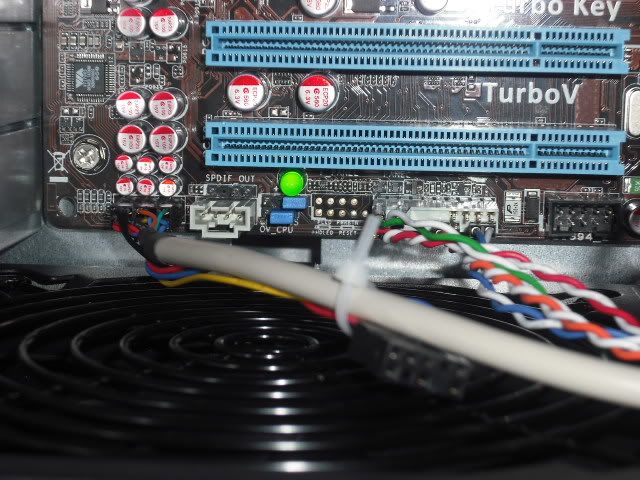
issues building plz help

Cypros

New Member
OK so i got a HAf 922, AMD 965 BE, asus m4a79xtd evo, corsair 750 watt PSU.

The mother board green LED light comes on when i turn on the PSU power. But when i hit the case power button nothing turns on, no fans spinning or anything. Im pretty sure i connected everything i needed to. I plugged the HDD and DVD with sata power from the PSu and the sata from them to the mobo, the HDD is plugged into the sata E1. I have 2 pci e in the 5870. there are 3 cords not plugged in, 2x PCIe and 1-4pin one. I have some picture but i need some help. When i push the power button on the case, i see the PSU fan move like an inch.

DSCF0010.jpg

DSCF0009.jpg

DSCF0007.jpg

DSCF0006.jpg


god this PSU has so many wires its NUTS!
 
i would suggest trying a different psu. if it does the same thing then its a hard ware issue. recheck all connections and make sure everything is seated like its supposed to be.
 
take out all the components besides what is needed to run the computer, pci cards, one of the memory sticks, and see if it will boot. and if it has onboard graphics use that and remove your external graphics card if you have one in. you may need to move your memory to the blue slots. although im sure it might not make a difference.
 
OK i took everything out and rebuilt it. I left the 5870 out, i only have one RAM in there. The optical drive and HDD are plugged in both SATA power and sata data cables. now when i plug it in and press power the i see the PSU fan jolt a bit and the heatsink fan. i just got my screen and windows 7 in the mail, god i want this thing to work.
 
Yea im pretty sure i put those guys on right because when i plug it in and push the case power ON i see some fan movement. The GPU,CPU and PSU fans jolt a bit.
 
UPDATE: ok so i removed everything except mobo, psu, and RAM and it works when i turn it on. Should i try to add the gfx card first or the HDD or dvd drive?
 
UPDATE: ok so i removed everything except mobo, psu, and RAM and it works when i turn it on. Should i try to add the gfx card first or the HDD or dvd drive?

If the motherboard doesn't have onboard video, add the GPU next.
 
Check your power switch with a meter.

I don't know if your using a stock (salvaged from a computer case) or a switch you got someplace else. If it's not a stock switch you should check it. I am building a portable system now, and I had a similar problem when I first tested it and it turned out to be the switch I had used. It was a momentary, but it was a "normally closed" momentary. So when I applied power the system would try to start, then after a few second it would shut down. I should explain that I installed a security key lock switch ahead of the power on switch. So I would turn the key to on, an the system would start without me touching the on switch. That is actually what gave me the clue that the switch was responsible. Like I said, if you bought one, check to see if it's "normally open" which most standard momentary switches are, or if it's "normally closed" as mine was. Before anybody asks, the switch was not in its original packaging, as I bought if from a surplus store and it had been placed in the wrong bin. I still should have check it. If that is not the issue, make sure your system is not using more power than you PSU is rated for, also, check and see if the power selection switch on the PSU (if yours has one) is set to 115 volts. That's all I can think of right now. Good luck.
 
Back
Top