Low memory, Suspect problem with ram card slot or virus

kalleanka

Member
So I have been having for a couple months now recurring problems with low memory.. I have 8gb ram in my laptop (2x 4gb cards).
But it seems to me like one of the slots have a loose seal or something because 1-2 times every month I get low memory on my computer (only 4gb used).
And every time that I take it to computer shop specialist or my friend who is also a professional and tell them to take out and put back inside the ram cards then it works again after very fast without memory problems.
But then after some weeks it comes back and is fixed by the same solution again.

The specialist in computer shop says he thinks its a virus because he can't see anything wrong in the hardware.
So I just want some second opinions because he wants to erase my HDD and reinstall windows but there is sooooo much data I have that I just can't do backup on.. This would be a nightmare for me.

Do you really think it's possible this is a virus? because the problem is fixed for some weeks after taking out and back in the ram cards so it doesn't sound like a software problem.

I can't do this myself either, I thought it looked simple after watching my friend do it once so I bought a screwdriver.. took out the battery, touched some kinda metal/aluminium not sure what it is actually, opened the laptop up and took out and in the ram cards just like my friend did before but then my computer wouldn't boot, it was just black screen.
So I had to take it to repair and he said I had made it short circuit, not sure what that is.
 
To the OP.

Please download and install on the offending machine PC Wizard from my sig.

Run it and go to FILE, SAVE AS and click OK. Copy the text out of that file and paste into this thread.
 
To the OP.

Please download and install on the offending machine PC Wizard from my sig.

Run it and go to FILE, SAVE AS and click OK. Copy the text out of that file and paste into this thread.

Sorry, but I've been trying to do this now many times, i downloaded it two times even.. The program just freezes when it's loaded and then I click something and it says "not responding" and i force shut down the program. :confused:
 
Hmm, So do you think it's possible for some kind of malware/virus/etc to cause these low memory problems I mentioned that are fixed by removing and reinserting the ram cards?
I'm not computer expert but it sounds like a hardware problem to me.

But now that you mentioned it I'm starting to think it could actually be some kind of malware/virus/etc like the professional in the computer shop said because there are some strange annoyances happening on my computer every now and then.

I will go to that thread and follow the instructions anyways.
Thanks!
 
Its possible, but if you say removing and reinstalling the ram fixes it temporarily then I doubt it. Go ahead and run those programs and post the logs back here and we'll see whats going on.
 
# AdwCleaner v3.018 - Report created 17/02/2014 at 13:28:24
# Updated 28/01/2014 by Xplode
# Operating System : Windows 8 (64 bits)
# Username : Marcuss - MARCUS
# Running from : C:\Users\Marcuss\Downloads\AdwCleaner.exe
# Option : Clean

***** [ Services ] *****

Service Deleted : WajamUpdater

***** [ Files / Folders ] *****

Folder Deleted : C:\ProgramData\boost_interprocess
Folder Deleted : C:\Program Files (x86)\Wajam
Folder Deleted : C:\Program Files (x86)\WinZip Registry Optimizer
Folder Deleted : C:\Users\Marcuss\AppData\Local\Bundled software uninstaller
Folder Deleted : C:\Users\Marcuss\AppData\Local\Wajam
Folder Deleted : C:\Users\Marcuss\AppData\Roaming\Microsoft\Windows\Start Menu\Programs\Wajam
Folder Deleted : C:\Users\Marcuss\AppData\Local\Google\Chrome\User Data\Default\Extensions\jpmbfleldcgkldadpdinhjjopdfpjfjp
File Deleted : C:\END
File Deleted : C:\Windows\System32\roboot64.exe

***** [ Shortcuts ] *****


***** [ Registry ] *****

Value Deleted : HKCU\Software\Mozilla\Firefox\Extensions [{5a95a9e0-59dd-4314-bd84-4d18ca83a0e2}]
Key Deleted : HKLM\SOFTWARE\Google\Chrome\Extensions\jpmbfleldcgkldadpdinhjjopdfpjfjp
Key Deleted : HKLM\SOFTWARE\Classes\AppID\priam_bho.DLL
Key Deleted : HKLM\SOFTWARE\Classes\wajam.WajamBHO
Key Deleted : HKLM\SOFTWARE\Classes\wajam.WajamBHO.1
Key Deleted : HKLM\SOFTWARE\Classes\wajam.WajamDownloader
Key Deleted : HKLM\SOFTWARE\Classes\wajam.WajamDownloader.1
Key Deleted : HKLM\SYSTEM\CurrentControlSet\Services\Eventlog\Application\WajamUpdater
Key Deleted : HKLM\SOFTWARE\Classes\AppID\{1FAEE6D5-34F4-42AA-8025-3FD8F3EC4634}
Key Deleted : HKLM\SOFTWARE\Classes\AppID\{D616A4A2-7B38-4DBC-9093-6FE7A4A21B17}
Key Deleted : HKLM\SOFTWARE\Classes\CLSID\{431532BD-0AE1-4ABC-BE8C-919F3D1332E2}
Key Deleted : HKLM\SOFTWARE\Classes\CLSID\{5D64294B-1341-4FE7-B6D8-7C36828D4DD5}
Key Deleted : HKLM\SOFTWARE\Classes\CLSID\{898EA8C8-E7FF-479B-8935-AEC46303B9E5}
Key Deleted : HKLM\SOFTWARE\Classes\CLSID\{A7A6995D-6EE1-4FD1-A258-49395D5BF99C}
Key Deleted : HKLM\SOFTWARE\Classes\CLSID\{AE805869-2E5C-4ED4-8F7B-F1F7851A4497}
Key Deleted : HKLM\SOFTWARE\Classes\Interface\{431532BD-0AE1-4ABC-BE8C-919F3D1332E2}
Key Deleted : HKLM\SOFTWARE\Classes\Interface\{79FB5FC8-44B9-4AF5-BADD-CCE547F953E5}
Key Deleted : HKLM\SOFTWARE\Classes\TypeLib\{095BFD3C-4602-4FE1-96F1-AEFAFBFD067D}
Key Deleted : HKLM\SOFTWARE\Microsoft\Windows\CurrentVersion\Explorer\Browser Helper Objects\{A7A6995D-6EE1-4FD1-A258-49395D5BF99C}
Key Deleted : HKLM\SOFTWARE\Microsoft\Windows\CurrentVersion\Explorer\Browser Helper Objects\{AE805869-2E5C-4ED4-8F7B-F1F7851A4497}
Key Deleted : HKCU\Software\Microsoft\Windows\CurrentVersion\Ext\Stats\{A7A6995D-6EE1-4FD1-A258-49395D5BF99C}
Key Deleted : HKCU\Software\Microsoft\Windows\CurrentVersion\Ext\Stats\{AE805869-2E5C-4ED4-8F7B-F1F7851A4497}
Key Deleted : HKCU\Software\Microsoft\Windows\CurrentVersion\Ext\Settings\{A7A6995D-6EE1-4FD1-A258-49395D5BF99C}
Key Deleted : HKCU\Software\Microsoft\Windows\CurrentVersion\Ext\Settings\{AE805869-2E5C-4ED4-8F7B-F1F7851A4497}
Key Deleted : HKLM\SOFTWARE\Microsoft\Internet Explorer\Extensions\{898EA8C8-E7FF-479B-8935-AEC46303B9E5}
Key Deleted : [x64] HKLM\SOFTWARE\Classes\CLSID\{898EA8C8-E7FF-479B-8935-AEC46303B9E5}
Key Deleted : [x64] HKLM\SOFTWARE\Classes\CLSID\{AE805869-2E5C-4ED4-8F7B-F1F7851A4497}
Key Deleted : [x64] HKLM\SOFTWARE\Classes\Interface\{431532BD-0AE1-4ABC-BE8C-919F3D1332E2}
Key Deleted : [x64] HKLM\SOFTWARE\Microsoft\Windows\CurrentVersion\Explorer\Browser Helper Objects\{AE805869-2E5C-4ED4-8F7B-F1F7851A4497}
Key Deleted : HKCU\Software\BI
Key Deleted : HKCU\Software\Wajam
Key Deleted : HKLM\Software\systweak
Key Deleted : HKLM\Software\Wajam
Key Deleted : HKLM\SOFTWARE\Microsoft\Windows\CurrentVersion\Uninstall\bi_uninstaller
Key Deleted : HKLM\SOFTWARE\Microsoft\Windows\CurrentVersion\Uninstall\Wajam

***** [ Browsers ] *****

-\\ Internet Explorer v10.0.9200.16537


-\\ Mozilla Firefox v25.0.1 (en-US)

[ File : C:\Users\Marcuss\AppData\Roaming\Mozilla\Firefox\Profiles\err8xp4f.default\prefs.js ]


-\\ Google Chrome v32.0.1700.107

[ File : C:\Users\Marcuss\AppData\Local\Google\Chrome\User Data\Default\preferences ]


*************************

AdwCleaner[R0].txt - [4399 octets] - [17/02/2014 13:27:29]
AdwCleaner[S0].txt - [4331 octets] - [17/02/2014 13:28:24]

########## EOF - C:\AdwCleaner\AdwCleaner[S0].txt - [4391 octets] ##########
 
~~~~~~~~~~~~~~~~~~~~~~~~~~~~~~~~~~~~~~~~~~~~~~~~~~~~~~~~~~~~~
Junkware Removal Tool (JRT) by Thisisu
Version: 6.1.1 (02.04.2014:1)
OS: Windows 8 x64
Ran by Marcuss on 17/02/2014 at 13:36:50.55
~~~~~~~~~~~~~~~~~~~~~~~~~~~~~~~~~~~~~~~~~~~~~~~~~~~~~~~~~~~~~


~~~ Services


~~~ Registry Values


~~~ Registry Keys

Successfully deleted: [Registry Key] HKEY_CURRENT_USER\Software\Microsoft\Internet Explorer\InternetRegistry\REGISTRY\USER\S-1-5-21-2925805307-3619646976-2998360088-1002\Software\wajam
Successfully deleted: [Registry Key] HKEY_CURRENT_USER\Software\Microsoft\Internet Explorer\SearchScopes\{AA9A4890-4262-4441-8977-E2FFCBFB706C}
Successfully deleted: [Registry Key] HKEY_LOCAL_MACHINE\Software\Microsoft\Internet Explorer\SearchScopes\{AA9A4890-4262-4441-8977-E2FFCBFB706C}


~~~ Files


~~~ Folders

Successfully deleted: [Folder] "C:\ProgramData\apn"


~~~ Chrome

Successfully deleted: [Folder] C:\Users\Marcuss\appdata\local\Google\Chrome\User Data\Default\Extensions\jpmbfleldcgkldadpdinhjjopdfpjfjp


~~~ Event Viewer Logs were cleared


~~~~~~~~~~~~~~~~~~~~~~~~~~~~~~~~~~~~~~~~~~~~~~~~~~~~~~~~~~~~~
Scan was completed on 17/02/2014 at 13:40:36.98
End of JRT log
~~~~~~~~~~~~~~~~~~~~~~~~~~~~~~~~~~~~~~~~~~~~~~~~~~~~~~~~~~~~~
 
Malwarebytes Anti-Malware 1.75.0.1300
www.malwarebytes.org

Database version: v2014.02.17.01

Windows 8 x64 NTFS
Internet Explorer 10.0.9200.16736
Marcuss :: MARCUS [administrator]

17/02/2014 13:52:53
mbam-log-2014-02-17 (13-52-53).txt

Scan type: Quick scan
Scan options enabled: Memory | Startup | Registry | File System | Heuristics/Extra | Heuristics/Shuriken | PUP | PUM
Scan options disabled: P2P
Objects scanned: 268165
Time elapsed: 6 minute(s), 37 second(s)

Memory Processes Detected: 0
(No malicious items detected)

Memory Modules Detected: 0
(No malicious items detected)

Registry Keys Detected: 0
(No malicious items detected)

Registry Values Detected: 0
(No malicious items detected)

Registry Data Items Detected: 0
(No malicious items detected)

Folders Detected: 0
(No malicious items detected)

Files Detected: 4
C:\Users\Marcuss\AppData\Local\Temp\bitool.dll (PUP.Optional.Somoto) -> Quarantined and deleted successfully.
C:\Users\Marcuss\AppData\Local\Temp\nsqF5DF.tmp (PUP.Optional.Somoto.A) -> Quarantined and deleted successfully.
C:\Users\Marcuss\AppData\Local\Temp\WajamC.exe (PUP.Optional.Wajam) -> Quarantined and deleted successfully.
C:\Users\Marcuss\AppData\Local\Temp\wajam_download.exe (PUP.Optional.Wajam) -> Quarantined and deleted successfully.

(end)
 
Its possible, but if you say removing and reinstalling the ram fixes it temporarily then I doubt it. Go ahead and run those programs and post the logs back here and we'll see whats going on.

Posted the logs from them above..
Also, if it's not caused my software then what can I do to fix this?
Because the computer professional says he can't see anything broken in hardware.
 
We will do 2 more scans but i really feel this is a hardware issue, bad memory slots would be my guess.

Do the following.

1.

Please download and run TDSSkiller

When the program opens, click on the start scan button.

tdssstartscan_zps32a151cd.jpg


TDSSKiller will now scan your computer for the TDSS infection. When the scan has finished it will display a result screen stating whether or not the infection was found on your computer. If it was found it will display a screen similar to the one below.

2663-2-eng.png


To remove the infections simply click on the Continue button and TDSSKiller will attempt to clean them or remove them.

After trying to clean them it will pop up with the results of the scan and its actions.

2663_3_en.png


Please reboot the system if asked to do so.

After running there will be a log that will be located at the root of your c:\ drive labeled tdsskiller with a series of numbers after it example, C:\TDSSKiller.2.4.7_23.07.2010_15.31.43_log.txt

Please open the log and copy and paste it back here.

2.

Download and Run ComboFix
If you already have Combofix, please delete this copy and download it again as it's being updated regularly.
  • Download this file here :

    Combofix

  • When the page loads click on the blue combofix download link next to the BleepingComputer Mirror.
  • Save the file to your windows desktop. The combofix icon will look like this when it has downloaded to your desktop.

    cf-icon.jpg
  • We are almost ready to start ComboFix, but before we do so, we need to take some preventative measures so that there are no conflicts with other programs when running ComboFix. At this point you should do the following:

  • Close all open Windows including this one.
  • Close or disable all running Antivirus, Antispyware, and Firewall programs as they may interfere with the proper running of ComboFix. Instructions on disabling these type of programs can be found here.
    Once these two steps have been completed, double-click on the ComboFix icon found on your desktop. Please note, that once you start ComboFix you should not click anywhere on the ComboFix window as it can cause the program to stall. In fact, when ComboFix is running, do not touch your computer at all. The scan could take a while, so please be patient.
  • Please click on I agree on the disclaimer window.
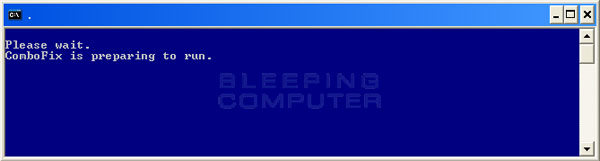
  • ComboFix will now install itself on to your computer. When it is done, a blue screen will appear as shown below.

    cf-preparing.jpg

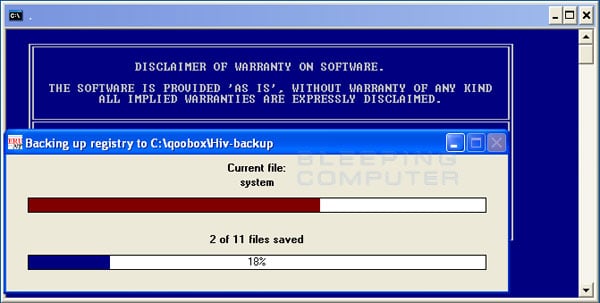
  • ComboFix is now preparing to run. When it has finished ComboFix will automatically attempt to create a System Restore point so that if any problems occur while using the program you can restore back to your previous configuration. When ComboFix has finished creating the restore point, it will then backup your Windows Registry as shown in the image below.

    erunt.jpg

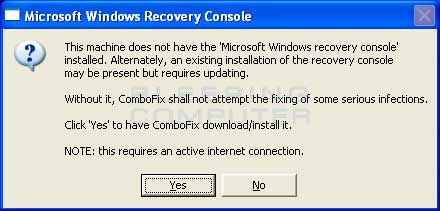
  • Once the Windows Registry has finished being backed up, ComboFix will attempt to detect if you have the Windows Recovery Console installed. If you already have it installed, you can skip to this section and continue reading. Otherwise you will see the following message as shown below:

    recovery-console-prompt.jpg

  • At the above message box, please click on the Yes button in order for ComboFix to continue. Please follow the steps and instructions given by ComboFix in order to finish the installation of the Recovery Console.
  • Please click on yes in the next window to continue scanning for malware.
  • ComboFix will now disconnect your computer from the Internet, so do not be surprised or concerned if you receive any warnings stating that you are no longer on the Internet. When ComboFix has finished it will automatically restore your Internet connection.
  • ComboFix will now start scanning your computer for known infections. This procedure can take some time, so please be patient.
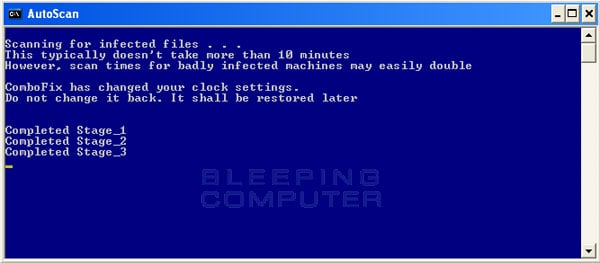
  • While the program is scanning your computer, it will change your clock format, so do not be concerned when you see this happen. When ComboFix is finished it will restore your clock settings to their previous settings. You will also see the text in the ComboFix window being updated as it goes through the various stages of its scan. An example of this can be seen below.

    still-scanning-clockchanges.jpg

  • When ComboFix has finished running, you will see a screen stating that it is preparing the log report.
  • This can take a while, so please be patient. If you see your Windows desktop disappear, do not worry. This is normal and ComboFix will restore your desktop before it is finished. Eventually you will see a new screen that states the program is almost finished and telling you the programs log file, or report, will be located at C:\ComboFix.txt.
  • When ComboFix has finished, it will automatically close the program and change your clock back to its original format. It will then display the log file automatically for you.
  • Now you just click on the edit menu and click on select all, then click on the edit menu again and click on copy. Then come to the forum in your reply and right click on your mouse and click on paste.

If for some reason, if you try to run a program or open a file and you get an error message saying "illegal operation attempted on a registry key that has been marked for deletion", please just reboot your pc and you'll be fine.


In your next reply please post:
  • The ComboFix log
  • An update on how your computer is running
 
Hey, I hope you don't mind me bumping this thread.. I want to start of with apologizing for not doing the last 2 tests that you gave such a detailed guide on how to do, You put a lot of effort into that reply.. It's just it didn't sound like you thought it was the problem and "let's just do these last 2 tests for the hell of it".

So instead I thought I would just be more careful not to bump the computer or anything that would nudge the ram card out of its slot again.. I've been to acer office twice and asked them to take a look at the ram card slots if anything is loose/bad.. they said there's nothing wrong with the slots and every time they took and and reinsterted the ram cards the computer was faster than ever for about a week or two every time.
Luckily I have warranty still so the quick take out and put back in process is free for me.

They said that they can take a real look into what is causing the problem or at least reinstall windows and replace the laptop if they can't get it working and that it would take a week and my data will be erased.. Not interested.

So now that we know it's not a bad memory card slot, what could be causing this problem when we think about my current solution to it makes my laptop in 100% condition every time reinserting the ram cards?
I can't take the 2 last tests as I'm writing this because my computer is having the memory problems currently and I am going to get it repaired tomorrow when acer office is open.. then I can do the last 2 tests again.. even though it doesn't sound like a software problem? :P

I am wondering if it could be a motherboard problem?
Because some months ago I bumped the computer and when I took it to a computer expert he repaired it and said it was something about the motherboard caused by the bump.. Do you see a connection between how reinserting the ram cards temporarily fixed a motherboard problem causing it to only use one of the ram cards after 1-4 weeks?

If you don't think it's the motherboard, then what would you suggest that I do after I've done the last 2 software tests in above reply?
If it's a motherboard problem, I guess I have no choice but to keep living with this problem or having my data erased as I give up my tool that I need for working for a week and a lot of data I can't backup or retrieve for free?

Thank you again for all the help so far.
 
When you say you bumped the computer, how hard was it and did it drop to the floor? Just because they say there is nothing wrong with the memory slots doesn't mean they still aren't bad. There is a very slim chance its a malware issue, I'm leaning more toward a bad motherboard. So are you saying it doesn't boot into windows anymore? I've seen many issues with bad ram slots. There really is no need for you to take it in and have them remove and reinsert the memory sticks, its really easy to do.
 
Once or 2-3 times I've lightly bumped it while having it in a bag (not a computer bag) so it didn't have enough protection in the bag when putting the bag down.. I have already changed to using a real computer bag =)

Everything is working on the computer except sometimes when the problem occurs it will start using only 1 ram card until taken out and reinserted again.

I tried before to reinsert the ram cards even after watching my profesional friend do it once with success.. but I caused a short circuit when I did that and had to take it for repair. Maybe with some help in how to avoid short circuits and if it's easy enough to repair a short circuit?
 
Give me the make and model number of your laptop so I can search for some specific instructions for you. Just bumping it inside a bag shouldn't cause any damage. But anything can happen.
 
The cheapest solution may be to get a single 8gb ram module if your laptop supports it. I still find it strange it won't run pc wizard.
 
If it's that much of a problem I would definitely have them replace the laptop, since it's already under warranty. Backing up your data is fairly trivial.

Also, you can do the reseat yourself as it does not require anything other than a screwdriver to open the cover.
 
Give me the make and model number of your laptop so I can search for some specific instructions for you. Just bumping it inside a bag shouldn't cause any damage. But anything can happen.

I'm no sure which numers are the make and model.. but I found this on a sticker on the back of the laptop:

v3-517g-53238g50mail
S/N nxrzked0043180749c3400
SNID: 31802985234

The low memory warnings are already back again.. seems whatever is causing it is getting in a worse condition the longer it remains unsolved or just bad luck?

I hardly move the laptop around anything at all.. just because I'm so scared to cause the RAM CARD to get loosened again.

Great idea about buying just a 1x 8gb card though.. but we don't know for certain that will fix it if it's not the ram card slot that's bad? Might be worth a try though since we seem to be out of options? Otherwise I'm sure I can resell the 8gb ram card again if it doesn't fix the problem and I won't have wasted much money.

Thanks again everyone, I don't know how I would manage without having this awesome forum to turn to for professional help when in need :good:
 
Back
Top