Low memory without any programs running?

kalleanka

Member
I have been using my new computer for a couple months with no lag then I bumped the computer and it wasn't booting so I had it repaired and he said he was able to fix the motherboard after that I was able to use it without lag for about a week then lag start suddenly and I haven't installed anything new since then I always keep laptop up to date on all programs and windows etc.
With no programs running it's slow loading (takes longer time to boot than before , because I have to wait a long time until my 3g connect window shows up that runs on startup but before it was instant almost.)

Then when I launch chrome I get warning about low memory and I have just booted the laptop.

When I launch my program I need for work it gets so much lag its impossible to work anymore.. I used to have no lag.

What do you think is best solution?
I would prefer being able to fix the problem without going back to an earlier backup.
But what I really don't want is to format the computer and not even go back to an earlier backup.
Because I am on an metered connection and it costs me a lot of money to update softwares since the earlier backup.. plus I have some new valuable data that I would prefer not losing.

If you need any more info to help me I will provide it.
Thanks in advance!
 
Ok, firstly there is no technician on the planet that can 'fix' a motherboard. That stuff is multi-layered mico tracks.

Here's my thoughts..

You've been had.

You either have RAM that is dimounted from its slots (check)

or

To be honest id start again.

rebuild everything and resinstall windows.
 
ok, just to add to my previous....

Questions:

What made you think you have less memory (RAM)?
What OS you have?
When did you last back up?
Do you have the Windows disk?

If you can, please download and install PC Wizard from my sig and install it. Got FILE, SAVE AS and click OK. Save the file as a text file and copy its contents into this thread.
 
What do you mean that I've been had?
That he scammed me someway?
Because he did at least fix the computer without formatting it.

And it still says I have 8gb ram if I look in computer properties.

The problem is that I can't rebuild it.. it's a laptop.
So I would have to go the technician again, I think it's weird if he didn't check if ram is dismounted from it's slots.. should I go and ask him to check this? (Will cost me money).

And reinstalling windows is really really bad for me.. It's going to cost me sooooo much money and I will lose so much work as well and will take me over a week just to get install everything I need for work and like I said I'm on a metered connection.
It's basically going to cost me thousands of dollars if I have to reinstall windows and lots of work and time.

But can it really be a dismounted ram?
Because it was working great for a week after I had it repaired and I haven't bumped it or moved it around anything since then but then it suddenly started lagging for no reason that I can think of.

Edit: To answer your second reply:
Because of the popup that I get frequently telling me I have low memory and it's telling me to turn of all programs and restart them.. except the only one I have up now is chrome and some of the standard programs like my 3g connection and avira free antivirus and things like this. But I have restarted computer many times and it doesn't change anything.
I have win8.
backup was done by the guy that repaired the computer (he works at a computer shop, I went there and paid them, so it wasn't done by acer the ones that made the laptop) so it was about a week before the lag came so it's not the end of the world if I need to go back to this date but will still cost me some very valuable data and some money.
I don't have the windows disk.

Will take a look at this PC Wizard now :)

Really appreciate you taking some time to help me!
 
Last edited:
<<< System Summary >>>

> Mainboard : Acer VA50_HC_CR

> Chipset : Intel Ivy Bridge

> Processor : Intel Core i5 3320M @ 2600 MHz (max : 3200)

> Physical Memory : 4096 MB (1 x 4096 DDR3-SDRAM )

> Video Card : Intel(R) HD Graphics 4000

> Hard Disk : Seagate ST500LT012-9WS142 (500GB)

> CD-Rom Drive : DTSOFT Virtual CdRom Device

> CD-Rom Drive : HUAWEI Mass Storage

> DVD-Rom Drive : MATSHITA DVD-RAM UJ8E1

> Monitor Type : LG Display - 16 inches

> Network Card : Broadcom NetLink BCM57785 Gigabit Ethernet PCIe

> Network Card : Atheros Communications AR9462 Wireless Network Adapter

> Operating System : Windows 8 Home Edition 6.02.9200 (64-bit)

> DirectX : Version 11.00

> Windows Performance Index : 5.7 on 7.9
 
Ok laptop? Didn't realise.

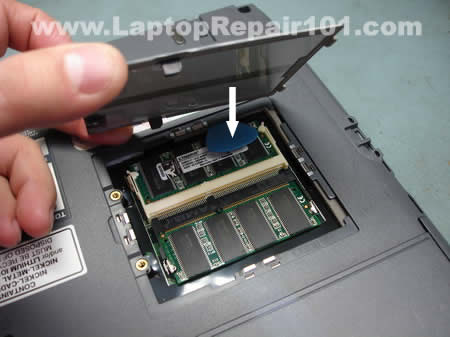
Secondly you say you have 8GB of RAM? the report only shows 4GB. If you dropped it or knocked it you may have easily dis-lodged 1 x 4GB of ram module. Check. Unscrew the RAM module cover on the back of the laptop and remove and reinstall each RAM module carefully touching exposed chassis metal each time before touching the ram. Here's a tutorial, but forget the static strap etc, just touch a screw to remove static build up in your body. Remove the battery, hold down the power button for 10 secs then remove the RAM case covering, unclip each clip, remove and reinstall each RAM module. Replace battery and plug into power. Start. http://www.youtube.com/watch?v=dbvmRsSh210

Thirdly go here and check you have the latest drivers etc http://www.intel.com/p/en_US/support/detect
 
Last edited:
Hmm it looks like this could very well be the culprit of my problem.
I will go back to the technician tomorrow and let him check do this.
Because I am 100% sure that I should have 8gb ram. I don't know how it's managed that one of them dislodged I have not moved the laptop anything during the time it was good and transition to bad.
Maybe the seal is not firm enough or maybe the technician didn't attach it properly.

I will let you know if this was the problem but I think it must be!
Thanks!
 
Mate, 4 screws to remove cover and a firm push on the RAM modules (with the laptop off and battery removed). Done. No need for a technician.

repair-failed-memory-slot-6.jpg


Jp4cyvmJGkLaptop-Ram-Upgrade.jpg


RAM-Aspire3680-1.jpg


aspire_one10_ram1b.jpg


these images are for example only, but the third example may look like yours as its an Acer too.
 
Last edited:
Ok, firstly there is no technician on the planet that can 'fix' a motherboard. That stuff is multi-layered mico tracks.

...
It really depends on what needs to be replaced to repair the motherboard. It is certainly possible to replace surface mount components with the right equipment.
 
I opened it but didn't understand how to dismount/insert the memory cards so I went to the technician and I explained the problem to him and showed him PC Wizard and that he needs to check if both RAM cards are properly attached and he checked and said it looks good and he showed me that best way to check is in computer properties it says 8gb ram even when PC wizard says 4gb.

What do you think about that?

I also found out that there isn't any backup that he made, he just split the HDD into 2 so I can use it for backup if I want to so I would have to reinstall windows, can I do that without the CD?
But I really don't want to do that.

He thinks it might be a virus too, he installed avira free antivirus last time and checked and there was no virus but he thinks maybe I have one now and I should scan the computer when I'm home again, I don't think it's virus because I don't go to porn websites or anything fishy.. only well known big websites. I will run a scan now.
 
I made a full system scan with free avira antivirus now and nothing was found.

What do you suggest I do now so there is a chance I don't have to reinstall windows?

It bothers me that we don't even know why this happen.. just reinstall windows without knowing why.
 
This can happen. Reinstalling Windows isn't hard. You simply need to back up your stuff. When you're at that point we can provide a how to guide.
 
It really depends on what needs to be replaced to repair the motherboard. It is certainly possible to replace surface mount components with the right equipment.

Very possible. Unless the actual paths have been physically damaged, any kind of circuit board can be repaired with the right tools and know-how easily.

Even if the paths do get physically damaged, in most cases there is an easy fix for that as well.
 
Very possible. Unless the actual paths have been physically damaged, any kind of circuit board can be repaired with the right tools and know-how easily.

Even if the paths do get physically damaged, in most cases there is an easy fix for that as well.

as an avionic engineer in a past life I can tell you that you are over simplifying it. in many cases its difficult to even obtain the components let alone retrack multilayered circuits.

By the sound of it you've repaired many motherboards? Retracked a lot? As to say 'in most cases' is bollocks.
 
Back
Top