Make Windows Vista Look/Act like XP?

BurningSkyline

New Member
I've been using vista for a year now, and Going to upgrade my PC to 7 soon, but all this "Eye Candy" is driving me CRAZY. I can't stand The Shell and the Theme. I don't like the win98 theme either. When It comes to me, Simplicity is best. The way user files are set up are horrible too. Back in WinXP days, I had everything organized nicely in the documents folder, but now its just too hard to keep organized. With the Documents folder, and then a folder for everything else. I mean, my documents folder is empty! I know, I would use WinXP still but I have 8GB of DDR3 Ram, and I'm not even sure if XP can handle DDR3. and XP64 got TERRIBLE reviews :|
can Anybody help me? If it all makes sense...
 
Why don't you just move everything into the Documents folder? Not trying to be sarcastic, but if that's the way you want it then do it. I like the individual folders personally. Win 7 will be the same, but you have the libraries that help you locate similar files: Music/Documents/Picures..etc
 
Why don't you simply go back to XP then?Are you not using it because it's old?Because if thats the reason then that's just stupid lol.Besides even if you have 8 GB of DDR3 RAM memory does not mean anything.I am sure you do not need that much RAM unless you are playing 3 the most modern games at the same time lol.So trust me...you do NOT need 8 GB of RAM memory unless you are a game programmer and doing TONS and TONS of things at the same time like game developers do lol.


Cheers mate!
 
Why don't you simply go back to XP then?Are you not using it because it's old?Because if thats the reason then that's just stupid lol.Besides even if you have 8 GB of DDR3 RAM memory does not mean anything.I am sure you do not need that much RAM unless you are playing 3 the most modern games at the same time lol.So trust me...you do NOT need 8 GB of RAM memory unless you are a game programmer and doing TONS and TONS of things at the same time like game developers do lol.


Cheers mate!

Because to use 8GB of memory you would need a 64 bit OS and XP x64 is terrible. It was buggy as hell and had 0 driver support.

you would also be surprised how much difference having that much memory makes. Even though you are right that no program that an average user would use would use that much memory, it still makes the system run a whole lot smoother

I found the file system much easier on Vista/7 than XP.

If it helps, change the files to icons, small or large, pick how you like it from the slider thing. Plan it out before hand how you want it, it is essentially the same filing system as XP, just with a bit of eyecandy
 
Because to use 8GB of memory you would need a 64 bit OS and XP x64 is terrible.

Yea I know that.That's why I told him he doesn't need that much RAM because I supposed he is using the x86 Vista OS.And even if he has the x64 OS,I am sure he doesn't need so much RAM lol.

By the way there was one guy who had 6 GB of RAM and even his desktop was lagging as hell and he said that upgrading to 8 GB of RAM will help hahaha!What a bullshit ROFL!:D

Anyway I am sure he doesn't need 8 GB of RAM lol unless if he is using programs that do tons of things per second xD
 
If you reeeeally hate Vista downgrade to 32bit XP. F*ck the ram, you don't need 8gb anyway, esp. in XP.

If that's not an option, suck it up, learn how to organize folders(this doesn't differ from XP to Vista), and download a different theme. In fact I'm pretty sure there's a Luna theme available for Vista.
 
It didn't make any sense to me at all to have all my stuff in "My Documents", I like Vista's way of organising files better. Documents is for documents and that's it. Perhaps just try to get used to it? I know, sometimes it can be hard to break out of an established way of doing things, but it might work a lot better if you try looking at it more 'glass half full'.

I think Vista is better than XP in just about every way, except the file manager does things I don't want it to do at times...

EDIT: *I HAVE NO EXPERIENCE WITH THIS PROGRAM MYSELF* There is this program called WindowBlinds that let you theme Windows, I'm pretty sure you can find an XP-esque WindowBlinds theme somewhere.

This thread seems to have a fair bit of interesting info and links if you can be bothered to sift through all the Vista vs. XP bickering and other garbage.
 
Last edited:
From what it sounds like you may want to look into upgrading to 7 sooner rather than later if possible. The libraries really help you aggregate you're files no matter where they're stored. Windows serach in 7 works just about as good as Spotlight in OSX and doesn't take all day to search you're files like it did with xp.
 
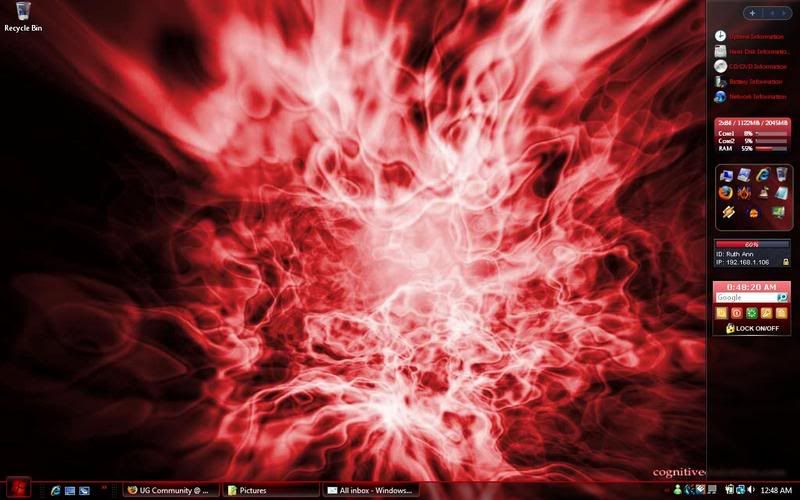
Windowblinds works. There's also a process that allows you to use any theme with it, without the need for windowblinds. I did it fairly easily. This was my Vista:

DesktopRed2-1.jpg


Granted, I'm not sure if it conflict's with Vista's EULA or not, but if it does, I doubt it's something that MS really cares about.
 
Yeah, I sure as hell need all of my ram. I play some older games, Export from Premiere sometimes, Also Use Photoshop and After Effects a bit.
 
I hope you know that the 8GB of RAM really helps exporting In HD. And to be honest, what sane person would run that amount of programs?
 
I hope you know that the 8GB of RAM really helps exporting In HD. And to be honest, what sane person would run that amount of programs?

More like helps a bit

My point was even on my computer with 4gb of ram and with 3 intensive Adobe programs running and all that other crap I was still only using 2.5gigs.
 
Back
Top