Need help concerning internal upgrade!

Mat22!!

New Member
Hey guys, thanks for reading this.

Basically I am looking to upgrade my Graphics Card in my Desktop as I want to be able to play the new "Star Wars: The Old Republic" with no worries. My desktop is:

Dell Inspiron 560
4GB RAM installed (added 2 GB myself)
Graphics: Intel(R) G45/G43 Express Chipset
OS: Windows 7 64bit

If anybody could recommend a Graphics Card that I can upgrade to that would be great! I'm not really looking to spend more than £100 to be honest with you.

If you need any more information then let me know!
 
Playing an old classic I see. Don't know how many times I've played it, myself. I have discovered that no matter what your specs are, the game seems to lag with lots of smoke. Just something to be aware of. Also, it's a single threaded game and I'm sure you've encountered problems with the game crashing or freezing. I guess you're familiar with your PC. Does it have a PCI-E express slot? I'm guessing yes.

Still need the specs of the power supply though, and whether or not is has any 6-pin PCI-E cables makes a big difference in your selection of cards.

In any case, here's a cheap card that needs no external power and performs well:

http://www.scan.co.uk/products/1gb-...1600mhz-gddr3-gpu-775mhz-400cores-dvi-hdmi-dp
 
linkin, its a new game that is due out next month but I'm running the BETA test at the moment and it is really lagging, i don't want it to be perfect, just enough so that i can play the game without any lagging as i just created a character on it and it took about 10 seconds to load every time i changed something like a facial feature. how would i go about finding out about the power supply? and im not sure if it is PCIe or not, im on system information and a couple of things say PCI and a couple say PCIe :/
sorry that i couldn't give you any more information.
 
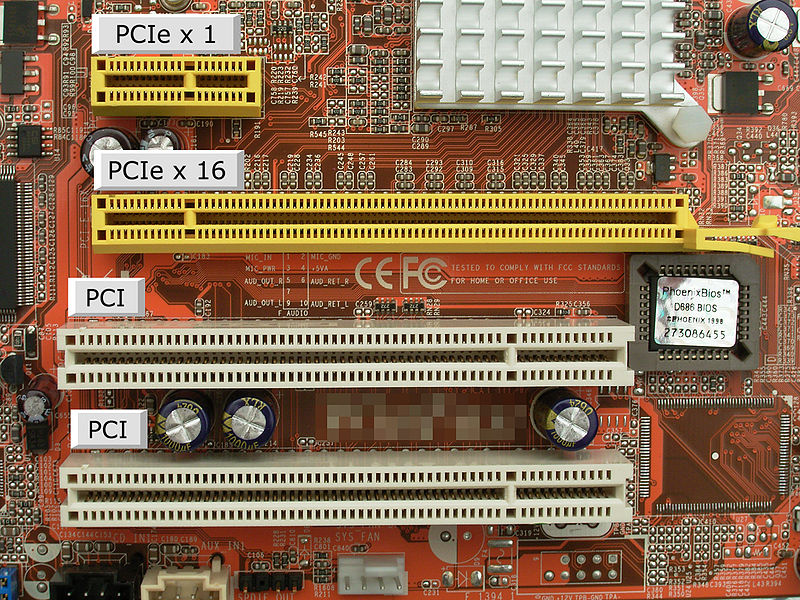
Ah sorry, I mistook it for "Knights of the old Republic." You can find out both by taking off the side panel off the PC. Here's what a PCI-E slot looks like:

11481-24939-800px-PCI_und_PCIe_Slots.jpg


And here's what a PCI-E 6/8 pin connector looks like:

BD6DDCF9-41DB-455D-9DCEA58885FC352C.jpg


May or may not have the extra 2 pins. Shouldn't matter. What we also need is the wattage and amperage of the power supply. Look for the box up top or bottom with all the wires coming out of it. On the sticker it should have ratings in a table like so:

-- 3.3v -- 5v -- 12v
-- 80w -- 80w -- 280w
-- 24a -- 16a -- 24a

Figures aren't exactly accurate but they should look something like that.
 
I have an OEM GeForce GT120 out of a Gateway FX that I run with max settings on all of my games with VERY little to no lag (I have some lag on Gothic 3)(and I am even messing around with their new 3D Settings), and it is on a 4 pin connector (the one usually used for the old Floppy drives)....
I play
WOW
Driver San Francisco
Fallout NV
Fighter Ace 4
Skyrim
Boiling Point Road to Hell
Bully
Far Cry 2
Prototype
LOMAC
and some others :)
Maybe one of these, they are relatively cheap... :)

http://www.geforce.com/Hardware/GPUs/geforce-gt-520/shopping
 
Last edited:
Back
Top