

TechCom0018
New Member
I need help setting up Mythbuntu 8.04 on my desktop. I been planning this desktop project for over a year now, and I'm having some trouble with the Mythbuntu set up. I already have a year membership with Schedules Direct.
Here's is my new Desktop Specs:
Desktop: Dell Dimension 4600 (about 4 years old)
Proceesor: Intel P4 2.40 GHz
RAM: 1.25 GB
DVD-RW: Pioneer 20x DVD+/-R DVD Burner
CD-R:Lite-On LTN4865 48x Max
HD1: Maxtor Diamond Max 8 40GB ATA/133 (Windows XP - 15.2 GB and Mythbuntu - 23.0 GB (Dual Boot) (Total HD size - 38.2 GB)
HD2: Western Digital Caviar SE 500GB Ultra ATA100 (NTFS format) (500 Gb Free Space)
Graphics Card: nVIDIA GeForce 4 MX 440 w/AGP8x (Dell)
Tuner Card: Hauppauge WinTV-PVR-500 MCE Dual TV Recorder Tuner Card w/ MCE Remote 253 PCI Interface
Here's more Info:
Mythbuntu: http://www.mythbuntu.org/
Myth TV: http://www.mythtv.org/wiki/index.php/Main_Page
TV Tuner:
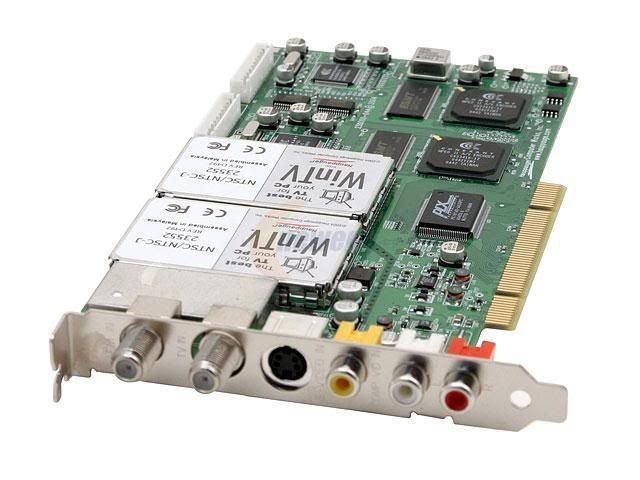
http://mythtv.org/wiki/index.php/Hauppauge_PVR-500
MCE Remote:
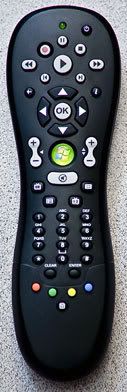
http://www.mythtv.org/wiki/index.php/MCE_Remote
Here are the problems I'm having with MythTV (on Mythbuntu):
1) My TV Shows are in black, white, and is snowy.
2) MCE remote is not working.
3) Channels not labeled.
4) TV Listing not working (and I have a membership with Schedules Direct).
5) When I turn off my PC, and my DVD+/-R driver tray is open, it won't close automatically like my CD-R driver does.
Here's what I would like to be able to do with MythTV ( on Mythbuntu):
1) Be able to play a DVD Movie via my DVD drive.
2) To copy all of my CD's and DVD's onto my 2nd 500GB HD and be able to play them back.
3) Be able to schedule my TV recordings, store my TV recording on my 2nd HD, and be able to record 2 different shows at the same time.
4) Be able to use pulgins (like, MythWeather, MythNews, MythBrowser, etc)
5) Be able to my Laptop to control and/or changes things on my desktop via a very secure remote access.
6) Be able to remotely print from my Laptop to the printer connected to my desktop (like I can do in Windows).
After spending time and money on this Desktop Project I would like it to work properly. So if anybody could help me out I would greatly appreciate it.
Thanks .
.
Here's is my new Desktop Specs:
Desktop: Dell Dimension 4600 (about 4 years old)
Proceesor: Intel P4 2.40 GHz
RAM: 1.25 GB
DVD-RW: Pioneer 20x DVD+/-R DVD Burner
CD-R:Lite-On LTN4865 48x Max
HD1: Maxtor Diamond Max 8 40GB ATA/133 (Windows XP - 15.2 GB and Mythbuntu - 23.0 GB (Dual Boot) (Total HD size - 38.2 GB)
HD2: Western Digital Caviar SE 500GB Ultra ATA100 (NTFS format) (500 Gb Free Space)
Graphics Card: nVIDIA GeForce 4 MX 440 w/AGP8x (Dell)
Tuner Card: Hauppauge WinTV-PVR-500 MCE Dual TV Recorder Tuner Card w/ MCE Remote 253 PCI Interface
Here's more Info:
Mythbuntu: http://www.mythbuntu.org/
Myth TV: http://www.mythtv.org/wiki/index.php/Main_Page
TV Tuner:
http://mythtv.org/wiki/index.php/Hauppauge_PVR-500
MCE Remote:
http://www.mythtv.org/wiki/index.php/MCE_Remote
Here are the problems I'm having with MythTV (on Mythbuntu):
1) My TV Shows are in black, white, and is snowy.
2) MCE remote is not working.
3) Channels not labeled.
4) TV Listing not working (and I have a membership with Schedules Direct).
5) When I turn off my PC, and my DVD+/-R driver tray is open, it won't close automatically like my CD-R driver does.
Here's what I would like to be able to do with MythTV ( on Mythbuntu):
1) Be able to play a DVD Movie via my DVD drive.
2) To copy all of my CD's and DVD's onto my 2nd 500GB HD and be able to play them back.
3) Be able to schedule my TV recordings, store my TV recording on my 2nd HD, and be able to record 2 different shows at the same time.
4) Be able to use pulgins (like, MythWeather, MythNews, MythBrowser, etc)
5) Be able to my Laptop to control and/or changes things on my desktop via a very secure remote access.
6) Be able to remotely print from my Laptop to the printer connected to my desktop (like I can do in Windows).
After spending time and money on this Desktop Project I would like it to work properly. So if anybody could help me out I would greatly appreciate it.
Thanks
. . I've rebooted it like 5 time and did a complete shutdown a few time and it still freezing up. I'm not sure if it's locked up, because it was shutdown while in its screensaver mode
  ? But it will not longer go to my desktop or to myth TV. The only option I can see is deleting the Mythbuntu partition, on my HD, and reinstalling Mythbuntu. But I rather not do that if possible. So do you know how I can fix this problem. Also I think that Mythbuntu can't, for some reason, connect to the X server. Thanks for your help


 . So thanks to everyone who tried to help me with my setup problem, and I still need some help getting my Mythbuntu up and running.