Need help. youtube freeze

swancity

New Member
Hi, I was hoping somebody can help me with this problem.
Everytime I watch youtube on my vaio CR220(just bought last week) it's freezes every few seconds. also when I was talking on skype, the other end can't hear well, it's freezez too(on n off) sound.
I would appreciate much if anyone cann help . thanks
 
Do you have broadband connection?
If not, YouTube will buffer the video file each time before playing it.

Also, Skype is known to have communication problems, so that shoudn't really matter.

If your internet connection is slow, then these problems are common and you will have to switch to broadband connection.
 
youtube freeze

Thanks adarsh for fast reply, yes, mine is broadband, usually skype is very good, so far haven't had connection or sound problem using desktop, as well as youtube on desktop, only with this new notebook wireless .
 
youtube freeze

the other thing is I compared with my daughter's new laptop(Dell XPS M1530), it played smoothly on hers. I'm sure it's something to do with buffering or flash player, cause with skype, the sound was on n off and static.
 
OK, this, it could be your temporary files:

*NOTE* CCleaner deletes EVERYTHING out of temp/temporary folders. If you have anything in a temp folder, back it up or move it to a permanent folder prior to running CCleaner!

Download CCleaner from here to clean temp files from your computer.
  • Double click on the file to start the installation of the program.
  • Select your language and click OK, then next.
  • Read the license agreement and click I Agree.
  • Click next to use the default install location. Click Install then finish to complete installation.
  • Double click the CCleaner shortcut on the desktop to start the program.
  • On the "Windows" tab, under "Internet Explorer," uncheck "Cookies" if you do not want them deleted. (If deleted, you will likely need to reenter your passwords at all sites where a cookie is used to recognize you when you visit).
  • If you use either the Firefox or Mozilla browsers, the box to uncheck for "Cookies" is on the Applications tab, under Firefox/Mozilla.
  • Click on the "Options" icon at the left side of the window, then click on "Advanced."
    deselect "Only delete files in Windows Temp folders older than 48 hours."
  • Click on the "Cleaner" icon on the left side of the window, then click Run Cleaner to run the program.
  • Caution: It is not recommended that you use the "Issues" feature unless you are very familiar with the registry as it has been known to find legitimate items.
  • After CCleaner has completed its process, click Exit.

Download: CCleaner (freeware)
http://www.majorgeeks.com/download4191.html
Run the installer, and uncheck the option to install Yahoo toolbar (unless you want Yahoo toolbar).
Once installed, run CCleaner click the Windows [tab]
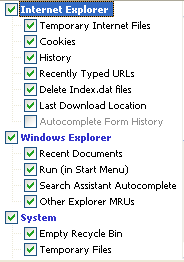
The following should be selected by default, if not, please select:
CCleanerA.png

Next: click Options click the Settings tab
Uncheck: "Only delete files older than 48 hrs.", click Ok
Then click Run Cleaner (bottom right) then Exit
 
Solution but for my problem

Well i recently switched from a wireless adapter to broadband and the internet was fine, just that i had a similar problem as you. I realized that when i switched back to wireless everything was back to normal:D. So take a look at your modem. Unplug it , wait for 20 seconds then plug it back and see what happens. Remember my solution was for my problem so i dont know if my solution will solve your problem but hope it works.:)
 
Back
Top