need to find out where the wires go

lovely?

Active Member
well, not like i havent had other problems lately, but the wires leading from the usb ports and sound ports in the front of my case are disconnected from my motherboard. the cords are thin, and color coded i think, but the motherboard shows no indication of where they go. there are two usb ports, a firewire port, a headphone jack, then another pinkish red jack (i dont know what that ones for)

my motherboard is a gigabyte, GA-k8vm800m. its kinda old, so i have no clue where the manual is... any help would be greatly appreciated
 
oh sorry to drag up an old post but thanks guys

ok this is what the manual gave me on the subject:


Pin No. - Definition
1 - Power
2 - Power
3 - USB DX-
4 - USB Dy-
5 - USB DX+
6 - USB Dy+
7 - GND
8 - GND
9 - No Pin
10 - NC

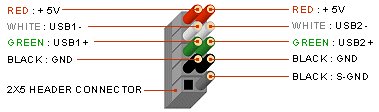
there was a picture also, telling me which number corresponded to which pin on the motherboard. what i need to know now, is what the colors on the cords leading from the usb's are, so i can connect them to the right pins. anyone know the polarities/colors of the cords?
 
Last edited:
cpx108_2p3.gif
 
i know this thread is old, but thanks for the reply, that picture really helps

EDIT: well, it did, right up untill i tried to put the wires in and windows refused to start, its all fine now that i took the wires back out, but i have no clue what i did wrong...i put the wires, which come in two connectors of three with green white and red, and then two black connectors. there are two male connectors on my motherboard. right next to eachother, labeled usb1 and usb2. my first try i installed all four connectors to their corresponding ports on the motherboard, on USB1 only, not installing any on usb2. when windows would not startup i decided to go back and try taking out the ones on top. (the top being the one with five pins instead of four like strangleholds picture. now i had four cords in the plugs on the bottom half of the connectors. it still would not start up, what did i do wrong?
 
Last edited:
Back
Top