New Build - Now I'm having issues

lillizzierae

New Member
It's my first build and I'm having issues now. The computer powers up (everything seems to be working) but it doesn't boot up. The monitor stays in standby mode. Could it be the graphics card? But I plug in the keyboard (not through usb but ps/2) and it doesn't seem to recognize it, seeing that the light doesn't come on.

The monitor is hooked up by Dynex dvi-d to hdmi cable.. dvi-d (monitor) to hdmi (graphics card). And the monitor worked fine when I hooked it up to the PS3 with the same cable. I couldn't hook it up to my other comp being that it doesn't have hdmi.

Is there anything I can do to figure out what the problem is?


* AMD Phenom II X6 1055T
* GIGABYTE GA-890XA-UD3 AM3 AMD 790X SATA 6Gb/s USB 3.0 ATX AMD Motherboard
* Radeon HD 5670 1GB 128-bit DDR5 PCI Express 2.0 x16 HDCP Ready CrossFireX
* G.SKILL 4GB (2 x 2GB) 240-Pin DDR3 SDRAM DDR3 1600 (PC3 12800)
* Thermaltake TR2 W0388RU 600W ATX 12V v2.2 Power Supply
* SAMSUNG F3 HD103SJ 1TB 7200 RPM SATA 3.0Gb/s 3.5" Hard Drive
* ASUS DRW-24B1ST/BLK/B/AS Black SATA 24X DVD Burner
 
Make sure all of your power cables are plugged in.

You should have:

24 pin motherboard
8 pin CPU (into the motherboard)
1xSATA to your hard drive
1xSATA to optical drive

If you have them all in, there is a possibility that your motherboard won't work with the Thuban core processors without flashing your BIOS. If that is the case, you won't be able to flash it without a different, not Thuban core AM3 processor. Will have a mooch if that is the case. Thuban cores are in the supports lise, however, newly produced ones may have the updated, working BIOS, and some of the ones currently in store stock have the older, not working one
 
does the monitor show the post screen or does it stay black at all times?
The monitor is always black. There's no beeps or anything when the computer powers up. The fans, lights, all turn on.


Make sure all of your power cables are plugged in.

You should have:

24 pin motherboard
8 pin CPU (into the motherboard)
1xSATA to your hard drive
1xSATA to optical drive
I'm sure they are I've looked over it many times.. but I'll triple-check. So you're saying if it's all plugged in I'm going to need another motherboard? You don't think there's any other reason this could happen?
 
I had a similar problem, test your power supply unit, Im not saying this is it for sure... is your motherboard grounded properly? Do you have your stand off screws under the motherboard installed correctly?
 
The monitor is always black. There's no beeps or anything when the computer powers up. The fans, lights, all turn on.


I'm sure they are I've looked over it many times.. but I'll triple-check. So you're saying if it's all plugged in I'm going to need another motherboard? You don't think there's any other reason this could happen?

there are other things that could cause it:

motherboard shorting
bad motherboard
bad CPU
bad memory
bad video card
bad power supply

I'm just saying that is a possibility.

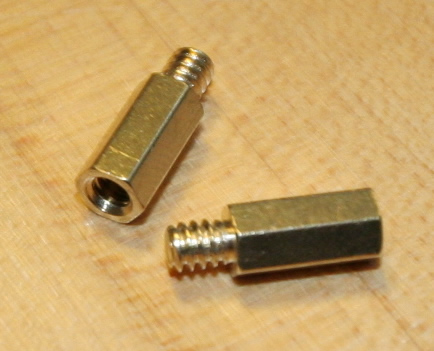
To check motherboard shorting, do as mtb said and check you have the standoffs between the motherboard and case. they look like this

IMG_6805.jpg


If they are in, that is ok

Test your system with only minimal components:

motherboard
CPU
1 stick of memory
1 hard drive
video card (you don't have onboard so wil;l have to use it)

and see if it boots. If not, try the other stick of memory.

If still not, to test the components individually you will need either:

replacements that you know work of every component that could potentially be cause the issue, or a fully working AM3 system. The latter would be better.

If you have a fully working AM3 system, swap the components from your system in one by one until it doesn't work. When that happens, you know it is that component causeing the problem. If it is the CPU though, it may not be that the CPU is bad, it may simply be that the BIOS isn't up to date on either board. To check that, put the CPU from the working computer in the system you have now and see if it boots. If it does, check the BIOS revision on the motherboard. It will either show at post, or you can check with CPUz. then go to the gigabyte site, find your motherboard, find the BIOS downloads and see which is the latest BIOS. If it is later than the one you have now, post here.

If you have spare components, you are better off building a fully working system and swapping them over. If that isn't an option for whatever reason, one at a time swap over until it works. If not, change more, and more, until it does. It may be several components don't work, or that several components aren't compatible
 
Back
Top