New build will not even post!

Bfg8142

New Member
Computer will not even go to the post window, sometimes will not even start the psu when all the connections are done properly. The only last thing I can think of is that maybe the RAM is too fast for the computer and will not let it boot as the motherboard states its 1600[oc]. However other than that I have absolutely no clue why it wont work. Please help!!!!

Thermaltake V3 Case
http://www.newegg.com/Product/Product.aspx?Item=N82E16811133094&Tpk=thermaltake v3 case

Adata 1600mhz gaming ram 2gb 1 stick
http://www.newegg.com/Product/Product.aspx?Item=N82E16820211450

Dell TX719 ATI X1950 Pro PCI-E 512MB Video Card
http://cgi.ebay.com/NEW-ATI-RADEON-...034?pt=PCC_Video_TV_Cards&hash=item2ea8a34d32

Cosair 430watt powersupply
http://www.newegg.com/Product/Product.aspx?Item=N82E16817139017

Seagate Barracuda 7200.11 ST3320613AS 320GB 7200 RPM Hard Drive
http://www.newegg.com/Product/Product.aspx?Item=N82E16822148316

Biostar 785G motherboard
http://www.newegg.com/Product/Produ...167&cm_re=biostar_785g-_-13-138-167-_-Product

Amd Athlon II X2 245
http://www.newegg.com/Product/Product.aspx?Item=N82E16819103687
 
Last edited:
When it would work the motherboard would come on with a solid red light that would not go off, the cpu/video card fans would engage.
 
.
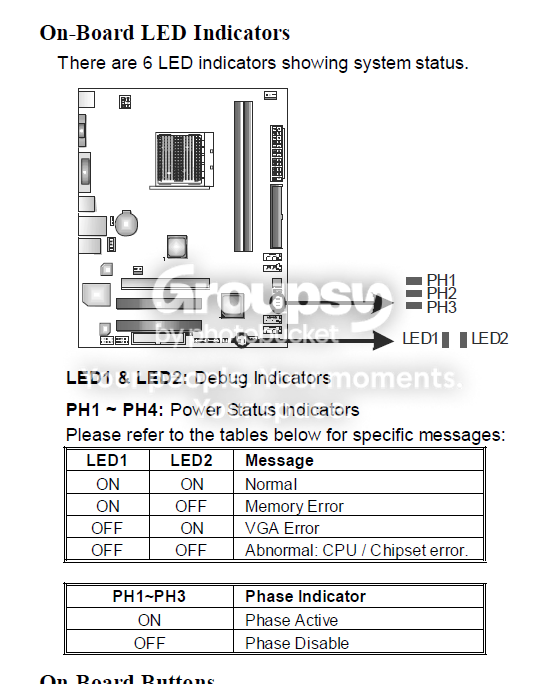
What are your MB LEDs showing?
.
LEDs.png
 
+1 for motherboard or power supply.

Have you stripped everything out and just tried to power on with the motherboard+RAM+power supply (using on board video if it has it)?
 
+1 for motherboard or power supply.

Have you stripped everything out and just tried to power on with the motherboard+RAM+power supply (using on board video if it has it)?

Well i did not take out the video card or the hard drive. will try that next.


It also lights up PH1 the first dot in the row i could not quite understand that debugging table.
 
Sure you got the standoffs in the right places, not one grounding out on the bottom of the board? Got the 4 pin CPU power connector plugged in?
 
Sure you got the standoffs in the right places, not one grounding out on the bottom of the board? Got the 4 pin CPU power connector plugged in?

Yeah im not sure if one is currently grounding out the case was absolutely terrible the pins would not line up properly for a mini atx and the powersupplys 4 pin connector would not snap in but i made sure it was in firmly.

I tried taking out everything except the powersupply, video card, and motherboard and i still cant get the powersupply to boot, however strangely it was working before..
 
The board only uses 6 standoffs, if you used more than that it probably has one grounding out.

Edit
From the looks of the case, it has pre formed standoffs, should not had it use any.

You got the 6 pin PCIe power connector plugged into the card?
 
Last edited:
The board only uses 6 standoffs, if you used more than that it probably has one grounding out.

Edit
From the looks of the case, it has pre formed standoffs, should not had it use any.

You got the 6 pin PCIe power connector plugged into the card?

yup and i just used the cases preformed holes i have another case i can move the stuff in to and try it but i doubt it will have any effect.
 
It has to be a DOA powersupply just because i moved it to the other case the 12v connector clicked in with more room in the case, and when i tried turning it on the case fan lit up for a second then turned off and that was it. Thanks for your help guys im going to try a new powersupply and then send this one in.
 
The one where you jump the green wire to ground with a paper clip to turn on the PSU, yeah.

Don't worry, there's no risk of injury.
 
I guess I read something wrong :confused:

edit: By the way, you won't void your warranty with the paperclip test, haha
 
Back
Top