I've never replaced anything in a computer. I think I've did enough reading to know that you unplug it, take it out and put the new one in.
My monitor is a ViewSonic and it kept flickering black so I figured it was the graphics card. My friend gave me a Palit GTS 450 - which is better than my Sapphire Radeon 4870 1gb I think; I want to put that in my computer. So I don't have to use DVI.
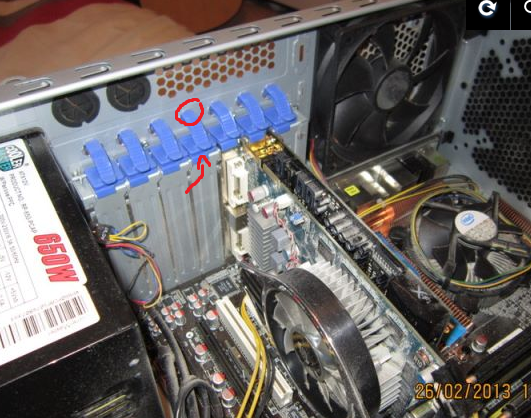
There are some blue clip things in the way though... I don't know how to properly move them. I have an ASUS PQ5 Deluxe mother board and an intel core 2 Q9450 @ 2.66 GHz (prob don't need to know that)
Any help on doing all of this? I just want to replace the graphics card. That's all. Thanks!
Picture:
http://imageshack.us/photo/my-images/717/img0605f.jpg/

My monitor is a ViewSonic and it kept flickering black so I figured it was the graphics card. My friend gave me a Palit GTS 450 - which is better than my Sapphire Radeon 4870 1gb I think; I want to put that in my computer. So I don't have to use DVI.
There are some blue clip things in the way though... I don't know how to properly move them. I have an ASUS PQ5 Deluxe mother board and an intel core 2 Q9450 @ 2.66 GHz (prob don't need to know that)
Any help on doing all of this? I just want to replace the graphics card. That's all. Thanks!
Picture:
http://imageshack.us/photo/my-images/717/img0605f.jpg/