New hdd (sometimes) not usable

Whitebird

New Member
EDIT: Solved with putting jumperplug to plug 5 and 6

Hi there, thanks for reading.

Here's the story:
A couple of days ago i bought a new hdd to put all my music, games and files on, so i figured 640gb WD would do the trick. At the same time i wanted to get rid of Vista and make a triple boot out of my 3 year old 320gb WD drive.
So, now i configured the triple boot (vista, xp, ubuntu), i can't seem to manage to get the new hdd working!
Like usual, i plugged it in , sata, and power, open up management, formatted the drive to Ntfs, rebooted, and now windows vista refuses to boot, xp freezes often and my hdd monitor says the drive is there, but in explorer, it isn't.

What i tried:
- Making sure the sata cable didn't connect to the case (you never know, read it somewhere)
- change the sata cable
- use different power connectors
- use fat32 filesystem

No dice

I figured i try this in another computer, but i only have one computer with sata connection.

Specs:
MS Windows XP Home 32-bit SP2 (busy updating to SP3)
MS Windows Vista Home Premium 32-bit
Ubuntu (i'll give exact version later on request)
Processor: Intel Pentium E2140 @ 1.60GHz Conroe 65nm Technology
Ram: 2.0GB Single-Channel DDR2 @ 333MHz (5-5-5-15)
Mobo: Acer F672CR (Socket 775)
Hdds:
313GB Western Digital WDC WD3200AAJS-22RYA0 (IDE)
Western Digital WDC WD6400AADS-00M2B0 (IDE)

Specs from speccy, under xp , that keeps crashing
speccy snapshot

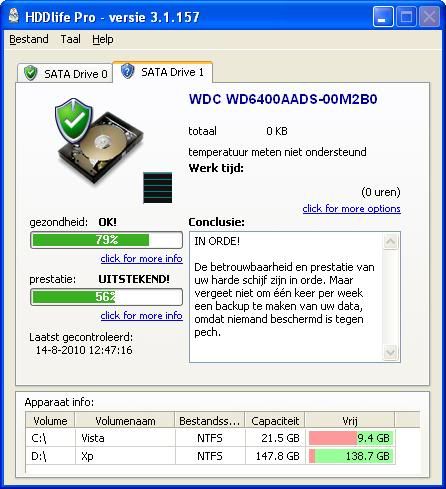
Screens from Hddlife pro (sorry they are in dutch, if there are unclear parts, let me know)
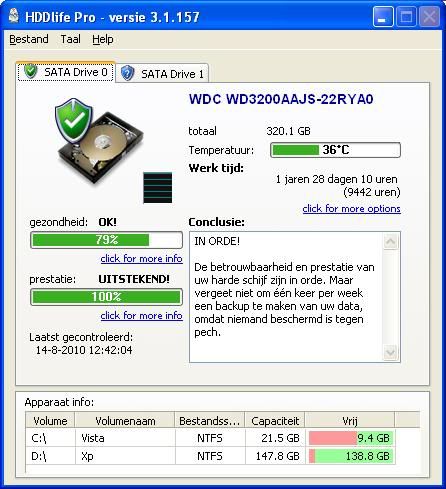
hdd0.jpg

hdd1.jpg


Thanks in advance, if there are any details i can give, just let me know ^^

-Whitebird

edit: now trying to format the 2nd hdd to ext3, and see if i can keep seeing it
 
Last edited:
You ought to scan the drive for errors using either scandisk in Windows, fsck in Linux, or use the Western Digital Data Lifeguard Diagnostic tool (preferable).

Also, how exactly did you format and partition the drive?

I am not a fan of multi-boot systems. I feel you should pick one OS per computer and go with it. You can always install a virtual machine if you feel like fooling around in another OS.

But anyway, if I were going to set up a multi-boot system like yours, this is how I would do it:

Determine first that the HDD is in good shape using the Western Digital tool.

Then, back up all of your stuff.

Boot up with a live-CD such as Knoppix or possibly even your Ubuntu installation disk. Format everything using cfdisk (cfdisk /dev/sda) - delete all partitions and write it.

Then go in and make a swap partition (size equivalent to the amount of RAM you have installed - 2GB, Type 82, not bootable), a Linux partition (Type 83, bootable, 150GB), and two Windows NTFS partitions (Type 86, bootable, 22GB for XP) and (Type 86, bootable, 146GB for Vista).

Then continue installing Ubuntu - I've never installed it, but I hear it is very user friendly - just be sure that you choose the correct swap and linux partitions.

Then install Vista - be sure you choose the correct partition.

And finally install XP - again, making sure to choose the correct partition.

You will probably have to go in and configure GRUB to add the Windows partitions. It's simple and we can walk you through it f you need help.

If you do all of this, after making sure that the hard drive doesn't have any errors, I don't think you'll have any problems. ;) :good:
 
Last edited:
Thank you for your quick response

The reason that i'm running these os's is because my father needs vista for his work (he gives free lessons of vista) and i need xp for gaming. Ubuntu is for all the other fun ^^

The test are now running, at first it gave me an cable error with the second hdd, but it's now running past that part.

This is what i did: I used different power plugs and i switched the cables on the mobo, so the 1st hdd is now my 640gb and my 2nd hdd is now my 320gb.

I'm changing later in the bios that it should boot of the 320gb

and a big thanks for the amazing tool!

edit: the scan for the 640gb hdd is stuck at sector 1315071, so maybe i got it with bad sectors?
edit2: cable error, cables are perfectly fine, i think i'm going back to the store, but my dad won't let me, because he thinks there's nothing wrong with the hdd
 
Last edited:
Well, what is his prognosis? If the scan shows errors, then there is clearly something wrong with the HDD.
 
Well, what is his prognosis? If the scan shows errors, then there is clearly something wrong with the HDD.
It only says "cable error, check cable", but I tried changing cables, they are connecting good, and without changing, it sometimes starts to test, but freezes at a sector then
 
Well, did the HDD come with cables? I would think returning the HDD with the cables would be a win-win
 
Well, did the HDD come with cables? I would think returning the HDD with the cables would be a win-win
No, the hdd was seperate, i only had to buy an extra sata cable, and i'm 100% certain the cable works, because i tested it with another one, and it functions perectly, the power connection is also good, so i think it's the hdd itself, the mobo connections are also good
 
I'd refund the HDD - how is it that your father is stopping you from doing that? I mean, you're getting a brand new HDD - I can't see how you could go wrong with that!?
 
I'd refund the HDD - how is it that your father is stopping you from doing that? I mean, you're getting a brand new HDD - I can't see how you could go wrong with that!?

It's because he's absolutely convinced nothing is wrong with the hdd, but that it ain't working because i made a triple boot. Makes no sense, sometimes the hdd dissappears from the bios settings, so it's not os-related. No luck convincing him ... yet

and he thought that he should have gotten an usb external drive, because it's PnP, but i wanted an internal one, with better write/read speed for my games.
A new hdd is fairly PnP , plug, format, then play :p
 
The computer that you are trying to use this drive in, do you know what chipset it has in it? It seems the western digital diagnostic has some issues with the VIA chipsets. However, if the drive keeps disappearing, either you have a bad or loose cables or bad connectors on the drive or motherboard itself.
 
If the board is only SATA 1.5. Try putting a jumper on pins 5 and 6 on the drive. Forces it to run in SATA 1.5 mode. Had close to the same problems with some chipsets.
 
If the board is only SATA 1.5. Try putting a jumper on pins 5 and 6 on the drive. Forces it to run in SATA 1.5 mode. Had close to the same problems with some chipsets.
i'll try and find a jumper and try that, thanks

but i can't seem to find on google the sata version i have, doesn't come up on speccy (i have Acer F672CR (Socket 775) )

It works! I have rebooted a couple of times to ensure that it stays, and it stays!

HUGE thanks! To all who helped
Thanks Stranglehold, Johnb35, deanJ20 and hitek

If it's dissapearing again, i'll post it here

and should i be worrying about the 57% spin up time

and another problem, the hdd is so slow, when i try to play a game, i can only see my mouse every 10 seconds ,even in the main menu...
It was faster the times it worked without the jumper

edit: seems switching cables on the mobo did the trick, not sure why, but i'm gaming and i have enough rome for other games to come!
Thanks!
 
Last edited:
Back
Top