
MyNameIsTj
New Member
So I got a new motherboard (ASUS P6x58e-pro) and pretty much swapped out all the components and got a new PSU to support it and a video card update in the near future,
cool stuff.
I did NOT reformat my hard drive or anything, primarily because I did not know I needed to or how to. I literally moved all the parts.
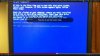
Now whenever I start my computer, it gets to the windows loading screen and flashes BSoD, then restarts.
I've heard of a few things, let me address them:
system restore
I can't get to that
start in safe mode
I can't get to the boot menu because it BSoD before it lets me, I can only boot windows normally (just BSoD's like previously mentioned), or do startup repair (which says it can't fix it)
turn off auto restart on system failure
I couldn't find where to.
re-install your operating system
I bought the computer from someone. It started off as an HP computer with windows 7. I took it apart and rebuilt it in another computer with a new motherboard/PSU/heatsink (so far). I did a system restore to factory settings and it reverted it to windows vista 64-bit home. Long story short, I do NOT have any CD's or anything to do with the OS.
Here is a video of what it does, better helps to explain it:
here
(note: the cpu fan failure isn't important. It did that on the old mobo too... The cpu fain IS running. It's not a problem, ignore it.)
I really need this computer right now, it's been a while since I've had it up and running.
Thanks so much for your support, I see it as a learning opportunity.
Edit: I was able to get this snapshot during the video...
cool stuff.
I did NOT reformat my hard drive or anything, primarily because I did not know I needed to or how to. I literally moved all the parts.
Now whenever I start my computer, it gets to the windows loading screen and flashes BSoD, then restarts.
I've heard of a few things, let me address them:
system restore
I can't get to that
start in safe mode
I can't get to the boot menu because it BSoD before it lets me, I can only boot windows normally (just BSoD's like previously mentioned), or do startup repair (which says it can't fix it)
turn off auto restart on system failure
I couldn't find where to.
re-install your operating system
I bought the computer from someone. It started off as an HP computer with windows 7. I took it apart and rebuilt it in another computer with a new motherboard/PSU/heatsink (so far). I did a system restore to factory settings and it reverted it to windows vista 64-bit home. Long story short, I do NOT have any CD's or anything to do with the OS.
Here is a video of what it does, better helps to explain it:
here
(note: the cpu fan failure isn't important. It did that on the old mobo too... The cpu fain IS running. It's not a problem, ignore it.)
I really need this computer right now, it's been a while since I've had it up and running.
Thanks so much for your support, I see it as a learning opportunity.
Edit: I was able to get this snapshot during the video...
Attachments
Last edited:
