

CheshireCat
New Member
(the question seems to have changed, so I thought I should start a new thread)
I'm trying to figure out whether or not I should RMA my new video card. It's an XFX 7900GS, w/ dual link DVI.
My monitor is a ViewSonic 22" Widescreen and it has inputs for VGA and DVI.
I get no signal when I use the DVI cable, but if I use the VGA cable with an adapter to the vid. card it works fine. (I just exchanged the monitor for a new one, so I know it's working ok)
I don't know if it's important, but I noticed that even though they're both DVI, the cable from the monitor looks a little different than the adapter plug. Referring to this picture:
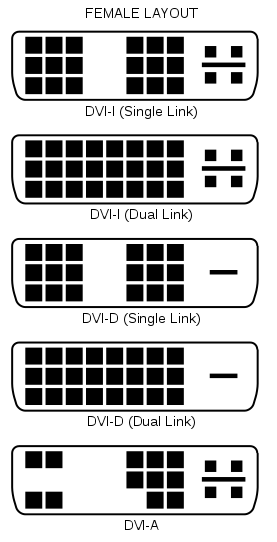
The end of the cable from the monitor looks like it is DVI-D (single link) and the adapter that I'm using with the VGA cable looks like it is DVI-I (dual link).
The input on the monitor looks like the DVI-D (dual link) picture, and the output on the card look like DVI-I(dual link), but it has a + shape instead of just a - shape.
Is any of this relevant? Is it worth getting a different cable or should I just go ahead and RMA the card?
I just don't understant why a dual-DVI card would only be able send an analog signal.
I'm trying to figure out whether or not I should RMA my new video card. It's an XFX 7900GS, w/ dual link DVI.
My monitor is a ViewSonic 22" Widescreen and it has inputs for VGA and DVI.
I get no signal when I use the DVI cable, but if I use the VGA cable with an adapter to the vid. card it works fine. (I just exchanged the monitor for a new one, so I know it's working ok)
I don't know if it's important, but I noticed that even though they're both DVI, the cable from the monitor looks a little different than the adapter plug. Referring to this picture:
The end of the cable from the monitor looks like it is DVI-D (single link) and the adapter that I'm using with the VGA cable looks like it is DVI-I (dual link).
The input on the monitor looks like the DVI-D (dual link) picture, and the output on the card look like DVI-I(dual link), but it has a + shape instead of just a - shape.
Is any of this relevant? Is it worth getting a different cable or should I just go ahead and RMA the card?
I just don't understant why a dual-DVI card would only be able send an analog signal.
Last edited: