
You are using an out of date browser. It may not display this or other websites correctly.
You should upgrade or use an alternative browser.
You should upgrade or use an alternative browser.
Noise at start up of computer
- Thread starter peter912
- Start date

Any changes made recently to the pc, like software or hardware? Can you open the case and check around the cpu fan for caked on dust? Check startup tab in task manager for any not needed programs that are running at bootup. What processor are you running? You can run a program to check the temp on it. If its an AMD cpu then use coretemp if Intel then use Realtemp.
Coretemp - https://www.alcpu.com/CoreTemp/Core-Temp-setup-v1.20.1.150.exe
Realtemp - https://www.techpowerup.com/download/techpowerup-real-temp/
Coretemp - https://www.alcpu.com/CoreTemp/Core-Temp-setup-v1.20.1.150.exe
Realtemp - https://www.techpowerup.com/download/techpowerup-real-temp/
Okay I installed CoretempAny changes made recently to the pc, like software or hardware? Can you open the case and check around the cpu fan for caked on dust? Check startup tab in task manager for any not needed programs that are running at bootup. What processor are you running? You can run a program to check the temp on it. If its an AMD cpu then use coretemp if Intel then use Realtemp.
Coretemp - https://www.alcpu.com/CoreTemp/Core-Temp-setup-v1.20.1.150.exe
Realtemp - https://www.techpowerup.com/download/techpowerup-real-temp/
I downloaded it but I don't know how to run itDid you run it? You'll see temperature readings pop up or they will be down by the clock.
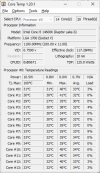
Yes, I have it but I have no idea how to post the image here
Yes, I have it but I have no idea how to post the image here. It is all 35C to 37C and co-pilot says that it is normalYou need to install it of course as you would most programs so open the downloaded file and it will start the install, just follow the prompts. At the end it will open you'll see this.
View attachment 12124
You can post that image so we can see what your temps are.
Last edited:
You need to press and hold alt button while pressing prnt scrn button on your keyboard. Then open mspaint and press and hold ctrl button and press the letter v. That will paste the image into paint to where you can save it and then attach it by pressing the attach files button you see at the bottom of the reply box.