Noob need complete help (please)

Look everyone as the title of this thread says is that im a noob. i have no clue what the difference between 64 bit to 32 bit are, also what is overlocking please tell me everything, and everything else. i know this is alot to ask but if possible can everyone tell me stuff about everything about the computer. from parts to what they are to how they work, whats there purpose and everything. please help if u can i wanna learn how to do everything. please help it would mean alot.

im wondering how does everyone no all this stuff about computers did they go to school or did someone (like im asking) tell you what the heck everything means, perhaps you all went to school that probaly is it. i realize im probaly the youngest or pretty close to the youngest i am 14 but i am very capable.

so dont hold anything back
even if this thing is 2,000,000,000 pages:):):):):):):):):):):)
 
You read books and various books and threads on CF. Gain knowledge from there... I just went to the public library and read about HTML years ago... you gain a bit of knowledge each day, and when you add all those days up, you get alot of knowledge.
 
There are actually different ways to learn that include schooling and pratical experience as well as doing what you are now namely "asking questions". While 64bit OSs are now available the software market is still 32bit probably for the next several years.

Overclocking or simply put OCing is trying to push hardwares like a cpu, memory, main board, or video card to see what speed it run the fastest at. This also places more stresses on hardwares and is nothing to rush into. Experienced users still take things one step at a time there to avoid damaging their system.

Spftware programmers/designers, repair techs, engineers all have to go through some type of schooling with the latter there going through a 4year college. Some software programmers also go 4yrs. over a 2yr. community type college. For actually working with hardwares that's where the practical "hands on" type experience plays an important role.
 
There is an education right here in the forum, by reading all the stickies that Ian and Preator put up
 
There is an education right here in the forum, by reading all the stickies that Ian and Preator put up

Yeah, they contain loads of information!

Where do we get our information from? Loads of places really, Internet, Here at CF, magazines, conversation, courses at college.
 
i got a good tip! only know what u need to, that way u dont get confused like me.. i didnt know what overclocking was till the other day and now i findout u can overclock this and that but this can happen that can happen the more u try to learn the more confused u get...well i do anyway:(
 
The problem with that analogy is you don't know when you need to know it, so learn it in case you need to know it or else it could be too late and you wish you did know it.

Confused....I am:confused::confused:
 
haha, computers are like anything else in life. if you are interested you will find ways to learn it.

for example, you want to buy a new monitor. you go to newegg.com (in my opinion the best computer hardware store) and look at monitors. you start to read the reviews and someone says that their GPU isnt powerful enough to run the monitor at its native resolution. so now you go to google.com or computerfourm.com and look up 'GPU' and 'native resolution'

if you are interested enough, you will learn something every day, and nobody on the face of the planet knows everything, everyone learns
 
Newegg isn't necessarily the best online vendor while still one of the better ones to deal with. Their main thing is usually seeing lower prices but not on every item. You'll find often that different reviews will say different things. Everyone has their own opinion all too often even on a forum.

The more complex a system the more involved the problems that can come up. Even an experienced tech can be tripped up on things at times. This is one of the main reasons why first hand experience often turns out to be the best teacher on many things.
 
There is nothing like 'good 'ol' hands on experience

Sure isn't :P

Don't go too hard on Kornowski now. He's rather new at buiding there. I think he just finished his second case there.
Yeah, It's my second build, but I've replaced stuff lots of times... :)
 
Newegg isn't necessarily the best online vendor while still one of the better ones to deal with. Their main thing is usually seeing lower prices but not on every item. You'll find often that different reviews will say different things. Everyone has their own opinion all too often even on a forum.

The more complex a system the more involved the problems that can come up. Even an experienced tech can be tripped up on things at times. This is one of the main reasons why first hand experience often turns out to be the best teacher on many things.

you may be able to find parts cheaper elsewhere, but in all my travels i have never found a place that has customer service that is anywhere near as good as newegg. and i definitely agree, there is no subsitute for first hand experience
 
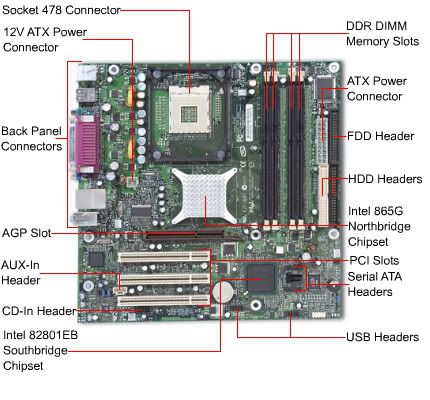
LOL! you aint that young. I started when i was 12!!! lol. its simple. the mother board is the main board where you plug stuff into like your CD drive and hard drive into and your hard drive. it looks like this.
Motherboard1.jpg


a motherboard holds your CPU as well. there are many different size CPU's and along with that are many different mother boards that hold the various sizes.
 
You gain experience as you use stuff more and more... most of the stuff you will learn by force... if your network goes down... you learn about networking... if your CPU fails, you'll learn about the differences between different CPUs...

Take it from me... I'm 14 too.:D It's possible... I know HTML, JavaScript, VB, C#, a little C++... built my own rig, and attempted to set up a home server... (it failed when I couldn't forward the ports)
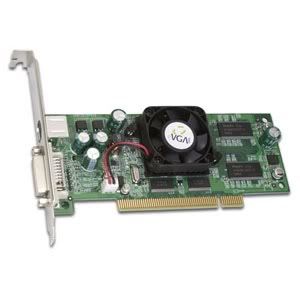
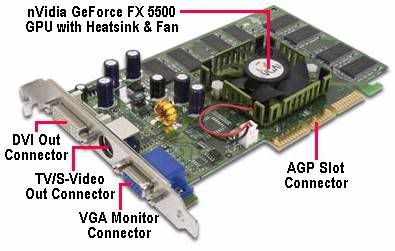
 
There are things called Graphics cards. what they do is process a lot of data like in games. such as the detail and rendering and many other things. they have special memory on the graphics card that hold the data for the environment of the game. they come on PCI, AGP PCI-E and PCI-E 16x. you may be thinking, "why so many PCI thingys?" well, why they named them all that, no clue. PCI was the 1st major kind. they are very old and out dated. then came AGP, it stands for "Advanced Graphics port" don't let the name fool you, its also outdated. I'm not sure where PCI-E 1x came in, but don't get it confused with PCI-E 16x. that are completely different. right now PCI-E 16 times are the best. they are faster and cost less to make than AGP or any other kind for that matter.


PCIGPU.jpg

PCI

AGP.jpg

AGP

PCI-E1x.jpg

PCI-E 1x

PCI-E16.jpg

PCI-E 16x
 
Last edited:
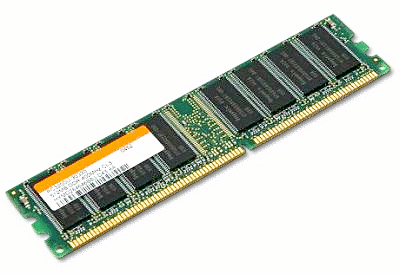
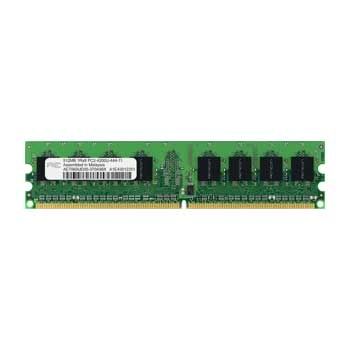
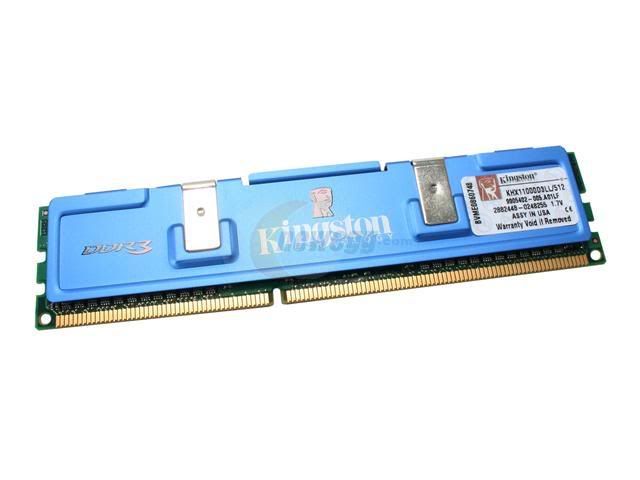
RAM is another component that you put into your motherboard to make a computer work. Its stands for Random Access memory. Basically, it holds data for the application you are currently using. if you don't have enough, then you computer will get slow. what happens if you run out is it will use the hard drive as a back up as RAM if necessary, but the hard drive will be very slow compared to RAM. there are 3 main types of RAM. DDR, DDR2, and DDR3. DDR was last generation and now the standard is DDR2. DDR2 runs at higher speeds and is more efficient. they are not backwards compatible. DDR3 is new and needs more time to develop.


Edit- also, if you have a 32bit OS (OS= Operating software (ie: Xp, Vista, 2000, 98)) it will only detect 3.25GB of RAM MAX. If you want to use more, you have to get a 64bit OS. the problem is, 64Bit OS have many compatibility issues with lots of software.

DDR.png

DDR

DDR2.jpg

DDR2

DDR3.jpg

DDR3
 
Last edited:
Back
Top