Noob need complete help (please)

Now for a hard drive. hard drives come in 4 different types. only 2 of which are mainly used. they come in IDE, E-IDE (enhanced IDE), SATA, and SCSI. SATA is becoming the standard while other older computers still use E-IDE. they hold all you data that you save. when data is needed it reads it and sends it to the RAM. there are a few variations of each. (SATA1, SATA2) (SCSI 68 pin and 80 pin) etc. they connectors are all different.
 
Overclocking is making a computer part run faster than its stock speeds. IE a CPU stock speed at 2GHz run at 3GHz. you can overclock a CPU, a graphics card, RAM. and a few other things. the shortened term for overclocking is "OC". note, when you overclock you void all computer parts warranties of the parts that do OC.
 
now for CPU's

AMD Sockets

* Super Socket 7 - AMD K6-2, AMD K6-III; Rise mP6.
* Socket 563 - AMD low-power mobile Athlon XP-M (µ-PGA Socket, mostly mobile parts).
* Socket 754 - AMD single-processor socket featuring single-channel DDR-SDRAM. Supports AMD Athlon 64, Sempron, Turion 64 processors.
* Socket 939 - AMD single-processor socket featuring dual-channel DDR-SDRAM. Supports Athlon 64, Athlon 64 FX to 1 GHz2, Athlon 64 X2, Opteron 100-series processors.
* Socket 940 - AMD single and multi-processor socket featuring DDR-SDRAM. Supports AMD Opteron 2, Athlon 64 FX processors.
* Socket A (also known as Socket 462) - AMD socket supporting Athlon, Duron, Athlon XP, Athlon XP-M, Athlon MP, and Sempron processors.
* Socket AM2 - AMD single-processor socket featuring DDR2-SDRAM. Replaces Socket 754 and Socket 9392 (PGA 940 contacts}.
* Socket AM2+ - Future AMD socket for single processor systems. Features support for DDR2 and HyperTransport 3 with separated power lanes. Planned to launch between mid 2007 and Q3 2007. Replaces Socket AM2 (PGA 940 contacts).
* Socket AM3 - Future AMD socket for single processor systems. Features support for DDR3 and HyperTransport 3 with separated power lanes. Planned to launch mid 2008. Replaces Socket AM2+ with support for DDR3-SDRAM (PGA ? contacts).
* Socket F (also known as Socket 1207) - AMD multi-processor socket featuring DDR2-SDRAM. Supports AMD Opteron2 processors. Replaces Socket 940*.
* Socket S1 - AMD socket for mobile platforms featuring DDR2-SDRAM. Replaces Socket 754 for mobile processors (638 contacts).

Intel Sockets

* Socket 1 - 80486
* Socket 2 - 80486
* Socket 3 - 80486 (3.3 V and 5 V) and compatibles
* Socket 4 - Intel Pentium 60/66 MHz
* Socket 5 - Intel Pentium 75-133 MHz; AMD K5; IDT WinChip C6, WinChip 2
* Socket 6 -
* Socket 7 - Intel Pentium, Pentium MMX; AMD K6
* Socket 8 - Intel Pentium Pro
* Socket 370 - Intel Pentium III, Celeron; Cyrix III; VIA C3
* Socket 423 - Intel Pentium 41 Willamette core
* Socket 463 (also known as Socket NexGen) - NexGen Nx586
* Socket 478 - Intel Pentium 4, Celeron, Pentium 4 Extreme Edition1, Pentium M Socket N
* Socket 479 - Intel Pentium M and Celeron M
* Socket 486 - 80486
* Socket 499 - DEC Alpha 21164a

* Socket 603 - Intel Xeon
* Socket 604 - Intel Xeon

* LGA 771 (also known as Socket 771) - Intel Xeon
* LGA 775 (also known as Socket 775 or Socket T) - Intel Pentium 4, Pentium D, Celeron D, Pentium Extreme Edition, Core 2 Duo, Core 2 Extreme, Celeron1, Xeon 3000 series, Core 2 Quad.

* PAC418 - Intel Itanium
* PAC611 - Intel Itanium 2, HP PA-RISC 8800 and 8900
* Socket B (LGA 1366) - a new socket for future Intel CPUs incorporating the integrated memory controller and CSI
* Socket H (LGA 715) - a future replacement for the current Socket T (LGA 775).
* Socket M - Intel Core Solo, Intel Core Duo and Intel Core 2 Duo
* Socket N - Intel Dual-Core Xeon LV
* Socket P - Intel-based; replaces Socket 479 and Socket M. Released May 9th, 2007.

those are all the socket types ever. that quote was from Wiki. only a few are actually used now when making new CPU's. LGA775 is the most popular as it supports the new core 2 duos which have been revered as the best overclocking CPU's ever as well as the new core 2 quads. Don't let a CPU's GHz (ie. 2.4Ghz) trick you into thinking that a CPU is faster by that. Things inside a CPU called pipelines matter more. the shorter the pipelines the less speed you need for date to go through. right now that's why core 2 duo is the best.
 
you may be able to find parts cheaper elsewhere, but in all my travels i have never found a place that has customer service that is anywhere near as good as newegg. and i definitely agree, there is no subsitute for first hand experience

Try mwave! When two boards in a row were ??? for a friend's new build a year ago mwave immediately sent out a third different model after I suggested trying that in case of a bad batch. The third board is still running strong at this time. The staff told him the same where they stated: "It's most likely a bad batch of boards.".

The first two were returned after the third was in and running. No hesitation on their part. They just happen to carry a smaller inventory of items like many. While neweeg saves on price often there's always something you can find elsewhere for less.
 
Try mwave! When two boards in a row were ??? for a friend's new build a year ago mwave immediately sent out a third different model after I suggested trying that in case of a bad batch. The third board is still running strong at this time. The staff told him the same where they stated: "It's most likely a bad batch of boards.".

The first two were returned after the third was in and running. No hesitation on their part. They just happen to carry a smaller inventory of items like many. While neweeg saves on price often there's always something you can find elsewhere for less.

actually i did buy a harddrive from mwave once, it was a good experience but nothing went wrong so i didnt have to deal with their customer service at all. but im on my 4th build and all 4 have been from newegg and there have been hardware issues and newegg is always super speedy, helpful, and friendly
 
Newegg and mwave as well as a few others count on having "good reps" overall to see a steady business. That same friend got burned on ZipZoomFly where they refused to replace or refund when he ordered from them. Shows alot about some places!
 
no problem. I sure wish they would make my info a sticky :P

OK, Power supply time. A power supply is often referred to as a PUS, or Power supply unit. remember, what makes a good power supply for hi end computers with demanding parts are not how many Watts it has (ie 400Watt PSU) but mainly the Amps on the 12V line. What is this? well, its a power cord that goes directly from your power supply to your graphics card. PCI-E 16x cards use a 6 prong adapter. it is very important that you have good amps on this line or your card may not function correctly. Efficiency is another thing. if your PSU is only 50% efficient, then you will not get as much power as advertises since a lot of the power will be lost in heat. Also, before buying a power supply always look at the reviews (well do that for anything you buy really) and if they tell you its bad, don't get get it. a bad power supply can be the fate of your whole build.
 
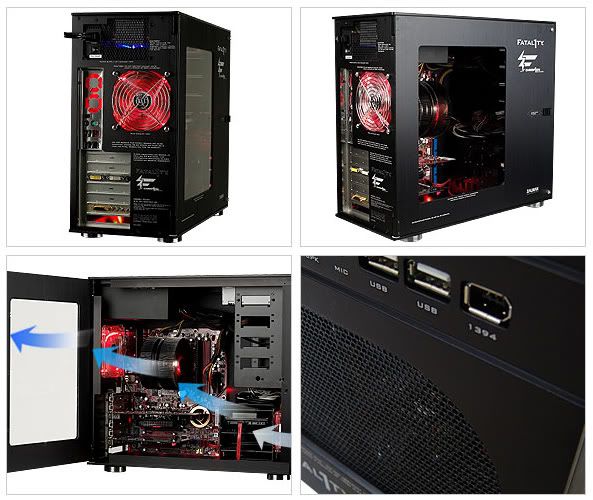
Cooling is next. Lets start with the basics. A good cooled case. When you look for a case you want to know how good the air flow is. what you should look for is one that has a 120mm fan on the front to intake cold air, since cold air resides on the lower part to the ground. the air will go from there, to the case. a good CPU heat sink (get there in a minute) will have 2 fans. one sucking and one blowing. the one sucking will take the cold air from the front of the case and the one blowing will be opposite of the sucking and blow the now hot air away. next a fan on the back of the case will exhaust the hot air. since hot air rises, the fan it normally placed on the upper back of the case.

casecooling.jpg
 
Last edited:
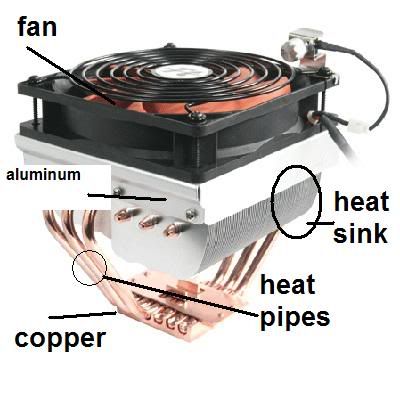
Cooling heatsinks. What is a heat sink? Well, its a metal piece that goes on things like a CPU, or GPU (graphics processing unit(it on the graphics card)) etc. its what help keeps the thing that its cooling stay cool. along with that is a fan that is mounted on the heatsink to help dissipate the heat on it. There are a few things to look for when getting one, especially if your going to overclock. Copper is the best out there. it disapate heat quickly so that is one thing you should look for when getting one. another thing you should look for are these things called heat pipes. they are solid tubes of what ever material is being used that make the heatsink take the heat even faster. normally you only see these in CPU heatsinks but now you can upgrade some graphics cards heatsinks with them. When you apply your heat sink you cant just put it on and go. you must use what they call, "thermal compound" to bond the CPU and heatsink together so they can actually transfer heat out of the thing it is cooling. Arctic Silver 5 is the #1 choice. it is 99.9% real silver. why is this good? well, silver conducts heat even better than copper, but silver is dangerous. you get it on your hands you got a problem. latex gloves do nicely.

heatsink-1.jpg
 
Last edited:
Fans. they come in a few sizes. 80mm, 92mm, 120mm and a few others. what to look for in a fan. well,
1 size matters. the bigger the fan, the more cooling area it covers, the less speed you need to get good airflow.
2 fan noise can be annoying. the noise are rated by dBA (decibels)
3 CFM (or Cubic feet per minute) is how much airflow it gets.

dBA.gif
 
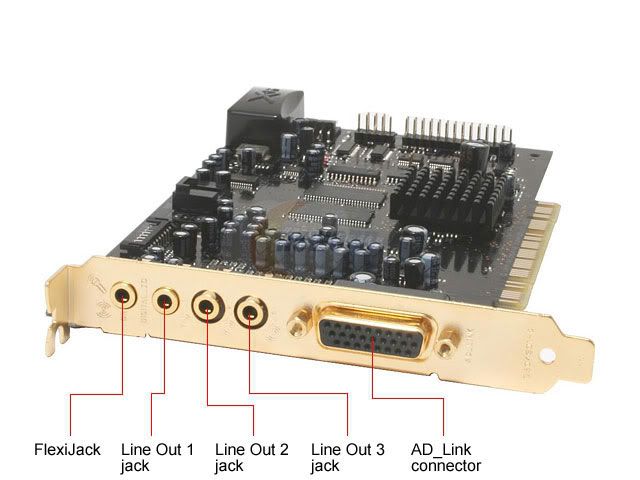
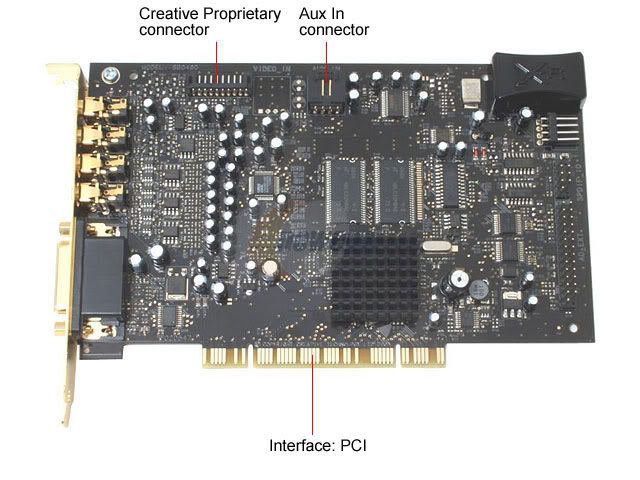
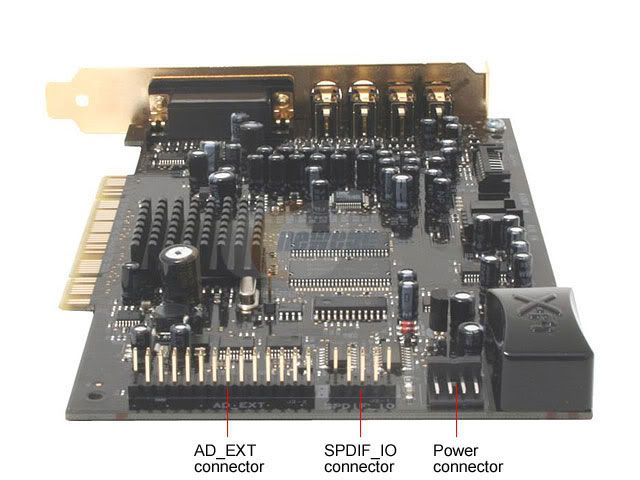
Sound cards. not all are the same. lets start with sound quality. there are 4 bit, 8 bit, 16 bit, 24 bit and 32 bit. 32 bit cards you don't see often, 24 are what cards now a days normally have. some cards have there own sound processor on them so when gaming gives you more frames per second. ( get to that in a minute) and some even have X RAM on them that holds super quality sound for game like in battlefield 2 and battlefield 2142 and Prey. these cards will have available surround sound where when in games helps locate the enemy easily. I got my 5.1 surround sound from logitech for only $32!!! really good system too!
soundcard1.jpg

soundcard2.jpg

saoundcard3.jpg
 
Last edited:
FPS can stand for many things. Knowing how to figure out what term it means is simple. when talking about game genera's FPS means First person shooters. when talking about performance in a game FPS means frames per second. that is a measurement of how choppy game play is. low FPS is like stop and go, while hi FPS is smooth game play. FPS in other terms like feet per second don't normally come up here.
 
Roncharles... the key here is to read all this slowly and read it more than once. Youre going to miss half the information the first time you read it, or not understand it. But if you keep reading all this slowly, and more than once itll start to make sense. Things will start to make sense and click. Everything is connected (no pun intended) so once you understand say... motherboards, itll be easier to understand differences between sockets, or different types of RAM, etc.

Take your time, this thread isnt going anywhere. Don't expect to have this all committed to memory and to completely understand it in 1 week, it takes time. I've been doing this stuff since I was 10 years old, and I'm now 19, and I still don't know everything, nor am I even close to knowing everything. There's still so much for me to learn, but I can't expect to learn it in a week, or in a month, or in a year.

Don't lose interest though, the good part and perhaps the bad part about computers and technology is it's constantly changing. There's always new stuff. That's either a good thing (always more to learn) or a bad thing (always more to learn), depends on how you wanna look at it.
 
i think he gets it quite well. he Pm me and thanked me. lol. I'm trying to be as simple and own to earth as I can. I think he gets it. I really am only saying the basics and i have visual aids to help help.
 
ya thanks guys. im going to find parts on new egg and then once im done ill post it here i should be done by like 4:00 p.m or 5 latest so u can tell me if its any good.

really the only game i play ( i play not alot of computer games but some)
Here they are...

Sims 2
Sims 2 University
Sims2 open for business
... and possibly other sim games from now

and the biggest most memory and computer power is
drum rolllllllllllllllllllllllllllllllllllllllllllllllllllllllllllllllllllllllllllllll
flight simulator X (if anyone plays this they know what i talking about when i say this thing is so computer lagging. so i know i need a( lets see if i get this right) good graphics and cpu to make this look nice.
 
Back
Top