Not booting after building a PC.

Tecboy

New Member
Everything is turned on. The RGBs and fans are on. There are powers in the USB outlets. Everything is plugged in. My pc does not boot. Is there something missing?
 
Need a list of your parts so we can make sure nothing is not compatible. Also before you mounted the motherboard to the case did you make sure you installed the correct amount of standoffs so that motherboard would not ground out against the case? All power cables connected? You shouold have the 24pin and the 8 pin cpu connecters attached. Do you have a system speaker attached to the motherboard pins to hear any bios beeps which would tell you why its not booting? Or does the motherboard have an LED display with a code listed?
 
Need to tshoot the LED code if your board has one or hook up the speaker to the header and it will give you a beep code.
 
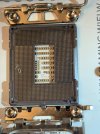
I took a pc to a technician. He said a few pins are bent in the CPU socket of a motherboard. I can not see it with my own eyes. I took my time to insert the CPU carefully and corrected way. I believe this motherboard has already been damaged when I purchased it.
 
I can't tell any pins are bent. Can anyone explains this to me?
 

Attachments

  • IMG_4714 (1).jpeg
    IMG_4714 (1).jpeg
    498 KB · Views: 4
Last edited:
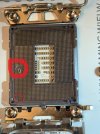
Whatever that is in the socket on the left needs to be removed. Plus it looks like that bottom left pin could be bent. See image.

cpu socket.jpeg
 
I contacted the ASUS support team. They said string was used to remove the cpu carefully. They also said there are a few pins bent, not just one.
 
Back
Top