nvidia driver problem plz help...

checkmate18

New Member
I have a Nvidia Geforce FX5500 video card and when i install a driver of this hardware it says "The NVIDIA Setup program could not locate any drivers that are compatible with your current hardware. Setup will now exit." ..but in my computer start up the computer found a new hardware Video Graphics Adapter (VGA) and when i click next it say "The hardware cant locate nessesary software"... Please Help Me...:(:(:
 
Did you just add this new card to your machine? Make sure its fully seated. Are you sure you downloaded the correct driver?
 
@johnb35...yes sir i add this to my computer and i download the correct driver..

jamesd1981..my os is windows xp sir..and also i try the driver did u say..but when is install this driver its say "The NVIDIA Setup program could not locate any drivers that are compatible with your current hardware. Setup will now exit..

when i go to in to DEVICE MANAGER my VGA is yellow question mark icon..
when i update my driver The Video Graphics Adapter (VGA) its search for the software and in the end of search it says Cannot Install This hardware. The hardware was not installed because the wizzard cannot find the nessesary software....


whats wrong?please help me.....
 
Last edited:
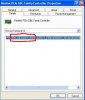
Right click on the that device in device manager, click on properties, then click on the details tab, Give me the 4 digit vendor and device id numbers. they will look like this.
 

Attachments

  • device.JPG
    device.JPG
    31.8 KB · Views: 120
Well, here is your problem. You DO NOT have an nvidia fx5500 video card because the device numbers you gave me refer to the VIA/S3G UniChrome Pro integrated graphics. Which this is the driver for.

www.viaarena.com/Driver/P4M800Pro-P4M800CE_220001z_XP_wIShld_logod.zip

unzip it and then double click on the setup.exe file to install the software.

Now... If you physically installed a dedicated video card the fx5500 did you connect the vga cable to it. Looks like you may have accidentaly connected it to the onboard video instead. Also its possible that you need to go into the bios and disable the onboard video so you can use the dedicated card.

However, give me the entrys that are listed under display adapters in device manager.
 
@johnb35..Because sir when i connect my monitor in to the the video card nothing happen in my computer start up its a black screen..i cant operate my computer when i connect it to video card because my monitor not responding...

In my device manager sir i not see any display adapters entry..
 
johnb35...Sir how to disable onboard video??when i disable onboard video its ready now to connect my computer to video card fx5500?because sir when i connect my monitor to the video card nothing happen in my monitor the bios is not appear also..
 
Look in your bios with the onboard hooked up to the monitor. Find a setting that sets which video your bios looks for first on boot. Should be listed something like integrated or onboard/PCI/PEG. Set it to PEG. Shut down, hook your monitor to the video card and reboot. See if you get a signal.
 
@StrangleHold...i cant see like that..my bios is american megatrends inc..i can see pci/peg in my bios..


PLZ HELP ME TO INSTALL MY VIDEO CARD..t.t
 
It doesn't seem like your system is recognizing the fx5500 video card, only the onboard graphics, which you need to download the driver for from that link I gave you. What computer do you have? Brand and model number?
 
@johnb35..But i think sir i need to disable the onboard video to connect my monitor to the video card..

Operating System: Microsoft Windows xp professional (5.1, Build 2600)
System manufacture: ECS
System Model: P4M800PRO-M2
Bios: Default system bios
Processor: Intel(R) Pentium(R) D CPU 2.80ghz (2 CPUs)
Memory: 480MB RAM
Page file: 291MB used, 830MB available
DirectX Version: DirectX 9.0c
 
@johnb35..i do what u said sir i change setting in to my bios and set my primary graphics to AGP But nothing happen..when i restart and i connect my monitor to the agp video card my monitor not responding its a black screen..
 
Maybe the card is dead? You need to someone there to help you figure this out. I'm guessing the card is dead since you had it installed and device manager won't even recognize it.
 
johnb35..thank you very much for your help sir..maybe i go to computer technician to help this problem.....Thank you sir and more power..
 
PEG is PCIe - select that.
Boot into safe mode (tap F8)
Uninstall all video drivers.
Use DriverSweeper to remove remaining files
Restart and install nVidia driver.

I know this has been covered, but I may of missed something, but PEG is what he needs to choose in the bios.
 
Back
Top