
Nvidia Ge Force 6600

Vizy

New Member
ok so i bought a friends old rig for a grand total of $30. It's a bargain, and he knows it, except he doesnt need another comp. He built a new one and sold me this one. The comp is so-so but it has a nvidia ge-force 6600. It played Counterstrike source extremely well and stuff and i was wondering if it would be able to play cod4.

Here is the card, extremely dusty, IDK if u can tell in the photothough.
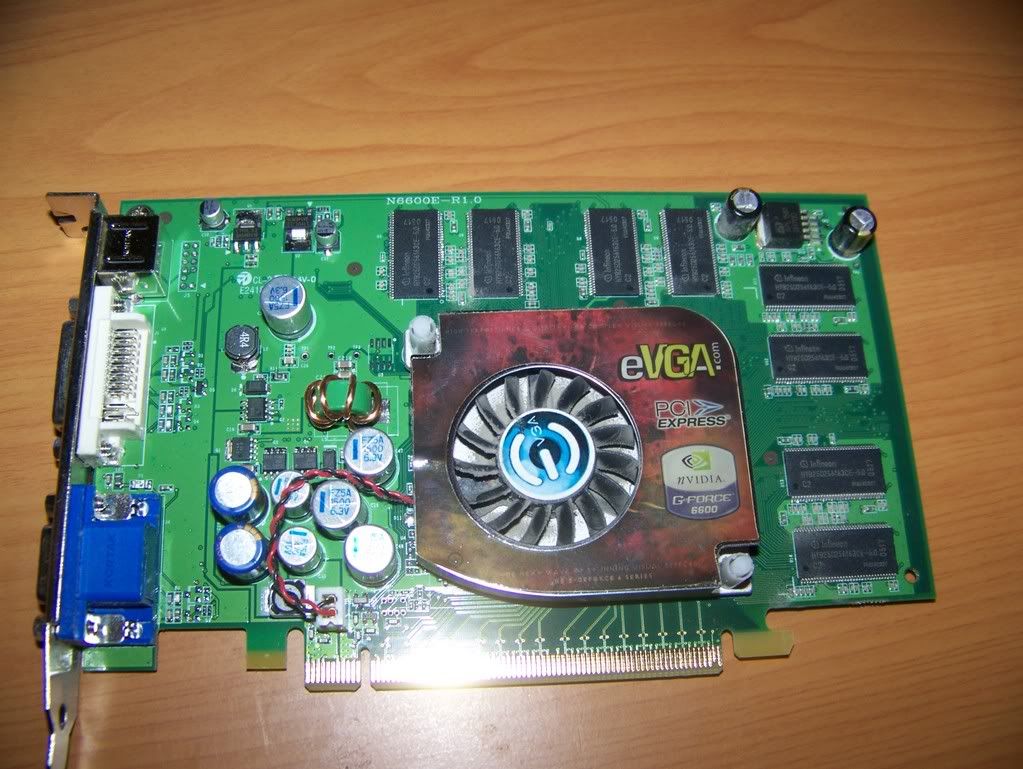
103_1607.jpg


Its ok if i blow the crap outta this thing right? Its time for a whole clase cleaning tonight...so...


thnx guys.
 
oh ye btw, its pci express.


oh snap, it shows it in the photo.

It's also 256 mb , it doesnt show in the pic but theres a sticker on the back.
 
i think you might be able too...probably on low settings.

i will be suprised if it does medium though.

What are the requirements to run COD4 on a PC?
Recommended requirements:
CPU: 2.4 GHz Dual Core or better
RAM: 1GB for XP and 2GB for Vista
HD: 8GB Free Space
GFX: 3.0 Shader Support, Nvidia Geforce 7800, ATI Radeon X1800 or better.

Minimum requirements:
CPU: Intel® Pentium® 4 2.4 GHz, AMD® Athlon™ 64 2800+ processor
or any 1.8Ghz Dual Core Processor or better.
RAM: 512MB RAM (768MB for Windows Vista)
HD: 8GB Free SPace
GFX: NVIDIA® Geforce™ 6600, ATI® Radeon® 9800Pro or better

i dont think the 6600 has 3.0 Shader Support?
 
i think you might be able too...probably on low settings.

i will be suprised if it does medium though.


i dont think the 6600 has 3.0 Shader Support?

Ok, so on low? Overlclocking it won't do much will it? Is it even possible to overclock gfx cards? So is it ok to blow this out?

oh yea it supports shader 3.0:

wikipedia said:
While ATI was the first to deliver Shader Model 2.0 capability to the retail market, Nvidia was the first to deliver Shader Model 3.0 (SM3) capability. SM3 extends SM2 in a number of ways: standard FP32 (32-bit floating-point) precision, dynamic branching, increased efficiency and longer shader lengths are the main additions. Shader Model 3.0 was quickly adopted by game developers because it was quite simple to convert existing shaders coded with SM 2.0/2.0A/2.0B to version 3.0, and it offered noticeable performance improvements across the entire GeForce 6 line.

http://en.wikipedia.org/wiki/GeForce_6_Series#GeForce_6600_Series
 
ok i have exactly the same card and i can play cod4 on low with no lag at all and it still lokks bloody good

alright thanx alot dude.

Ok so right now i'm gonna add several more hdd's and complete reformat all of thema nd reinstall windows, do i have the monito plugged into my gfx card or my onboard? I don't have the gfx installed yet.
 
if you have the graphics card in the PCI-E slot when booting then that is what you want to have the monitor plugged into
 
As you can see in my sig, i also have the 6600, and it played it fairly well, with textures on Extra, high, and high, I let the game choose my settings the only thing i changed was AA turned it off.

Hopefully your computer specs are better than mine ;D
 
I had the 6600 AGP and it was depressing trying to play recent games but it could play the best ever games:

Astroids
Pacman
NFS: Hot Pursuit 2
 
I had a 6600 AGP athalon 3000 512mb ram and a 120gig 7200rpm drive and it had a hard time playing WOW even when we put in another gig of ram let alone COD4
 
k, thnx alot guys for all you replies and such.

Remember how the card was second hand? I plugged it in and booted and a some scary sound was coming, sounding like a wire was hitting against a fan. I iimmediatley pulled the plug (i was scared it was my cpu fan) and it stopped. I checked aorund and i found the culprit: it was the EVGA heatsink fan. I was like WTF. I turned the fan with my fingers and the fan seems to not be turning correctly. IDK in better words, but it wobbles hitting other stuff (u knw?). The card works fine ( i never got into windows yet) but it gives me video so it's all good.


I did some browsing and found that the gfx card have processors (im a complete idiot when it comes to vid cards) that have aftermarket heatsinks. I need a cheap one, and i found some of these on the Egg of New:

AC
http://www.newegg.com/Product/ProductReview.aspx?Item=N82E16835186017

Mass cool
http://www.newegg.com/Product/Product.aspx?Item=N82E16835150076

i was leaning more toward the AC one (more reviews.)

And also the Thermal compound Q, anyone give me a simple how-to put thermal paste on. I removed the heatsink on the card and there was a some sticky substance (i'm only guessing its thermal compound ...some type of it,)


thnx guys,
 
I checked aorund and i found the culprit: it was the EVGA heatsink fan. I was like WTF. I turned the fan with my fingers and the fan seems to not be turning correctly. IDK in better words, but it wobbles hitting other stuff (u knw?).

Result of Thermal/wear fatigue more than like. My last HS/f developed a warped frame, resulting in the same noise.


Vizy93 said:
I did some browsing and found that the gfx card have processors (im a complete idiot when it comes to vid cards) that have aftermarket heatsinks. I need a cheap one, and i found some of these on the Egg of New:

AC
http://www.newegg.com/Product/ProductReview.aspx?Item=N82E16835186017

Mass cool
http://www.newegg.com/Product/Product.aspx?Item=N82E16835150076

i was leaning more toward the AC one (more reviews.)

Leaning toward passive (fanless) as well? If so, I don't have an opinion, I've used Masscool to good results though.

Vizy93 said:
And also the Thermal compound Q, anyone give me a simple how-to put thermal paste on. I removed the heatsink on the card and there was a some sticky substance (i'm only guessing its thermal compound ...some type of it,)

Well The GPU surface area is much smaller than a (modern) CPU's, so the application will vary only in quantity of thermal paste. Stick a small amount on, bb sized or smaller for a GPU, spread it around, etc. I usually take some plastic wrap (or even something like a grocery bag) Shove a finger into it, stretching the plastic till there are no creases.
 
Last edited:
Result of Thermal/wear fatigue more than like. My last HS/f developed a warped frame, resulting in the same noise.


Leaning toward passive (fanless) as well? If so, I don't have an opinion, I've used Masscool to good results though.


Well The GPU surface area is much smaller than a (modern) CPU's, so the application will vary only in quantity of thermal paste. Stick a small amount on, bb sized or smaller for a GPU, spread it around, etc. I usually take some plastic wrap (or even something like a grocery bag) Shove a finger into it, stretching the plastic till there are no creases.


So the links i posted up? they're ok. lol, i didn't even notice they didn't have fans on them. This would affect my temperatures, no?
 
Back
Top