Ocz vertex 40% fragmented after 2 weeks

driverdj2000

New Member
now i know u cant defrag them manually but i dont want its performance to drop either.
I have trim enabledin win7.
when will windows tidy up the drive? can i execute a command to do this?
 
Fragmentation on a solid state disc will not drop performance. Solid state drives are not mechanical in nature, and therefore fragmentation will not hinder performance of the drive.
 
As bomberboysk stated, solid state drives read data more efficiently and different than on a normal hard drive disk. Fragmentation on a solid state drive will do nothing to hinder read speeds.
 
he wants to know how to clean up his disk using the trim function

""I have trim enabledin win7.
when will windows tidy up the drive? can i execute a command to do this?""
 
cheers guys,
ill leave it be so.
i did read somewhere that it would hinder the speed but you read all sorts of wrong opinions on the web
 
you do not need to defrag your ssd, it will only add to ware and tare of your ssd

why arrange files using defrag when the seek time of the drive is basicly instant?

you are using windows 7 so aslong as the ssd drive supports trim windows 7 will excicute the function when its needed!!

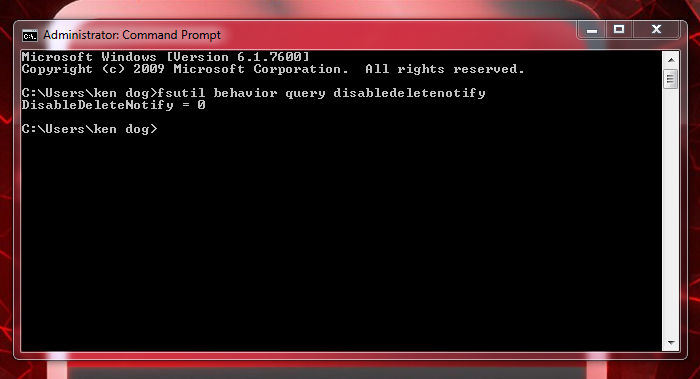
to tell if its enabled

click windows logo/all prgrams/accessories/command prompt (right click mouse and run as administrator) type in "fsutil behavior query disabledeletenotify" enter

trim2.png


disabledeletenotify = 0 means that trim is active in windows7
 
I've been reading up on SSD's and the most helpful thing you can do with them is to not treat them like traditional HDD's... ie: no defragging.
 
Back
Top