Hello, a hard drive died on me a while back, i bought cables to hook up to the hard drive to retrieve data off of it, when i hook the bad hard drive up to my computer via usb, it does notice it, and im able to go in and look for my stuff that i want to get off of that drive, but after a couple of minutes, the corrupted hard drive dissapears from the computer, and i get that little noice as if i had taken the usb plug out, which i didnt. I turn off the corrupted hard drive for a couple of mins, then i turn it back on, the computer recognizes it but after a couple of mins, same thing, it goes away. Does anyone no why it does that? And how do i go about getting it to stay on my computer?

You are using an out of date browser. It may not display this or other websites correctly.
You should upgrade or use an alternative browser.
You should upgrade or use an alternative browser.
old hard drive
- Thread starter pwf269
- Start date
i dont know too much about computers, and was told if i want to get files off of the hard drive to get these cables and put it into the usb slot, it works fine, except for the problem of the bad hard drive going off from my computer, it wont stay long enough for me to figure out where to get my files so i can copy them to my other computer.

S.T.A.R.S.
banned
Do you hear any strange noises from the hard drive?
Also in what position is the hard drive when you are using it?
I am asking this because I have one old hard drive which works properly ONLY if it is in the position that the LABEL stick is down and the CIRCUIT board is up.This is what I mean:
LABEL STICK UP,CIRCUIT BOARD DOWN:

LABEL STICK DOWN,CIRCUIT BOARD UP:

Also in what position is the hard drive when you are using it?
I am asking this because I have one old hard drive which works properly ONLY if it is in the position that the LABEL stick is down and the CIRCUIT board is up.This is what I mean:
LABEL STICK UP,CIRCUIT BOARD DOWN:
LABEL STICK DOWN,CIRCUIT BOARD UP:
Last edited:
S.T.A.R.S.
banned
1. So hard drive doesn't work properly no matter in what position it is?
2. When you power on the hard drive,does it start spinning and then after short amount of time it stops spinning?
3. When (like you said) hard drive after few minutes disappears,do you hear that WINDOWS DISCONNECT sound EVERY time when that happens or not?Because that usually leads to a bad power wire connection if it's not connected properly even though it LOOKS like it's connected properly.
4. When (like you said) hard drive after few minutes disappears,in that moment do you hear ANY sound from the hard drive like it does not have enough power?Because that usually leads to a bad power wire connection if it's not connected properly even though it LOOKS like it's connected properly.
5. Also if your hard drive is SATA,make sure you do NOT use this type of power SATA wire:

I am talking about this black part.That one is bad quality and wires inside of it move very easily and that can result in a broke power connection to the hard drive and for that reason your hard drive does not have enough power in a certain moment and that results in your hard drive disappearing.
Use this one instead:

6. Do you use this kind of external power supply for your hard drive?
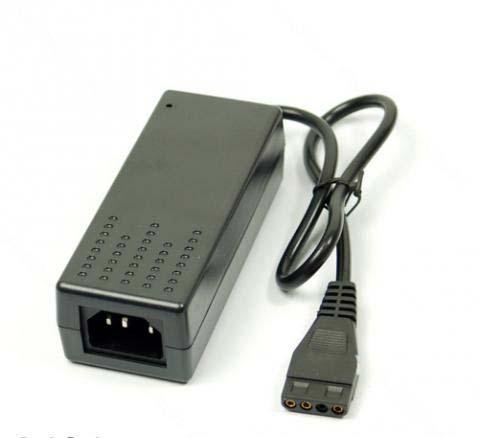
As you can see this one ends with PATA POWER wire and you just plug the SATA power wire to it and then to a hard drive.Is that how you power it up?
7. Did you try what Johnb35 suggested by connecting the hard drive directly to your computer's power supply (for power) and to your SATA port directly on the motherboard (for data)?
8. Does your USB port (the one you are connecting your hard drive to) work properly?
9. Is your USB port (the one you are connecting your hard drive to) clean?Because dirty USB ports can result in a bad connection and are also sensitive even on the smallest wire movements and can result in a lost connection.
10. Did you try to use some other external operating system which you can just load directly from the CD-ROM disk like Linux Ubuntu and see if the hard drive disappears there too?
11. Any messages from S.M.A.R.T. ?
So...you said that when you connect the hard drive you can see the data and go through it.That shows that hard drive still works.So answer on above questions and we will see what to do next.
Cheers!
2. When you power on the hard drive,does it start spinning and then after short amount of time it stops spinning?
3. When (like you said) hard drive after few minutes disappears,do you hear that WINDOWS DISCONNECT sound EVERY time when that happens or not?Because that usually leads to a bad power wire connection if it's not connected properly even though it LOOKS like it's connected properly.
4. When (like you said) hard drive after few minutes disappears,in that moment do you hear ANY sound from the hard drive like it does not have enough power?Because that usually leads to a bad power wire connection if it's not connected properly even though it LOOKS like it's connected properly.
5. Also if your hard drive is SATA,make sure you do NOT use this type of power SATA wire:
I am talking about this black part.That one is bad quality and wires inside of it move very easily and that can result in a broke power connection to the hard drive and for that reason your hard drive does not have enough power in a certain moment and that results in your hard drive disappearing.
Use this one instead:
6. Do you use this kind of external power supply for your hard drive?
As you can see this one ends with PATA POWER wire and you just plug the SATA power wire to it and then to a hard drive.Is that how you power it up?
7. Did you try what Johnb35 suggested by connecting the hard drive directly to your computer's power supply (for power) and to your SATA port directly on the motherboard (for data)?
8. Does your USB port (the one you are connecting your hard drive to) work properly?
9. Is your USB port (the one you are connecting your hard drive to) clean?Because dirty USB ports can result in a bad connection and are also sensitive even on the smallest wire movements and can result in a lost connection.
10. Did you try to use some other external operating system which you can just load directly from the CD-ROM disk like Linux Ubuntu and see if the hard drive disappears there too?
11. Any messages from S.M.A.R.T. ?
So...you said that when you connect the hard drive you can see the data and go through it.That shows that hard drive still works.So answer on above questions and we will see what to do next.
Cheers!
Well, i Hooked up the hard drive to the mother board and turned my computer on, but then chkdisk popped up and asked if i wanted to have the hard drive checked, i let it scan the hard drive, but it took forever, should i have just bypassed this and just looked for the files that i want to copy on to another disk?
There are no noises coming from the hard drive, except the normal startup noise.
There are no noises coming from the hard drive, except the normal startup noise.
S.T.A.R.S.
banned
1. Turn on the computer and wait until Windows loads.
2. Connect that hard drive to your computer through SATA port on your motherboard.
3. Open Command Prompt and write the following command:
chkdsk.exe Z: /F /R /X /V
NOTE: "Z:" is just the drive letter I chose at random.So be sure you write the correct drive letter.If the drive has multiple partitions,you will need to repeat the CHKDSK process for every partition using it's drive letter.
The process will start.Do not interrupt the process!The process may take a very long time depending on many factors such as:
-many files which needs to be checked (file data)
-many errors which needs to be fixed
-capacity
-hardware type
-RPM speed
-computer speed
-and a LOT more...
On one of my drives the process took approximately 11 hours.
So the CHKDSK process CANNOT take only 1 hour or less on EVERY SINGLE hard disk drive.The time for CHKDSK to finish depends on MANY MANY MANY factors so LET THE PROCESS FINISH and DO NOT cancel it.
4. When the CHKDSK process is finished,type "EXIT" and press ENTER button on your keyboard.
5. Restart the computer.
6. When Windows loads again,create a new folder on your desktop and call it however you want...let's say..."ALL DATA".
7. Now go into the drive (the one which you just checked with CHKDSK) and copy ALL the data you want/need into that folder you created on your desktop which in this case I called "ALL DATA".
Report back with the results!
Cheers!
2. Connect that hard drive to your computer through SATA port on your motherboard.
3. Open Command Prompt and write the following command:
chkdsk.exe Z: /F /R /X /V
NOTE: "Z:" is just the drive letter I chose at random.So be sure you write the correct drive letter.If the drive has multiple partitions,you will need to repeat the CHKDSK process for every partition using it's drive letter.
The process will start.Do not interrupt the process!The process may take a very long time depending on many factors such as:
-many files which needs to be checked (file data)
-many errors which needs to be fixed
-capacity
-hardware type
-RPM speed
-computer speed
-and a LOT more...
On one of my drives the process took approximately 11 hours.
So the CHKDSK process CANNOT take only 1 hour or less on EVERY SINGLE hard disk drive.The time for CHKDSK to finish depends on MANY MANY MANY factors so LET THE PROCESS FINISH and DO NOT cancel it.
4. When the CHKDSK process is finished,type "EXIT" and press ENTER button on your keyboard.
5. Restart the computer.
6. When Windows loads again,create a new folder on your desktop and call it however you want...let's say..."ALL DATA".
7. Now go into the drive (the one which you just checked with CHKDSK) and copy ALL the data you want/need into that folder you created on your desktop which in this case I called "ALL DATA".
Report back with the results!
Cheers!

On one of my drives the process took approximately 11 hours.
So the CHKDSK process CANNOT take only 1 hour or less on EVERY SINGLE hard disk drive.The time for CHKDSK to finish depends on MANY MANY MANY factors so LET THE PROCESS FINISH and DO NOT cancel it.
As far as I'm concerned any drive that takes over an hour to finish is shot. I had a drive that had lots of errors and was done doing the checkdisk in 15 minutes. A drive that takes longer than an hour is not safe to even use.
I connected the hard drive to the sata port on the mother board, the hard drive came up as drive J, so i typed in chkdsk.exe J: /f /r /x /v and i got this message
"Access Denied as you do not have sufficient privileges.
You Have to invoke this utility running in elevated mode"
is there a certain way i have to write it?
and also, i was hearing some "tapping" noises coming from the hard drive
it only lasted about a minute though and stopped
"Access Denied as you do not have sufficient privileges.
You Have to invoke this utility running in elevated mode"
is there a certain way i have to write it?
and also, i was hearing some "tapping" noises coming from the hard drive
it only lasted about a minute though and stopped
If you are doing that from command prompt you have to run it as administrator. Right click on command prompt in start menu and click on run as admin.
However, if you are getting any weird noises from the drive, I would throw in the towel and forget about it unless you have data on there that you really need.
However, if you are getting any weird noises from the drive, I would throw in the towel and forget about it unless you have data on there that you really need.
S.T.A.R.S.
banned
It's scanning now thank you. I have a lot of pics and videos on there that I'm trying to get to
Great!
Just follow my instructions and hopefuly you should be able to get your data back.Just be sure that you do NOT move the hard disk drive and it's connected wires so that the connection does not terminate.
It was still scanning at 13 hrs into it, and all i had were unreadable files. i went into disk management where it shows all the disks that i have, and when i looked at the hard drive that i was having scanned which was (J), next to it said RAW, when i right clicked on that drive it took a while for anything to come up but when it did, it said i needed to format this drive in order to use it.