
You are using an out of date browser. It may not display this or other websites correctly.
You should upgrade or use an alternative browser.
You should upgrade or use an alternative browser.
Overclocking The E8400
- Thread starter g4m3rof1337
- Start date


houseofbugs
New Member
Have you tried running your memory and CPU unlinked? I don't know if I told you to try that or not.
I know that my E8400 does 4.4GHZ @ 1.385V. You are probably giving it too much voltage. Also update to the latest BIOS and set all the voltages except for CPU to 'Auto'.
BIOS Update:
SZ1I BIOS is available now, the major highlights are listed below:
* Improves support for CPU's with unlocked multipliers.
CPU Fast Read is a new option that is introduced with the SZ1H/SZ1E BIOS. A setting of 'Enabled' gives the fastest memory/CPU performance. A setting of 'Disabled' is highest compatibility mode for those that experience the video corruption bug.
BIOS updating can be accomplished VIA the below methods:
FLOPPY Installation - Recommended installation method
* Download the following executable: ftp://ftp.evga.com/bios/E175_SZ1I.exe
* Insert blank floppy disk into drive and run executable
* Restart machine, and set floppy as the primary boot device
* Press "Y" to program BIOS
* After flash, power off PC completely, on reboot load defaults in BIOS
CD/DVD Installation - Recommended installation method
* Download the following .iso file: ftp://ftp.evga.com/bios/E175_SZ1I.iso
* Use a CD Burning software to burn the .iso image onto a blank CD (Nero, Alochol 120%, MagicISO etc.)
* Restart machine, and set the CD Drive as the primary boot device.
* The BIOS flash process will begin, Press “Y” to program BIOS.
* After flash remove the CD, power off PC Completely.
* Turn on the PC and load defaults in BIOS.
I know that my E8400 does 4.4GHZ @ 1.385V. You are probably giving it too much voltage. Also update to the latest BIOS and set all the voltages except for CPU to 'Auto'.
BIOS Update:
SZ1I BIOS is available now, the major highlights are listed below:
* Improves support for CPU's with unlocked multipliers.
CPU Fast Read is a new option that is introduced with the SZ1H/SZ1E BIOS. A setting of 'Enabled' gives the fastest memory/CPU performance. A setting of 'Disabled' is highest compatibility mode for those that experience the video corruption bug.
BIOS updating can be accomplished VIA the below methods:
FLOPPY Installation - Recommended installation method
* Download the following executable: ftp://ftp.evga.com/bios/E175_SZ1I.exe
* Insert blank floppy disk into drive and run executable
* Restart machine, and set floppy as the primary boot device
* Press "Y" to program BIOS
* After flash, power off PC completely, on reboot load defaults in BIOS
CD/DVD Installation - Recommended installation method
* Download the following .iso file: ftp://ftp.evga.com/bios/E175_SZ1I.iso
* Use a CD Burning software to burn the .iso image onto a blank CD (Nero, Alochol 120%, MagicISO etc.)
* Restart machine, and set the CD Drive as the primary boot device.
* The BIOS flash process will begin, Press “Y” to program BIOS.
* After flash remove the CD, power off PC Completely.
* Turn on the PC and load defaults in BIOS.

Ramodkk
VIP Member
I believe this is my Ram, http://microcenter.com/single_product_results.phtml?product_id=0259027
I ran Orthos perfectly fine for an hour and 26 minutes, then I went to play Crysis Wars, and it restarted while playing, so I tried it again, same problem, it restarted. So I upped the voltage to 1.37500V, and was able to play for longer than the first two tries, then it froze. So I upped the voltage a little to 1.39375V, and I got a red rectangle in the upper left, so..
Thanks.
You need to be sure what RAM you have because the CAS latency varies a lot from model to model. Download CPU-Z, that'll tell you the specs of your RAM. According to that link though, your RAM has 5-6-6-15. Those timings are a bit too high and might hold down your CPU overclock.
Also, running an hour of stress is not enough. Which is probably why you had those restarts. What I'd do is set the speed back to 3.6GHz (for which you didn't need CPU voltage increase right?) and then start again going up slowly.

g4m3rof1337
Active Member
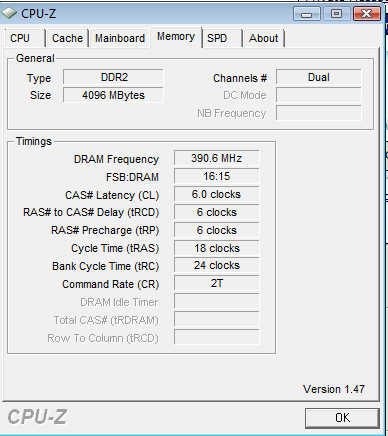
Could you recommend me some better Ram?
I'm not sure what I should set my CPU Core, CPU FSB, and Memory to.
I've always been changing the CPU Core and leaving everything else on Auto, but when I changed the CPU FSB and Memory, I finally got to 4.05, and was able to run Orthos, while before, I was only able to barely get to the Desktop, before it would restart or freeze.
Last edited:
Ramodkk
VIP Member
Can you show a screen of the "SPD" window?
If those are the stock timings of your memory, it may give you a bottleneck. Just get some Crucial Ballistix, Corsair XMS2, Patriot Performance or OCZ Reaper and make sure the timings are at least 5-5-5-112/15, if you find 4-4-4-12 that'd be best.
If those are the stock timings of your memory, it may give you a bottleneck. Just get some Crucial Ballistix, Corsair XMS2, Patriot Performance or OCZ Reaper and make sure the timings are at least 5-5-5-112/15, if you find 4-4-4-12 that'd be best.
g4m3rof1337
Active Member
SPD screen?
And I'll find some Ram and post a link.
Thanks.
And I'll find some Ram and post a link.
Thanks.