
PC Problem

D-Roo

New Member
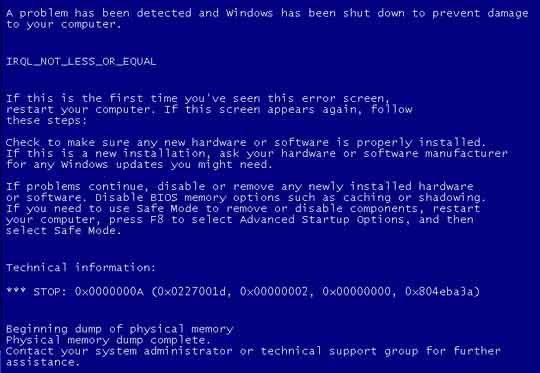
Ok so, I was playing Call of Duty 4 and my computer random comes to this blue screen talking about how there was a crash and I might not have installed some hardware right...This happened 3 times...all while playing Call of Duty 4...I don't know what it wrong but the only thing ive actually put into this computer since i got it was an X-Fi Xtreme Gamer...And that was about 2 months ago. This blue screen error also happened once before about a month ago. So I'm pretty sure the part thar is causing this problem is the X-Fi card...but I don't know how to fix this problem...Some please give me some advice at what the problem might be and how to fix it...

This is what the screen looked like...
0x0000000abluescreenerror.jpg
 
What were you doing when it crashed the first time? Also, is Call of Duty 4 the first new game you've played since you got the card? My guess would be that the card is over heating if the problem is indeed the card.
 
When it crashed the first time i believe i was playing Counter Strike Source. And then my sister told me that it did the same thing to her another time, and she doesnt play games...my guess is she was just on Microsoft Word or Yahoo or something.
 
How much ram do you have in your system? And if you have 2 or more sticks of ram, are they all from the same company and do they all have the same latencys and timings?

Download a little program called MemTest and run it to check your ram, it will tell you if you are having problems with your ram.
http://www.memtest.org/

What could be happening is that 1 stick of your ram is starting to go bad, and has a few errors in it.
 
Last edited:
Ill give you the specs of my system... (It's a custom PC by the way)...

Antec 900 Case
Abit IP35 Pro
FSP 700W Power Supply
eVGA 8800 GTS 640mb GPU
2 Gigs (2x 1gig) of Kingston Hyper X ddr2 PC6400
Some $50 Zalman CPU Cooler
Western Digital 260GB Hard Drive
X-Fi Xtreme Gamer
Windows Vista 32-bit Home Premium
Samsung CD/DVD Drive


And yes, i only have 2 gigs...bought with eachother...so they are exactly the same.

And what memtest should i download? Pre-compiled bootable ISO, or pre-compiled bootable binary?
 
Uninstall the sound card drivers... if all works well then the sound card is the problem. When did you start getting these BSODs? Before/after installing sound card?
 
Ive had this computer for about 4 months now and its a custom built computer. I got the X-Fi Sound Card 2 months ago. The first time i got this blue screen error was about 1 and a half months ago, while playing Counter Strike Source. Then another 1 month ago, while doing normal things like Microsoft Word. And I hadn't had another one until two days ago...and Ive already had 4 in the past two days...all 4 of these being while playing Call of Duty 4. So when you say uninstall the drivers...the drivers for my X-Fi? or my drivers for my old integrated sound card.

And paratwa, i DLed the memtest u gave me, and when i went to the readme so see how to install it, its says its for Linux only...
 
Last edited:
And paratwa, i DLed the memtest u gave me, and when i went to the readme so see how to install it, its says its for Linux only...


Oops! That shouldn't be right. I just looked at that link again and it said it was for all Os's.

This one should be it. Sorry for the mix up.

http://hcidesign.com/memtest/download.html
I know this one will work, I just tested it.


And that other link I gave you was a bin file, that was really not what I wanted to give you.
 
Last edited:
ok well i tried doing the memtest....It told me that i couldnt test my entire 2048mb of ram all at one time so i started by testing 512mb of ram...it took like 30 minutes so i just decided to stop it, not knowing whether something was wrong or not...

So idk what the hell the problem is...

Do you think if i had a technician come over do you think he/she would be able to fix it?
 
ok well i tried doing the memtest....It told me that i couldnt test my entire 2048mb of ram all at one time so i started by testing 512mb of ram...it took like 30 minutes so i just decided to stop it, not knowing whether something was wrong or not...

So idk what the hell the problem is...

Do you think if i had a technician come over do you think he/she would be able to fix it?


Sorry, should have told you how to do it. You need to open 2 copy's of memtest and put in the window 1024 which equals 1 gig
into the window of each copy, then hit start testing. I will take quite a while for it to run. Just walk away from the system and let it do it's thing. It does a very good test of your memory, if there are any problems with it, it will let you know.
 
alright thanks man. also, when i start one of the two, what if it takes a while for the second one to start...is that ok?

Also, do u think the RAM is the problem? Would a sound card really be able to make the computer reeboot? because the sound card isnt vital to the computers operation to i was just wondering... If the memtest turns up with good RAM results what do you think i should do? have a technician come and check it out? or is there another thing that i could do as an average joe...
 
Bad or corrupted drivers can make just about anything crash. So if you think it might possibly be the sound card, then yeah, pull it and try running your system for a few days to see if the problem goes away. Remember to remove the device from your device manager as well, since just removing the card from your case will still leave drivers on your harddrive.

And yeah it takes a while for the other one to start. Just let it run.
 
And as an average Joe, you can do just about every thing except re solder or replace blown capacitors.

From the reseach I did on your error code, it sure looks like it could very well be your ram.

You can try removing 1 stick of your ram and running your system for a day or so and see if your error returns, if it does, reinstall that 1 stick and remove the other one and repeat.
 
alright thanks man, youve been a huge help to me *not being sarcastic*. Ill try to get this all figured out.

and btw, whats the Device Manager?

and if you remove RAM, do you just take it out of your mobo? Do you need to uninstall anything or something like that?
 
alright thanks man, youve been a huge help to me *not being sarcastic*. Ill try to get this all figured out.

and btw, whats the Device Manager?

and if you remove RAM, do you just take it out of your mobo? Do you need to uninstall anything or something like that?

:D

Device manager shows all of your hardware and the status of them, either not working, in an conflict, no drivers, or working

RAM is just 2 little sticks, around 5-6" long. You don't take out the motherboard. And no, you don't need to uninstall or install anything. It's Plug-and-Play
 
no, i kno what RAM is, but i was wondering if i needed to do sumething before i took the RAM out. but thanks, now i kno. Also, is it bad to run 4 gigs of RAM with windows vista 32bit? I hear it will only register about 3.5 gigs but will it make the computer unstable if i run that much?

Oh and by the way paratwa, i fixed the problem...or atleast it has been fixed so far. All i needed to do was install the latest Nvidia driver for my 8800 GTS. But im think my RAM could be running a little slow though because some things have been loading a bit slower lately, nothing that noticable or annoying, but i think im gonna get another 2 gigs of RAM if possible.
 
Last edited:
Oh and by the way paratwa, i fixed the problem...or atleast it has been fixed so far. All i needed to do was install the latest Nvidia driver for my 8800 GTS. But im think my RAM could be running a little slow though because some things have been loading a bit slower lately, nothing that noticable or annoying, but i think im gonna get another 2 gigs of RAM if possible.

Man, Those error codes are worthless! :) Everything I read on them when researching the codes led me to believe it was the ram.
Go figure it was the GPU drivers.

Anyways, I'm glad you got it figured out.
 
haha yea im glad also. I didnt think DLing that driver was going to help but I thought I might as well give it a try. And i think it worked. But maybe it'll happen again (hopefully not) then I'll assume its the RAM. Thanks for your help man.
 
Thats the problem with those error codes, they could mean 10 different things. And since everything in a computer ties into something else, 1 small thing can take down everything, leading to errors that have really nothing to do with the original problem.

Trouble shooting a computer, especially when it is not in front of you is hard to do. But you got it figured out, so good for you!

I bet you feel real proud of yourself to! It's a good feeling when you get it figured out by yourself.
 
Back
Top