DavidWright05
New Member
HI FIRST TIME BUILDER...
i AM PLACING MY CPU INTO THE MOTHERBOARD BUT I AM VERY CONFUSED AND SCARED...
I PLACED IT DOWN (INTEL CORE 2 DUO) FULLY ALIGNED WITH THE GOLD TRIANGLE BOTTOM LEFT AND THE SHINY METAL SIDE OF THE CPU TOWARDS ME, BUT IT JUST IS LYING THERE... AM I SUPPOSED TO APPLY PRESSURE? I DIDNT NOTICE ANYTHING REALLY "FALL INTO PLACE" OR ANYTHING IT IS JUST SITTING ON TOP. OMFG PLZ HELP ME DID I **** UP MY CPU?

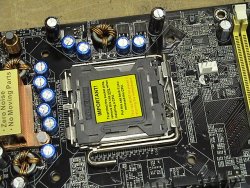
^^^^ Thats what it looks like not too clear

^^ thats what it looked like when i tried to close the case... I even pressed down with a little force but it wouldnt close. something is freaking wrong. I hope i did not ruin my CPU. I knew this was a HUGE MISTAKEEEEEEEEEEEEEEEe
i AM PLACING MY CPU INTO THE MOTHERBOARD BUT I AM VERY CONFUSED AND SCARED...
I PLACED IT DOWN (INTEL CORE 2 DUO) FULLY ALIGNED WITH THE GOLD TRIANGLE BOTTOM LEFT AND THE SHINY METAL SIDE OF THE CPU TOWARDS ME, BUT IT JUST IS LYING THERE... AM I SUPPOSED TO APPLY PRESSURE? I DIDNT NOTICE ANYTHING REALLY "FALL INTO PLACE" OR ANYTHING IT IS JUST SITTING ON TOP. OMFG PLZ HELP ME DID I **** UP MY CPU?
^^^^ Thats what it looks like not too clear
^^ thats what it looked like when i tried to close the case... I even pressed down with a little force but it wouldnt close. something is freaking wrong. I hope i did not ruin my CPU. I knew this was a HUGE MISTAKEEEEEEEEEEEEEEEe
Last edited: