Possible for me to run Dual Monitors?

MBGraphics

VIP Member
Hey guys, I havnt ever run dual monitors before, so I was wondering if it's possible for me to run them on my computer.

I have a Dell 19" analog LCD monitor and a Sharp 19" LCD (has 2 different cords I can plug in not including the power cord) and the Dell has only 1 (the blue analog) the Sharp has 1 analog and I believe 1 digital (it's longer than the analog and it's black instead of blue) it fits into the white adapter on my GPU, but when I tried putting the Dell monitor in the spot it can go in, and the Sharp into the spot that it can go in, only the Sharp displays a picture BUT it's distorted (off colored, mostly a greenish-yellow tint) and the Dell doesnt do anything.

What im wondering, is it even possible for me to run dual monitors with these 2 that I have and the Radeon X300SE GPU that I have?

Thanks in advance, I can get pictures if needed (of the back of my PC, and for all cords on both monitors)

-Mike
 
Correct, both monitors work fine when I use the blue analog cord. But when I try using both, it wont work.

Im not sure where to get the drivers from though :(
Would you mind giving me a link?

Thanks
-Mike
 
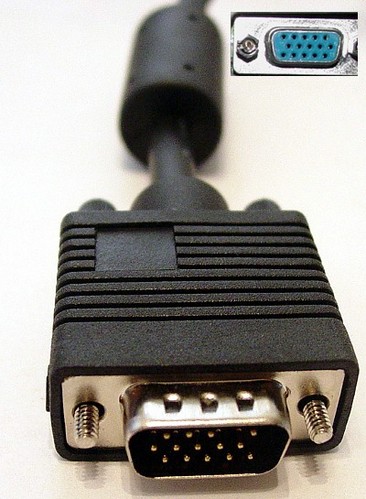
Im assuming the two types of connectors youre using are VGA and DVI

VGA

vga2.jpg


DVI

03dvi_d-box-l.jpg


Sometimes, in order to hook up the monitor, it needs to go through a converter thing (cant think of the name right now)

AD-ZOG-DVI-VGA.jpg


If the pins on the converter thing get bent, it can lead to funny looking images like the one you say youre getting on the sharp.


Just had another thought... Im assuming the ATI Radeon X300SE wasnt stock with the dell so when you installed it, did you upgrade your PSU. I dont know much about power so im not the one to tell you you dont have enough power but i think it could be a possiblity.

Drivers: http://ati.amd.com/support/driver.html
 
Thanks, I'll have to look into one of those converters :)

Actually, the Radeon X300SE was stock with this computer when I bought it. The only thing I have ever installed internaly on my own was 2 more GB of RAM.

Thanks for the drivers :)
 
Thanks, I'll have to look into one of those converters :)

Actually, the Radeon X300SE was stock with this computer when I bought it. The only thing I have ever installed internaly on my own was 2 more GB of RAM.

Thanks for the drivers :)

Did the drivers help?

I think you need the adapter because they both monitors plug into your graphics card (simultaneously) so thats probably not the problem.
 
Nope, drivers didnt work :(
Still get the green lines threw the screen.

I guess i'll have to get a DVI to VGA adapter.

Thanks for your help :)
 
ok, that the Dell monitor isnt displaying at all, I think thats because you didnt enable it in the driver (yet).

and you see what you're doing when you have both connected? (on the disorted screen?) because if you can, try connecting them both, right mouse button on the desktop, and select "Catalyst(TM) Control Center" you'll get a screen popping up, this is for the grafic's card settings.

in that screen you select (on the left side) "Displays Manager" and then right click on the small screen picture with a "2" in it, and select "Enable"

Here's a picture of what I mean:
Catalyst.jpg


Now, I'm not entirely sure if the Xp version of these drivers has the same layout, but I think it does. either way, if you do this, the Dell monitor should show a picture.

I'd say try that first, then we'll see what problems pop up. :)
 
Ok archangel, that worked :D
only one problem now. I took an switched so that the dell monitor is the main one for now because the Sharp monitor is still having some troubles. It shows the background like it should, but it still has the green all over the place (it's like a lime green) and it basically looks like its a picture WAY over sharpend in photoshop :P
How do I fix this?
 
Hmm, now the sharp screen isnt all "fuzzy" green, it's just a solid lime green that you can still kinda see threw (like a green mask) Any ideas on how to fix this?

Thanks
-Mike
 
Back
Top