novicegeek
Member
Evening all,
I've got a Brother MFC-J5830DW, which is the little brother of the printer I had before, but that's completely besides the point.
Recently, this printer started jamming. I thought I was successful in fixing it because it would go for a little bit without a jam, but now it's jamming every single time.
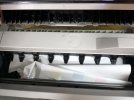
I've cleaned the rollers that I can locate with isopropyl alcohol, ran a maintenance sheet through it, turned it off and unplugged it for a bit, heck, I even ran a paper through it that had a little alcohol on it to clean stuff on the way through, but apparently, my printer is a teetotaler. So now, I cannot for the life of me get a piece of paper to get through without jamming. It always jams right underneath the scanner bed (as you can see in the pic).
I just figured someone might have a similar printer that had a similar problem and had a fix for it.
Any suggestions?
Thank you.
I've got a Brother MFC-J5830DW, which is the little brother of the printer I had before, but that's completely besides the point.
Recently, this printer started jamming. I thought I was successful in fixing it because it would go for a little bit without a jam, but now it's jamming every single time.
I've cleaned the rollers that I can locate with isopropyl alcohol, ran a maintenance sheet through it, turned it off and unplugged it for a bit, heck, I even ran a paper through it that had a little alcohol on it to clean stuff on the way through, but apparently, my printer is a teetotaler. So now, I cannot for the life of me get a piece of paper to get through without jamming. It always jams right underneath the scanner bed (as you can see in the pic).
I just figured someone might have a similar printer that had a similar problem and had a fix for it.
Any suggestions?
Thank you.