
You are using an out of date browser. It may not display this or other websites correctly.
You should upgrade or use an alternative browser.
You should upgrade or use an alternative browser.
Problem
- Thread starter Butter22
- Start date

royalmarine
New Member
what graphics card do you have?
does it need a power connection to it?
IF it does, then your psu should have a 6pin cable. that goes into the graphics card.
what is the specs of the system?
more info and we can help more
does it need a power connection to it?
IF it does, then your psu should have a 6pin cable. that goes into the graphics card.
what is the specs of the system?
more info and we can help more
If it is a constant steady long beep that would point at a cpu problem. If it is split up into a long and short beeps that would likely point at a memory problem like the wrong type or speed or mismatched as well as defective dimms. One long two short would likely be a defective video card if nothing comes up onscreen.
Try editing a single post or put more in one there. The one thing needed would be the actual make and model of the board to see what bios is used and an accurate description of what beeps or beeping you are hearing.
Is it one constant beep or long or short followed by more then one long or short. That would generally be a long followed by 1, 2, 3, or more short beeps to point at a specific hardware.
Is it one constant beep or long or short followed by more then one long or short. That would generally be a long followed by 1, 2, 3, or more short beeps to point at a specific hardware.
TrainTrackHack
VIP Member
Does the comp actually boot up? It could be the CPU overheating, At least AMDs (I think) have the habit of making constant noise when they overheat, make sure that the HSF is seated properly and the thermal paste is good.
royalmarine
New Member
Does the comp actually boot up? It could be the CPU overheating, At least AMDs (I think) have the habit of making constant noise when they overheat, make sure that the HSF is seated properly and the thermal paste is good.
mine does that when i turn it on with no heatsink on it.
i touched it once when i was a wee idiot noob and burnt my finger


Could your motherboard be bad? I had the same issue with a friend's Compaq. It would freeze and just have one long unending beep.
The make and model as well as what is actually being heard when is the best thing to go by when trying to isolate the hardware itself. Since each different bios will not always point at the same thing that information is the first place to start. On most boards however a constant steady single beep is not good! unless something was left unplugged?
royalmarine
New Member
The make and model as well as what is actually being heard when is the best thing to go by when trying to isolate the hardware itself. Since each different bios will not always point at the same thing that information is the first place to start. On most boards however a constant steady single beep is not good! unless something was left unplugged?
thats why i suggested the power cable for the gpu. in the first post.
i always forget mine when im changing sli config.
but im not sure if the op's gpu needs a 6pin cable?
royalmarine
New Member
butter22, on your power supply do you have one of these cables?
you should have one on your power supply. IF YOU DONT, THEN USE THE SECOND CABLE IN THE PICTURE THAT CAME WITH THE GRAPHICS CARD. it plugs into 2 normal molex connections and into the gpu.
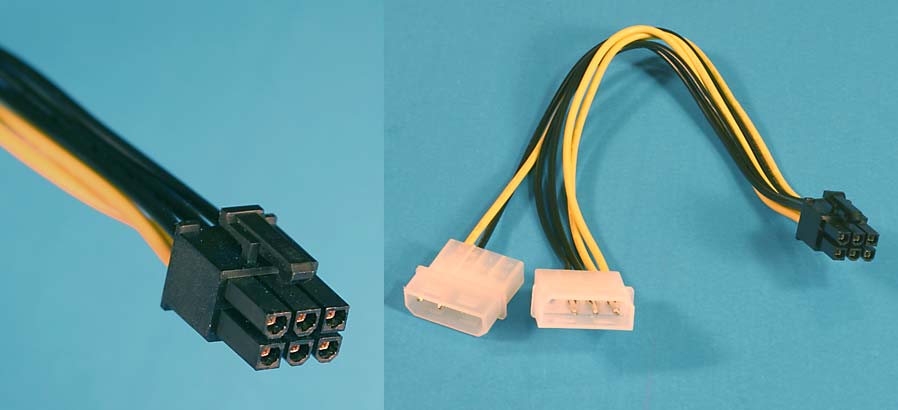
it needs to be plugged into the graphics card here

you should have one on your power supply. IF YOU DONT, THEN USE THE SECOND CABLE IN THE PICTURE THAT CAME WITH THE GRAPHICS CARD. it plugs into 2 normal molex connections and into the gpu.
it needs to be plugged into the graphics card here
royalmarine
New Member
he has
HIS Radeon 3850, Gigabyte S series, Okia 650wt psu, AMD X2 5200
i never heard of Okia psu.
did you connect both cable's to the motherboard?
disconnect everything.
put in 1 stick of ram, the cpu and cooler and the graphics card.
no harddrive and no dvd drive.
connect the keyboard and turn it on. see if that works.
HIS Radeon 3850, Gigabyte S series, Okia 650wt psu, AMD X2 5200
i never heard of Okia psu.
did you connect both cable's to the motherboard?
disconnect everything.
put in 1 stick of ram, the cpu and cooler and the graphics card.
no harddrive and no dvd drive.
connect the keyboard and turn it on. see if that works.
How carefully did you build it?
Sometimes its worth tearing down and re-assembling. Once you know you have done everything correctly, and its still beeping (check out google for the beep pattern) you might have to resort to swapping out individual parts for known good working parts to determine which piece of hardware is faulty in your new system.
Good luck!
Sometimes its worth tearing down and re-assembling. Once you know you have done everything correctly, and its still beeping (check out google for the beep pattern) you might have to resort to swapping out individual parts for known good working parts to determine which piece of hardware is faulty in your new system.
Good luck!