
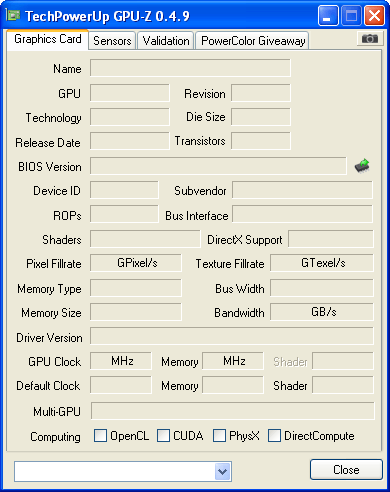
Problem!

Leemckie

New Member
2ad.png


What gives?!
Help please!

Additional
------------------
System Information
------------------
Time of this report: 12/10/2010, 16:38:19
Machine name: *********
Operating System: Windows XP Professional (5.1, Build 2600) Service Pack 3 (2600.xpsp.080413-2111)
Language: English (Regional Setting: English)
System Manufacturer: Acer
System Model: Aspire SA80
BIOS: Phoenix - AwardBIOS v6.00PG
Processor: Intel(R) Pentium(R) 4 CPU 2.93GHz
Memory: 480MB RAM
Page File: 1010MB used, 110MB available
Windows Dir: C:\WINDOWS
DirectX Version: DirectX 9.0c (4.09.0000.0904)
DX Setup Parameters: Not found
DxDiag Version: 5.03.2600.5512 32bit Unicode

Display Devices
---------------
Card name:
Manufacturer:
Chip type:
DAC type:
Device Key: Enum\
Display Memory: n/a
Current Mode: 1280 x 1024 (32 bit) (1Hz)
Monitor:
Monitor Max Res:
Driver Name: vga.dll
Driver Version: 5.01.2600.0000 (English)
DDI Version: unknown
Driver Attributes: Final Retail
Driver Date/Size: 4/14/2008 11:00:00, 9344 bytes
WHQL Logo'd: Yes
WHQL Date Stamp: n/a
VDD: n/a
Mini VDD: vga.sys
Mini VDD Date: 4/14/2008 11:00:00, 20992 bytes
Device Identifier: {D7B70EE0-4340-11CF-B063-282AAEC2C835}
Vendor ID: 0x0000
Device ID: 0x0000
SubSys ID: 0x00000000
Revision ID: 0x0000
Revision ID: 0x0000
Video Accel:
Deinterlace Caps: n/a
Registry: OK
DDraw Status: Not Available
D3D Status: Not Available
AGP Status: Not Available
DDraw Test Result: Not run
D3D7 Test Result: Not run
D3D8 Test Result: Not run
D3D9 Test Result: Not run
 
Either try reinstalling the program or see if you can click on the down arrow on the bottom box and see if anything appears. I just downloaded it and it does run correctly for me.

Also, did you install the video driver yet? Look in device manager under display adapters and see what is listed.
 
I havn't install any video drivers as i havn't the foggiest which one to install.

the program is working fine it's just that my computer doesn't return any information about my video card.
 
Look in device manager and see if there are any entries with yellow question marks and let us know what they are. Also look under display adapters and see if anything is listed there. If you don't see display adapters then the video driver isn't installed.
 
Sorry about the long reply.

There are two yellow question marked enteries:
PCI Simple Communications controller
&
Video Controller (VGA Compatible)
 
Ok, you need to install a couple drivers then. For me to give you the correct driver download I need to know what specific video and modem is installed. Please do the following for each item. Go into device manager and right click on the device with the question mark, and click on properties, then click on the details tab and then give me the 4 digit vender and device id numbers for each. They look like this, the id numbers are circled in red.
 

Attachments

  • device.JPG
    device.JPG
    31.8 KB · Views: 43
Thank you so much for all your help!

I'm usually good with computer, do you mind running me through the process you went through so I can refer to it next time i come across a problem like this?
 
Back
Top