Programs Win 7 is not comp. with.

Elidicious

Member
What are some programs that windows 7 is not compatible with ?
I hear people say the upgrade is not worthy [for some programs]

What are some of the programs you know/think won't work with Win 7?

I want a direct answer.

thank you.
 
i was watching this also. Only suggestion since im new to it windows 7 Pro is i did have to jump through hoops for days to get it working and learn. I had the problem also. I got them all working. Replies would be nice but i suggest what i did. from windows 'F1' key for help. query 'compatibility'. Other source is
support.microsoft.com . get to windows 7 and use the query suggested.

The only reason i had problems was because of 64bit installation. the install has to do with 32bit installation. it can be done. not always easy. just another adventure. i say it can be done for all.
Im just saying a better question might be how. did you try right clicking the exe file you are trying to install? right click troubleshoot compatibility. good place to start.
 
Last edited:
Sorry, maybe not a direct answer as you requested, but, as tremmor mentioned,

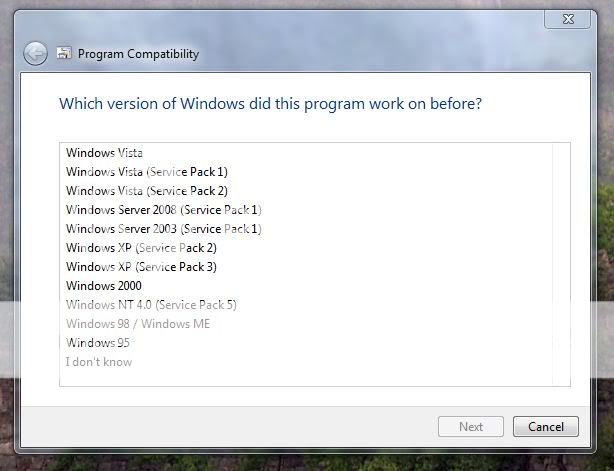
Windows 7 has a compatibility wizard. For any program that will not run under 7, there is the ability to emulate most previous versions of Windows to allow the program to function as it did with the previous version.

Compability.jpg


Of all my programs, there was only one that didn't like 7, my favorite photo editor, but it runs fine with Vista emulation.

I think most people that run 7 are surprised at how compatible it is with their hardware and software.
 
Last edited:
Windows 7 is absoultely brilliant for backward compatability. It can emulate an older version of windows better than any other previous version.

It also comes with a lot of "automatic" drivers for hardware, which is insane, but it's not so good that you forget to install the actual drivers (liek I did for my graphics card), then find a game wont load and you cant figure out why lol
 
Sorry, maybe not a direct answer as you requested, but, as tremmor mentioned,

Windows 7 has a compatibility wizard. For any program that will not run under 7, there is the ability to emulate most previous versions of Windows to allow the program to function as it did with the previous version.

Compability.jpg


Of all my programs, there was only one that didn't like 7, my favorite photo editor, but it runs fine with Vista emulation.

I think most people that run 7 are surprised at how compatible it is with their hardware and software.

This is why I like Windows 7.It contains the emulations for ALL previous versions of Windows including even the Windows 95 and 98!!!:DOf course I still use XP,but Windows 7 is really great because of this nice feature!
 
.
@Jevery - the Program compatibility is in windows 7? I only have to run it?
.
Here's how it works, right click on a program icon and you will have these choices,
.
Wizard-1.jpg

.
Choose "Troubleshoot Compatibility"
.
.
Wizard-2.jpg

.
.
And you have a choice of letting 7 make an attempt at choosing emulation settings or manually choosing the settings based on what type of problem or incompatibility notifications that you are seeing.
.
.
Wizard-3.jpg

.
.
If you choose, "The program worked in earlier versions of Windows but won't install or run now," then you'll be able to choose which version of Windows to emulate.
.
.
Wizard-4.jpg

.
.
The only problems I've encountered in going from XP to Vista, and now to 7 is drivers for old hardware. I had to trash an old Epson scanner that neither Epson nor Microsoft thought was worth writing driver updates for. Though, the good part was a new scanner with 4 times the resolution was half of what I paid for the old Epson - It was time to upgrade anyway. And I can't run Vista or 7 on an old Dell computer in my Son's room, as Dell has apparently discontinued upgrade support for computers that they sold six years ago. Can't really blame Dell for that, but that's precisely why I've started building my own systems.
.
.
EDIT - Disclaimer,
I'm not saying that you won't spend some time getting everything to work or that you will get everything to work, because if your experience with computers has been like mine,
1. It takes two to three times the amount of time to accomplish a task as what was originally estimated
2. Solving one problem will lead to secondary problems, will lead to .........
 
Last edited:
Thanx Jevery.

The only problem I worry about is the wireless keyboard/mouse. I use the Logitech easycall system

logitech_easycall.jpg

The speakerphone is attached to my PC through USB ports. Do you think there'll be any problem with compatibility issues?
 
Back
Top