Question about defragmented hardrive

chris0276

banned
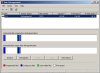
I just defragmented my hardrive and it showed me a picture of before and after defrag. I've attached a picture to illustrate what I mean. What exactly do all the colors mean and why is there so much space between data?
p.s. I'm running Windows XP MCE 2005
 

Attachments

  • Defraged hardrive.JPG
    Defraged hardrive.JPG
    43.6 KB · Views: 47
Basicly Red is fragmented files. Fragmented files means a file that is on more then 1 disk in the HDD. Blue is Contiguous files. Files that are on 1 disk in the HDD. Unmovable files are system files and white is free space.
 
Wow, you've got a whole lot of free space left. That's a good thing, no need to worry about spacing between the 2 chunks. They're just seperations of system files and misc files. Needy and not so needy... mishmashed all together.
 
Hehe

Reading the legend would have answered your question. However, to get back to you, Windows seperates the files as it sees fit. As long as you defragment often, then you do not need to worry. Go fill up the HDD now ;)

JAN :D
 
LaptopExtreme said:
Wow, you've got a whole lot of free space left. That's a good thing, no need to worry about spacing between the 2 chunks. They're just seperations of system files and misc files. Needy and not so needy... mishmashed all together.

Thanks for the input. I know I have a lot of free space and I already installed of the Windows updates and all software that I'm going to use. I know I probably will never fill up the hardrive but it's nice to have all the extra space just in case.
 
chris0276 said:
Thanks for the input. I know I have a lot of free space and I already installed of the Windows updates and all software that I'm going to use. I know I probably will never fill up the hardrive but it's nice to have all the extra space just in case.
O yea, you definitly will:)
 
Back
Top