Raid 0

Shane

Super Moderator
Staff member
Is it worth it?

I think the Hard drive is a major bottleneck in my system,i could buy a faster one but theyre quite costly and id like something cheap but will give my system a boost.

I currently have a Seagate Barracuda 250Gb 16Mb cache.

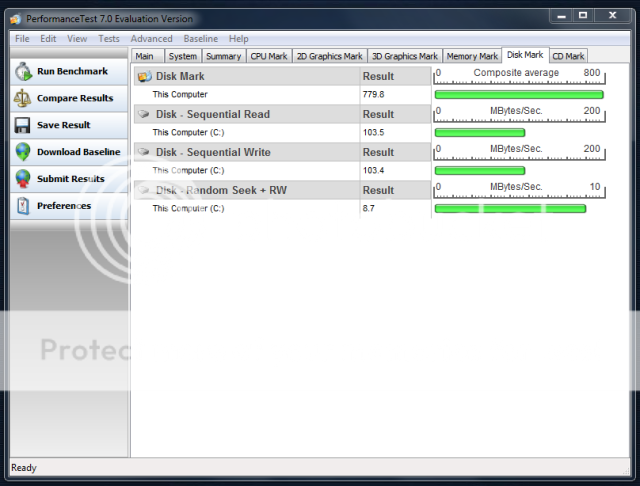
Bench....
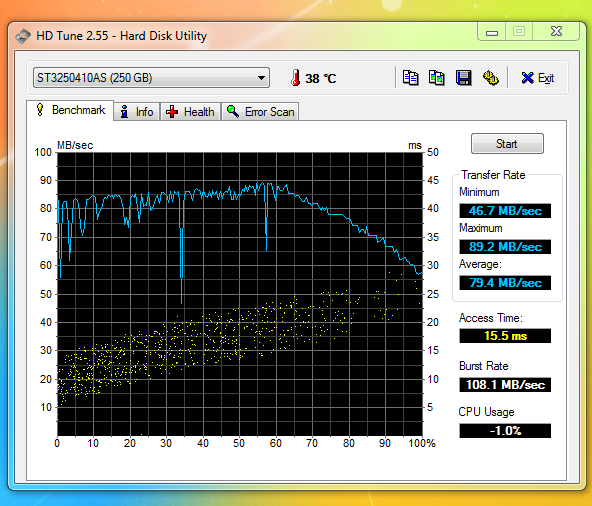
benchslow.png


If i purchased another one could i then use this and set up RAID 0...

http://www.ebuyer.com/product/123967

Im not sure if my mobo supports raid?
 
Last edited:
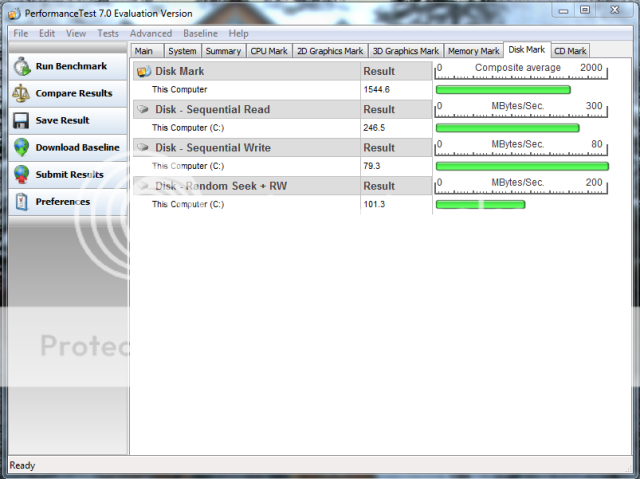
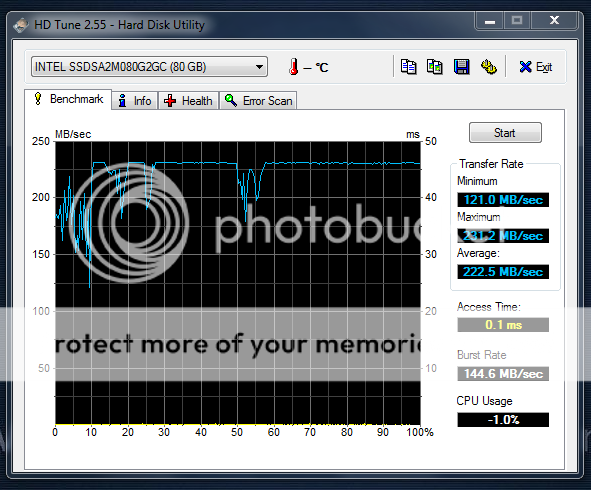
This may not be what you were looking for in an answer but this is what my HDD's specs look like and I will be upgrading to RAID 0 with my 2tb drives in a few weeks


A friend of mine has had his RAID 0 working for 2 years now and he said that the performance boost was noticeable to him and he is happy that he has his HDD's set up with that configuration.
 
hmm see,yours even though its a bigger drive still beats mine,i heard the smaller the drive the faster in some cases but im not sure if thats true.

I just want a performance boost on boot speed and hopefully a more snappy responsiveness in windows.

This is the raid card i was thinking of getting....


But someone mentions this:
Being standard pci you only get SATA150 and not SATA300. You can get full SATA300 support with pcie versions of this card also available from ebuyer for a few pounds more.

http://www.ebuyer.com/product/123967

Well i dont have a spare Pci-e slot,only Pci or Pcix1 :(...does this mean that if i but the PCI version it will be performance limited and making the whole project useless?
 
Last edited:
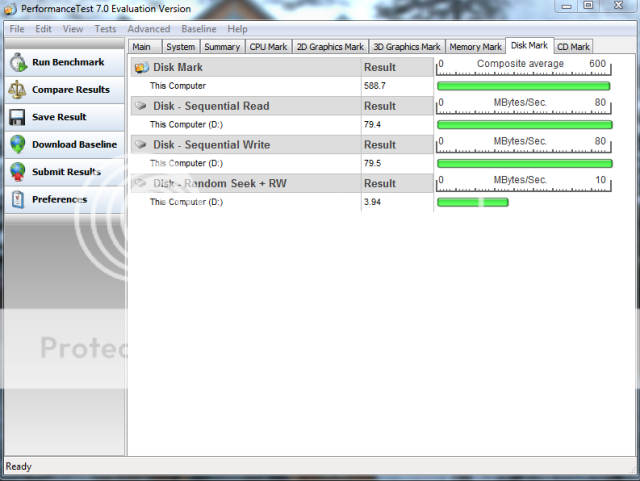
I ran four of those drives in RAID. Here's how mine tested as a single drive,


Four in RAID 10,


So about a 30% speed increase with RAID. You'll notice a modest improvement in everyday use. You'll definitely notice the increase when reading or copying very large files, but not so much for applications that access many smaller files like virus scans. An SSD boot drive is best if you're after faster loadng speeds and random seek applications. I recently replaced my RAID array with an Intel SSD


.
 
Well i dont have a spare Pci-e slot,only Pci or Pcix1 :(...does this mean that if i but the PCI version it will be performance limited and making the whole project useless?

From what I have read, using sata l connectors vs sata ll will cut the performance of your raid configuration in half. I will be using a bios controlled raid with my motherboard so I can use the sata ll ports that are on my motherboard. You might be able to do the same.
 
If you really want to increase your hard drive read speeds buy a good quality solid state drive. The Super Talent 32 gigabyte UltraDrive ME FTM32GX25H Solid State Drive has read speeds higher than 220 megabytes per second. I've heard that it is a very good quality. I'm still waiting for the price to come down on these.

Solid State will have better performance over raid 0 but like you I am waiting for the price to come down. I might get one for just my os on my next build. But that is a long time from now.
 
Anyone know if i can set up raid 0 with two diffrent size hard drives?

say a 250gb and a 500gb.....just to try Raid 0?

both drives are the same speed/cache and SATA 2.
 
Anyone know if i can set up raid 0 with two diffrent size hard drives?

say a 250gb and a 500gb.....just to try Raid 0?

both drives are the same speed/cache and SATA 2.

You can but the space will be limited to the smallest drive.

so for your situation:

1x250gb & 1x500gb = 250gb used on each drive = 500gb total usable space in raid 0.

I am fairly sure that you will not be able to use the 250gb that is extra on the 500gb. Since that drive will already be formatted for raid 0. But I could be mistaken on that.
 
You can but the space will be limited to the smallest drive.

so for your situation:

1x250gb & 1x500gb = 250gb used on each drive = 500gb total usable space in raid 0.

I am fairly sure that you will not be able to use the 250gb that is extra on the 500gb. Since that drive will already be formatted for raid 0. But I could be mistaken on that.

Yeah i guessed,but thats not a problem,because i already have the 500gb and the 250gb drives so i wanted to see how fast raid 0 is with them both...if its a good result then id just buy another 250gb drive and do 2x 250gb in raid 0.....

Does my mobo support raid? or do i have to buy one of those cards?

EDIT:It appears my mobo supports the following....
SATA RAID 0 • SATA RAID 1 • SATA RAID 10 • SATA RAID 5

http://www1.uk.shopping.com/xPO-ASUS-ExpGATE-S775-P45-DDR2-FSB1600-PCIE2-0-GBLAN-ATX

So what do i need to set this up?
Obviusly il format both drives clean.....
 
Last edited:
If you still have the manual for it, it basically tells you how to set it up. First you enable raid in the bios, then boot to the raid utility to actually setup what raid you want, then install windows and most likely you'll need to install the raid driver before the install will actually see the drives.
 
Hi john,

right found the manual....no english section in it whatsoever!!!!

so ive looked online and found an english version there....basicly it says.

To enter the Intel matrix storage controller:

1;Install the Serial ATA Hard dirks
2;Turn on the system
3;During post,Press <CTRL+l> to display the Utility Main menu

The thing is,im following that and no menu is showing to allow me to set up Raid....it just carrys on trying to launch from my windows CD!!!!

This is the manual im following if it helps....
http://www.docstoc.com/docs/10485188/ASUS-P5Q---User-Guide-Manual

,appreciate any help guys.thanks
 
Did you remember to do this:
Setting the RAID item in BIOS
You must set the RAID item in the BIOS Setup before you can create a RAID set(s). To do this:1. Enter the BIOS Setup during POST.2. Go to the
Main
menu, select
Storage Confguration
, then press <Enter>.3. Select the item
Confgure SATA as
, then press <Enter> to display the
confguration options.
4. Select [RAID] from the
Confgure SATA as
item options, then press <Enter>.5. Save your changes, then exit the BIOS Setup
?
 
Did you remember to do this:
Setting the RAID item in BIOS
You must set the RAID item in the BIOS Setup before you can create a RAID set(s). To do this:1. Enter the BIOS Setup during POST.2. Go to the
Main
menu, select
Storage Confguration
, then press <Enter>.3. Select the item
Confgure SATA as
, then press <Enter> to display the
confguration options.
4. Select [RAID] from the
Confgure SATA as
item options, then press <Enter>.5. Save your changes, then exit the BIOS Setup
?

I dont see those options :/

i done what you said all the way up to where ive bolded...

In Sata configuration all the choice i see are....

Disabled
Compatible
Enhanced

and in the configure Sata as menu i see....


IDE
AHCI

I see nothing for RAID :cool:

EDIT:

Ive now found out why...my mobo only has the ich10 chipset and not the ich10r which supports raid :/....always my luck !

Il have to purchased a Sata controller card now....do you guys think its realy worth going RAID 0...would i see a huge improvement in loading times?
 
Last edited:
Ive now found out why...my mobo only has the ich10 chipset and not the ich10r which supports raid :/....always my luck !
I guess we should have checked that first, oh well everyone misses something sometime :P
Il have to purchased a Sata controller card now....do you guys think its realy worth going RAID 0...would i see a huge improvement in loading times?
It'll be faster, but I've never really been a fan of RAID0 (or any RAID at home for that matter).
 
Back
Top