
You are using an out of date browser. It may not display this or other websites correctly.
You should upgrade or use an alternative browser.
You should upgrade or use an alternative browser.
Ram issues? I hope so
- Thread starter G25r8cer
- Start date


G25r8cer
Active Member
Did some research and found a few instances of peoples Win 7 showing more ram than whats installed. Must be a Windows issue and not bios related.
Dang for a second there I thought I had 2 x 4gb sticks lmao
Guess I'll just deal with Windows and other programs being wrong
Either way I'm happy G-skill made good and got me my ram back very quickly. 4+ yr old ram and they replaced it free of charge
Dang for a second there I thought I had 2 x 4gb sticks lmao
Guess I'll just deal with Windows and other programs being wrong
Either way I'm happy G-skill made good and got me my ram back very quickly. 4+ yr old ram and they replaced it free of charge

Did some research and found a few instances of peoples Win 7 showing more ram than whats installed. Must be a Windows issue and not bios related.
Can you post the links of them? I'm curious about it now.
G25r8cer
Active Member
A few
http://forums.whirlpool.net.au/archive/1570944
http://www.tech-forums.net/forums/f77/windows-7-showing-more-ram-than-installed-236022/
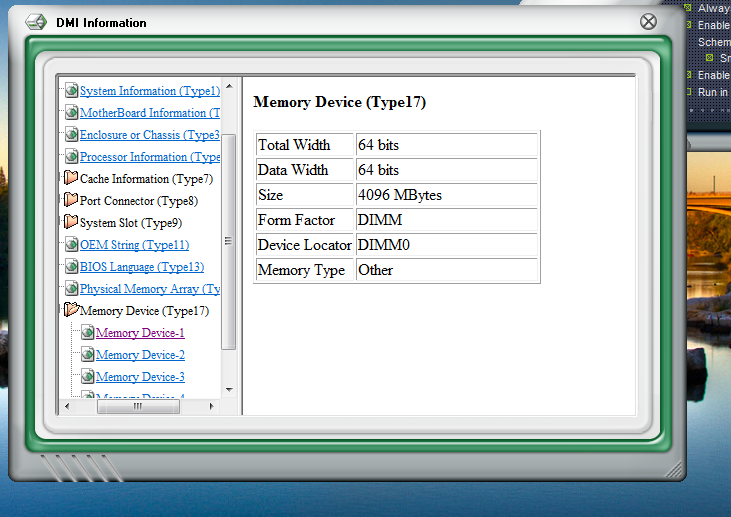
Now I am even more confused. Bios still shows 4gb but, the probe utility directly from asus says 4gb sticks in each DIMM. What the heck
http://forums.whirlpool.net.au/archive/1570944
http://www.tech-forums.net/forums/f77/windows-7-showing-more-ram-than-installed-236022/
Now I am even more confused. Bios still shows 4gb but, the probe utility directly from asus says 4gb sticks in each DIMM. What the heck


The sticker on the memory says 4GBNQ, so they are 4gb each. From the looks of it your bios is 4 years old. If you have memory remapping set right and max memory unchecked in windows. I would update the bios.
The sticker on the memory says 4GBNQ, so they are 4gb each. From the looks of it your bios is 4 years old. If you have memory remapping set right and max memory unchecked in windows. I would update the bios.
Then explain this.
http://www.newegg.com/Product/Product.aspx?Item=N82E16820231193
Same part number but these say 2x2gb.
I'm totally confused.
Sorry, had to take my grandson home, lol. Yeah that's really weird, my set of 8gb has 4GBXL on each stick. On my other computer has 4gb set and has 4GBNQ on each stick. That's a screwed up numbering system. But his CPUz shot says 2GBNQ
Even with 64bit windows it says 8gb with 3.75 usable, really weird.
Even with 64bit windows it says 8gb with 3.75 usable, really weird.
Last edited:
G25r8cer
Active Member
Really really weird. I have no idea why cpuz is giving wrong part number. And why windows, ccleaner, probe II, and many more think I have 8gb installed.
Also Bios is up to date!

I guess I am going to try and contact G-skill via E-mail as i'd rather not deal with a phone call
Also Bios is up to date!

I guess I am going to try and contact G-skill via E-mail as i'd rather not deal with a phone call
G25r8cer
Active Member
Just sent an e-mail to G-skill tech support. I attached a bunch of photos and explained what was going on. Hopefully they can help or point me in the correct direction.
It's not a huge deal Win 7 thinking I have more ram but, my question is what will happen if I say install 2 more sticks of the same ram. Will Windows think I have 16gb?
It's not a huge deal Win 7 thinking I have more ram but, my question is what will happen if I say install 2 more sticks of the same ram. Will Windows think I have 16gb?

Okedokey
Well-Known Member
With the computer off, PSU and wall switch off and the power cable PLUGGED IN:
- Remove all sticks of RAM.
- Remove the CMOS battery.
- Hold down power button for 20 secs.
- Replace CMOS battery.
- Start computer (without RAM).
- Wait until it beeps.
- Shutdown.
- Replace ONE stick of RAM.
- Start up.
- Enter BIOS.
- Set Default Bios (usually F5).
- Save and restart (usually F10).
- Shutdown once it boots.
- Replace remaining RAM.
- Restart.
- Enter BIOS again and correctly set the BIOS settings for RAM - voltage, timing etc.
- Save and restart (F10).
- Enter Windows.
- Update Chipset Drivers. http://support.amd.com/en-us/download/chipset?os=Windows 7 - 64 (latest came out a couple of weeks ago).
- Restart.
- Post results.
G25r8cer
Active Member
do u think this is a 4 or 8gb kit?
When u say wall switch do you mean the psu power switch?
Also steps 7 and 10 how should I shutdown? Hold power switch or hit switch on psu?
FYI: f2 is default on this mobo. Not trying to insult just letting you know
Edit: This mobo does NOT have a speaker nor do I have speakers on this computer either. For steps 7 and 10 I held the power button to shut down.
When I went to install the chipset drivers you provided ... my pc froze up (mouse and keyboard stopped responding but, the install graphics were still scrolling through pictures). I had no choice but to restart at that point.
I restarted, un-installed ATI, rebooted, removed all traces of ati (files and registry), rebooted, ran Ccleaner a few times, rebooted, now your chipset drivers installed without freezing. Catalyst control center is no more though.
Same results. 8gb showing and 3.75gb usable
Now I am wondering if it's a mobo issue. I am about ready to give up and throw this mobo in the trash and start all over
When u say wall switch do you mean the psu power switch?
Also steps 7 and 10 how should I shutdown? Hold power switch or hit switch on psu?
FYI: f2 is default on this mobo. Not trying to insult just letting you know
Edit: This mobo does NOT have a speaker nor do I have speakers on this computer either. For steps 7 and 10 I held the power button to shut down.
When I went to install the chipset drivers you provided ... my pc froze up (mouse and keyboard stopped responding but, the install graphics were still scrolling through pictures). I had no choice but to restart at that point.
I restarted, un-installed ATI, rebooted, removed all traces of ati (files and registry), rebooted, ran Ccleaner a few times, rebooted, now your chipset drivers installed without freezing. Catalyst control center is no more though.
Same results. 8gb showing and 3.75gb usable
Now I am wondering if it's a mobo issue. I am about ready to give up and throw this mobo in the trash and start all over
Last edited:
