

Strokes
New Member
I have 4 GB of G~skill PB 8500 RAM. I was playing a game when I noticed a bit of lag, so I exited and went into my task manager in hope to see whats wrong. I noticed it said I only had 2 GB of ram. I said "bull" and restarted my desktop in hope that it would recognize all of my ram. It did nothing. My MOBO normally beeps once acknowledging its start up, but nothing happened. No beep, nothing, and my monitor did nothing either, just went to sleep. I took out a stick and it booted fine, but with both in it does nothing.
Now let me say this, there are 4 slots, 2 yellow and 2 black:
My MOBO:
http://www.newegg.com/Product/Product.aspx?Item=N82E16813131361&Tpk=asus amd motherboard
The instructions clearly state that RAM is to be inserted in the same color slot for 2 sticks. Look at the picture on newegg and think of this>
When I put my 2 RAM sticks into the same color slots, it doesn't boot, but when I put them into different color slots next to each other, it says I only have 2 GB of ram but take a look at this:
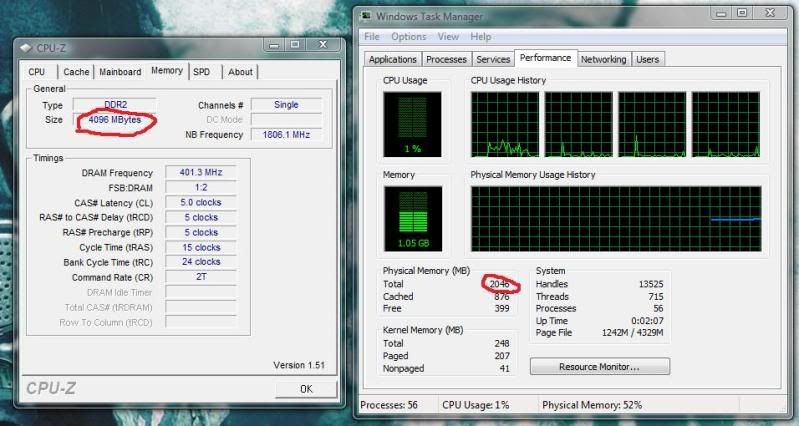
CPU-Z says I have 4 Gigs of ram any my task manager says I have 2. Also I went to my computer and it said I have 4 GB.
If anyone understands my problem, or for that matter can make sense of what I just said, Please help me. Most appreciated, strokes.
Now let me say this, there are 4 slots, 2 yellow and 2 black:
My MOBO:
http://www.newegg.com/Product/Product.aspx?Item=N82E16813131361&Tpk=asus amd motherboard
The instructions clearly state that RAM is to be inserted in the same color slot for 2 sticks. Look at the picture on newegg and think of this>
When I put my 2 RAM sticks into the same color slots, it doesn't boot, but when I put them into different color slots next to each other, it says I only have 2 GB of ram but take a look at this:
CPU-Z says I have 4 Gigs of ram any my task manager says I have 2. Also I went to my computer and it said I have 4 GB.
If anyone understands my problem, or for that matter can make sense of what I just said, Please help me. Most appreciated, strokes.
