Rate My PC!!!

micky_d01

New Member
Hey all!

I'm considering buying the below PC. To my untrained eye it appears to be a pretty good system at a pretty good price. Although I need the assistance of your trained eyes! I am open to any criticism, opinions, comments on a weak link in the system, etc. With my low budget in mind, if I can only play all the modern games at average visual settings with this system - I would be over the moon! Would this keep up with the pace? Thats all I'm really after (also, and I give you all permission to burn me on this one - I so wanna play the old GTA:ViceCity again :) :) :) ).

Heres the specs -
AMD AM2 6000 Processor (3ghz)
2GBDDR2 MEMORY
250 HARD DISK DRIVE
18 X LITE-ON DUAL LAYER DVDRW
FRONT AND REAR USB PORTS
ONBOARD SOUND CARD
Nvidia 256MB 7300GS Video Card
Onboard LAN CARD (BROADBAND READY)
ATX TOWER CASE

All for US$564 (AU$688)

You can find the link here-
http://cgi.ebay.com.au/NEW-AM2-6000...yZ130727QQssPageNameZWDVWQQrdZ1QQcmdZViewItem
 
Seeing as how you are buying it from eBay pre-setup and it looks like it would be hard to get other parts, I would guess that you are sticking to that buy.
I would suggest getting all the parts individually from newegg.com or tigerdirect.com, and assembling it yourself.
If that was the case, I would suggest downgrading the CPU to a lower model (ie. 5600 or the 5200) and spend the saved money on a better GFX card. The card that is in the computer isn't a bad card, but for gaming, it would bottleneck the CPU.
I don't see anywhere what kind of RAM that is, but Newegg has some really good Corsair DDR2 800 for about $100. Building your own computer would be a little more expensive (you could probably build one that could run new games better than the one you can get at eBay, for the same price.)

If you want, I could set one up on newegg.com for the budget you want. Give me an idea of what you might want.
 
Thanks for such a prompt and helpful reply!

My only hesitation in going for what you suggested would be that I currently have a PC running 3.2GHz (with HT technology). Would the Dual-Core 5600 or 5200 CPU that you mentioned even be a worth-my-while upgrade from what I've already got?
What if I asked the seller if he could just replace the graphics card with a better one and I pay the extra difference? What would you suggest I get him to put in?
If you're prepared to put together some good parts from newegg.com then I'd surely consider it! Stick to the general idea of the one I'm already looking at and modify / add whatever you feel neccesary. I kinda do have my mind set on the speed of the "AMD AM2 6000 Processor" so try and stick as close to that as possible.

Thanks man you're a pro!
 
Nope, never tried the Core 2 Duo's. By the same token, I've never tried an AMD. This PC just happened to be the best price for performance. Which do you prefer?

Any further suggestions on the setup?
 
P.S.
Current Games I wanna play -
GTA:SanAndreas and ViceCity
NFS: Most Wanted and Carbon

Future Games I'd wanna play -
GTA4
Whatever else comes up.
 
When choosing a CPU, I think a lot of people go with the CPU they first used, and never thought to go to the other side. Some people actually do the research and look at what they really need to do. I don't think I want to or could persuade with one or the other, and anything I'd say, I'm sure someone could come up with a better argument for the other side. Research what each one can do for you and try it out.
As for you using the AMD 6000+ I'd have to go over the budget to come up with a GFX, RAM etc. that would not bottleneck it. If you are set on the 6000, you could always get better parts later on.

So all I need to know is how much you would be willing to spend, if I need to include a monitor/OS/other extras in the price, and any other comments.

by the way, I'd go with what oscaryu1 says over me because he knows a lot more than I do. He helped me build my first gaming computer.
 
$1000max is my budget.
I need an LCD monitor included, I have new operating software I can use. Furthermore, generally the same settings as discussed, maybe a better performing Graphics Card. Welll I started with Intel, I'm only going AMD cos that's what seems to be cheap and good performance at the moment - I have no probs going an Intel, whatever.

Can anyone suggest the best Graphics Card under $300??
 
The PC seller has allowed me to substitute a few parts so below are the specs i've concluded-


"AMD" AM2 6000 Processor (3ghz)
"Asus M2N-E" OR "Asus M2N-SLI Deluxe" MOTHERBOARD
GENERIC 2GBDDR2 MEMORY
"WESTERN DIGITAL" 250GB HDD
"LITE-ON" 18 X DUAL LAYER DVDRW
FRONT AND REAR USB PORTS
ONBOARD SOUND CARD
"HIS Radeon X1950 Pro" OR "XFX GeForce 8800 GTS 320MB" VID CARD
Onboard LAN CARD (BROADBAND READY)
ATX TOWER CASE

What do you all think?
Good choice of parts?
Any suggestions for a few different parts?

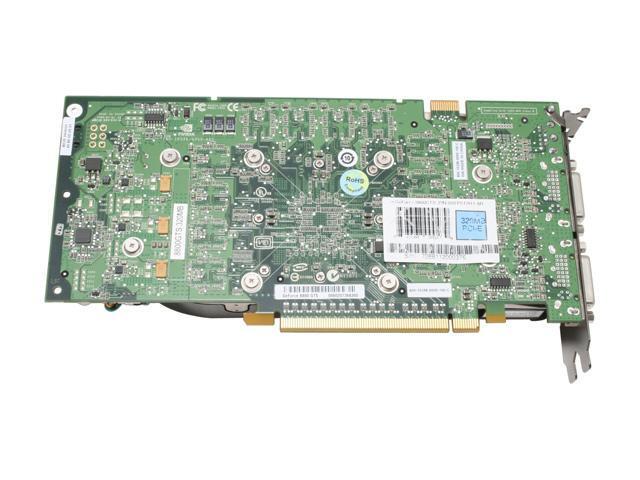
The 8800gts looks pretty involved when it comes to installation. And the video outputs look different to the one I have on my current PC. Considering the motherboard I'll be using, do I need a heap of gear to hook it up? Or am I just scared away by the look of it?
 
What is the new price? I recommend keeping the old build and buying the card yourself; he will undoubtedly charge extra for the card and installation, which isn't hard at all by the way, a simple seating, and hooking up of any extra PSU cables.

The output looks different because it's DVI, not d-sub/VGA. A converter will come with the card when you buy it new, so no worries, unless he chooses not to include it.

Regarding the originals price, it's pretty good. Dell or HP would sell something similar for a grand.
 
Thanks Hermeslyre, that what I wanted to hear. He hasn't got back to me on an updated price yet though I know what your saying. I'm beginning to fall in love with the 8800GTS as I'm sure everyone does. It just seams like the safest choice, can't go wrong, ya know? So lets say I just buy the PC straight up without him changing the cards. It will come with the "Nvidia 256MB 7300GS" Video Card. If i put in the 8800GTS, will the 7300GS become completely useless? I don't know how Vid Cards work, but could I possibly use the second card the way you use 2, 3 or 4 sticks of RAM? I just don't want it to be a waste ya know?

Also, whats with the SLI connector on the 8800GTS? It's on the opposite side to the terminals that plug into the motherboard.

14-130-082-05.jpg
 
The 7300gs will be taken of of the PCI-e slot, and replaced with the 8800gts (good card BTW). If it's integrated into the motherboard then nothing needs to be done, except, only possibly, disabling it in the BIOS. I don't think the 7300gs had an integrated form however. On this subject, no, The 7300 cannot be used along with the new card. If you replaced it with another 7300, they were SLI capable (which is what the pins on the top of the card you referred to are, a SLI connector to connect two cards), and you had a SLI motherboard than you could pair them together, though performance would not be doubled, more a mere 50-80%.

So in the end, If you go with this build the 7300gs would be a slight waste. You could get around this by building yourself.. It would save money as well, But if you aren't comfortable doing this yourself then this build still looks good, even better if you pair it with a 8800. ;)
 
AMD AM2 6000 Processor (3ghz)
ASUS M2N-E-SLI MOTHERBOARD
2GBDDR2 GENERIC RAM
250GB SATA II 8MB CACHE WD HARD DISK DRIVE
18 X LITE-ON DUAL LAYER DVDRW
FRONT AND REAR USB PORTS
ONBOARD SOUND CARD
Nvidia 256MB 7300GS Video Card
Onboard LAN CARD (BROADBAND READY)
ATX TOWER CASE

TOTAL: $748

Notice that he said he'll change the M2N-X motherboard to a M2N-E-SLI for an extra AU$60 (US$50). I requested a regular M2N-E but he must not have access to them.

Furthermore, I've decided that the 8800GTS will definetely be the card I buy. To save me money, I'll do that myself and figure out something to do with the 7300GS that comes with the PC. That process should add around AU$400 (US$335) to the budget.

I havn't decided on a particular monitor, though I have my mind set on a widescreen unless anyone should prove otherwise. I like the look of the tinted reflective screens on some monitors. I'll add AU$200 - AU$300 (US$160 - US$250) to the budget for a monitor. Can anyone suggest a good monitor to look out for that will best suit the PC and Vid Card?

And finally, do you think I will have to change the RAM? Will the generic RAM really just not make the cut? Will it really be that bad? I guess it's not a huge problem since good RAM isn't all that expensive. I can ask the seller to change the RAM - is there any suggestions for good quality-for-price gaming RAM?

THANKS!!!!

P.S. what are your opinions on +AU$100 (+US$85) for a soprano case instead of the ATX?
 
Back
Top