T thair Member Sep 20, 2013 #1 Hi there, recently i connected my Samsung screen on my desktop by HD cable but the problem is the sound i can't play it how can i make sound play with my Samsung screen. Thank you
Hi there, recently i connected my Samsung screen on my desktop by HD cable but the problem is the sound i can't play it how can i make sound play with my Samsung screen. Thank you
johnb35 Administrator Staff member Sep 20, 2013 #2 You have to go into the sound properties and change the output to hdmi instead of onboard sound or dedicated card.
You have to go into the sound properties and change the output to hdmi instead of onboard sound or dedicated card.
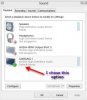
T thair Member Sep 21, 2013 #3 Hi Johnb35, thank you for reply me, i attached a picture for what i chose is that right Attachments Ashampoo_Snap_2013.09.21_05h24m42s_004_.jpg 12.1 KB · Views: 19
voyagerfan99 Master of Turning Things Off and Back On Again Staff member Sep 21, 2013 #4 Yes that is the correct device. Do you have sound now?
voyagerfan99 Master of Turning Things Off and Back On Again Staff member Sep 21, 2013 #6 Make sure the volume is turned up on the speakers in the monitor.