Since adding 2 additional sticks of DRAM, having stability issues

gillmanjr

Member
Hey guys, my rig is in my signature below. Recently I bought an additional 2 sticks of Corsair Dominator plat (2x 16GB) and added them to my system. The only reason I bought them is because someone close to me was selling them on FB marketplace for VERY cheap. Given the current market, I decided to just grab them. Anyway, after adding them to my system and re-enabling XMP, I've been having a LOT of stability problems. I've had several game crashes to desktop (more than one game) and a bunch of random windows crashes as well. I went back into my BIOS last night and disabled XMP, and since then no more issues. Is this typical of DDR5-5600? I know dual channel puts the CPU controller under more load, but something doesn't seem right here. Should I remove those 2 additional sticks and just run with a single channel with XMP enabled? Or should I leave all four sticks in and leave XMP disabled? FYI I haven't had a chance to run memtest yet but I was going to do that, is there a possibility that the 2 new sticks are faulty?
 
Most likely its because the ram aren't matched pairs with your existing. You could have stability issues because the timings aren't the same with all sticks, probably why disabling xmp fixes your issue.

I would leave it disabled and run a memtest. I just researched your motherboard and realized natively the board only supports ram up to 5600mhz without an overclock so if the ram already is 5600mhz then you don't need to enable xmp.
Should I remove those 2 additional sticks and just run with a single channel with XMP enabled?
You can still run dual channel with 2 sticks, just have to make sure they are in the specific slots of dimmA2 and dimmB2 which are the second and 4th slots from the cpu.
 
Most boards don't like running 4 sticks of DDR5 beyond JEDEC specs, although Intel IMC's might be more tolerant of that.

What was the model # of the corsair dominators you picked up, and what is the model # of the ones you had before?
 
I just researched your motherboard and realized natively the board only supports ram up to 5600mhz without an overclock so if the ram already is 5600mhz then you don't need to enable xmp.

I don't understand because if I open my BIOS it says that the memory is only running at 4800 MHz. Why would anyone enable XMP if RAM is going to run at the native speed normally?

What was the model # of the corsair dominators you picked up, and what is the model # of the ones you had before?

I don't know the exact model numbers but they are identical RAM. I had Corsair Dominator Platinum DDR5-5600 and thats what I bought, they are definitely identical. I have the box for mine but the guy I bought the other two from didn't have the box, probably part of the reason he sold them so cheap. Normally I wouldn't buy PC components without the original box, but I made an exception.
 
I don't understand because if I open my BIOS it says that the memory is only running at 4800 MHz. Why would anyone enable XMP if RAM is going to run at the native speed normally?
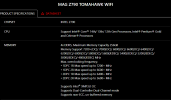
memory.png

According to that it natively supports up to 5600mhz without overclocking. So not sure why bios is only registering at 4800mhz unless the new ram is 4800mhz and not 5600mhz. When you run only your original ram, what does bios say speed is? Try using both sets independently and check to see what bios speed says. XMP is used when you use ram higher than what is natively supported. XMP is not needed when using at or below native max speed.
 
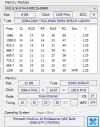
May I suggest using HWInfo to see what your computer is showing for the RAM? That way we can confirm the model/PN of the RAM, the Type and the speeds. Get info on each module.

Example:

1768319934012.png
 
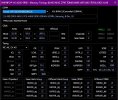
First, update your BIOS. If HWInfo is reading correctly, H0 is the original bios that launched with that board back in 2022.

XMP Timing's also not running according to that timing chart, which could be BIOS related. Get that sorted first.
 
First, update your BIOS. If HWInfo is reading correctly, H0 is the original bios that launched with that board back in 2022.

XMP Timing's also not running according to that timing chart, which could be BIOS related. Get that sorted first.

I just flashed my BIOS to the most recent version, right before I added the new DRAM sticks. It can't be right because the BIOS flash worked perfectly, there were no problems.
 
I just flashed my BIOS to the most recent version, right before I added the new DRAM sticks. It can't be right because the BIOS flash worked perfectly, there were no problems.
Hmmm... still don't work eh? I'd still keep the latest BIOS on your board for security patch purposes.

It might just not like running 4 sticks of ram then. I'm looking at the QVL list for your motherboard and there's not many on that list for running a 4 stick combo, let alone Samsung B-Die, which isn't preferred for DDR5 compared to SK Hynix chips.

DDR5's hard to run with 4 sticks. Either the IMC can't handle it, or the motherboard layout has too much losses, or both.

If you run each pair individually and they work fine, it's not the memory that has issues. I'd chalk that off as DDR5 shenanigans and either your CPU or motherboard can't handle that. Not much you can do, except to sell the extra set off, or keep that as spares for some reason.

If you really want 64gb, you'll need to grab a 2x32gb stick.
 
Back
Top