So...uhh...no power right?

esperante

New Member
Building a new comp for the first time and having some issues...
Mainly the CD drives have no power and there is no display, nor is the keyboard recognized.

here's the run down.

Processor - Phenom II X3 720 BE
MBoard - GIGABYTE GA-MA790GPT-UD3H AM3
Memory (1 stick) - CORSAIR 2GB 240-Pin DDR3 SDRAM DDR3 1333
Case - Raidmax Smilodon

I'm assuming these parts work together. Using these parts for a new computer and also reusing some old parts. The old parts worked the night before. Specifically reusing:

400 W PSU
2 CD-RW/whatever drives
2 HDD - only 1 plugged all up ATM
HIS HD 4670

Now i'm installing windows 7 so i need the CD drives to boot which they don't b/c apparently there is no power to them. There is no display to the monitor regardless whether or not the GFX card is in or i'm using the onboard video. VGA (onboard) or DVI on the Vid card make no difference. At least the fans work including the new CPU fan so at least the CPU shouldn't die. They're quite a few fans on the case and they do all work if plugged in.

help please

parts link:

CPU:
http://www.newegg.com/Product/Product.aspx?Item=N82E16819103649

MBoard:
http://www.newegg.com/Product/Product.aspx?Item=N82E16813128398

Memory:
http://www.newegg.com/Product/Product.aspx?Item=N82E16820145246
 
Most likely your power supply is bad/underrated. Doesn't the 4670 require the 6 pin power connector from the power supply? Does yours even have one?
 
The 4670 is actually really power efficient and doesn't even have an input for the 6 pin. The PSU is actually a 350 with (i think) 400 W max, but advertised as 400. Would this explain most of these problems?

Also, i think the mobo has another input for another power connector (2 x 4).
 
Is ths power supply connector on the motherboard a 20 or 24 pin connector? Do you have the cpu 4 pin connector plugged into the motherboard. The connector is usually near the processor.
 
Sounds like a weak power supply or you didnt get the standoffs under the board in the right places. Pretty sure it will run with just the 4 pin CPU power connector. Does your power supply have the 20 or 24 pin board power connector? If your just using a 20 pin and 4 pin, plus just a 400W (dont know what brand) it could be a power issue.
 
My PSU (FSP group brand) originally has a 20 pin connector and so I had to get an adapter to fit the 24 pins on the old motherboard. The PSU is from 2005. When I pulled the the power connectors out of the old mobo I did have a 4 pin connector in it as well as the converted 24 pin.

The new mobo is 24 pin and has an additional 8-pin connector. Check the mobo link and look at the ninth pic top down next to the 'ultra durable.' the 400 PSU doesn't have the 8-pin, only numerous 4 and a six for the gfx card.

Honestly i don't know what standoffs are. Mobo installation seemed pretty straightforward.
 
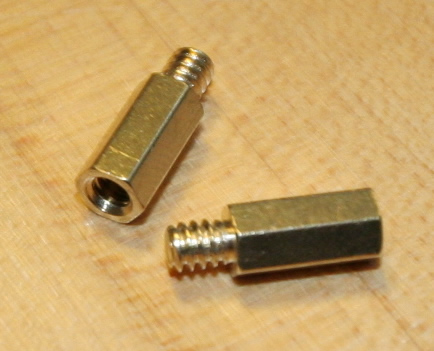
These are standoffs, they go between the case and the motherboard so it doesn't short against the case.

IMG_6805.jpg
 
A standoff is a little gold screw that screws into the case, then you screw the motherboard into the standoffs. if you isntalled the mobo directly onto the case that will cause shorting. The 4 pin CPU connector is needed or the pc will not boot at all.

Also, did you put the front panel connecters in their proper places?
 
FSP is not a bad power supply, kinda older and pretty small for that system. Seems like it would of atleast booted using the onboard though.

Might need to check the standoffs. You only put them under the holes that have the little grounded strip around them. If you have one where there is no hole it will ground out against the bottom of the board.

0,1425,i=136748,00.jpg
 
My PSU (FSP group brand) originally has a 20 pin connector and so I had to get an adapter to fit the 24 pins on the old motherboard. The PSU is from 2005. When I pulled the the power connectors out of the old mobo I did have a 4 pin connector in it as well as the converted 24 pin.

The new mobo is 24 pin and has an additional 8-pin connector. Check the mobo link and look at the ninth pic top down next to the 'ultra durable.' the 400 PSU doesn't have the 8-pin, only numerous 4 and a six for the gfx card.

Honestly i don't know what standoffs are. Mobo installation seemed pretty straightforward.

You will need one of these to convert the 4 pin to an 8 pin
 
Yeah so thats the name for those brass threaded pieces. Yeah, the mobo is definitely not touching the case panel. Its a good 1/4 inch off. These paper-esqe washers were included with the screws and I put them under the screw (sandwiched between the mobo and screw head), as opposed to maybe underneath the mobo and between the standoffs and the board.

I studied the front panel connector instructions for a good while and and those should all be in their right spots. Positives and negatives lined up. Gigabyte does a good job w/ the manual.


Regardless i don't have a 8 pin connecter and even the manual states that > 500W is needed, so yeah, its pointing in that direction. I'll prob see if i can pick up a corsair 650 or 750 W. Even the newegg pics show the missing connectors that I need.
 
Back
Top