SSD Drive question

Shane

Super Moderator
Staff member
So i plan to buy me an SSD Drive...I cannot put up with this hard drive lag anymore.

This is the one i plan to get....does it get your thumbs up?

http://www.ebuyer.com/product/225415


What i want to know is how you guys manage your SSD drives?
(for those of you that have one)

What do you have installed on your SSD for best space/performance on the SSD?

Windows + Small Apps?...
Windows + Games?

I was thinking that i should only install Windows + a few small apps such as Antivirus and maybe BC2 to the SSD?...thats what i use the most.....everything else to the spinning disk?
 
Looks good, I think it's money well spent.

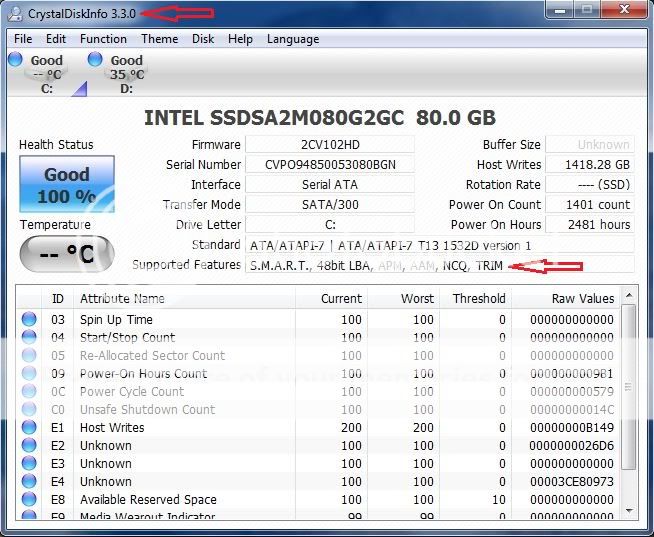
Disable automatic defrag. In msconfig disable superfetch, verify TRIM is enabled with Crystal Disk Info.

Relocate library files, (Documents, Music, Pictures, Videos, Downloads), to spinning storage. Maintain a portion of the drive empty to spread writes, such as temporary internet files, across a larger area of the drive.

On my SSD I've got Windows 7, an internet security suite, MS Word and Excel, Photo Studio, Catalyst Control Center, all of my monitoring and OCing programs and still have 48 GB free of my 74.4 or 80 GB drive, (depending on how you measure a GB). A 60 GB drive would have been plenty for me.
 
Agreed, a Win 7 install will take around 30GB with apps. Then its just about how many games you have. Win 7 btw will automatically disable defrag.
 
Got my SSD Drive :)

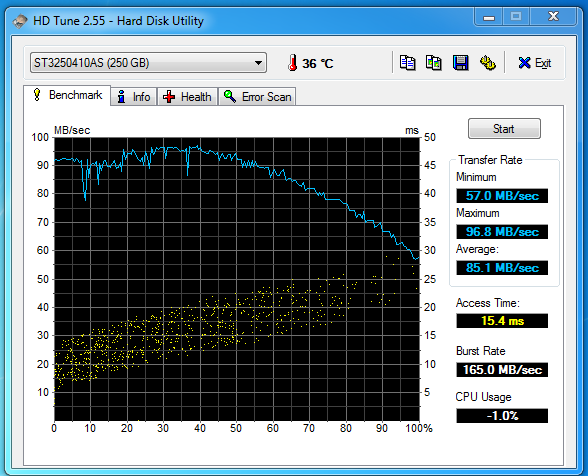
Old Seagate Barracuda 250Gb drive :)

Seagate.png


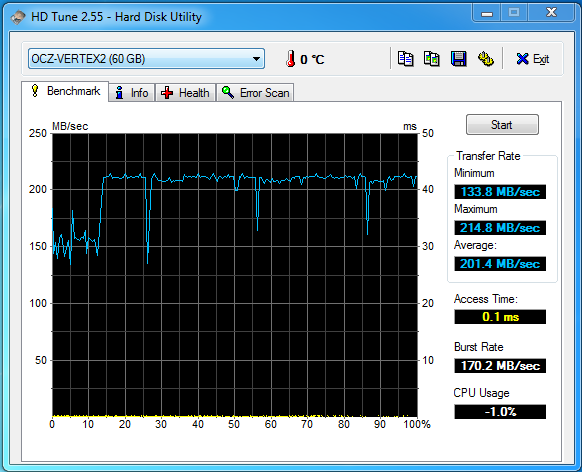
New OCZ Vertex 2 SSD :)

Vertex.png


Much better.

How do i know if Trim is enabled? anyone know...only i googled it up and apparently i have to have my HDD set as ACHI in the bios to enable Trim support,But when i enabled ACHI the system just restarted at the windows boot u screen.

Checked and my drive has the latest Firmware.
 
Last edited:
How do i know if Trim is enabled? anyone know...only i googled it up and apparently i have to have my HDD set as ACHI in the bios to enable Trim support,But when i enabled ACHI the system just restarted at the windows boot u screen.
Switching to AHCI changes the driver used to access it, windows doesn't appreciate that ;)

I have seen posts where people are able to switch them without reinstalling/repairing windows and providing the drivers. I haven't tried the below method, so if you have anything that you can't lose don't try it.

If you want to switch to AHCI after installing Windows 7, you’ll need to modify your registry and boot settings. I highly recommend to take your time to work through this Windows 7 tutorial, because AHCI has many advantages: It allows you to use hard drive features, such as NCQ (Native Command Queuing) or eSATA-Hot-Plugging, which can speed up Windows 7 if you are using a RAID drive.


1. Open regedit.exe (enter regedit.exe into search field)

2. Uncollapse the registry keys: HKEY_LOCAL_MACHINE\System\CurrentControlSet\services\msahci


3. Modify the key “Start” to “0″

Alternatively, you can download our registry tweak or insert the following text into a notepad, save it as a .reg file and start it:

Code:
Windows Registry Editor Version 5.00
[HKEY_LOCAL_MACHINE\SYSTEM\CurrentControlSet\services\msahci]
“Start”=dword:00000000

4. Next time you restart, Windows 7 will load the default drivers for AHCI (msahci.sys) and will use it for queuing SATA-controllers and their drives that run in AHCI-mode. So, the next step will be to switch your current SATA controllers from IDE to AHCI, else Windows 7 would still queue them via IDE and note via AHCI.

5. Restart and press “del” during start up to enter the BIOS.
Find your SATA-controller (read your motherboards manual for instructions) and change the mode from IDE to AHCI. Keep in mind that some motherboards don’t even support AHCI!

6. Done. You successfully switched to AHCI in Windows 7. Your disk performance can increase significantly if you are using a RAID drive and AHCI. A RAID drive is basically a combined set of two drives (of the same type and size) for better reliability/performance.


Read more: http://windows7themes.net/switch-to-ahci-after-install-windows-7.html#ixzz0xiyhg4xw
 
Cromewell your a champ!

Just done that registry edit...changed to ACHI mode in the Bios and worked,glad i didn't have to re-install windows again

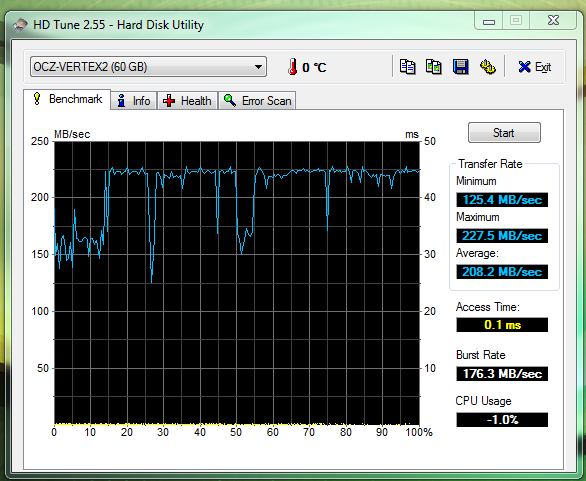
My average and maximum speeds have actualy increased a bit since changing to ACHI too :)

achi.png


Thanks :)
 
Last edited:
Didnt know about that app,Thanks il give it a try.

EDIT:That app confirms Trim is enabled on mine :)
 
Last edited:
Agreed, a Win 7 install will take around 30GB with apps. Then its just about how many games you have. Win 7 btw will automatically disable defrag.
Eh, its closer to 15GB or so running just 7, with 7, plus a couple benching apps, and SP1, im pushing about 18.9GB used on my 30gb vertex with 7 enterprise.
 
SSD's rock. I have a 40GB Vertex2 and never want to go back to a traditional HDD for my boot drive. I've tweaked Debian a bit and installed the latest kernel wich has trim support. A SSD is probably the best upgrade anyone can do.
 
SSD's rock. I have a 40GB Vertex2 and never want to go back to a traditional HDD for my boot drive. I've tweaked Debian a bit and installed the latest kernel wich has trim support. A SSD is probably the best upgrade anyone can do.

i do agree, i owned a 80 gig intel ssd and i do miss it more than anything else on the pc i used to own
 
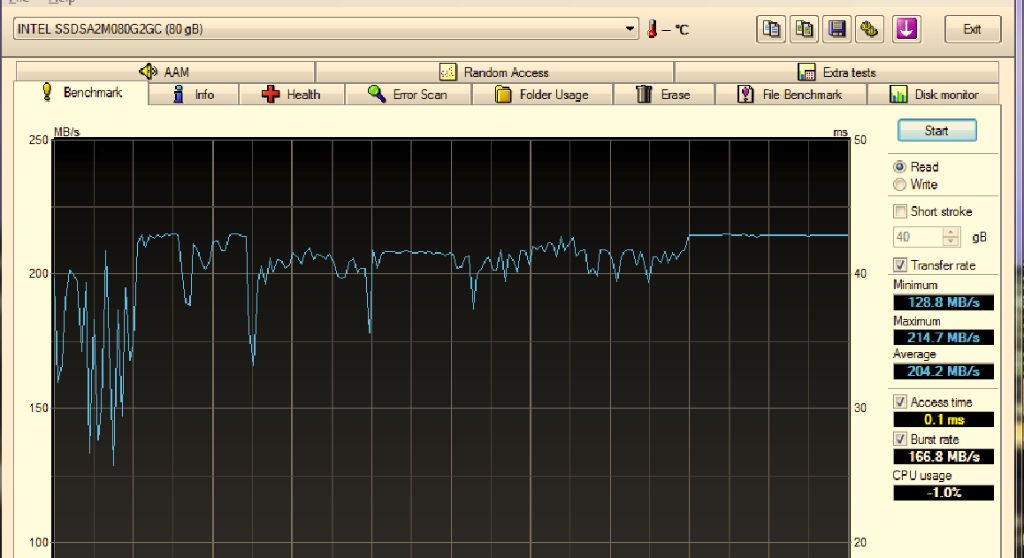
i would like to put forward my intel 80gig ssd benchmark

(this is after a few months of usage and 3/4 full)

int.png


so im guessing if i tweeked it a little after a fresh install it might be a little bit quicker than yours nevakonaza but not quick enough to warrant the extra £70 i paid for the intel

so all in all that is a dam fine ssd, i wouldnt mind getting 2 for raid0

EDIT.... dam bigfella you got 4x40gig intel ssd's running in raid. lets see some benchmarks for them suckers, erm NOW lol
 
Last edited:
hey yeah ill get that to you bro, when i have time!!! lol

but yeah, case is a bit cramped now! ssd is a big step up though right?!!
 
depends on your income right? either way worth it!! lol,

you got nice nice shit too mate, right! btw, i lived in your part of the world, v nice.... women! lol ;)
 
Back
Top