SSD Question

Metallica17

New Member
Okay so this is just a random question I though of earlier. So if I get an SSD and install Windows 7 onto that, can I install the drivers to a hard drive or does it have to go on the SSD? This might be a stupid question but I'm not familiar with SSD's and hard drives too much.
 
You mean like audio drivers, video drivers, etc? You could install them either place, but you'd probably want them on the SSD. Their small and essential. On the SSD put the OS and all essential software commonly accessed by the OS such as anti-virus + anything else that you have room for and want to open or run faster.
 
Okay yeah I guess I was just wondering what I should put on the SSD. I have never used once but I'm going to get one so it was just a thought. So just put the OS and other essentials that'll fit on the SSD.
 
Windows 7 makes it easy to move the library files, (Documents, Music, Pictures, Video), off the SSD and onto a storage HDD which is useful if you maintain large libraries. An SSD will perform better and last longer if you maintain some free space on it, (i.e. don't run it at capacity).
 
SSD
Operating System
Programs
Games
Drivers/Chipsets

HDD
Movies
Music
Downloads from operating system
Page Caching/Search Caching


Simply put anything that wont see a speed boost and that will "write" to the drive often you want to put on the HDD. If you use Firefox google tweaks to limit the writes it will do on the system. SSD is a pain when it comes to writes as only so many writes can be done per cell so limiting it will expand its life which for the premium price you pay for them is important imo.
 
SSD
Operating System
Programs
Games
Drivers/Chipsets

HDD
Movies
Music
Downloads from operating system
Page Caching/Search Caching


Simply put anything that wont see a speed boost and that will "write" to the drive often you want to put on the HDD. If you use Firefox google tweaks to limit the writes it will do on the system. SSD is a pain when it comes to writes as only so many writes can be done per cell so limiting it will expand its life which for the premium price you pay for them is important imo.

Okay but the SSD I'm going to get isn't going to be massive, and jevery said to leave free space on it so it performs better. Is a 60GB SSD good?
 
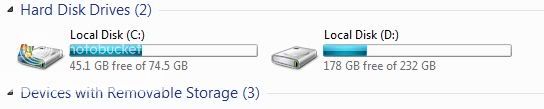
I've only used 30 GB of my 80 GB (really 74.5 GB) SSD

HDD-1.jpg


I have loaded on the SSD,
Windows 7
Catalyst Control Center
MS Office, Full Version
Norton Internet Security 2010
Various Benching and Monitoring software

I say to leave a portion empty in order to spread writes, (temp internet files, etc.), over a larger area as the individual memory cells have a limited number of write cycles before failure. How many, no one really knows. Some say that a good MLC based drive should last ten years of average use. Bottom line is that the drive will likely last longer than I care to use it, as something better will be along shortly.
 
Alright cool. I just don't want to end up with not enough space on the SSD. I just mainly want the OS and small programs I use a lot on the SSD.
 
All you should have on the SSD is the OS, Drivers, and if you are so inclined benching programs. I install all games and programs to my hard drives, and due to that i still have 9.2gb free on my 30gb vertex, with
 
All you should have on the SSD is the OS, Drivers, and if you are so inclined benching programs. I install all games and programs to my hard drives, and due to that i still have 9.2gb free on my 30gb vertex, with

Well based off what I use I could easily fit OS/Programs/Drivers on 30GB of space leaving plenty of room for 1-2 games + a 10-15GB set aside in another partition. I will admit I am so jealous of my buddy he got the X25-m and it loads games a lot faster specially Gothic 3 / Divinity II which are games I love atm :)

Makes me wish I had $200 laying around :P
 
Last edited:
Back
Top