Strange DNS entrys

Carl29

New Member
Hi,
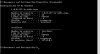
can someone please tell me what's shown on the pictures?
I've clean up the PC and afterwards I went to the command line and typed "ipconfig /displaydns" just to see, and I did found that. does that mean I've worms or virus?
I've used malwarebits, spybot, but it stills. I use BitDefender as anti virus.


thanks
Carl

(here's the screenshot and Atached you have the hijackthis log)
 

Attachments

Your HJT log looks fine to me. Try issuing 'ipconfig /flushdns'
http://www.topbits.com/how-to-flush-dns.html
Most DNS clients cache the results of name resolution requests. This means that the DNS clients will temporarily store the website names that you have been visiting lately. This process speeds up name resolution if multiple lookups are done to the same address, such as is common when browsing the web. Hence, if you visit Yahoo.com second time, the DNS client will already have the name mapped and hence will retrieve the mapping quickly.

You may also want to check your HOSTS file for malware-related entries
http://accs-net.com/hosts/how_to_use_hosts.html
Try to locate any existing hosts file on your computer:

Windows 95/98/Me c:\windows\hosts

Windows NT/2000/XP Pro c:\winnt\system32\drivers\etc\hosts

Windows XP Home c:\windows\system32\drivers\etc\hosts

(you may need administrator access for Windows NT/2000/XP)

Does that help at all?
 
You may also want to check your HOSTS file for malware-related entries
Quote:
http://accs-net.com/hosts/how_to_use_hosts.html
Try to locate any existing hosts file on your computer:

Windows 95/98/Me c:\windows\hosts

Windows NT/2000/XP Pro c:\winnt\system32\drivers\etc\hosts

Windows XP Home c:\windows\system32\drivers\etc\hosts

(you may need administrator access for Windows NT/2000/XP)
Does that help at all?

hey, I just found very starnge things around...
-Found "hosts" with a bunch of abnormal content and "hosts.20100226-200741.backup"
the "hosts" starts with:
Code:
# Copyright (c) 1993-1999 Microsoft Corp.
#
# Éste es un ejemplo de archivo HOSTS usado por Microsoft TCP/IP para Windows.
#
# Este archivo contiene las asignaciones de las direcciones IP a los nombres de
# host. Cada entrada debe permanecer en una línea individual. La dirección IP
# debe ponerse en la primera columna, seguida del nombre de host correspondiente.
# La dirección IP y el nombre de host deben separarse con al menos un espacio.
# 
#
# También pueden insertarse comentarios (como éste) en líneas individuales
# o a continuación del nombre de equipo indicándolos con el símbolo "#"
#
# Por ejemplo:
#
#      102.54.94.97     rhino.acme.com          # servidor origen
#       38.25.63.10     x.acme.com              # host cliente x

127.0.0.1       localhost
127.0.0.1				activate.adobe.com
127.0.0.1				practivate.adobe.com
127.0.0.1				ereg.adobe.com
127.0.0.1				activate.wip3.adobe.com
127.0.0.1				wip3.adobe.com
127.0.0.1				3dns-3.adobe.com
127.0.0.1				3dns-2.adobe.com
127.0.0.1				adobe-dns.adobe.com
127.0.0.1				adobe-dns-2.adobe.com
127.0.0.1				adobe-dns-3.adobe.com
127.0.0.1				ereg.wip3.adobe.com
127.0.0.1				activate-sea.adobe.com
127.0.0.1				wwis-dubc1-vip60.adobe.com
127.0.0.1				activate-sjc0.adobe.com
# Start of entries inserted by Spybot - Search & Destroy
127.0.0.1	www.007guard.com
127.0.0.1	007guard.com
127.0.0.1	008i.com
127.0.0.1	www.008k.com
127.0.0.1	008k.com
127.0.0.1	www.00hq.com
127.0.0.1	00hq.com
127.0.0.1	010402.com
127.0.0.1	www.032439.com
... ... ...... ... ...... ... ...
[B][I][U]AND GOES AND GOES[/U][/I][/B]
... ... ...... ... ...... ... ...
127.0.0.1	www.zvizuten.cn
127.0.0.1	zvizuten.cn
127.0.0.1	www.zxcsolution.com
127.0.0.1	zxcsolution.com
127.0.0.1	www.zxlinks.com
127.0.0.1	zxlinks.com
127.0.0.1	www.zxoqacar.cn
127.0.0.1	zxoqacar.cn
127.0.0.1	zyban-zocor-levitra.com
# This list is Copyright 2000-2008 Safer Networking Limited
# End of entries inserted by Spybot - Search & Destroy

[B][I][U]AND FINISH UP IN LINE 13160[/U][/I][/B]

and "hosts.20100226-200741.backup":

Code:
# Copyright (c) 1993-1999 Microsoft Corp.
#
# Éste es un ejemplo de archivo HOSTS usado por Microsoft TCP/IP para Windows.
#
# Este archivo contiene las asignaciones de las direcciones IP a los nombres de
# host. Cada entrada debe permanecer en una línea individual. La dirección IP
# debe ponerse en la primera columna, seguida del nombre de host correspondiente.
# La dirección IP y el nombre de host deben separarse con al menos un espacio.
# 
#
# También pueden insertarse comentarios (como éste) en líneas individuales
# o a continuación del nombre de equipo indicándolos con el símbolo "#"
#
# Por ejemplo:
#
#      102.54.94.97     rhino.acme.com          # servidor origen
#       38.25.63.10     x.acme.com              # host cliente x

127.0.0.1       localhost
127.0.0.1				activate.adobe.com
127.0.0.1				practivate.adobe.com
127.0.0.1				ereg.adobe.com
127.0.0.1				activate.wip3.adobe.com
127.0.0.1				wip3.adobe.com
127.0.0.1				3dns-3.adobe.com
127.0.0.1				3dns-2.adobe.com
127.0.0.1				adobe-dns.adobe.com
127.0.0.1				adobe-dns-2.adobe.com
127.0.0.1				adobe-dns-3.adobe.com
127.0.0.1				ereg.wip3.adobe.com
127.0.0.1				activate-sea.adobe.com
127.0.0.1				wwis-dubc1-vip60.adobe.com
127.0.0.1				activate-sjc0.adobe.com
 
I would delete all of those entries except for
127.0.0.1 localhost

in the hosts file and completely delete hosts.20100226-200741.backup
I don't think the adobe stuff is malicious but I think the 'z' stuff may be (I'd have to Google the entries to check) - at any rate, you don't need any of it, so I'd clear it out. ;)
 
I would delete all of those entries except for


in the hosts file and completely delete hosts.20100226-200741.backup
I don't think the adobe stuff is malicious but I think the 'z' stuff may be (I'd have to Google the entries to check) - at any rate, you don't need any of it, so I'd clear it out. ;)


there's also some other files inside the folder "\etc":
-lmhosts
-networks
-protocol
-services

are those normal?
thanks
 
Great,
I think that it's OK now.
Internet goes faster also.

Now I've this
Code:
# Copyright (c) 1993-1999 Microsoft Corp.
#
# Éste es un ejemplo de archivo HOSTS usado por Microsoft TCP/IP para Windows.
#
# Este archivo contiene las asignaciones de las direcciones IP a los nombres de
# host. Cada entrada debe permanecer en una línea individual. La dirección IP
# debe ponerse en la primera columna, seguida del nombre de host correspondiente.
# La dirección IP y el nombre de host deben separarse con al menos un espacio.
# 
#
# También pueden insertarse comentarios (como éste) en líneas individuales
# o a continuación del nombre de equipo indicándolos con el símbolo "#"
#
# Por ejemplo:
#
#      102.54.94.97     rhino.acme.com          # servidor origen
#       38.25.63.10     x.acme.com              # host cliente x

127.0.0.1       localhost
# This list is Copyright 2000-2008 Safer Networking Limited
# End of entries inserted by Spybot - Search & Destroy

and in "ipconfig /displaydns" you can check image please.

Thanks a lot
 

Attachments

  • Dibujo.JPG
    Dibujo.JPG
    33.9 KB · Views: 99
Back
Top