

Stildawn
New Member
Im a bit of a neat freak when it comes to my computer...
So anyway my vista start menu is pissing me off no end...
Mainly the All Programs part... I like to keep it neat and minimal... All the games are put into a Games subfolder, and all the apps the same etc...
But unlike XP and all other versions of Windows, Vista seems to be all wack, some folders for different things cant seem to be moved or deleted... Like you move them and they just reappear the next day...
I cant figure out why and where its getting this from, sometimes I have even deleted the said folder by exploring to its actual path in the C:\
Now the other day, for some random reason it generated a Programs subfolder which in it had another apps and games folder... A direct repeat of the apps and games folder already in the All Programs menus.... So I was pissed off and deleted this next repeat.... Only to turn my computer on today and see that my Apps folder only has two apps left in it and my Games folder only has 2 left in it... Where the hell did all the others go...
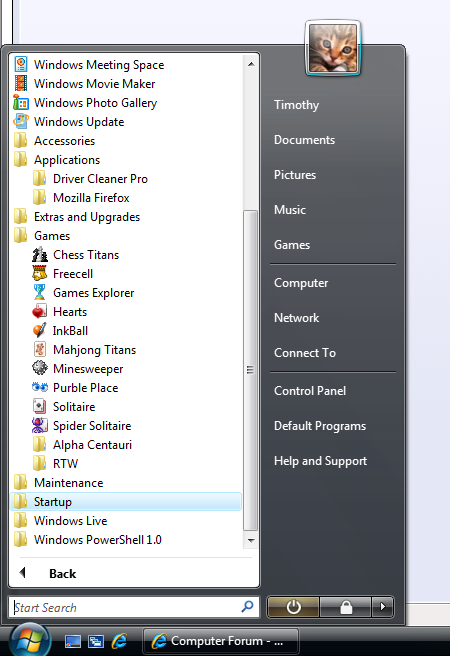
Heres a screenshot incase my rant above didnt cover it enough, both those opened subfolders used to have lots of folders for different apps and games etc... And now they are mostly gone....
Anyway to turn whatever the hell vista is doing off and have it a straight forward system like all the previous windows????
So anyway my vista start menu is pissing me off no end...
Mainly the All Programs part... I like to keep it neat and minimal... All the games are put into a Games subfolder, and all the apps the same etc...
But unlike XP and all other versions of Windows, Vista seems to be all wack, some folders for different things cant seem to be moved or deleted... Like you move them and they just reappear the next day...
I cant figure out why and where its getting this from, sometimes I have even deleted the said folder by exploring to its actual path in the C:\
Now the other day, for some random reason it generated a Programs subfolder which in it had another apps and games folder... A direct repeat of the apps and games folder already in the All Programs menus.... So I was pissed off and deleted this next repeat.... Only to turn my computer on today and see that my Apps folder only has two apps left in it and my Games folder only has 2 left in it... Where the hell did all the others go...
Heres a screenshot incase my rant above didnt cover it enough, both those opened subfolders used to have lots of folders for different apps and games etc... And now they are mostly gone....
Anyway to turn whatever the hell vista is doing off and have it a straight forward system like all the previous windows????
