
You are using an out of date browser. It may not display this or other websites correctly.
You should upgrade or use an alternative browser.
You should upgrade or use an alternative browser.
To Hot?
- Thread starter B_Wease
- Start date

salvage-this
Active Member
Not at all. That is actually quite cool.
The reason I am asking this is because I am doing everything I can to try and figure out why my video card decided to take a turn for the worst. I've had it for about 2 months and it's been AMAZING! Just yesterday I was playing a game and out of no where lines started glitching EVERYWHERE! Now I cant play any game without screen flickers or horizontal and vertical lines shooting all over the place. People have been saying it's due to over heating in my system / video card. But I've opened up the ATI overdrive and my Video Card hits 40c when I am running the game. It's all set at factory settings no over clocking at all. I don't even know how to over clock. The video card is a HIS ATI video card and I've only heard bad things about their warranty service. Any other ideas on what might be causing this issue? My RAM never reaches past 50% Usage, and my CPU never goes past 5%. Any ideas / suggestions would be greatly appreciated!
Thanks everyone!
B_Wease
Thanks everyone!
B_Wease
Also, the more I think about it, it could possibly be my ram. I only have 4gigs and here's the link of my ram
http://www.newegg.com/Product/Product.aspx?Item=N82E16820226134
It says i'm using 40% of my ram just on idle. Could it possibly be my ram.
Here are my specs
CPU- AMD PhenomII 3.8ghz Hex Core Processor
MOBO- MSI mobo, don't know the specs, its a 100.00 mobo with no on board video
Video Card- HIS AMD 5870 Turbo w/ 1g DDR5 CoD Edition
PSU - 850w
I am running Windows 7
And am currently using a 27' LCD Samsung Monitor
With everything up and going like I said I am at 40% Mem usage. Could it be that my ram got over worked when playing a game and is now toast? If so how would I find that out? Or is it in fact my video card?
http://www.newegg.com/Product/Product.aspx?Item=N82E16820226134
It says i'm using 40% of my ram just on idle. Could it possibly be my ram.
Here are my specs
CPU- AMD PhenomII 3.8ghz Hex Core Processor
MOBO- MSI mobo, don't know the specs, its a 100.00 mobo with no on board video
Video Card- HIS AMD 5870 Turbo w/ 1g DDR5 CoD Edition
PSU - 850w
I am running Windows 7
And am currently using a 27' LCD Samsung Monitor
With everything up and going like I said I am at 40% Mem usage. Could it be that my ram got over worked when playing a game and is now toast? If so how would I find that out? Or is it in fact my video card?
Here is the link to my mobo, The RAM says its 1.65v or something like that. is that too much for this mobo?
http://www.frys.com/product/6250080?site=sr:SEARCH:MAIN_RSLT_PG
http://www.frys.com/product/6250080?site=sr:SEARCH:MAIN_RSLT_PG
Here is whats going on.
http://www.computerforum.com/attachment.php?attachmentid=4131&stc=1&d=1289108987
http://www.computerforum.com/attachment.php?attachmentid=4131&stc=1&d=1289108987
Attachments
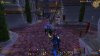
Sorry for posting so many posts. Just trying to figure out what's going on. I also found out that after I auto tuned my ATI Overdrive it set my GPU to 875MHz and my High Performance Memory Clock Settings to 1225MHz and my fan to 30%. When I started up wow my activity jumped to almost 40 percent, not sure why a high performance Video card like the one I have would jump to 40% on WoW. Also the temp started jumping from 40c all the way up to 60c. I'm not sure if this info will help decide what you guys think the problem is but I thought it couldn't hurt to post it.

Aastii
VIP Member
Your PSU should be fine, it is a decent unit, and your clocks are stock for your card. 40% usage in WoW is about right for your card, as are the temperatures.
What you are seeing is a type of artifacting, which is a problem usually with the video card, or with the card getting a lack of power, which as your power supply is more than capable of running your card, I doubt it is that.
If you can't test the card in another system, Istart an RMA process with HIS. Copied and pasted directly from their site:
Take pictures of the card BEFORE sending it off, so if it gets damaged during posting, or if HIS damage it themselves, you have proof that the card had no physical flaws when you last had it
What you are seeing is a type of artifacting, which is a problem usually with the video card, or with the card getting a lack of power, which as your power supply is more than capable of running your card, I doubt it is that.
If you can't test the card in another system, Istart an RMA process with HIS. Copied and pasted directly from their site:
Warranty Replacement (RMA) Service
To initiate the RMA process you must first fill out the following request form:
http://www.lexypacific.com/forms/rma.pdf
Then fax, email or mail the form with a proof of purchase to Lexy Pacific.
Lexy Pacific
Mail To: RMA Dept.
Lexy Pacific 611 Vaqueros Ave.
Sunnyvale CA. 94085
Tel: (408) 331-8818
Fax: (408) 331-8851
Email: [email protected]
Customer Service Hours: 9:00AM - 6:00PM (Pacific Time)
If you cannot find your proof to purchase please contact the company you purchased the product from.
You must then wait to receive an RMA number from us, which you will use to identify the product at the post office. Be aware that you will only have to pay for the shipping to get the package to us. Ship only the defective product. keep all accessories.
The turn-around time is 2-4 weeks from the date we receive the package. Please be aware that any physical damage or mishandling to the product will result in a voided warranty and the product will be shipped back to you without any repairs.
Take pictures of the card BEFORE sending it off, so if it gets damaged during posting, or if HIS damage it themselves, you have proof that the card had no physical flaws when you last had it
Also I want to get a video card for the time being so i'm not with out one.
If I were to get this video card
http://www.newegg.com/Product/Produ...4150506&cm_re=6870_ATI-_-14-150-506-_-Product
Would it be able to x-fire with this video card?
http://www.amazon.com/HIS-Eyefinity...2?ie=UTF8&s=electronics&qid=1289157673&sr=8-2
Thanks Guys!
If I were to get this video card
http://www.newegg.com/Product/Produ...4150506&cm_re=6870_ATI-_-14-150-506-_-Product
Would it be able to x-fire with this video card?
http://www.amazon.com/HIS-Eyefinity...2?ie=UTF8&s=electronics&qid=1289157673&sr=8-2
Thanks Guys!