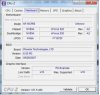
hello, about 3 years ago i got a computer from my friend, he said there was a problem with the internet on it and he had bought a new one. He doesnt know much about computers so thats all the info i got from him.
I have not bothered to fix it until now, and i can not find the problem.
I open Everest home edition and it says the motherboard is unknown. I have tryed to reinstall the drivers and reformat the computer and installing windows xp/vista and 7 in 32bit and 64bit but with no result.
The internet port on the motherboard is nowhere to be found on the computer settings, the led light is lit green at all times.
I have tested with 2 PCI network cards, with the first one when i conect the cable the green light comes on but then says the network cable is unplugged. with the 2nd the light only becomes orange..
I have also tryed with a wireless usb adapter and that works but then after 5-10mins it stops and says network limited.
I am not to good with computers, so i was guessing the unknown motherboard problem is the reason why my internet isnt working. Any ideas?
The mother board is a Jetway M26gta-dg with an AMD athlon 64 x2 dual core processor 4200+ and 2gb ram.
Thanks Adam
I have not bothered to fix it until now, and i can not find the problem.
I open Everest home edition and it says the motherboard is unknown. I have tryed to reinstall the drivers and reformat the computer and installing windows xp/vista and 7 in 32bit and 64bit but with no result.
The internet port on the motherboard is nowhere to be found on the computer settings, the led light is lit green at all times.
I have tested with 2 PCI network cards, with the first one when i conect the cable the green light comes on but then says the network cable is unplugged. with the 2nd the light only becomes orange..
I have also tryed with a wireless usb adapter and that works but then after 5-10mins it stops and says network limited.
I am not to good with computers, so i was guessing the unknown motherboard problem is the reason why my internet isnt working. Any ideas?
The mother board is a Jetway M26gta-dg with an AMD athlon 64 x2 dual core processor 4200+ and 2gb ram.
Thanks Adam