Upgrade or buy new desktop?

Supes03

New Member
I was planning to get a brand new desktop computer, but I'm not sure if i want to yet. If i have to upgrade a lot of parts in my old computer to play current games, I want to just buy a brand new computer. The specs of my current computer:

CPU: Intel Core i5 2500 3.3GHz
M/B: AsusTek SandyBridge Model #P8H61-M PLUS2
RAM: 4GB (only able to use 3.49GB)
Local Disk Drive (C: ) 465GB
VGA: Nvidia Geforce GT 440
 
Last edited:
Your looking at the least more ram and a better video card. What model of power supply are you using? Should have at least 8gb of ram. What games are you wanting to play?
 
Your looking at the least more ram and a better video card. What model of power supply are you using? Should have at least 8gb of ram. What games are you wanting to play?
I'm not sure what kind of model I'm using, but I'll try to find out. So how long do you think the motherboard and cpu will last? Will i just have to keep on upgrading the graphics card as the years pass? When i go to control panel then into the system, I'm able to see what kind of cpu or windows my computer is using. It says that i have 4GB of ram but then next to it, it says i can only use 3.49GB of the ram. I added 2GB of ram about 2 years ago because i thought i didn't have much ram. I was hoping to have 4GB of ram.

One more thing, when i turn on the computer it takes about 7 to 8 min to completely finish loading up which i really hate. Is there any way to fix that, or is there just nothing i can do because it's to old. Sorry but how do i find out the model of the power supply that the computer is using? Thank you.
 
Last edited:
Sorry but how do i find out the model of the power supply that the computer is using?

Open the case and look for a model listed on the side of it.
So how long do you think the motherboard and cpu will last?

Usually years anymore providing no power surges have been happening or power supply doesn't go pop.
Will i just have to keep on upgrading the graphics card as the years pass?

Thats why I asked what games you play. Once we know that, we can tell how good of a video card you need which determines what power supply is needed to push the card.
One more thing, when i turn on the computer it takes about 7 to 8 min to completely finish loading up which i really hate. Is there any way to fix that, or is there just nothing i can do because it's to old.

This could be caused by a few things.

1. Malware/rootkits
2. Failing hard drive
3. Too many programs loading at bootup
4. Faulty memory
5. Corrupt windows

Lets start by doing the following procedure and post the requested logs for me.

1.

Please download AdwCleaner by Xplode onto your Desktop.


•Please close all open programs and internet browsers.
•Double click on adwcleaner.exe to run the tool.
•Click on Scan.
•After the scan you will need to click on clean for it to delete the adware.
•Your computer will be rebooted automatically. A text file will open after the restart.
•Please post the content of that logfile in your reply.
•You can find the logfile at C:\AdwCleaner[Sn].txt as well - n is the order number.

2.

Please download Junkware Removal Tool to your desktop.

•Shutdown your antivirus to avoid any conflicts.
•Very important that you run the tool in this manner:
Right-mouse click JRT.exe and select Run as administrator
Do NOT just double-click it.
•The tool will open and start scanning your system.
•Please be patient as this can take a while to complete.
•On completion, a log (JRT.txt) is saved to your desktop and will automatically open.
•Post the contents of JRT.txt in your next message.

3.

Please download Malwarebytes' Anti-Malware and save it to your desktop.
  • Double-click mbam-setup.exe and follow the prompts to install the program.
  • At the end, be sure a checkmark is placed next to
    • Update Malwarebytes' Anti-Malware
    • and Launch Malwarebytes' Anti-Malware
  • then click Finish.
  • If an update is found, it will download and install the latest version. Please keep updating until it says you have the latest version.
  • Once the program has loaded, select Perform quick scan, then click Scan.
  • When the scan is complete, click OK, then Show Results to view the results.
  • Be sure that everything is checked, and click Remove Selected.
  • A log will be saved automatically which you can access by clicking on the Logs tab within Malwarebytes' Anti-Malware

If for some reason Malwarebytes will not install or run please download and run Rkill.scr, Rkill.exe, or Rkill.com. If you are still having issues running rkill then try downloading these renamed versions of the same program.

EXPLORER.EXE
IEXPLORE.EXE
USERINIT.EXE
WINLOGON.EXE

But DO NOT reboot the system and then try installing or running Malwarebytes. If Rkill (which is a black box) appears and then disappears right away or you get a message saying rkill is infected, keep trying to run rkill until it over powers the infection and temporarily kills it. Once a log appears on the screen, you can try running malwarebytes or downloading other programs.

Please post the log that Malwarebytes displays on your screen.

4.

Download OTL to your Desktop


•Double click on the icon to run it. Make sure all other windows are closed and to let it run uninterrupted.
•Click on Minimal Output at the top
•Click the Quick Scan button. Do not change any settings unless otherwise told to do so. The scan wont take long.
◦When the scan completes, it will open two notepad windows. OTL.Txt and Extras.Txt. These are saved in the same location as OTL. Just post the OTL.txt file in your reply.

Then post the logs from the following 4 programs.

1. Adwcleaner
2. Junkware removal tool
3. Malwarebytes
4. OTL

 
Open the case and look for a model listed on the side of it.


Usually years anymore providing no power surges have been happening or power supply doesn't go pop.


Thats why I asked what games you play. Once we know that, we can tell how good of a video card you need which determines what power supply is needed to push the card.
I want to be able to play these games. Arma 2, DayZ SA, Killing Floor 2, Star Wars Battlefront (2015), and maybe Tom Clancy's Division which is not out yet.

When I wrote the type of Motherboard I have(AsusTek) there was no SandyBridge written next to it. It was actually written next to the cpu i have. Intel Core i5 2500 Code name: SandyBridge.

I won't be able to scan the computer with each virus program you told me to download. It's pretty late here, so I will do this tomorrow and tell you about the results. Did you want me to download each program you've listed?
 
Last edited:
Did you want me to download each program you've listed?

Download and run each program and post the logs.

Recommended requirements for some of those games is a gtx 960 or R9 280. The 280 will require a 550 watt power supply while the 960 will work fine on a 500 watt psu.
 
Download and run each program and post the logs.

Recommended requirements for some of those games is a gtx 960 or R9 280. The 280 will require a 550 watt power supply while the 960 will work fine on a 500 watt psu.
Malwarebytes:

Malwarebytes Anti-Malware
www.malwarebytes.org

Scan Date: 2015-12-13
Scan Time: 오후 6:48
Logfile:
Administrator: Yes

Version: 2.2.0.1024
Malware Database: v2015.12.13.03
Rootkit Database: v2015.12.07.01
License: Trial
Malware Protection: Enabled
Malicious Website Protection: Enabled
Self-protection: Disabled

OS: Windows 7 Service Pack 1
CPU: x86
File System: NTFS
User: kim

Scan Type: Hyper Scan
Result: Completed
Objects Scanned: 298815
Time Elapsed: 9 min, 42 sec

Memory: Enabled
Startup: Enabled
Filesystem: Disabled
Archives: Enabled
Rootkits: Disabled
Heuristics: Enabled
PUP: Enabled
PUM: Enabled

Processes: 0
(No malicious items detected)

Modules: 0
(No malicious items detected)

Registry Keys: 4
PUP.Optional.Conduit, HKU\S-1-5-21-2950306246-3557167193-3990953342-1001\SOFTWARE\APPDATALOW\SOFTWARE\ConduitSearchScopes, Quarantined, [0c8bbce8b5d6e1552ac9830643c003fd],
PUP.Optional.PriceGong, HKU\S-1-5-21-2950306246-3557167193-3990953342-1001\SOFTWARE\APPDATALOW\SOFTWARE\PriceGong, Quarantined, [9601d9cb8ffcc1757bc6258644bf38c8],
PUP.Optional.Conduit, HKU\S-1-5-21-2950306246-3557167193-3990953342-1004\SOFTWARE\APPDATALOW\SOFTWARE\ConduitSearchScopes, Quarantined, [3a5dd4d082092016d3201673e51e9868],
PUP.Optional.PriceGong, HKU\S-1-5-21-2950306246-3557167193-3990953342-1004\SOFTWARE\APPDATALOW\SOFTWARE\PriceGong, Quarantined, [4156d9cb43485adc65dccae1679cfd03],

Registry Values: 1
Trojan.Agent.Gen, HKLM\SOFTWARE\MICROSOFT\WINDOWS\CURRENTVERSION\RUN|A10421F1, C:\Windows\A10421F1\svchsot.exe, Quarantined, [f0a7c9dbb8d3092d3e1cf341bb48af51]

Registry Data: 0
(No malicious items detected)

Folders: 1
PUP.Optional.SweetIM, C:\Users\kim\AppData\Local\Google\Chrome\User Data\Default\External Extensions\{EEE6C373-6118-11DC-9C72-001320C79847}, Quarantined, [5b3cabf9c0cb6cca92ef8631c73cbb45],

Files: 2
PUP.Optional.SweetIM, C:\Users\kim\AppData\Local\Google\Chrome\User Data\Default\External Extensions\{EEE6C373-6118-11DC-9C72-001320C79847}\SweetNT.crx, Quarantined, [5b3cabf9c0cb6cca92ef8631c73cbb45],
PUP.Optional.SweetIM, C:\Users\kim\AppData\Local\Google\Chrome\User Data\Default\External Extensions\{EEE6C373-6118-11DC-9C72-001320C79847}\SweetFB.crx, Quarantined, [5b3cabf9c0cb6cca92ef8631c73cbb45],

Physical Sectors: 0
(No malicious items detected)


(end)
 
Download and run each program and post the logs.

Recommended requirements for some of those games is a gtx 960 or R9 280. The 280 will require a 550 watt power supply while the 960 will work fine on a 500 watt psu.
I opened the lid to the side of the computer, and there was no name of the power supply.

It still takes 6 minutes and 30 second to finish loading everything. It was my mistake that i said it took 7 to 8min to load up; it was more like 6min. Anyway there is no change.
 
Last edited:
Download and run each program and post the logs.

Recommended requirements for some of those games is a gtx 960 or R9 280. The 280 will require a 550 watt power supply while the 960 will work fine on a 500 watt psu.
 

Attachments

Last edited:
OK then... Still majorly infected. Please run the following. In order.

1.

Please download and run TDSSkiller

When the program opens, click on the start scan button.

tdssstartscan_zps32a151cd.jpg


TDSSKiller will now scan your computer for the TDSS infection. When the scan has finished it will display a result screen stating whether or not the infection was found on your computer. If it was found it will display a screen similar to the one below.

2663-2-eng.png


To remove the infections simply click on the Continue button and TDSSKiller will attempt to clean them or remove them.

After trying to clean them it will pop up with the results of the scan and its actions.

2663_3_en.png


Please reboot the system if asked to do so.

After running there will be a log that will be located at the root of your c:\ drive labeled tdsskiller with a series of numbers after it example, C:\TDSSKiller.2.4.7_23.07.2010_15.31.43_log.txt

Please open the log and copy and paste it back here.

2.

Download and Run ComboFix
If you already have Combofix, please delete this copy and download it again as it's being updated regularly.
  • Download this file here :

    Combofix

  • When the page loads click on the blue combofix download link next to the BleepingComputer Mirror.
  • Save the file to your windows desktop. The combofix icon will look like this when it has downloaded to your desktop.

    cf-icon.jpg
  • We are almost ready to start ComboFix, but before we do so, we need to take some preventative measures so that there are no conflicts with other programs when running ComboFix. At this point you should do the following:

  • Close all open Windows including this one.
  • Close or disable all running Antivirus, Antispyware, and Firewall programs as they may interfere with the proper running of ComboFix. Instructions on disabling these type of programs can be found here.
    Once these two steps have been completed, double-click on the ComboFix icon found on your desktop. Please note, that once you start ComboFix you should not click anywhere on the ComboFix window as it can cause the program to stall. In fact, when ComboFix is running, do not touch your computer at all. The scan could take a while, so please be patient.
  • Please click on I agree on the disclaimer window.
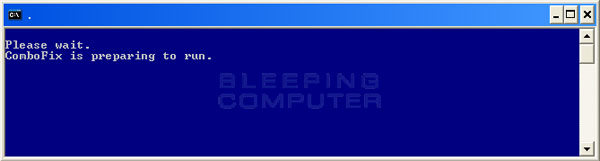
  • ComboFix will now install itself on to your computer. When it is done, a blue screen will appear as shown below.

    cf-preparing.jpg

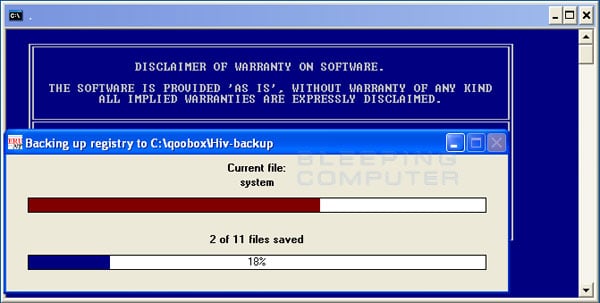
  • ComboFix is now preparing to run. When it has finished ComboFix will automatically attempt to create a System Restore point so that if any problems occur while using the program you can restore back to your previous configuration. When ComboFix has finished creating the restore point, it will then backup your Windows Registry as shown in the image below.

    erunt.jpg

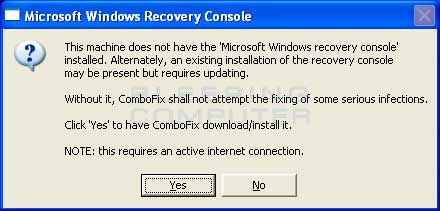
  • Once the Windows Registry has finished being backed up, ComboFix will attempt to detect if you have the Windows Recovery Console installed. If you already have it installed, you can skip to this section and continue reading. Otherwise you will see the following message as shown below:

    recovery-console-prompt.jpg

  • At the above message box, please click on the Yes button in order for ComboFix to continue. Please follow the steps and instructions given by ComboFix in order to finish the installation of the Recovery Console.
  • Please click on yes in the next window to continue scanning for malware.
  • ComboFix will now disconnect your computer from the Internet, so do not be surprised or concerned if you receive any warnings stating that you are no longer on the Internet. When ComboFix has finished it will automatically restore your Internet connection.
  • ComboFix will now start scanning your computer for known infections. This procedure can take some time, so please be patient.
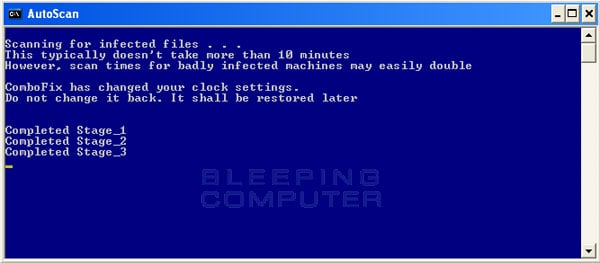
  • While the program is scanning your computer, it will change your clock format, so do not be concerned when you see this happen. When ComboFix is finished it will restore your clock settings to their previous settings. You will also see the text in the ComboFix window being updated as it goes through the various stages of its scan. An example of this can be seen below.

    still-scanning-clockchanges.jpg

  • When ComboFix has finished running, you will see a screen stating that it is preparing the log report.
  • This can take a while, so please be patient. If you see your Windows desktop disappear, do not worry. This is normal and ComboFix will restore your desktop before it is finished. Eventually you will see a new screen that states the program is almost finished and telling you the programs log file, or report, will be located at C:\ComboFix.txt.
  • When ComboFix has finished, it will automatically close the program and change your clock back to its original format. It will then display the log file automatically for you.
  • Now you just click on the edit menu and click on select all, then click on the edit menu again and click on copy. Then come to the forum in your reply and right click on your mouse and click on paste.

If for some reason, if you try to run a program or open a file and you get an error message saying "illegal operation attempted on a registry key that has been marked for deletion", please just reboot your pc and you'll be fine.

3.

Also need you to post a log that combofix produces but doesn't automatically show you. Please navigate to C:\Qoobox and in that folder will be a file named add-remove programs.txt. Open that file and copy and paste the contents back here.


In your next reply please post:
The Tdsskiller log
The Combofix log
The add-remove programs list
 
Also, are you using a 32 bit version of Windows? I'm mainly curious due to the reserved space although that could be allocated to the iGPU still if it wasn't explicitly disabled in BIOS.

It might be more convenient to wipe the drive and install a 64 bit variant with a fresh format.
 
OK then... Still majorly infected. Please run the following. In order.
Hi. I think the last program is almost done scanning the computer. I want to clarify something. Once i pressed the power button to turn the computer on, and timed it exactly then how long it took to load everything, it took about 6 minutes and 30 seconds as i said earlier. When i timed the computer when it was almost about to transition to the desktop and i waited for it to load everything, it took about 5 minutes and 14 seconds. I scanned the computer anyway even if it's not that big of a problem as I stated it was to be.

Oh yeah and this was when I timed it before i scanned with the last two programs you told me to scan with.
 
Last edited:
Also, are you using a 32 bit version of Windows? I'm mainly curious due to the reserved space although that could be allocated to the iGPU still if it wasn't explicitly disabled in BIOS.

It might be more convenient to wipe the drive and install a 64 bit variant with a fresh format.
Yes i think i am using 32 bit version. I'm not sure what you're talking about when you mentioned about reserved space. How do i install a 64 bit varient then?
 
Yes you are using the 32 bit version of the OS, hence why it says x86 after windows 7.

In order to install the 64 bit version, you would have to backup your personal data, wipe the drive and install 64 bit version. Then reinstall programs and transfer your data back. You have been severely infected though. Have you ran tdsskiller yet?
 
Yes you are using the 32 bit version of the OS, hence why it says x86 after windows 7.

In order to install the 64 bit version, you would have to backup your personal data, wipe the drive and install 64 bit version. Then reinstall programs and transfer your data back. You have been severely infected though. Have you ran tdsskiller yet?
Severely infected? Really? So you did take a look at the logs that i posted now? The only way for it to load up faster is to wipe everything and install the 62 bit version? Yes I let tdsskiller run on the computer.
 
Do you feel comfortable with the process of installing the 64 bit version? I still have to go through the combofix log, there are some stuff to be removed yet. I'm on my way to bed and will look over the log when I get home from work tomorrow as my mind will be fresh. What about the add-remove programs list? I want to make sure you don't have any programs installed that may be causing issues as well.

There is definitely an issue with it taking that long to finish loading windows.

Also, now that combofix has ran, could you rerun the OTL program and post a new log for me. Thanks.
 
Do you feel comfortable with the process of installing the 64 bit version? I still have to go through the combofix log, there are some stuff to be removed yet. I'm on my way to bed and will look over the log when I get home from work tomorrow as my mind will be fresh. What about the add-remove programs list? I want to make sure you don't have any programs installed that may be causing issues as well.

There is definitely an issue with it taking that long to finish loading windows.

Also, now that combofix has ran, could you rerun the OTL program and post a new log for me. Thanks.
If it will really improve the performance of my computer, i might try to install the 64 bit version. Backing up and transferring my personal data, and reinstalling the programs sounds kind of difficult though. Okay, I will run the OTL program once more.
 

Attachments

Do you feel comfortable with the process of installing the 64 bit version? I still have to go through the combofix log, there are some stuff to be removed yet. I'm on my way to bed and will look over the log when I get home from work tomorrow as my mind will be fresh. What about the add-remove programs list? I want to make sure you don't have any programs installed that may be causing issues as well.

There is definitely an issue with it taking that long to finish loading windows.

Also, now that combofix has ran, could you rerun the OTL program and post a new log for me. Thanks.
Here is the most recent OTL log. Thank you.
 

Attachments

Back
Top