Upgraded hardware, now Windows wont load

The Russ Bus

New Member
I know, Im a noob. I got my new parts from the Egg last night and put everything together. Upgraded my old Intel based socket 478 machine to a new amd board and 5000+ AM2 processor. I got a new mobo, cpu, and memory. Everything else including hdd was from the old rig. Everything works but when Windows tries to load, it freezes half way through the load screen and resets the machine. I loaded windows fine in safe mode, installed a few new drivers from the mobo cd, everything was good.
Im thinking its hanging on one of the drivers from the old hardware? What do I do?
 
yeah, i dont think its the old drivers. it sounds like your power supply.
what are the specs for your rig?
also wattage, voltage, and amps on your power supply? (should be on the side of the power supply)
 
Power suply is 500w and fairly new, no problems with it until I put new mobo in. I can also change bios settings and all that. Just wont load windows normaly. I was able to run in safe mode, and i ran the repair utility off the windows cd.
Im going to try and load linux from the live cd tonight and see what happens.
 
If you swap boards out it is always better to do a clean install. It can be done but you should have uninstalled all your old drivers and uninstalled some devices before you swaped everything out, but its kinda past that now. You can just do a repair install. But a Clean install would be better.
 
If you swap boards out it is always better to do a clean install. It can be done but you should have uninstalled all your old drivers and uninstalled some devices before you swaped everything out, but its kinda past that now. You can just do a repair install. But a Clean install would be better.


I ran the repair install off the WinXP CD. Same problem. Ive got my winblows set up just how I like in darnit, I dont wanna clean install!
 
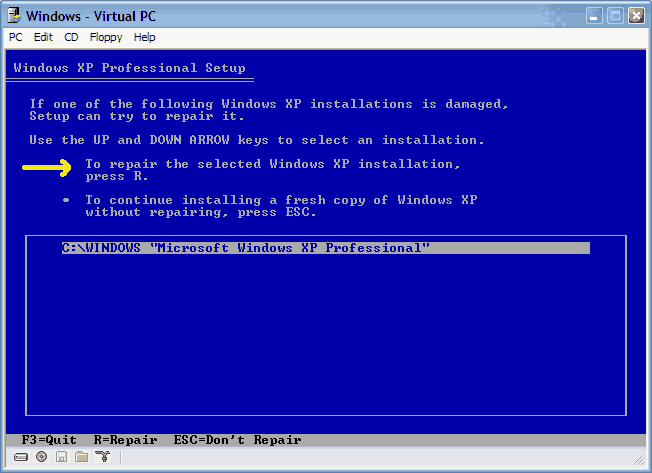
Not talking about the repair utility. Skip the first repair where you hit R. If you let it go on to the harddrive setup page theres another repair option at the bottom.
 
Yes from booting from the XP cd. Skip the first time it says hit R for repair. Let it go on to your harddrive set up page then pick R for repair

4.gif
 
Back
Top