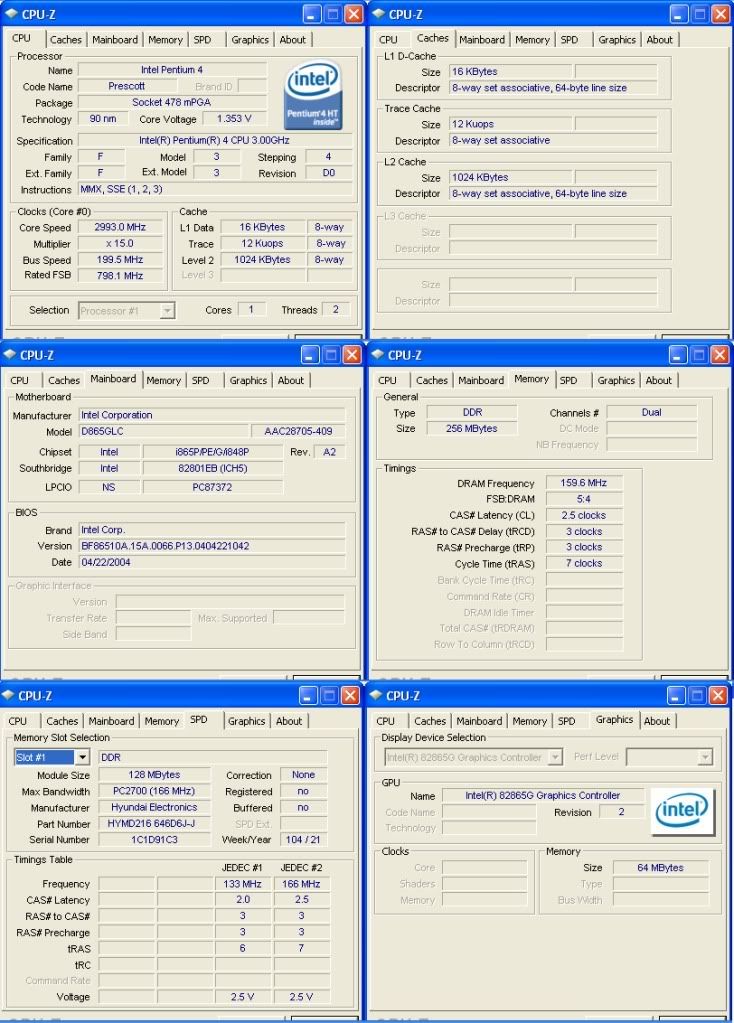
The pic below pretty much tells you what all I have.I know I mainly just need to look for ddr 184 pin dimm.But performancewise,what do I need to look for?thanks for youre input!I looked around & can't relly find much info.
Actually it would be better to give us the specific model of computer you have so we can see what ram speed it can handle. If its an OEM computer we need the brand and model number or if its a custom built, we need the model of the motherboard.
EDIT: Never mind, here are your memory specs. You can run ddr400 in that system.
It depends what kind of upgrade you want, but for pretty much anything your current 256MB will significantly slow down your computer. I see why you want to upgrade . Anyways, in today's world you'll want at least 1+ gigs of RAM, so if I were you I'd go with this: http://www.newegg.com/Product/Product.aspx?Item=N82E16820231036
It's fast, it gets great reviews, it's by a good brand, and I've personally been using it for a few months now sandwiched between two other ddr modules.
EDIT: I didn't see your title. Sorry about the 1GB thing. You may still want to get a 2+GB module from Gskill, though. Some other brands that I think are good are Corsair, Kingston, and Patriot.
I would say that they would work, but high density can be a problem in the older motherboards. I would just go with one of these from newegg, garanteed to work with your motherboard.
I would say that they would work, but high density can be a problem in the older motherboards. I would just go with one of these from newegg, garanteed to work with your motherboard.
Thanks john.I went ahead & got 2 G.SKILL Value 1GBs for now,the one spynoodle listed earlier.http://www.newegg.com/Product/Produc...82E16820231036
Hope it works good.
Also that link you gave me on my motherboard says this.
Remove the AGP video card before installing or upgrading memory to avoid interference with the memory retention mechanism.
To be fully compliant with all applicable DDR SDRAM memory specifications, the board should be populated with DIMMs that support the Serial Presence Detect (SPD) data structure. This allows the BIOS to read the SPD data and program the chipset to accurately configure memory settings for optimum performance. If non-SPD memory is installed, the BIOS will attempt to correctly configure the memory settings, but performance and reliability may be impacted or the DIMMs may not function under the determined frequency.
Were would I find the AGP vid card on my board?I removed a ram earlier when I was checking what kind it was,could I have messed somthing up?My computer startsup quick & runs ok.So I guess its ok.But sometimes I get a glitch or freeze.Could be all the updating on my antivirus software & such small memory im guessing.
Thanks for using the RAM I listed! It seemed like the best deal for a 1GB stick from a good brand name when I bought it. I figured 81% 5-star reviews couldn't lie. Hope you like it!
Edit: Also, I'd like to add that when you add them, determine if they're running in dual-channel. It seems like you currently have two 128MB modules, and if you bought two of the Gskill modules, then you probably have two empty slots on your motherboard, right? If that's true, then when you add the two new modules into the two new slots, just check in CPUz to make sure that they're both running in dual-channel. Dual-channel mode makes your memory run faster, so it will increase performance in that mode.

 ?thanks for youre input!I looked around & can't relly find much info
 .
.


 . Anyways, in today's world you'll want at least 1+ gigs of RAM, so if I were you I'd go with this:

 Hope you like it!