
dragoon38900
New Member
Hello all. I am currently planning to finally upgrade my computer. Basically, I need a faster computer, larger disk size, more ram, the works. I need it so that I can start an animation that my group is currently trying to complete (also Ive always wanted to try new games...) . On my current system, Im using a Amd Duran (1.3 Ghz), 256mb ram, a wopping 8 gigs of hardrive space (being sarcastic here), and only god knows what video card i use. Basically, its old (yes, laugh at it) and this wouldnt really be an "upgrade", more like a "replacment". I need a system that can run programs like Adobe Premiere Pro, Photoshop, Image Ready, etc, all at almost the same time. Also, it should be able to handle the new games out there.
First off, Im not really a computer hardware kind of guy, so please bare with my ignorance of the whole topic...
Ok, I have a budget of a maximum of $1100, but i REALLY dont want to spend it all. I did some research, and Ive come up with this system:
http://www.newegg.com/Product/Product.asp?Item=N82E16819103562 - PROCESSOR: AMD Athlon 64 X2 3800 -$295
http://www.newegg.com/Product/Product.asp?Item=N82E16813131530 - Motherboard: ASUS A8N-E Socket 939 NVIDIA nForce4 Ultra ATX AMD - $92.99
http://www.newegg.com/Product/Product.asp?Item=N82E16822136009 - Hard Drive: Western Digital Caviar RE WD1600YD 160GB 7200 RPM 16MB Cache Serial ATA150 -$85
http://www.newegg.com/Product/Product.asp?Item=N82E16820145527 - Ram: CORSAIR ValueSelect 2GB (2 x 1GB) 240-Pin DDR2 SDRAM Unbuffered DDR2 533 (PC2 4200) Dual Channel Kit System Memory - $150
http://www.newegg.com/Product/Product.asp?Item=N82E16814130275 - Video Card: eVGA 256-A8-N507 Geforce 7800GS 256MB 256-bit GDDR3 AGP 4X/8X -$284.99
Total - $907.98
Is this a good system? Am I missing anything? Is getting the 7800 worth it (for an example, a 6800 still has 256 mb...)? How about the dual cores? Do these seem compatible with each other? Also, would this system make a noise problem? Are there things that I should be aware of before buying anything? Is getting more hard drive space worth it for making animations (not 3d), but I guess this question is pretty much based on the person... Is getting 2 gigs of ram worth the trouble? (I heard that getting 4 gigs of ram shows little difference nowadays compared to 2 gigs, is this true?)
If there are better brands that would give more bang for the buck, please suggest them. This is my first attempt to build a computer, so please excuse my lack of knowledge... Im just not experianced with the new technology, as all my computers (im upgrading my crappiest one, btw....one of them is pretty good actually, a dell though, but its not really "mine", so...) are pretty much old.
Edit (thanks to filip-matijevic and ceewi1 for the input) :
http://www.newegg.com/Product/Product.asp?Item=N82E16819103562 - PROCESSOR: AMD Athlon 64 X2 3800 -$295
http://www.newegg.com/Product/Product.asp?Item=N82E16813131530 - Motherboard: ASUS A8N-E Socket 939 NVIDIA nForce4 Ultra ATX AMD - $92.99
http://www.newegg.com/Product/Product.asp?Item=N82E16822136010 - Hard Drive: Western Digital Caviar RE WD1600YD 250GB 7200 RPM 16MB Cache Serial ATA150 -$95
http://www.newegg.com/Product/Product.asp?Item=N82E16814150139 - Videocard: XFX GeForce 7900 GT EXTREME 256MB 256-bit GDDR3 PCI Express x16 Video Card - $315.00
http://www.newegg.com/Product/Product.asp?Item=N82E16820145486 - CORSAIR XMS 2GB (2 x 1GB) 184-Pin DDR SDRAM Unbuffered DDR 400 (PC 3200) Dual Channel Kit System Memory - $165
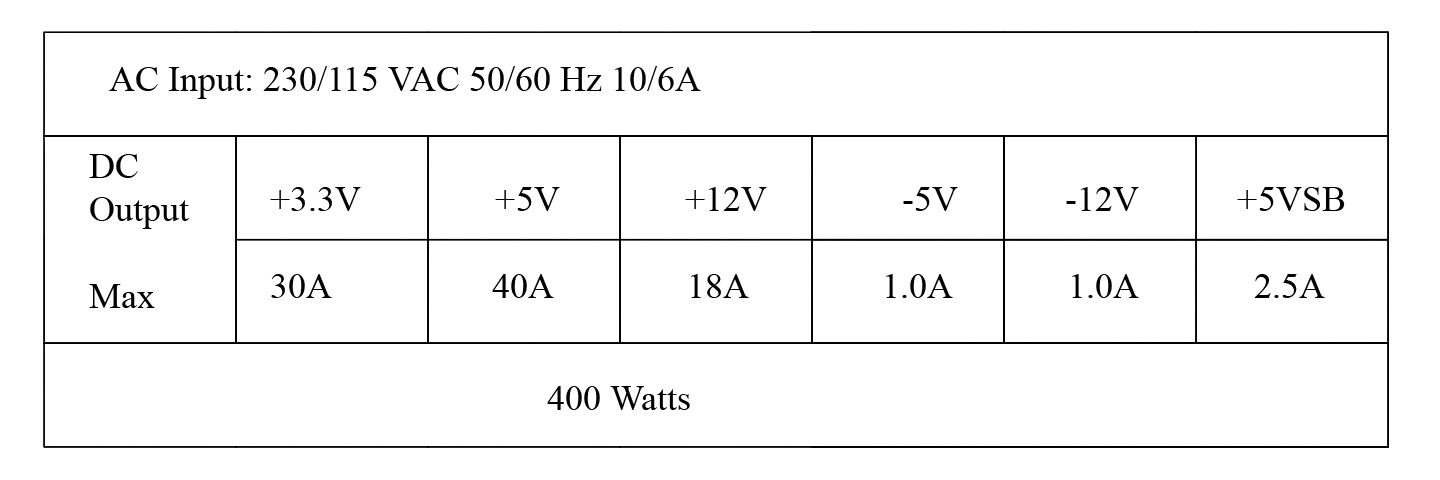
http://www.newegg.com/Product/Product.asp?Item=N82E16817189003 - PSU: XCLIO XClio 450BL 450W - $43.99
Total - $1006.98
So far, I only have $100 to input, and I really hope I can fit in enough for a new Monitor, at least 19 inch. (CRT of course).
I was just wondering, how much would this system handle before you find any hints of slowing down/lag/etc? Or in other words, what would someone be doing on the computer before it slows down? (I dont know if that came out right...)
First off, Im not really a computer hardware kind of guy, so please bare with my ignorance of the whole topic...
Ok, I have a budget of a maximum of $1100, but i REALLY dont want to spend it all. I did some research, and Ive come up with this system:
http://www.newegg.com/Product/Product.asp?Item=N82E16819103562 - PROCESSOR: AMD Athlon 64 X2 3800 -$295
http://www.newegg.com/Product/Product.asp?Item=N82E16813131530 - Motherboard: ASUS A8N-E Socket 939 NVIDIA nForce4 Ultra ATX AMD - $92.99
http://www.newegg.com/Product/Product.asp?Item=N82E16822136009 - Hard Drive: Western Digital Caviar RE WD1600YD 160GB 7200 RPM 16MB Cache Serial ATA150 -$85
http://www.newegg.com/Product/Product.asp?Item=N82E16820145527 - Ram: CORSAIR ValueSelect 2GB (2 x 1GB) 240-Pin DDR2 SDRAM Unbuffered DDR2 533 (PC2 4200) Dual Channel Kit System Memory - $150
http://www.newegg.com/Product/Product.asp?Item=N82E16814130275 - Video Card: eVGA 256-A8-N507 Geforce 7800GS 256MB 256-bit GDDR3 AGP 4X/8X -$284.99
Total - $907.98
Is this a good system? Am I missing anything? Is getting the 7800 worth it (for an example, a 6800 still has 256 mb...)? How about the dual cores? Do these seem compatible with each other? Also, would this system make a noise problem? Are there things that I should be aware of before buying anything? Is getting more hard drive space worth it for making animations (not 3d), but I guess this question is pretty much based on the person... Is getting 2 gigs of ram worth the trouble? (I heard that getting 4 gigs of ram shows little difference nowadays compared to 2 gigs, is this true?)
If there are better brands that would give more bang for the buck, please suggest them. This is my first attempt to build a computer, so please excuse my lack of knowledge... Im just not experianced with the new technology, as all my computers (im upgrading my crappiest one, btw....one of them is pretty good actually, a dell though, but its not really "mine", so...) are pretty much old.
Edit (thanks to filip-matijevic and ceewi1 for the input) :
http://www.newegg.com/Product/Product.asp?Item=N82E16819103562 - PROCESSOR: AMD Athlon 64 X2 3800 -$295
http://www.newegg.com/Product/Product.asp?Item=N82E16813131530 - Motherboard: ASUS A8N-E Socket 939 NVIDIA nForce4 Ultra ATX AMD - $92.99
http://www.newegg.com/Product/Product.asp?Item=N82E16822136010 - Hard Drive: Western Digital Caviar RE WD1600YD 250GB 7200 RPM 16MB Cache Serial ATA150 -$95
http://www.newegg.com/Product/Product.asp?Item=N82E16814150139 - Videocard: XFX GeForce 7900 GT EXTREME 256MB 256-bit GDDR3 PCI Express x16 Video Card - $315.00
http://www.newegg.com/Product/Product.asp?Item=N82E16820145486 - CORSAIR XMS 2GB (2 x 1GB) 184-Pin DDR SDRAM Unbuffered DDR 400 (PC 3200) Dual Channel Kit System Memory - $165
http://www.newegg.com/Product/Product.asp?Item=N82E16817189003 - PSU: XCLIO XClio 450BL 450W - $43.99
Total - $1006.98
So far, I only have $100 to input, and I really hope I can fit in enough for a new Monitor, at least 19 inch. (CRT of course).
I was just wondering, how much would this system handle before you find any hints of slowing down/lag/etc? Or in other words, what would someone be doing on the computer before it slows down? (I dont know if that came out right...)
Last edited:


 )
)