while i was downloading a game, a random pop up comes up asking me to download active x, it thought it was part of the game so i dl'd it but then moments later my computer detected Spyware.IEMonster.b and Adware Zlob.PornAdvertiser.ba and suddenly porn shortcuts start popping up on my desktop, any ideas how to get rid of these?

You are using an out of date browser. It may not display this or other websites correctly.
You should upgrade or use an alternative browser.
You should upgrade or use an alternative browser.
urgent!
- Thread starter helzus
- Start date

evilfantasy
New Member
Download and rename HijackThis (HJT)
- Double-click on HJTInstall.
- Click on the Install button.
- It will automatically place HJT in C:\Program Files\TrendMicro\HijackThis\HijackThis.exe.
- Upon install, HijackThis should open for you.
- Close HijackThis and rename it.
- Go to C:\Program Files\Trend Micro\HijackThis.exe
- Right click on HijackThis.exe and select Rename.
- Type in sniper.exe and press Enter.
- Right-click on sniper.exe and select Send To > Desktop (create shortcut)
- From the desktop open HiajckThis.
- If using Windows Vista, be sure to Run As Administrator
- Click on the Do a system scan and save a log file button
- HijackThis will scan and then a log will open in notepad.
- Copy and then paste the log in your post.
- Don't have Hijackthis fix anything yet. Most of what it finds will be harmless or even required.
Logfile of Trend Micro HijackThis v2.0.2
Scan saved at 5:41:03 AM, on 1/27/2008
Platform: Windows XP SP2 (WinNT 5.01.2600)
MSIE: Internet Explorer v7.00 (7.00.6000.16574)
Boot mode: Normal
Running processes:
C:\WINDOWS\System32\smss.exe
C:\WINDOWS\system32\csrss.exe
C:\WINDOWS\system32\winlogon.exe
C:\WINDOWS\system32\services.exe
C:\WINDOWS\system32\lsass.exe
C:\WINDOWS\system32\svchost.exe
C:\WINDOWS\system32\svchost.exe
C:\WINDOWS\System32\svchost.exe
C:\WINDOWS\System32\svchost.exe
C:\WINDOWS\System32\svchost.exe
C:\WINDOWS\system32\spoolsv.exe
C:\Program Files\Common Files\Microsoft Shared\VS7DEBUG\MDM.EXE
c:\Program Files\Norton AntiVirus\navapsvc.exe
C:\Program Files\Softex\OmniPass\Omniserv.exe
C:\Program Files\Viewpoint\Common\ViewpointService.exe
C:\Program Files\Softex\OmniPass\OPXPApp.exe
C:\WINDOWS\Explorer.EXE
C:\WINDOWS\System32\alg.exe
C:\WINDOWS\system32\wscntfy.exe
C:\windows\system\hpsysdrv.exe
C:\WINDOWS\System32\hkcmd.exe
C:\Program Files\Hewlett-Packard\Digital Imaging\Unload\hpqcmon.exe
C:\Program Files\Hewlett-Packard\HP Share-to-Web\hpgs2wnd.exe
C:\HP\KBD\KBD.EXE
C:\Program Files\Common Files\Symantec Shared\ccApp.exe
C:\WINDOWS\System32\spool\drivers\w32x86\3\hpztsb08.exe
C:\Program Files\Java\jre1.6.0_02\bin\jusched.exe
C:\Program Files\Verizon\Servicepoint\VerizonServicepoint.exe
C:\PROGRA~1\Verizon\SMARTB~1\MotiveSB.exe
C:\Program Files\iTunes\iTunesHelper.exe
C:\Program Files\QuickTime\qttask.exe
C:\WINDOWS\system32\ctfmon.exe
C:\Program Files\Updates from HP\137903\Program\BackWeb-137903.exe
C:\Program Files\interMute\SpamSubtract\SpamSubtract.exe
C:\Program Files\Viewpoint\Viewpoint Manager\ViewMgr.exe
c:\Program Files\Hewlett-Packard\HP Share-to-Web\hpgs2wnf.exe
C:\Program Files\iPod\bin\iPodService.exe
c:\Program Files\Common Files\Symantec Shared\ccEvtMgr.exe
C:\Program Files\Common Files\AOL\Loader\aolload.exe
C:\WINDOWS\system32\svcd\svchost.exe
c:\PROGRA~1\NORTON~1\navw32.exe
C:\PROGRA~1\MOZILL~1\FIREFOX.EXE
C:\Program Files\Trend Micro\HijackThis\HijackThis.exe
C:\Program Files\Messenger\msmsgs.exe
R1 - HKCU\Software\Microsoft\Internet Explorer\Main,Default_Page_URL = http://us8.hpwis.com/
R1 - HKCU\Software\Microsoft\Internet Explorer\Main,Default_Search_URL = http://srch-us8.hpwis.com/
R1 - HKCU\Software\Microsoft\Internet Explorer\Main,Search Bar = http://srch-us8.hpwis.com/
R1 - HKCU\Software\Microsoft\Internet Explorer\Main,Search Page = http://srch-us8.hpwis.com/
R0 - HKCU\Software\Microsoft\Internet Explorer\Main,Start Page = http://wapp.verizon.net/bookmarks/bmredir.asp?region=all&bw=dsl&cd=7.0unattached&bm=ho_central
R1 - HKLM\Software\Microsoft\Internet Explorer\Main,Default_Page_URL = http://go.microsoft.com/fwlink/?LinkId=69157
R1 - HKLM\Software\Microsoft\Internet Explorer\Main,Default_Search_URL = http://go.microsoft.com/fwlink/?LinkId=54896
R1 - HKLM\Software\Microsoft\Internet Explorer\Main,Search Bar = http://srch-us8.hpwis.com/
R1 - HKLM\Software\Microsoft\Internet Explorer\Main,Search Page = http://go.microsoft.com/fwlink/?LinkId=54896
R0 - HKLM\Software\Microsoft\Internet Explorer\Main,Start Page = http://go.microsoft.com/fwlink/?LinkId=69157
R1 - HKCU\Software\Microsoft\Windows\CurrentVersion\Internet Settings,ProxyOverride = localhost
F3 - REG:win.ini: run="C:\WINDOWS\system32\winupdate.exe"
O2 - BHO: &Research - {037C7B8A-151A-49E6-BAED-CC05FCB50328} - C:\WINDOWS\system32\winsrc.dll
O2 - BHO: AcroIEHlprObj Class - {06849E9F-C8D7-4D59-B87D-784B7D6BE0B3} - C:\Program Files\Adobe\Acrobat 5.0\Reader\ActiveX\AcroIEHelper.ocx
O2 - BHO: Verizon Broadband Toolbar - {4E7BD74F-2B8D-469E-D0FC-E57AF4D5FA7D} - C:\WINDOWS\DOWNLO~1\vzbb.dll
O2 - BHO: SSVHelper Class - {761497BB-D6F0-462C-B6EB-D4DAF1D92D43} - C:\Program Files\Java\jre1.6.0_02\bin\ssv.dll
O2 - BHO: NAV Helper - {BDF3E430-B101-42AD-A544-FADC6B084872} - c:\Program Files\Norton AntiVirus\NavShExt.dll
O3 - Toolbar: hp toolkit - {B2847E28-5D7D-4DEB-8B67-05D28BCF79F5} - C:\HP\EXPLOREBAR\HPTOOLKT.DLL
O3 - Toolbar: Norton AntiVirus - {42CDD1BF-3FFB-4238-8AD1-7859DF00B1D6} - c:\Program Files\Norton AntiVirus\NavShExt.dll
O3 - Toolbar: Verizon Broadband Toolbar - {4E7BD74F-2B8D-469E-D0FC-E57AF4D5FA7D} - C:\WINDOWS\DOWNLO~1\vzbb.dll
O4 - HKLM\..\Run: [hpsysdrv] c:\windows\system\hpsysdrv.exe
O4 - HKLM\..\Run: [HotKeysCmds] C:\WINDOWS\System32\hkcmd.exe
O4 - HKLM\..\Run: [CamMonitor] c:\Program Files\Hewlett-Packard\Digital Imaging\Unload\hpqcmon.exe
O4 - HKLM\..\Run: [Share-to-Web Namespace Daemon] c:\Program Files\Hewlett-Packard\HP Share-to-Web\hpgs2wnd.exe
O4 - HKLM\..\Run: [KBD] C:\HP\KBD\KBD.EXE
O4 - HKLM\..\Run: [StorageGuard] "C:\Program Files\Common Files\Sonic\Update Manager\sgtray.exe" /r
O4 - HKLM\..\Run: [TkBellExe] "C:\Program Files\Common Files\Real\Update_OB\realsched.exe" -osboot
O4 - HKLM\..\Run: [Recguard] C:\WINDOWS\SMINST\RECGUARD.EXE
O4 - HKLM\..\Run: [ccApp] "c:\Program Files\Common Files\Symantec Shared\ccApp.exe"
O4 - HKLM\..\Run: [ccRegVfy] "c:\Program Files\Common Files\Symantec Shared\ccRegVfy.exe"
O4 - HKLM\..\Run: [Reminder] "C:\Windows\Creator\Remind_XP.exe"
O4 - HKLM\..\Run: [PS2] C:\WINDOWS\system32\ps2.exe
O4 - HKLM\..\Run: [HPDJ Taskbar Utility] C:\WINDOWS\System32\spool\drivers\w32x86\3\hpztsb08.exe
O4 - HKLM\..\Run: [SunJavaUpdateSched] "C:\Program Files\Java\jre1.6.0_02\bin\jusched.exe"
O4 - HKLM\..\Run: [VerizonServicepoint.exe] C:\Program Files\Verizon\Servicepoint\VerizonServicepoint.exe
O4 - HKLM\..\Run: [Motive SmartBridge] C:\PROGRA~1\Verizon\SMARTB~1\MotiveSB.exe
O4 - HKLM\..\Run: [iTunesHelper] "C:\Program Files\iTunes\iTunesHelper.exe"
O4 - HKLM\..\Run: [IgfxTray] C:\WINDOWS\System32\igfxtray.exe
O4 - HKLM\..\Run: [QuickTime Task] "C:\Program Files\QuickTime\qttask.exe" -atboottime
O4 - HKLM\..\Run: [AlcxMonitor] ALCXMNTR.EXE
O4 - HKCU\..\Run: [ctfmon.exe] C:\WINDOWS\system32\ctfmon.exe
O4 - HKCU\..\Run: [ieupdate] "C:\WINDOWS\system32\ieupdates.exe"
O4 - HKUS\S-1-5-18\..\Run: [Picasa Media Detector] C:\Documents and Settings\Owner\My Documents\download\xxltlelilyxx\Picasa2\PicasaMediaDetector.exe (User 'SYSTEM')
O4 - HKUS\.DEFAULT\..\Run: [Picasa Media Detector] C:\Documents and Settings\Owner\My Documents\download\xxltlelilyxx\Picasa2\PicasaMediaDetector.exe (User 'Default user')
O4 - Startup: spamsubtract.lnk = C:\Program Files\interMute\SpamSubtract\SpamSubtract.exe
O4 - Global Startup: Quicken Scheduled Updates.lnk = C:\Program Files\Quicken\bagent.exe
O4 - Global Startup: Updates from HP.lnk = C:\Program Files\Updates from HP\137903\Program\BackWeb-137903.exe
O8 - Extra context menu item: E&xport to Microsoft Excel - res://C:\DOCUME~1\Owner\MYDOCU~1\MYPICT~1\OFFICE11\EXCEL.EXE/3000
O9 - Extra button: (no name) - {08B0E5C0-4FCB-11CF-AAA5-00401C608501} - C:\Program Files\Java\jre1.6.0_02\bin\ssv.dll
O9 - Extra 'Tools' menuitem: Sun Java Console - {08B0E5C0-4FCB-11CF-AAA5-00401C608501} - C:\Program Files\Java\jre1.6.0_02\bin\ssv.dll
O9 - Extra button: Run IMVU - {d9288080-1baa-4bc4-9cf8-a92d743db949} - C:\Documents and Settings\Owner\Start Menu\Programs\>IMVU\Run IMVU.lnk (file missing)
O9 - Extra button: (no name) - {e2e2dd38-d088-4134-82b7-f2ba38496583} - C:\WINDOWS\Network Diagnostic\xpnetdiag.exe
O9 - Extra 'Tools' menuitem: @xpsp3res.dll,-20001 - {e2e2dd38-d088-4134-82b7-f2ba38496583} - C:\WINDOWS\Network Diagnostic\xpnetdiag.exe
O9 - Extra button: Messenger - {FB5F1910-F110-11d2-BB9E-00C04F795683} - C:\Program Files\Messenger\msmsgs.exe
O9 - Extra 'Tools' menuitem: Windows Messenger - {FB5F1910-F110-11d2-BB9E-00C04F795683} - C:\Program Files\Messenger\msmsgs.exe
O12 - Plugin for .spop: C:\Program Files\Internet Explorer\Plugins\NPDocBox.dll
O16 - DPF: {5F5F9FB8-878E-4455-95E0-F64B2314288A} (ijjiPlugin2 Class) - http://gamedownload.ijjimax.com/gamedownload/dist/hgstart/HGPlugin11USA.cab
O16 - DPF: {CD995117-98E5-4169-9920-6C12D4C0B548} - http://gamedownload.ijjimax.com/gamedownload/dist/hgstart/HGPlugin9USA.cab
O23 - Service: Symantec Event Manager (ccEvtMgr) - Symantec Corporation - c:\Program Files\Common Files\Symantec Shared\ccEvtMgr.exe
O23 - Service: Symantec Password Validation Service (ccPwdSvc) - Symantec Corporation - c:\Program Files\Common Files\Symantec Shared\ccPwdSvc.exe
O23 - Service: Google Updater Service (gusvc) - Google - C:\Program Files\Google\Common\Google Updater\GoogleUpdaterService.exe
O23 - Service: iPod Service - Apple Computer, Inc. - C:\Program Files\iPod\bin\iPodService.exe
O23 - Service: Norton AntiVirus Auto Protect Service (navapsvc) - Symantec Corporation - c:\Program Files\Norton AntiVirus\navapsvc.exe
O23 - Service: NVIDIA Driver Helper Service (NVSvc) - NVIDIA Corporation - C:\WINDOWS\System32\nvsvc32.exe
O23 - Service: Softex OmniPass Service (omniserv) - Unknown owner - C:\Program Files\Softex\OmniPass\Omniserv.exe
O23 - Service: Viewpoint Manager Service - Viewpoint Corporation - C:\Program Files\Viewpoint\Common\ViewpointService.exe
O23 - Service: Security Service (XWPN) - Unknown owner - C:\WINDOWS\system32\svcd\svchost.exe
--
End of file - 9143 bytes
Scan saved at 5:41:03 AM, on 1/27/2008
Platform: Windows XP SP2 (WinNT 5.01.2600)
MSIE: Internet Explorer v7.00 (7.00.6000.16574)
Boot mode: Normal
Running processes:
C:\WINDOWS\System32\smss.exe
C:\WINDOWS\system32\csrss.exe
C:\WINDOWS\system32\winlogon.exe
C:\WINDOWS\system32\services.exe
C:\WINDOWS\system32\lsass.exe
C:\WINDOWS\system32\svchost.exe
C:\WINDOWS\system32\svchost.exe
C:\WINDOWS\System32\svchost.exe
C:\WINDOWS\System32\svchost.exe
C:\WINDOWS\System32\svchost.exe
C:\WINDOWS\system32\spoolsv.exe
C:\Program Files\Common Files\Microsoft Shared\VS7DEBUG\MDM.EXE
c:\Program Files\Norton AntiVirus\navapsvc.exe
C:\Program Files\Softex\OmniPass\Omniserv.exe
C:\Program Files\Viewpoint\Common\ViewpointService.exe
C:\Program Files\Softex\OmniPass\OPXPApp.exe
C:\WINDOWS\Explorer.EXE
C:\WINDOWS\System32\alg.exe
C:\WINDOWS\system32\wscntfy.exe
C:\windows\system\hpsysdrv.exe
C:\WINDOWS\System32\hkcmd.exe
C:\Program Files\Hewlett-Packard\Digital Imaging\Unload\hpqcmon.exe
C:\Program Files\Hewlett-Packard\HP Share-to-Web\hpgs2wnd.exe
C:\HP\KBD\KBD.EXE
C:\Program Files\Common Files\Symantec Shared\ccApp.exe
C:\WINDOWS\System32\spool\drivers\w32x86\3\hpztsb08.exe
C:\Program Files\Java\jre1.6.0_02\bin\jusched.exe
C:\Program Files\Verizon\Servicepoint\VerizonServicepoint.exe
C:\PROGRA~1\Verizon\SMARTB~1\MotiveSB.exe
C:\Program Files\iTunes\iTunesHelper.exe
C:\Program Files\QuickTime\qttask.exe
C:\WINDOWS\system32\ctfmon.exe
C:\Program Files\Updates from HP\137903\Program\BackWeb-137903.exe
C:\Program Files\interMute\SpamSubtract\SpamSubtract.exe
C:\Program Files\Viewpoint\Viewpoint Manager\ViewMgr.exe
c:\Program Files\Hewlett-Packard\HP Share-to-Web\hpgs2wnf.exe
C:\Program Files\iPod\bin\iPodService.exe
c:\Program Files\Common Files\Symantec Shared\ccEvtMgr.exe
C:\Program Files\Common Files\AOL\Loader\aolload.exe
C:\WINDOWS\system32\svcd\svchost.exe
c:\PROGRA~1\NORTON~1\navw32.exe
C:\PROGRA~1\MOZILL~1\FIREFOX.EXE
C:\Program Files\Trend Micro\HijackThis\HijackThis.exe
C:\Program Files\Messenger\msmsgs.exe
R1 - HKCU\Software\Microsoft\Internet Explorer\Main,Default_Page_URL = http://us8.hpwis.com/
R1 - HKCU\Software\Microsoft\Internet Explorer\Main,Default_Search_URL = http://srch-us8.hpwis.com/
R1 - HKCU\Software\Microsoft\Internet Explorer\Main,Search Bar = http://srch-us8.hpwis.com/
R1 - HKCU\Software\Microsoft\Internet Explorer\Main,Search Page = http://srch-us8.hpwis.com/
R0 - HKCU\Software\Microsoft\Internet Explorer\Main,Start Page = http://wapp.verizon.net/bookmarks/bmredir.asp?region=all&bw=dsl&cd=7.0unattached&bm=ho_central
R1 - HKLM\Software\Microsoft\Internet Explorer\Main,Default_Page_URL = http://go.microsoft.com/fwlink/?LinkId=69157
R1 - HKLM\Software\Microsoft\Internet Explorer\Main,Default_Search_URL = http://go.microsoft.com/fwlink/?LinkId=54896
R1 - HKLM\Software\Microsoft\Internet Explorer\Main,Search Bar = http://srch-us8.hpwis.com/
R1 - HKLM\Software\Microsoft\Internet Explorer\Main,Search Page = http://go.microsoft.com/fwlink/?LinkId=54896
R0 - HKLM\Software\Microsoft\Internet Explorer\Main,Start Page = http://go.microsoft.com/fwlink/?LinkId=69157
R1 - HKCU\Software\Microsoft\Windows\CurrentVersion\Internet Settings,ProxyOverride = localhost
F3 - REG:win.ini: run="C:\WINDOWS\system32\winupdate.exe"
O2 - BHO: &Research - {037C7B8A-151A-49E6-BAED-CC05FCB50328} - C:\WINDOWS\system32\winsrc.dll
O2 - BHO: AcroIEHlprObj Class - {06849E9F-C8D7-4D59-B87D-784B7D6BE0B3} - C:\Program Files\Adobe\Acrobat 5.0\Reader\ActiveX\AcroIEHelper.ocx
O2 - BHO: Verizon Broadband Toolbar - {4E7BD74F-2B8D-469E-D0FC-E57AF4D5FA7D} - C:\WINDOWS\DOWNLO~1\vzbb.dll
O2 - BHO: SSVHelper Class - {761497BB-D6F0-462C-B6EB-D4DAF1D92D43} - C:\Program Files\Java\jre1.6.0_02\bin\ssv.dll
O2 - BHO: NAV Helper - {BDF3E430-B101-42AD-A544-FADC6B084872} - c:\Program Files\Norton AntiVirus\NavShExt.dll
O3 - Toolbar: hp toolkit - {B2847E28-5D7D-4DEB-8B67-05D28BCF79F5} - C:\HP\EXPLOREBAR\HPTOOLKT.DLL
O3 - Toolbar: Norton AntiVirus - {42CDD1BF-3FFB-4238-8AD1-7859DF00B1D6} - c:\Program Files\Norton AntiVirus\NavShExt.dll
O3 - Toolbar: Verizon Broadband Toolbar - {4E7BD74F-2B8D-469E-D0FC-E57AF4D5FA7D} - C:\WINDOWS\DOWNLO~1\vzbb.dll
O4 - HKLM\..\Run: [hpsysdrv] c:\windows\system\hpsysdrv.exe
O4 - HKLM\..\Run: [HotKeysCmds] C:\WINDOWS\System32\hkcmd.exe
O4 - HKLM\..\Run: [CamMonitor] c:\Program Files\Hewlett-Packard\Digital Imaging\Unload\hpqcmon.exe
O4 - HKLM\..\Run: [Share-to-Web Namespace Daemon] c:\Program Files\Hewlett-Packard\HP Share-to-Web\hpgs2wnd.exe
O4 - HKLM\..\Run: [KBD] C:\HP\KBD\KBD.EXE
O4 - HKLM\..\Run: [StorageGuard] "C:\Program Files\Common Files\Sonic\Update Manager\sgtray.exe" /r
O4 - HKLM\..\Run: [TkBellExe] "C:\Program Files\Common Files\Real\Update_OB\realsched.exe" -osboot
O4 - HKLM\..\Run: [Recguard] C:\WINDOWS\SMINST\RECGUARD.EXE
O4 - HKLM\..\Run: [ccApp] "c:\Program Files\Common Files\Symantec Shared\ccApp.exe"
O4 - HKLM\..\Run: [ccRegVfy] "c:\Program Files\Common Files\Symantec Shared\ccRegVfy.exe"
O4 - HKLM\..\Run: [Reminder] "C:\Windows\Creator\Remind_XP.exe"
O4 - HKLM\..\Run: [PS2] C:\WINDOWS\system32\ps2.exe
O4 - HKLM\..\Run: [HPDJ Taskbar Utility] C:\WINDOWS\System32\spool\drivers\w32x86\3\hpztsb08.exe
O4 - HKLM\..\Run: [SunJavaUpdateSched] "C:\Program Files\Java\jre1.6.0_02\bin\jusched.exe"
O4 - HKLM\..\Run: [VerizonServicepoint.exe] C:\Program Files\Verizon\Servicepoint\VerizonServicepoint.exe
O4 - HKLM\..\Run: [Motive SmartBridge] C:\PROGRA~1\Verizon\SMARTB~1\MotiveSB.exe
O4 - HKLM\..\Run: [iTunesHelper] "C:\Program Files\iTunes\iTunesHelper.exe"
O4 - HKLM\..\Run: [IgfxTray] C:\WINDOWS\System32\igfxtray.exe
O4 - HKLM\..\Run: [QuickTime Task] "C:\Program Files\QuickTime\qttask.exe" -atboottime
O4 - HKLM\..\Run: [AlcxMonitor] ALCXMNTR.EXE
O4 - HKCU\..\Run: [ctfmon.exe] C:\WINDOWS\system32\ctfmon.exe
O4 - HKCU\..\Run: [ieupdate] "C:\WINDOWS\system32\ieupdates.exe"
O4 - HKUS\S-1-5-18\..\Run: [Picasa Media Detector] C:\Documents and Settings\Owner\My Documents\download\xxltlelilyxx\Picasa2\PicasaMediaDetector.exe (User 'SYSTEM')
O4 - HKUS\.DEFAULT\..\Run: [Picasa Media Detector] C:\Documents and Settings\Owner\My Documents\download\xxltlelilyxx\Picasa2\PicasaMediaDetector.exe (User 'Default user')
O4 - Startup: spamsubtract.lnk = C:\Program Files\interMute\SpamSubtract\SpamSubtract.exe
O4 - Global Startup: Quicken Scheduled Updates.lnk = C:\Program Files\Quicken\bagent.exe
O4 - Global Startup: Updates from HP.lnk = C:\Program Files\Updates from HP\137903\Program\BackWeb-137903.exe
O8 - Extra context menu item: E&xport to Microsoft Excel - res://C:\DOCUME~1\Owner\MYDOCU~1\MYPICT~1\OFFICE11\EXCEL.EXE/3000
O9 - Extra button: (no name) - {08B0E5C0-4FCB-11CF-AAA5-00401C608501} - C:\Program Files\Java\jre1.6.0_02\bin\ssv.dll
O9 - Extra 'Tools' menuitem: Sun Java Console - {08B0E5C0-4FCB-11CF-AAA5-00401C608501} - C:\Program Files\Java\jre1.6.0_02\bin\ssv.dll
O9 - Extra button: Run IMVU - {d9288080-1baa-4bc4-9cf8-a92d743db949} - C:\Documents and Settings\Owner\Start Menu\Programs\>IMVU\Run IMVU.lnk (file missing)
O9 - Extra button: (no name) - {e2e2dd38-d088-4134-82b7-f2ba38496583} - C:\WINDOWS\Network Diagnostic\xpnetdiag.exe
O9 - Extra 'Tools' menuitem: @xpsp3res.dll,-20001 - {e2e2dd38-d088-4134-82b7-f2ba38496583} - C:\WINDOWS\Network Diagnostic\xpnetdiag.exe
O9 - Extra button: Messenger - {FB5F1910-F110-11d2-BB9E-00C04F795683} - C:\Program Files\Messenger\msmsgs.exe
O9 - Extra 'Tools' menuitem: Windows Messenger - {FB5F1910-F110-11d2-BB9E-00C04F795683} - C:\Program Files\Messenger\msmsgs.exe
O12 - Plugin for .spop: C:\Program Files\Internet Explorer\Plugins\NPDocBox.dll
O16 - DPF: {5F5F9FB8-878E-4455-95E0-F64B2314288A} (ijjiPlugin2 Class) - http://gamedownload.ijjimax.com/gamedownload/dist/hgstart/HGPlugin11USA.cab
O16 - DPF: {CD995117-98E5-4169-9920-6C12D4C0B548} - http://gamedownload.ijjimax.com/gamedownload/dist/hgstart/HGPlugin9USA.cab
O23 - Service: Symantec Event Manager (ccEvtMgr) - Symantec Corporation - c:\Program Files\Common Files\Symantec Shared\ccEvtMgr.exe
O23 - Service: Symantec Password Validation Service (ccPwdSvc) - Symantec Corporation - c:\Program Files\Common Files\Symantec Shared\ccPwdSvc.exe
O23 - Service: Google Updater Service (gusvc) - Google - C:\Program Files\Google\Common\Google Updater\GoogleUpdaterService.exe
O23 - Service: iPod Service - Apple Computer, Inc. - C:\Program Files\iPod\bin\iPodService.exe
O23 - Service: Norton AntiVirus Auto Protect Service (navapsvc) - Symantec Corporation - c:\Program Files\Norton AntiVirus\navapsvc.exe
O23 - Service: NVIDIA Driver Helper Service (NVSvc) - NVIDIA Corporation - C:\WINDOWS\System32\nvsvc32.exe
O23 - Service: Softex OmniPass Service (omniserv) - Unknown owner - C:\Program Files\Softex\OmniPass\Omniserv.exe
O23 - Service: Viewpoint Manager Service - Viewpoint Corporation - C:\Program Files\Viewpoint\Common\ViewpointService.exe
O23 - Service: Security Service (XWPN) - Unknown owner - C:\WINDOWS\system32\svcd\svchost.exe
--
End of file - 9143 bytes
evilfantasy
New Member
Please download Combofix by sUBs from one of the below links.
(Try all three if necessary)IMPORTANT - Combofix.exe MUST be saved to and ran from the Desktop.
CF disconnects your machine from the internet. The connection is automatically restored before CF completes its run.
If CF runs into difficulty and terminates prematurely, the connection can be manually restored by restarting your machine.
----------
Next post add
Combofix log
(Try all three if necessary)IMPORTANT - Combofix.exe MUST be saved to and ran from the Desktop.
- Close any open Web browsers. (Firefox, Internet Explorer, etc)
- Close/disable all anti virus and anti malware programs so they do not interfere with Combofix. <-- IMPORTANT
- Click on this link to see a list of programs that should be disabled and how to disable them. If yours is not listed and you don't know how to disable it, please ask.
- Double click combofix.exe & follow the prompts.
[*] From the keyboard select 1 and press Enter
- When finished, it will produce a log for you.
- Post that log in your next reply.
CF disconnects your machine from the internet. The connection is automatically restored before CF completes its run.
If CF runs into difficulty and terminates prematurely, the connection can be manually restored by restarting your machine.
----------
Next post add
Combofix log
it didn't actually prompt me to press 1 or anything, it just did everything by itself
ComboFix 08-01-23.1C - 2008-01-27 6:18:24.1 - NTFSx86
Running from: C:\Documents and Settings\LocalService\Desktop\ComboFix.exe
* Created a new restore point
.
((((((((((((((((((((((((((((((((((((((( Other Deletions )))))))))))))))))))))))))))))))))))))))))))))))))
.
C:\WINDOWS\system32\ieupdates.exe
C:\WINDOWS\system32\ntload.sys
C:\WINDOWS\system32\update32.exe
C:\WINDOWS\system32\winsrc.dll
C:\WINDOWS\system32\winupdate.exe
C:\WINDOWS\system32\wscmp.dll
.
((((((((((((((((((((((((((((((((((((((( Drivers/Services )))))))))))))))))))))))))))))))))))))))))))))))))
.
-------\LEGACY_NTLOAD
-------\ntload
((((((((((((((((((((((((( Files Created from 2007-12-27 to 2008-01-27 )))))))))))))))))))))))))))))))
.
2008-01-27 06:15 . 2000-08-31 08:00 51,200 --a------ C:\WINDOWS\Nircmd.exe
2008-01-27 05:48 . 2008-01-27 05:49 <DIR> d-------- C:\WINDOWS\system32\SmitfraudFix
2008-01-27 05:37 . 2008-01-27 05:37 <DIR> d-------- C:\Program Files\Trend Micro
2008-01-27 04:07 . 2008-01-27 06:12 3,262 --a------ C:\WINDOWS\system32\sex5.ico
2008-01-27 04:07 . 2008-01-27 06:12 3,262 --a------ C:\WINDOWS\system32\sex4.ico
2008-01-27 04:06 . 2008-01-27 06:14 3,262 --a------ C:\WINDOWS\system32\sex3.ico
2008-01-27 04:06 . 2008-01-27 06:11 3,262 --a------ C:\WINDOWS\system32\sex2.ico
2008-01-27 04:05 . 2008-01-27 06:13 3,262 --a------ C:\WINDOWS\system32\sex1.ico
2008-01-27 04:01 . 2008-01-27 04:01 87,552 --a------ C:\WINDOWS\system32\TmpX.exe
2008-01-27 03:58 . 2008-01-27 06:31 114 --a------ C:\WINDOWS\system32\url3
2008-01-27 03:58 . 2008-01-27 06:31 102 --a------ C:\WINDOWS\system32\url2
2008-01-27 03:58 . 2008-01-27 06:31 102 --a------ C:\WINDOWS\system32\url1
2008-01-27 03:58 . 2008-01-27 06:31 8 --a------ C:\WINDOWS\system32\CID
2008-01-27 03:57 . 2008-01-27 03:57 <DIR> d-------- C:\WINDOWS\system32\svcd
2008-01-27 03:57 . 2008-01-27 03:57 34,816 --a------ C:\info.exe
2008-01-27 03:57 . 2008-01-27 03:57 4 --a------ C:\WINDOWS\system32\SvcNm
2008-01-27 00:39 . 2008-01-27 00:39 54,156 --ah----- C:\WINDOWS\QTFont.qfn
2008-01-27 00:39 . 2008-01-27 00:39 1,409 --a------ C:\WINDOWS\QTFont.for
2008-01-23 20:06 . 2007-10-10 18:55 6,065,664 -----c--- C:\WINDOWS\system32\dllcache\ieframe.dll
2008-01-23 20:06 . 2007-06-30 22:31 2,455,488 -----c--- C:\WINDOWS\system32\dllcache\ieapfltr.dat
2008-01-23 20:06 . 2007-06-30 22:36 991,232 -----c--- C:\WINDOWS\system32\dllcache\ieframe.dll.mui
2008-01-23 20:06 . 2007-10-10 18:55 459,264 -----c--- C:\WINDOWS\system32\dllcache\msfeeds.dll
2008-01-23 20:06 . 2007-10-10 18:55 383,488 -----c--- C:\WINDOWS\system32\dllcache\ieapfltr.dll
2008-01-23 20:06 . 2007-10-10 18:55 267,776 -----c--- C:\WINDOWS\system32\dllcache\iertutil.dll
2008-01-23 20:06 . 2007-10-10 18:55 63,488 -----c--- C:\WINDOWS\system32\dllcache\icardie.dll
2008-01-23 20:06 . 2007-10-10 18:55 52,224 -----c--- C:\WINDOWS\system32\dllcache\msfeedsbs.dll
2008-01-23 20:06 . 2007-10-10 05:59 13,824 -----c--- C:\WINDOWS\system32\dllcache\ieudinit.exe
2008-01-23 19:56 . 2007-08-13 18:54 33,792 --a--c--- C:\WINDOWS\system32\dllcache\custsat.dll
2008-01-23 19:40 . 2006-08-21 04:14 128,896 -----c--- C:\WINDOWS\system32\dllcache\fltmgr.sys
2008-01-23 19:40 . 2006-08-21 04:14 23,040 -----c--- C:\WINDOWS\system32\dllcache\fltmc.exe
2008-01-23 19:40 . 2006-08-21 07:21 16,896 -----c--- C:\WINDOWS\system32\dllcache\fltlib.dll
2008-01-23 19:21 . 2007-07-09 08:09 584,192 -----c--- C:\WINDOWS\system32\dllcache\rpcrt4.dll
2008-01-22 21:08 . 2008-01-22 21:08 <DIR> d-------- C:\WINDOWS\provisioning
2008-01-22 21:08 . 2008-01-22 21:08 <DIR> d-------- C:\WINDOWS\peernet
2008-01-22 20:57 . 2008-01-22 20:57 <DIR> d-------- C:\WINDOWS\ServicePackFiles
2008-01-22 20:31 . 2008-01-22 20:31 <DIR> d-------- C:\WINDOWS\EHome
.
(((((((((((((((((((((((((((((((((((((((( Find3M Report ))))))))))))))))))))))))))))))))))))))))))))))))))))
.
2008-01-27 00:05 --------- d-----w C:\Program Files\Common Files\Symantec Shared
2007-12-21 08:27 --------- d-----w C:\Program Files\Common Files\SupportSoft
2007-12-08 09:40 65,536 ----a-w C:\WINDOWS\DUMP495d.tmp
2007-12-08 08:06 --------- d-----w C:\Program Files\WinAce
2003-04-10 11:19 32 -csha-w C:\WINDOWS\{FC92DEF6-B98A-462F-BDEC-6F8042F11C76}.dat
2003-04-10 11:19 32 --sha-w C:\WINDOWS\system32\{9E165BF4-5E4A-49D1-BA74-00B57060829D}.dat
.
((((((((((((((((((((((((((((((((((((( Reg Loading Points ))))))))))))))))))))))))))))))))))))))))))))))))))
.
.
*Note* empty entries & legit default entries are not shown
REGEDIT4
[HKEY_CURRENT_USER\SOFTWARE\Microsoft\Windows\CurrentVersion\Run]
"ctfmon.exe"="C:\WINDOWS\system32\ctfmon.exe" [2004-08-04 02:56 15360]
"Aim6"="" []
[HKEY_LOCAL_MACHINE\SOFTWARE\Microsoft\Windows\CurrentVersion\Run]
"hpsysdrv"="c:\windows\system\hpsysdrv.exe" [1998-05-07 18:04 52736]
"HotKeysCmds"="C:\WINDOWS\System32\hkcmd.exe" [2004-08-20 15:51 118784]
"CamMonitor"="c:\Program Files\Hewlett-Packard\Digital Imaging\Unload\hpqcmon.exe" [2002-06-22 09:27 69632]
"Share-to-Web Namespace Daemon"="c:\Program Files\Hewlett-Packard\HP Share-to-Web\hpgs2wnd.exe" [2002-04-17 19:42 69632]
"KBD"="C:\HP\KBD\KBD.EXE" [2003-02-11 21:02 61440]
"StorageGuard"="C:\Program Files\Common Files\Sonic\Update Manager\sgtray.exe" [2003-02-13 10:01 155648]
"TkBellExe"="C:\Program Files\Common Files\Real\Update_OB\realsched.exe" [2003-04-10 01:36 151597]
"Recguard"="C:\WINDOWS\SMINST\RECGUARD.EXE" [2002-09-13 23:42 212992]
"ccApp"="c:\Program Files\Common Files\Symantec Shared\ccApp.exe" [2002-11-15 04:29 54976]
"ccRegVfy"="c:\Program Files\Common Files\Symantec Shared\ccRegVfy.exe" [2002-11-15 04:29 59072]
"Reminder"="C:\Windows\Creator\Remind_XP.exe" [2003-03-18 03:50 331776]
"PS2"="C:\WINDOWS\system32\ps2.exe" [2002-10-16 17:57 81920]
"HPDJ Taskbar Utility"="C:\WINDOWS\System32\spool\drivers\w32x86\3\hpztsb08.exe" [2003-03-11 05:08 172032]
"SunJavaUpdateSched"="C:\Program Files\Java\jre1.6.0_02\bin\jusched.exe" [2007-07-12 04:00 132496]
"VerizonServicepoint.exe"="C:\Program Files\Verizon\Servicepoint\VerizonServicepoint.exe" [2006-02-01 18:33 1880064]
"Motive SmartBridge"="C:\PROGRA~1\Verizon\SMARTB~1\MotiveSB.exe" [2006-06-23 11:33 438359]
"iTunesHelper"="C:\Program Files\iTunes\iTunesHelper.exe" [2006-10-30 09:36 256576]
"IgfxTray"="C:\WINDOWS\System32\igfxtray.exe" [2004-08-20 15:55 155648]
"QuickTime Task"="C:\Program Files\QuickTime\qttask.exe" [2006-10-25 18:58 282624]
"AlcxMonitor"="ALCXMNTR.EXE" [2004-09-07 13:47 57344 C:\WINDOWS\ALCXMNTR.EXE]
[HKEY_USERS\.DEFAULT\Software\Microsoft\Windows\CurrentVersion\Run]
"Picasa Media Detector"="C:\Documents and Settings\Owner\My Documents\download\xxltlelilyxx\Picasa2\PicasaMediaDetector.exe" [2007-09-27 20:17 443968]
C:\Documents and Settings\Owner\Start Menu\Programs\Startup\
spamsubtract.lnk - C:\Program Files\interMute\SpamSubtract\SpamSubtract.exe [2003-04-10 06:21:36 552960]
C:\Documents and Settings\All Users\Start Menu\Programs\Startup\
Quicken Scheduled Updates.lnk - C:\Program Files\Quicken\bagent.exe [2002-09-20 21:20:02 53248]
Updates from HP.lnk - C:\Program Files\Updates from HP\137903\Program\BackWeb-137903.exe [2003-04-10 02:04:00 16384]
[HKEY_LOCAL_MACHINE\software\microsoft\windows nt\currentversion\winlogon\notify\OPXPGina]
C:\Program Files\Softex\OmniPass\opxpgina.dll 2003-02-21 05:50 40960 C:\Program Files\Softex\OmniPass\OPXPGina.dll
R2 Viewpoint Manager Service;Viewpoint Manager Service;"C:\Program Files\Viewpoint\Common\ViewpointService.exe" [2007-01-04 16:38]
R2 XWPN;Security Service;C:\WINDOWS\system32\svcd\svchost.exe [2008-01-27 03:57]
S3 hamachi_oem;PlayLinc Adapter;C:\WINDOWS\system32\DRIVERS\gan_adapter.sys [2006-09-27 16:12]
.
Contents of the 'Scheduled Tasks' folder
"2008-01-13 07:46:59 C:\WINDOWS\Tasks\Norton AntiVirus - Scan my computer.job"
- c:\PROGRA~1\NORTON~1\NAVW32.exe
"2006-12-04 00:58:44 C:\WINDOWS\Tasks\Symantec NetDetect.job"
- C:\Program Files\Symantec\LiveUpdate\NDETECT.EXE
.
**************************************************************************
catchme 0.3.1344 W2K/XP/Vista - rootkit/stealth malware detector by Gmer, http://www.gmer.net
Rootkit scan 2008-01-27 06:32:28
Windows 5.1.2600 Service Pack 2 NTFS
scanning hidden processes ...
scanning hidden autostart entries ...
scanning hidden files ...
scan completed successfully
hidden files: 0
**************************************************************************
.
Completion time: 2008-01-27 6:42:27 - machine was rebooted [Owner]
ComboFix-quarantined-files.txt 2008-01-27 11:42:18
.
2008-01-25 00:14:10 --- E O F ---
ComboFix 08-01-23.1C - 2008-01-27 6:18:24.1 - NTFSx86
Running from: C:\Documents and Settings\LocalService\Desktop\ComboFix.exe
* Created a new restore point
.
((((((((((((((((((((((((((((((((((((((( Other Deletions )))))))))))))))))))))))))))))))))))))))))))))))))
.
C:\WINDOWS\system32\ieupdates.exe
C:\WINDOWS\system32\ntload.sys
C:\WINDOWS\system32\update32.exe
C:\WINDOWS\system32\winsrc.dll
C:\WINDOWS\system32\winupdate.exe
C:\WINDOWS\system32\wscmp.dll
.
((((((((((((((((((((((((((((((((((((((( Drivers/Services )))))))))))))))))))))))))))))))))))))))))))))))))
.
-------\LEGACY_NTLOAD
-------\ntload
((((((((((((((((((((((((( Files Created from 2007-12-27 to 2008-01-27 )))))))))))))))))))))))))))))))
.
2008-01-27 06:15 . 2000-08-31 08:00 51,200 --a------ C:\WINDOWS\Nircmd.exe
2008-01-27 05:48 . 2008-01-27 05:49 <DIR> d-------- C:\WINDOWS\system32\SmitfraudFix
2008-01-27 05:37 . 2008-01-27 05:37 <DIR> d-------- C:\Program Files\Trend Micro
2008-01-27 04:07 . 2008-01-27 06:12 3,262 --a------ C:\WINDOWS\system32\sex5.ico
2008-01-27 04:07 . 2008-01-27 06:12 3,262 --a------ C:\WINDOWS\system32\sex4.ico
2008-01-27 04:06 . 2008-01-27 06:14 3,262 --a------ C:\WINDOWS\system32\sex3.ico
2008-01-27 04:06 . 2008-01-27 06:11 3,262 --a------ C:\WINDOWS\system32\sex2.ico
2008-01-27 04:05 . 2008-01-27 06:13 3,262 --a------ C:\WINDOWS\system32\sex1.ico
2008-01-27 04:01 . 2008-01-27 04:01 87,552 --a------ C:\WINDOWS\system32\TmpX.exe
2008-01-27 03:58 . 2008-01-27 06:31 114 --a------ C:\WINDOWS\system32\url3
2008-01-27 03:58 . 2008-01-27 06:31 102 --a------ C:\WINDOWS\system32\url2
2008-01-27 03:58 . 2008-01-27 06:31 102 --a------ C:\WINDOWS\system32\url1
2008-01-27 03:58 . 2008-01-27 06:31 8 --a------ C:\WINDOWS\system32\CID
2008-01-27 03:57 . 2008-01-27 03:57 <DIR> d-------- C:\WINDOWS\system32\svcd
2008-01-27 03:57 . 2008-01-27 03:57 34,816 --a------ C:\info.exe
2008-01-27 03:57 . 2008-01-27 03:57 4 --a------ C:\WINDOWS\system32\SvcNm
2008-01-27 00:39 . 2008-01-27 00:39 54,156 --ah----- C:\WINDOWS\QTFont.qfn
2008-01-27 00:39 . 2008-01-27 00:39 1,409 --a------ C:\WINDOWS\QTFont.for
2008-01-23 20:06 . 2007-10-10 18:55 6,065,664 -----c--- C:\WINDOWS\system32\dllcache\ieframe.dll
2008-01-23 20:06 . 2007-06-30 22:31 2,455,488 -----c--- C:\WINDOWS\system32\dllcache\ieapfltr.dat
2008-01-23 20:06 . 2007-06-30 22:36 991,232 -----c--- C:\WINDOWS\system32\dllcache\ieframe.dll.mui
2008-01-23 20:06 . 2007-10-10 18:55 459,264 -----c--- C:\WINDOWS\system32\dllcache\msfeeds.dll
2008-01-23 20:06 . 2007-10-10 18:55 383,488 -----c--- C:\WINDOWS\system32\dllcache\ieapfltr.dll
2008-01-23 20:06 . 2007-10-10 18:55 267,776 -----c--- C:\WINDOWS\system32\dllcache\iertutil.dll
2008-01-23 20:06 . 2007-10-10 18:55 63,488 -----c--- C:\WINDOWS\system32\dllcache\icardie.dll
2008-01-23 20:06 . 2007-10-10 18:55 52,224 -----c--- C:\WINDOWS\system32\dllcache\msfeedsbs.dll
2008-01-23 20:06 . 2007-10-10 05:59 13,824 -----c--- C:\WINDOWS\system32\dllcache\ieudinit.exe
2008-01-23 19:56 . 2007-08-13 18:54 33,792 --a--c--- C:\WINDOWS\system32\dllcache\custsat.dll
2008-01-23 19:40 . 2006-08-21 04:14 128,896 -----c--- C:\WINDOWS\system32\dllcache\fltmgr.sys
2008-01-23 19:40 . 2006-08-21 04:14 23,040 -----c--- C:\WINDOWS\system32\dllcache\fltmc.exe
2008-01-23 19:40 . 2006-08-21 07:21 16,896 -----c--- C:\WINDOWS\system32\dllcache\fltlib.dll
2008-01-23 19:21 . 2007-07-09 08:09 584,192 -----c--- C:\WINDOWS\system32\dllcache\rpcrt4.dll
2008-01-22 21:08 . 2008-01-22 21:08 <DIR> d-------- C:\WINDOWS\provisioning
2008-01-22 21:08 . 2008-01-22 21:08 <DIR> d-------- C:\WINDOWS\peernet
2008-01-22 20:57 . 2008-01-22 20:57 <DIR> d-------- C:\WINDOWS\ServicePackFiles
2008-01-22 20:31 . 2008-01-22 20:31 <DIR> d-------- C:\WINDOWS\EHome
.
(((((((((((((((((((((((((((((((((((((((( Find3M Report ))))))))))))))))))))))))))))))))))))))))))))))))))))
.
2008-01-27 00:05 --------- d-----w C:\Program Files\Common Files\Symantec Shared
2007-12-21 08:27 --------- d-----w C:\Program Files\Common Files\SupportSoft
2007-12-08 09:40 65,536 ----a-w C:\WINDOWS\DUMP495d.tmp
2007-12-08 08:06 --------- d-----w C:\Program Files\WinAce
2003-04-10 11:19 32 -csha-w C:\WINDOWS\{FC92DEF6-B98A-462F-BDEC-6F8042F11C76}.dat
2003-04-10 11:19 32 --sha-w C:\WINDOWS\system32\{9E165BF4-5E4A-49D1-BA74-00B57060829D}.dat
.
((((((((((((((((((((((((((((((((((((( Reg Loading Points ))))))))))))))))))))))))))))))))))))))))))))))))))
.
.
*Note* empty entries & legit default entries are not shown
REGEDIT4
[HKEY_CURRENT_USER\SOFTWARE\Microsoft\Windows\CurrentVersion\Run]
"ctfmon.exe"="C:\WINDOWS\system32\ctfmon.exe" [2004-08-04 02:56 15360]
"Aim6"="" []
[HKEY_LOCAL_MACHINE\SOFTWARE\Microsoft\Windows\CurrentVersion\Run]
"hpsysdrv"="c:\windows\system\hpsysdrv.exe" [1998-05-07 18:04 52736]
"HotKeysCmds"="C:\WINDOWS\System32\hkcmd.exe" [2004-08-20 15:51 118784]
"CamMonitor"="c:\Program Files\Hewlett-Packard\Digital Imaging\Unload\hpqcmon.exe" [2002-06-22 09:27 69632]
"Share-to-Web Namespace Daemon"="c:\Program Files\Hewlett-Packard\HP Share-to-Web\hpgs2wnd.exe" [2002-04-17 19:42 69632]
"KBD"="C:\HP\KBD\KBD.EXE" [2003-02-11 21:02 61440]
"StorageGuard"="C:\Program Files\Common Files\Sonic\Update Manager\sgtray.exe" [2003-02-13 10:01 155648]
"TkBellExe"="C:\Program Files\Common Files\Real\Update_OB\realsched.exe" [2003-04-10 01:36 151597]
"Recguard"="C:\WINDOWS\SMINST\RECGUARD.EXE" [2002-09-13 23:42 212992]
"ccApp"="c:\Program Files\Common Files\Symantec Shared\ccApp.exe" [2002-11-15 04:29 54976]
"ccRegVfy"="c:\Program Files\Common Files\Symantec Shared\ccRegVfy.exe" [2002-11-15 04:29 59072]
"Reminder"="C:\Windows\Creator\Remind_XP.exe" [2003-03-18 03:50 331776]
"PS2"="C:\WINDOWS\system32\ps2.exe" [2002-10-16 17:57 81920]
"HPDJ Taskbar Utility"="C:\WINDOWS\System32\spool\drivers\w32x86\3\hpztsb08.exe" [2003-03-11 05:08 172032]
"SunJavaUpdateSched"="C:\Program Files\Java\jre1.6.0_02\bin\jusched.exe" [2007-07-12 04:00 132496]
"VerizonServicepoint.exe"="C:\Program Files\Verizon\Servicepoint\VerizonServicepoint.exe" [2006-02-01 18:33 1880064]
"Motive SmartBridge"="C:\PROGRA~1\Verizon\SMARTB~1\MotiveSB.exe" [2006-06-23 11:33 438359]
"iTunesHelper"="C:\Program Files\iTunes\iTunesHelper.exe" [2006-10-30 09:36 256576]
"IgfxTray"="C:\WINDOWS\System32\igfxtray.exe" [2004-08-20 15:55 155648]
"QuickTime Task"="C:\Program Files\QuickTime\qttask.exe" [2006-10-25 18:58 282624]
"AlcxMonitor"="ALCXMNTR.EXE" [2004-09-07 13:47 57344 C:\WINDOWS\ALCXMNTR.EXE]
[HKEY_USERS\.DEFAULT\Software\Microsoft\Windows\CurrentVersion\Run]
"Picasa Media Detector"="C:\Documents and Settings\Owner\My Documents\download\xxltlelilyxx\Picasa2\PicasaMediaDetector.exe" [2007-09-27 20:17 443968]
C:\Documents and Settings\Owner\Start Menu\Programs\Startup\
spamsubtract.lnk - C:\Program Files\interMute\SpamSubtract\SpamSubtract.exe [2003-04-10 06:21:36 552960]
C:\Documents and Settings\All Users\Start Menu\Programs\Startup\
Quicken Scheduled Updates.lnk - C:\Program Files\Quicken\bagent.exe [2002-09-20 21:20:02 53248]
Updates from HP.lnk - C:\Program Files\Updates from HP\137903\Program\BackWeb-137903.exe [2003-04-10 02:04:00 16384]
[HKEY_LOCAL_MACHINE\software\microsoft\windows nt\currentversion\winlogon\notify\OPXPGina]
C:\Program Files\Softex\OmniPass\opxpgina.dll 2003-02-21 05:50 40960 C:\Program Files\Softex\OmniPass\OPXPGina.dll
R2 Viewpoint Manager Service;Viewpoint Manager Service;"C:\Program Files\Viewpoint\Common\ViewpointService.exe" [2007-01-04 16:38]
R2 XWPN;Security Service;C:\WINDOWS\system32\svcd\svchost.exe [2008-01-27 03:57]
S3 hamachi_oem;PlayLinc Adapter;C:\WINDOWS\system32\DRIVERS\gan_adapter.sys [2006-09-27 16:12]
.
Contents of the 'Scheduled Tasks' folder
"2008-01-13 07:46:59 C:\WINDOWS\Tasks\Norton AntiVirus - Scan my computer.job"
- c:\PROGRA~1\NORTON~1\NAVW32.exe
"2006-12-04 00:58:44 C:\WINDOWS\Tasks\Symantec NetDetect.job"
- C:\Program Files\Symantec\LiveUpdate\NDETECT.EXE
.
**************************************************************************
catchme 0.3.1344 W2K/XP/Vista - rootkit/stealth malware detector by Gmer, http://www.gmer.net
Rootkit scan 2008-01-27 06:32:28
Windows 5.1.2600 Service Pack 2 NTFS
scanning hidden processes ...
scanning hidden autostart entries ...
scanning hidden files ...
scan completed successfully
hidden files: 0
**************************************************************************
.
Completion time: 2008-01-27 6:42:27 - machine was rebooted [Owner]
ComboFix-quarantined-files.txt 2008-01-27 11:42:18
.
2008-01-25 00:14:10 --- E O F ---
Last edited:
evilfantasy
New Member
Delete these files/folders, as follows:
1. Go to Start > Run > type Notepad.exe and click OK to open Notepad.
It must be Notepad, not Wordpad.
3. Go to the Notepad window and click Edit > Paste
4. Then click File > Save
5. Name the file CFScript.txt - Save the file to your Desktop
6. Then drag the CFScript (hold the left mouse button while dragging the file) and drop it (release the left mouse button) into ComboFix.exe as you see in the screenshot below. Important: Perform this instruction carefully!
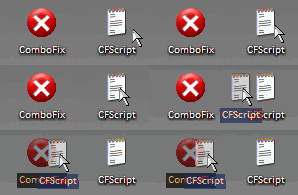
ComboFix will begin to execute, just follow the prompts.
After reboot (in case it asks to reboot), it will produce a log for you.
Post that log (Combofix.txt) in your next reply.
Note: Do not mouseclick combofix's window while it is running. That may cause your system to freeze
----------
Download SDFix.exe and save it to your Desktop.
Double click SDFix.exe and it will extract the files to %systemdrive%
(Drive that contains the Windows Directory, typically C:\SDFix)
Please then reboot your computer in Safe Mode by doing the following:
----------
Next post
Combofix log
SDFix log
1. Go to Start > Run > type Notepad.exe and click OK to open Notepad.
It must be Notepad, not Wordpad.
- Click Start , then Run
- Type notepad.exe in the Run Box.
Code:
File::
C:\WINDOWS\system32\sex5.ico
C:\WINDOWS\system32\sex4.ico
C:\WINDOWS\system32\sex3.ico
C:\WINDOWS\system32\sex2.ico
C:\WINDOWS\system32\sex1.ico
C:\WINDOWS\system32\TmpX.exe
C:\WINDOWS\system32\url3
C:\WINDOWS\system32\url2
C:\WINDOWS\system32\url1
C:\WINDOWS\system32\CID
C:\WINDOWS\system32\svcd
C:\info.exe
C:\WINDOWS\system32\SvcNm
3. Go to the Notepad window and click Edit > Paste
4. Then click File > Save
5. Name the file CFScript.txt - Save the file to your Desktop
6. Then drag the CFScript (hold the left mouse button while dragging the file) and drop it (release the left mouse button) into ComboFix.exe as you see in the screenshot below. Important: Perform this instruction carefully!
ComboFix will begin to execute, just follow the prompts.
After reboot (in case it asks to reboot), it will produce a log for you.
Post that log (Combofix.txt) in your next reply.
Note: Do not mouseclick combofix's window while it is running. That may cause your system to freeze
----------
Download SDFix.exe and save it to your Desktop.
Double click SDFix.exe and it will extract the files to %systemdrive%
(Drive that contains the Windows Directory, typically C:\SDFix)
Please then reboot your computer in Safe Mode by doing the following:
- Restart your computer
- After hearing your computer beep once during startup, but before the Windows icon appears, tap the F8 key continually;
- Instead of Windows loading as normal, the Advanced Options Menu should appear;
- Select the first option, to run Windows in Safe Mode, then press Enter.
- Choose your usual account.
- Open the extracted SDFix folder and double click RunThis.bat to start the script.
- Type Y to begin the cleanup process.
- It will remove any Trojan Services and Registry Entries that it finds then prompt you to press any key to Reboot.
- Press any Key and it will restart the PC.
- When the PC restarts the Fixtool will run again and complete the removal process then display Finished, press any key to end the script and load your desktop icons.
- Once the desktop icons load the SDFix report will open on screen and also save into the SDFix folder as Report.txt
(Report.txt will also be copied to Clipboard). - Finally add the contents of the Report.txt in your next post.
----------
Next post
Combofix log
SDFix log
evilfantasy
New Member
You didn't follow the instructions on how to install it.
Delete it from where it is now C:\Documents and Settings\LocalService\Desktop\ComboFix.exe
Reinstall/save it directly to the desktop.
Please download Combofix by sUBs from one of the below links.
(Try all three if necessary)IMPORTANT - Combofix.exe MUST be saved to and ran from the Desktop.
Delete it from where it is now C:\Documents and Settings\LocalService\Desktop\ComboFix.exe
Reinstall/save it directly to the desktop.
ComboFix Log
ComboFix 08-01-23.1C - Owner 2008-01-27 7:15:30.2 - NTFSx86
Running from: C:\Documents and Settings\Owner\Desktop\ComboFix.exe
Command switches used :: C:\Documents and Settings\Owner\Desktop\CFScript.txt
* Created a new restore point
FILE
C:\info.exe
C:\WINDOWS\system32\CID
C:\WINDOWS\system32\sex1.ico
C:\WINDOWS\system32\sex2.ico
C:\WINDOWS\system32\sex3.ico
C:\WINDOWS\system32\sex4.ico
C:\WINDOWS\system32\sex5.ico
C:\WINDOWS\system32\svcd
C:\WINDOWS\system32\SvcNm
C:\WINDOWS\system32\TmpX.exe
C:\WINDOWS\system32\url1
C:\WINDOWS\system32\url2
C:\WINDOWS\system32\url3
.
((((((((((((((((((((((((((((((((((((((( Other Deletions )))))))))))))))))))))))))))))))))))))))))))))))))
.
C:\info.exe
C:\WINDOWS\system32\CID
C:\WINDOWS\system32\sex1.ico
C:\WINDOWS\system32\sex2.ico
C:\WINDOWS\system32\sex3.ico
C:\WINDOWS\system32\sex4.ico
C:\WINDOWS\system32\sex5.ico
C:\WINDOWS\system32\SvcNm
C:\WINDOWS\system32\TmpX.exe
C:\WINDOWS\system32\url1
C:\WINDOWS\system32\url2
C:\WINDOWS\system32\url3
.
((((((((((((((((((((((((( Files Created from 2007-12-27 to 2008-01-27 )))))))))))))))))))))))))))))))
.
2008-01-27 06:15 . 2000-08-31 08:00 51,200 --a------ C:\WINDOWS\Nircmd.exe
2008-01-27 05:48 . 2008-01-27 05:49 <DIR> d-------- C:\WINDOWS\system32\SmitfraudFix
2008-01-27 05:37 . 2008-01-27 05:37 <DIR> d-------- C:\Program Files\Trend Micro
2008-01-27 03:57 . 2008-01-27 03:57 <DIR> d-------- C:\WINDOWS\system32\svcd
2008-01-27 00:39 . 2008-01-27 00:39 54,156 --ah----- C:\WINDOWS\QTFont.qfn
2008-01-27 00:39 . 2008-01-27 00:39 1,409 --a------ C:\WINDOWS\QTFont.for
2008-01-23 20:06 . 2007-10-10 18:55 6,065,664 -----c--- C:\WINDOWS\system32\dllcache\ieframe.dll
2008-01-23 20:06 . 2007-06-30 22:31 2,455,488 -----c--- C:\WINDOWS\system32\dllcache\ieapfltr.dat
2008-01-23 20:06 . 2007-06-30 22:36 991,232 -----c--- C:\WINDOWS\system32\dllcache\ieframe.dll.mui
2008-01-23 20:06 . 2007-10-10 18:55 459,264 -----c--- C:\WINDOWS\system32\dllcache\msfeeds.dll
2008-01-23 20:06 . 2007-10-10 18:55 383,488 -----c--- C:\WINDOWS\system32\dllcache\ieapfltr.dll
2008-01-23 20:06 . 2007-10-10 18:55 267,776 -----c--- C:\WINDOWS\system32\dllcache\iertutil.dll
2008-01-23 20:06 . 2007-10-10 18:55 63,488 -----c--- C:\WINDOWS\system32\dllcache\icardie.dll
2008-01-23 20:06 . 2007-10-10 18:55 52,224 -----c--- C:\WINDOWS\system32\dllcache\msfeedsbs.dll
2008-01-23 20:06 . 2007-10-10 05:59 13,824 -----c--- C:\WINDOWS\system32\dllcache\ieudinit.exe
2008-01-23 19:56 . 2007-08-13 18:54 33,792 --a--c--- C:\WINDOWS\system32\dllcache\custsat.dll
2008-01-23 19:40 . 2006-08-21 04:14 128,896 -----c--- C:\WINDOWS\system32\dllcache\fltmgr.sys
2008-01-23 19:40 . 2006-08-21 04:14 23,040 -----c--- C:\WINDOWS\system32\dllcache\fltmc.exe
2008-01-23 19:40 . 2006-08-21 07:21 16,896 -----c--- C:\WINDOWS\system32\dllcache\fltlib.dll
2008-01-23 19:21 . 2007-07-09 08:09 584,192 -----c--- C:\WINDOWS\system32\dllcache\rpcrt4.dll
2008-01-22 21:08 . 2008-01-22 21:08 <DIR> d-------- C:\WINDOWS\provisioning
2008-01-22 21:08 . 2008-01-22 21:08 <DIR> d-------- C:\WINDOWS\peernet
2008-01-22 20:57 . 2008-01-22 20:57 <DIR> d-------- C:\WINDOWS\ServicePackFiles
2008-01-22 20:31 . 2008-01-22 20:31 <DIR> d-------- C:\WINDOWS\EHome
.
(((((((((((((((((((((((((((((((((((((((( Find3M Report ))))))))))))))))))))))))))))))))))))))))))))))))))))
.
2008-01-27 11:33 --------- d-----w C:\Program Files\Common Files\Symantec Shared
2007-12-21 08:27 --------- d-----w C:\Program Files\Common Files\SupportSoft
2007-12-08 09:40 65,536 ----a-w C:\WINDOWS\DUMP495d.tmp
2007-12-08 08:06 --------- d-----w C:\Program Files\WinAce
2003-04-10 11:19 32 -csha-w C:\WINDOWS\{FC92DEF6-B98A-462F-BDEC-6F8042F11C76}.dat
2003-04-10 11:19 32 --sha-w C:\WINDOWS\system32\{9E165BF4-5E4A-49D1-BA74-00B57060829D}.dat
.
((((((((((((((((((((((((((((( snapshot@2008-01-27_ 6.41.39.43 )))))))))))))))))))))))))))))))))))))))))
.
- 2008-01-27 11:16:35 237,568 ----a-w C:\WINDOWS\erdnt\Hiv-backup\Users\00000001\NTUSER.DAT
+ 2008-01-27 12:15:03 237,568 ----a-w C:\WINDOWS\erdnt\Hiv-backup\Users\00000001\NTUSER.DAT
- 2008-01-27 11:16:35 8,192 ----a-w C:\WINDOWS\erdnt\Hiv-backup\Users\00000002\UsrClass.dat
+ 2008-01-27 12:15:03 8,192 ----a-w C:\WINDOWS\erdnt\Hiv-backup\Users\00000002\UsrClass.dat
- 2008-01-27 11:16:36 237,568 ----a-w C:\WINDOWS\erdnt\Hiv-backup\Users\00000003\NTUSER.DAT
+ 2008-01-27 12:15:03 237,568 ----a-w C:\WINDOWS\erdnt\Hiv-backup\Users\00000003\NTUSER.DAT
- 2008-01-27 11:16:36 8,192 ----a-w C:\WINDOWS\erdnt\Hiv-backup\Users\00000004\UsrClass.dat
+ 2008-01-27 12:15:03 8,192 ----a-w C:\WINDOWS\erdnt\Hiv-backup\Users\00000004\UsrClass.dat
- 2008-01-27 11:16:38 3,989,504 ----a-w C:\WINDOWS\erdnt\Hiv-backup\Users\00000005\ntuser.dat
+ 2008-01-27 12:15:04 3,989,504 ----a-w C:\WINDOWS\erdnt\Hiv-backup\Users\00000005\ntuser.dat
- 2008-01-27 11:16:38 200,704 ----a-w C:\WINDOWS\erdnt\Hiv-backup\Users\00000006\UsrClass.dat
+ 2008-01-27 12:15:04 200,704 ----a-w C:\WINDOWS\erdnt\Hiv-backup\Users\00000006\UsrClass.dat
+ 2004-08-04 07:56:48 388,608 -c--a-w C:\WINDOWS\system32\dllcache\cmd.exe
.
((((((((((((((((((((((((((((((((((((( Reg Loading Points ))))))))))))))))))))))))))))))))))))))))))))))))))
.
.
*Note* empty entries & legit default entries are not shown
REGEDIT4
[HKEY_CURRENT_USER\SOFTWARE\Microsoft\Windows\CurrentVersion\Run]
"ctfmon.exe"="C:\WINDOWS\system32\ctfmon.exe" [2004-08-04 02:56 15360]
"Aim6"="" []
[HKEY_LOCAL_MACHINE\SOFTWARE\Microsoft\Windows\CurrentVersion\Run]
"hpsysdrv"="c:\windows\system\hpsysdrv.exe" [1998-05-07 18:04 52736]
"HotKeysCmds"="C:\WINDOWS\System32\hkcmd.exe" [2004-08-20 15:51 118784]
"CamMonitor"="c:\Program Files\Hewlett-Packard\Digital Imaging\Unload\hpqcmon.exe" [2002-06-22 09:27 69632]
"Share-to-Web Namespace Daemon"="c:\Program Files\Hewlett-Packard\HP Share-to-Web\hpgs2wnd.exe" [2002-04-17 19:42 69632]
"KBD"="C:\HP\KBD\KBD.EXE" [2003-02-11 21:02 61440]
"StorageGuard"="C:\Program Files\Common Files\Sonic\Update Manager\sgtray.exe" [2003-02-13 10:01 155648]
"TkBellExe"="C:\Program Files\Common Files\Real\Update_OB\realsched.exe" [2003-04-10 01:36 151597]
"Recguard"="C:\WINDOWS\SMINST\RECGUARD.EXE" [2002-09-13 23:42 212992]
"ccApp"="c:\Program Files\Common Files\Symantec Shared\ccApp.exe" [2002-11-15 04:29 54976]
"ccRegVfy"="c:\Program Files\Common Files\Symantec Shared\ccRegVfy.exe" [2002-11-15 04:29 59072]
"Reminder"="C:\Windows\Creator\Remind_XP.exe" [2003-03-18 03:50 331776]
"PS2"="C:\WINDOWS\system32\ps2.exe" [2002-10-16 17:57 81920]
"HPDJ Taskbar Utility"="C:\WINDOWS\System32\spool\drivers\w32x86\3\hpztsb08.exe" [2003-03-11 05:08 172032]
"SunJavaUpdateSched"="C:\Program Files\Java\jre1.6.0_02\bin\jusched.exe" [2007-07-12 04:00 132496]
"VerizonServicepoint.exe"="C:\Program Files\Verizon\Servicepoint\VerizonServicepoint.exe" [2006-02-01 18:33 1880064]
"Motive SmartBridge"="C:\PROGRA~1\Verizon\SMARTB~1\MotiveSB.exe" [2006-06-23 11:33 438359]
"iTunesHelper"="C:\Program Files\iTunes\iTunesHelper.exe" [2006-10-30 09:36 256576]
"IgfxTray"="C:\WINDOWS\System32\igfxtray.exe" [2004-08-20 15:55 155648]
"QuickTime Task"="C:\Program Files\QuickTime\qttask.exe" [2006-10-25 18:58 282624]
"AlcxMonitor"="ALCXMNTR.EXE" [2004-09-07 13:47 57344 C:\WINDOWS\ALCXMNTR.EXE]
[HKEY_USERS\.DEFAULT\Software\Microsoft\Windows\CurrentVersion\Run]
"Picasa Media Detector"="C:\Documents and Settings\Owner\My Documents\download\xxltlelilyxx\Picasa2\PicasaMediaDetector.exe" [2007-09-27 20:17 443968]
C:\Documents and Settings\Owner\Start Menu\Programs\Startup\
spamsubtract.lnk - C:\Program Files\interMute\SpamSubtract\SpamSubtract.exe [2003-04-10 06:21:36 552960]
C:\Documents and Settings\All Users\Start Menu\Programs\Startup\
Quicken Scheduled Updates.lnk - C:\Program Files\Quicken\bagent.exe [2002-09-20 21:20:02 53248]
Updates from HP.lnk - C:\Program Files\Updates from HP\137903\Program\BackWeb-137903.exe [2003-04-10 02:04:00 16384]
[HKEY_LOCAL_MACHINE\software\microsoft\windows nt\currentversion\winlogon\notify\OPXPGina]
C:\Program Files\Softex\OmniPass\opxpgina.dll 2003-02-21 05:50 40960 C:\Program Files\Softex\OmniPass\OPXPGina.dll
R2 Viewpoint Manager Service;Viewpoint Manager Service;"C:\Program Files\Viewpoint\Common\ViewpointService.exe" [2007-01-04 16:38]
R2 XWPN;Security Service;C:\WINDOWS\system32\svcd\svchost.exe [2008-01-27 03:57]
S3 hamachi_oem;PlayLinc Adapter;C:\WINDOWS\system32\DRIVERS\gan_adapter.sys [2006-09-27 16:12]
.
Contents of the 'Scheduled Tasks' folder
"2008-01-13 07:46:59 C:\WINDOWS\Tasks\Norton AntiVirus - Scan my computer.job"
- c:\PROGRA~1\NORTON~1\NAVW32.exe
"2006-12-04 00:58:44 C:\WINDOWS\Tasks\Symantec NetDetect.job"
- C:\Program Files\Symantec\LiveUpdate\NDETECT.EXE
.
**************************************************************************
catchme 0.3.1344 W2K/XP/Vista - rootkit/stealth malware detector by Gmer, http://www.gmer.net
Rootkit scan 2008-01-27 07:31:19
Windows 5.1.2600 Service Pack 2 NTFS
scanning hidden processes ...
scanning hidden autostart entries ...
scanning hidden files ...
scan completed successfully
hidden files: 0
**************************************************************************
.
--------------------- DLLs Loaded Under Running Processes ---------------------
PROCESS: C:\WINDOWS\system32\winlogon.exe
-> C:\Program Files\Softex\OmniPass\opxpgina.dll
.
Completion time: 2008-01-27 7:37:32
ComboFix-quarantined-files.txt 2008-01-27 12:37:01
ComboFix2.txt 2008-01-27 11:42:28
.
2008-01-25 00:14:10 --- E O F ---
ComboFix 08-01-23.1C - Owner 2008-01-27 7:15:30.2 - NTFSx86
Running from: C:\Documents and Settings\Owner\Desktop\ComboFix.exe
Command switches used :: C:\Documents and Settings\Owner\Desktop\CFScript.txt
* Created a new restore point
FILE
C:\info.exe
C:\WINDOWS\system32\CID
C:\WINDOWS\system32\sex1.ico
C:\WINDOWS\system32\sex2.ico
C:\WINDOWS\system32\sex3.ico
C:\WINDOWS\system32\sex4.ico
C:\WINDOWS\system32\sex5.ico
C:\WINDOWS\system32\svcd
C:\WINDOWS\system32\SvcNm
C:\WINDOWS\system32\TmpX.exe
C:\WINDOWS\system32\url1
C:\WINDOWS\system32\url2
C:\WINDOWS\system32\url3
.
((((((((((((((((((((((((((((((((((((((( Other Deletions )))))))))))))))))))))))))))))))))))))))))))))))))
.
C:\info.exe
C:\WINDOWS\system32\CID
C:\WINDOWS\system32\sex1.ico
C:\WINDOWS\system32\sex2.ico
C:\WINDOWS\system32\sex3.ico
C:\WINDOWS\system32\sex4.ico
C:\WINDOWS\system32\sex5.ico
C:\WINDOWS\system32\SvcNm
C:\WINDOWS\system32\TmpX.exe
C:\WINDOWS\system32\url1
C:\WINDOWS\system32\url2
C:\WINDOWS\system32\url3
.
((((((((((((((((((((((((( Files Created from 2007-12-27 to 2008-01-27 )))))))))))))))))))))))))))))))
.
2008-01-27 06:15 . 2000-08-31 08:00 51,200 --a------ C:\WINDOWS\Nircmd.exe
2008-01-27 05:48 . 2008-01-27 05:49 <DIR> d-------- C:\WINDOWS\system32\SmitfraudFix
2008-01-27 05:37 . 2008-01-27 05:37 <DIR> d-------- C:\Program Files\Trend Micro
2008-01-27 03:57 . 2008-01-27 03:57 <DIR> d-------- C:\WINDOWS\system32\svcd
2008-01-27 00:39 . 2008-01-27 00:39 54,156 --ah----- C:\WINDOWS\QTFont.qfn
2008-01-27 00:39 . 2008-01-27 00:39 1,409 --a------ C:\WINDOWS\QTFont.for
2008-01-23 20:06 . 2007-10-10 18:55 6,065,664 -----c--- C:\WINDOWS\system32\dllcache\ieframe.dll
2008-01-23 20:06 . 2007-06-30 22:31 2,455,488 -----c--- C:\WINDOWS\system32\dllcache\ieapfltr.dat
2008-01-23 20:06 . 2007-06-30 22:36 991,232 -----c--- C:\WINDOWS\system32\dllcache\ieframe.dll.mui
2008-01-23 20:06 . 2007-10-10 18:55 459,264 -----c--- C:\WINDOWS\system32\dllcache\msfeeds.dll
2008-01-23 20:06 . 2007-10-10 18:55 383,488 -----c--- C:\WINDOWS\system32\dllcache\ieapfltr.dll
2008-01-23 20:06 . 2007-10-10 18:55 267,776 -----c--- C:\WINDOWS\system32\dllcache\iertutil.dll
2008-01-23 20:06 . 2007-10-10 18:55 63,488 -----c--- C:\WINDOWS\system32\dllcache\icardie.dll
2008-01-23 20:06 . 2007-10-10 18:55 52,224 -----c--- C:\WINDOWS\system32\dllcache\msfeedsbs.dll
2008-01-23 20:06 . 2007-10-10 05:59 13,824 -----c--- C:\WINDOWS\system32\dllcache\ieudinit.exe
2008-01-23 19:56 . 2007-08-13 18:54 33,792 --a--c--- C:\WINDOWS\system32\dllcache\custsat.dll
2008-01-23 19:40 . 2006-08-21 04:14 128,896 -----c--- C:\WINDOWS\system32\dllcache\fltmgr.sys
2008-01-23 19:40 . 2006-08-21 04:14 23,040 -----c--- C:\WINDOWS\system32\dllcache\fltmc.exe
2008-01-23 19:40 . 2006-08-21 07:21 16,896 -----c--- C:\WINDOWS\system32\dllcache\fltlib.dll
2008-01-23 19:21 . 2007-07-09 08:09 584,192 -----c--- C:\WINDOWS\system32\dllcache\rpcrt4.dll
2008-01-22 21:08 . 2008-01-22 21:08 <DIR> d-------- C:\WINDOWS\provisioning
2008-01-22 21:08 . 2008-01-22 21:08 <DIR> d-------- C:\WINDOWS\peernet
2008-01-22 20:57 . 2008-01-22 20:57 <DIR> d-------- C:\WINDOWS\ServicePackFiles
2008-01-22 20:31 . 2008-01-22 20:31 <DIR> d-------- C:\WINDOWS\EHome
.
(((((((((((((((((((((((((((((((((((((((( Find3M Report ))))))))))))))))))))))))))))))))))))))))))))))))))))
.
2008-01-27 11:33 --------- d-----w C:\Program Files\Common Files\Symantec Shared
2007-12-21 08:27 --------- d-----w C:\Program Files\Common Files\SupportSoft
2007-12-08 09:40 65,536 ----a-w C:\WINDOWS\DUMP495d.tmp
2007-12-08 08:06 --------- d-----w C:\Program Files\WinAce
2003-04-10 11:19 32 -csha-w C:\WINDOWS\{FC92DEF6-B98A-462F-BDEC-6F8042F11C76}.dat
2003-04-10 11:19 32 --sha-w C:\WINDOWS\system32\{9E165BF4-5E4A-49D1-BA74-00B57060829D}.dat
.
((((((((((((((((((((((((((((( snapshot@2008-01-27_ 6.41.39.43 )))))))))))))))))))))))))))))))))))))))))
.
- 2008-01-27 11:16:35 237,568 ----a-w C:\WINDOWS\erdnt\Hiv-backup\Users\00000001\NTUSER.DAT
+ 2008-01-27 12:15:03 237,568 ----a-w C:\WINDOWS\erdnt\Hiv-backup\Users\00000001\NTUSER.DAT
- 2008-01-27 11:16:35 8,192 ----a-w C:\WINDOWS\erdnt\Hiv-backup\Users\00000002\UsrClass.dat
+ 2008-01-27 12:15:03 8,192 ----a-w C:\WINDOWS\erdnt\Hiv-backup\Users\00000002\UsrClass.dat
- 2008-01-27 11:16:36 237,568 ----a-w C:\WINDOWS\erdnt\Hiv-backup\Users\00000003\NTUSER.DAT
+ 2008-01-27 12:15:03 237,568 ----a-w C:\WINDOWS\erdnt\Hiv-backup\Users\00000003\NTUSER.DAT
- 2008-01-27 11:16:36 8,192 ----a-w C:\WINDOWS\erdnt\Hiv-backup\Users\00000004\UsrClass.dat
+ 2008-01-27 12:15:03 8,192 ----a-w C:\WINDOWS\erdnt\Hiv-backup\Users\00000004\UsrClass.dat
- 2008-01-27 11:16:38 3,989,504 ----a-w C:\WINDOWS\erdnt\Hiv-backup\Users\00000005\ntuser.dat
+ 2008-01-27 12:15:04 3,989,504 ----a-w C:\WINDOWS\erdnt\Hiv-backup\Users\00000005\ntuser.dat
- 2008-01-27 11:16:38 200,704 ----a-w C:\WINDOWS\erdnt\Hiv-backup\Users\00000006\UsrClass.dat
+ 2008-01-27 12:15:04 200,704 ----a-w C:\WINDOWS\erdnt\Hiv-backup\Users\00000006\UsrClass.dat
+ 2004-08-04 07:56:48 388,608 -c--a-w C:\WINDOWS\system32\dllcache\cmd.exe
.
((((((((((((((((((((((((((((((((((((( Reg Loading Points ))))))))))))))))))))))))))))))))))))))))))))))))))
.
.
*Note* empty entries & legit default entries are not shown
REGEDIT4
[HKEY_CURRENT_USER\SOFTWARE\Microsoft\Windows\CurrentVersion\Run]
"ctfmon.exe"="C:\WINDOWS\system32\ctfmon.exe" [2004-08-04 02:56 15360]
"Aim6"="" []
[HKEY_LOCAL_MACHINE\SOFTWARE\Microsoft\Windows\CurrentVersion\Run]
"hpsysdrv"="c:\windows\system\hpsysdrv.exe" [1998-05-07 18:04 52736]
"HotKeysCmds"="C:\WINDOWS\System32\hkcmd.exe" [2004-08-20 15:51 118784]
"CamMonitor"="c:\Program Files\Hewlett-Packard\Digital Imaging\Unload\hpqcmon.exe" [2002-06-22 09:27 69632]
"Share-to-Web Namespace Daemon"="c:\Program Files\Hewlett-Packard\HP Share-to-Web\hpgs2wnd.exe" [2002-04-17 19:42 69632]
"KBD"="C:\HP\KBD\KBD.EXE" [2003-02-11 21:02 61440]
"StorageGuard"="C:\Program Files\Common Files\Sonic\Update Manager\sgtray.exe" [2003-02-13 10:01 155648]
"TkBellExe"="C:\Program Files\Common Files\Real\Update_OB\realsched.exe" [2003-04-10 01:36 151597]
"Recguard"="C:\WINDOWS\SMINST\RECGUARD.EXE" [2002-09-13 23:42 212992]
"ccApp"="c:\Program Files\Common Files\Symantec Shared\ccApp.exe" [2002-11-15 04:29 54976]
"ccRegVfy"="c:\Program Files\Common Files\Symantec Shared\ccRegVfy.exe" [2002-11-15 04:29 59072]
"Reminder"="C:\Windows\Creator\Remind_XP.exe" [2003-03-18 03:50 331776]
"PS2"="C:\WINDOWS\system32\ps2.exe" [2002-10-16 17:57 81920]
"HPDJ Taskbar Utility"="C:\WINDOWS\System32\spool\drivers\w32x86\3\hpztsb08.exe" [2003-03-11 05:08 172032]
"SunJavaUpdateSched"="C:\Program Files\Java\jre1.6.0_02\bin\jusched.exe" [2007-07-12 04:00 132496]
"VerizonServicepoint.exe"="C:\Program Files\Verizon\Servicepoint\VerizonServicepoint.exe" [2006-02-01 18:33 1880064]
"Motive SmartBridge"="C:\PROGRA~1\Verizon\SMARTB~1\MotiveSB.exe" [2006-06-23 11:33 438359]
"iTunesHelper"="C:\Program Files\iTunes\iTunesHelper.exe" [2006-10-30 09:36 256576]
"IgfxTray"="C:\WINDOWS\System32\igfxtray.exe" [2004-08-20 15:55 155648]
"QuickTime Task"="C:\Program Files\QuickTime\qttask.exe" [2006-10-25 18:58 282624]
"AlcxMonitor"="ALCXMNTR.EXE" [2004-09-07 13:47 57344 C:\WINDOWS\ALCXMNTR.EXE]
[HKEY_USERS\.DEFAULT\Software\Microsoft\Windows\CurrentVersion\Run]
"Picasa Media Detector"="C:\Documents and Settings\Owner\My Documents\download\xxltlelilyxx\Picasa2\PicasaMediaDetector.exe" [2007-09-27 20:17 443968]
C:\Documents and Settings\Owner\Start Menu\Programs\Startup\
spamsubtract.lnk - C:\Program Files\interMute\SpamSubtract\SpamSubtract.exe [2003-04-10 06:21:36 552960]
C:\Documents and Settings\All Users\Start Menu\Programs\Startup\
Quicken Scheduled Updates.lnk - C:\Program Files\Quicken\bagent.exe [2002-09-20 21:20:02 53248]
Updates from HP.lnk - C:\Program Files\Updates from HP\137903\Program\BackWeb-137903.exe [2003-04-10 02:04:00 16384]
[HKEY_LOCAL_MACHINE\software\microsoft\windows nt\currentversion\winlogon\notify\OPXPGina]
C:\Program Files\Softex\OmniPass\opxpgina.dll 2003-02-21 05:50 40960 C:\Program Files\Softex\OmniPass\OPXPGina.dll
R2 Viewpoint Manager Service;Viewpoint Manager Service;"C:\Program Files\Viewpoint\Common\ViewpointService.exe" [2007-01-04 16:38]
R2 XWPN;Security Service;C:\WINDOWS\system32\svcd\svchost.exe [2008-01-27 03:57]
S3 hamachi_oem;PlayLinc Adapter;C:\WINDOWS\system32\DRIVERS\gan_adapter.sys [2006-09-27 16:12]
.
Contents of the 'Scheduled Tasks' folder
"2008-01-13 07:46:59 C:\WINDOWS\Tasks\Norton AntiVirus - Scan my computer.job"
- c:\PROGRA~1\NORTON~1\NAVW32.exe
"2006-12-04 00:58:44 C:\WINDOWS\Tasks\Symantec NetDetect.job"
- C:\Program Files\Symantec\LiveUpdate\NDETECT.EXE
.
**************************************************************************
catchme 0.3.1344 W2K/XP/Vista - rootkit/stealth malware detector by Gmer, http://www.gmer.net
Rootkit scan 2008-01-27 07:31:19
Windows 5.1.2600 Service Pack 2 NTFS
scanning hidden processes ...
scanning hidden autostart entries ...
scanning hidden files ...
scan completed successfully
hidden files: 0
**************************************************************************
.
--------------------- DLLs Loaded Under Running Processes ---------------------
PROCESS: C:\WINDOWS\system32\winlogon.exe
-> C:\Program Files\Softex\OmniPass\opxpgina.dll
.
Completion time: 2008-01-27 7:37:32
ComboFix-quarantined-files.txt 2008-01-27 12:37:01
ComboFix2.txt 2008-01-27 11:42:28
.
2008-01-25 00:14:10 --- E O F ---
SDFix Log
SDFix: Version 1.131
Run by Owner on Sun 01/27/2008 at 07:50 AM
Microsoft Windows XP [Version 5.1.2600]
Running From: C:\DOCUME~1\Owner\Desktop\SDFix
Safe Mode:
Checking Services:
Restoring Windows Registry Values
Restoring Windows Default Hosts File
Rebooting...
Normal Mode:
Checking Files:
Trojan Files Found:
C:\LOG10.TMP - Deleted
C:\LOG12.TMP - Deleted
C:\WINDOWS\system32\svcd\svchost.exe - Deleted
C:\WINDOWS\system32\upds.log - Deleted
Folder C:\WINDOWS\system32\svcd - Removed
Removing Temp Files...
ADS Check:
C:\WINDOWS
No streams found.
C:\WINDOWS\explorer.exe
No streams found.
C:\WINDOWS\system32
No streams found.
C:\WINDOWS\system32\svchost.exe
No streams found.
C:\WINDOWS\system32\ntoskrnl.exe
No streams found.
Final Check:
catchme 0.3.1344.2 W2K/XP/Vista - rootkit/stealth malware detector by Gmer, http://www.gmer.net
Rootkit scan 2008-01-27 08:04:14
Windows 5.1.2600 Service Pack 2 NTFS
scanning hidden processes ...
scanning hidden services & system hive ...
scanning hidden registry entries ...
scanning hidden files ...
scan completed successfully
hidden processes: 0
hidden services: 0
hidden files: 0
Remaining Services:
------------------
Authorized Application Key Export:
[HKEY_LOCAL_MACHINE\system\currentcontrolset\services\sharedaccess\parameters\firewallpolicy\standardprofile\authorizedapplications\list]
[HKEY_LOCAL_MACHINE\system\currentcontrolset\services\sharedaccess\parameters\firewallpolicy\domainprofile\authorizedapplications\list]
Remaining Files:
---------------
File Backups: - C:\DOCUME~1\Owner\Desktop\SDFix\backups\backups.zip
Files with Hidden Attributes:
Wed 30 Aug 2006 196 A.SHR --- "C:\BOOT.BAK"
Fri 25 Jan 2008 925,696 A..H. --- "C:\Documents and Settings\Owner\Local Settings\Temporary Internet Files\ijjistarter2.exe"
Tue 7 Aug 2007 921,600 A..H. --- "C:\Documents and Settings\Owner\Local Settings\Temporary Internet Files\ijjistarter2FxB.exe"
Thu 10 Apr 2003 1,206 A..HR --- "C:\Program Files\Common Files\Symantec Shared\Registry Backup\ccReg.reg"
Thu 10 Apr 2003 12,368 A..HR --- "C:\Program Files\Common Files\Symantec Shared\Registry Backup\CommonClient.reg"
Mon 12 Feb 2007 3,096,576 A..H. --- "C:\Documents and Settings\Owner\Application Data\U3\temp\Launchpad Removal.exe"
Sun 21 Oct 2007 5,903,928 A..H. --- "C:\Documents and Settings\Owner\My Documents\download\xxltlelilyxx\Picasa2\setup.exe"
Finished!
SDFix: Version 1.131
Run by Owner on Sun 01/27/2008 at 07:50 AM
Microsoft Windows XP [Version 5.1.2600]
Running From: C:\DOCUME~1\Owner\Desktop\SDFix
Safe Mode:
Checking Services:
Restoring Windows Registry Values
Restoring Windows Default Hosts File
Rebooting...
Normal Mode:
Checking Files:
Trojan Files Found:
C:\LOG10.TMP - Deleted
C:\LOG12.TMP - Deleted
C:\WINDOWS\system32\svcd\svchost.exe - Deleted
C:\WINDOWS\system32\upds.log - Deleted
Folder C:\WINDOWS\system32\svcd - Removed
Removing Temp Files...
ADS Check:
C:\WINDOWS
No streams found.
C:\WINDOWS\explorer.exe
No streams found.
C:\WINDOWS\system32
No streams found.
C:\WINDOWS\system32\svchost.exe
No streams found.
C:\WINDOWS\system32\ntoskrnl.exe
No streams found.
Final Check:
catchme 0.3.1344.2 W2K/XP/Vista - rootkit/stealth malware detector by Gmer, http://www.gmer.net
Rootkit scan 2008-01-27 08:04:14
Windows 5.1.2600 Service Pack 2 NTFS
scanning hidden processes ...
scanning hidden services & system hive ...
scanning hidden registry entries ...
scanning hidden files ...
scan completed successfully
hidden processes: 0
hidden services: 0
hidden files: 0
Remaining Services:
------------------
Authorized Application Key Export:
[HKEY_LOCAL_MACHINE\system\currentcontrolset\services\sharedaccess\parameters\firewallpolicy\standardprofile\authorizedapplications\list]
[HKEY_LOCAL_MACHINE\system\currentcontrolset\services\sharedaccess\parameters\firewallpolicy\domainprofile\authorizedapplications\list]
Remaining Files:
---------------
File Backups: - C:\DOCUME~1\Owner\Desktop\SDFix\backups\backups.zip
Files with Hidden Attributes:
Wed 30 Aug 2006 196 A.SHR --- "C:\BOOT.BAK"
Fri 25 Jan 2008 925,696 A..H. --- "C:\Documents and Settings\Owner\Local Settings\Temporary Internet Files\ijjistarter2.exe"
Tue 7 Aug 2007 921,600 A..H. --- "C:\Documents and Settings\Owner\Local Settings\Temporary Internet Files\ijjistarter2FxB.exe"
Thu 10 Apr 2003 1,206 A..HR --- "C:\Program Files\Common Files\Symantec Shared\Registry Backup\ccReg.reg"
Thu 10 Apr 2003 12,368 A..HR --- "C:\Program Files\Common Files\Symantec Shared\Registry Backup\CommonClient.reg"
Mon 12 Feb 2007 3,096,576 A..H. --- "C:\Documents and Settings\Owner\Application Data\U3\temp\Launchpad Removal.exe"
Sun 21 Oct 2007 5,903,928 A..H. --- "C:\Documents and Settings\Owner\My Documents\download\xxltlelilyxx\Picasa2\setup.exe"
Finished!
evilfantasy
New Member
Download and install CleanUp!
Open Cleanup! by double-clicking the icon on your desktop (or from the Start > All Programs menu).
Set the program up as follows:
Note: CleanUp! deletes EVERYTHING out of your temp/temporary folders, it does not make backups. If you have any documents or programs that are saved in any Temporary Folders, please make a backup of these before running CleanUp! If you have a 64 bit Operating System do NOT run Cleanup and let me know as we will use another utility
----------
Download ViewpointKiller
Download DrWeb CureIt & save it to your desktop.
Scan with DrWeb-CureIt as follows:
Next post add
Dr Web log
New Hijackthis log
Open Cleanup! by double-clicking the icon on your desktop (or from the Start > All Programs menu).
Set the program up as follows:
- Click Options...
- Move the arrow down to Standard CleanUp!
- Uncheck the following:
- Delete Newsgroup cache
- Delete Newsgroup Subscriptions
- Click OK
Note: CleanUp! deletes EVERYTHING out of your temp/temporary folders, it does not make backups. If you have any documents or programs that are saved in any Temporary Folders, please make a backup of these before running CleanUp! If you have a 64 bit Operating System do NOT run Cleanup and let me know as we will use another utility
----------
Download ViewpointKiller
- Unzip the program and all of the contents of ViewpointKiller.zip to a location such as your desktop.
- Double click the ViewpointKiller icon to run ViewpointKiller.exe.
- Select the File menu, and select Check to see if you have Viewpoint installed.
- If ViewpointKiller indicates that any of the Viewpoint variants are installed, select the proper Kill option in the File menu.
- Follow the prompts and instructions very carefully, answering Yes or No depending on which option you are most comfortable with.
- The MsConfig instructions are very important, so be sure to read them carefully.
- Note: When done with ViewpointKiller right click and delete all files that were unzipped.
Download DrWeb CureIt & save it to your desktop.
Scan with DrWeb-CureIt as follows:
- Double-click on drweb-cureit.exe and then click Start.
- An Express Scan of your PC notice will appear.
- Under Start the Express Scan Now Click OK to start.
- This is a short scan that will scan the files currently running in memory.
- If or when something is found, click the Yes button when it asks you if you want to cure it.
- Once the short scan has finished, Click Options > Change settings
- Choose the Scan tab and UNcheck Heuristic analysis and click OK
- Back at the main window, select the Complete scan button.
- Then click the Green Arrow Start Scanning button on the right and the scan will start.

- Click Yes to all if it asks if you want to cure/move any file(s).
- When the scan is done.
- In the Dr.Web CureIt menu on top left, click File and choose Save report list.
- Save the DrWeb.csv report to your Desktop.
- Exit Dr.Web Cureit.
- Important! Reboot your computer because it could be possible that files in use will be moved/deleted during reboot.
- After reboot, Right-click the Dr.Web log on the desktop and choose Open With > Notepad
- Copy and paste that log in the next reply
Next post add
Dr Web log
New Hijackthis log

evilfantasy
New Member
You need to clean the Temporary Folders because they have copies of the malware that we are cleaning.
You most likely have a 32bit system.
You most likely have a 32bit system.
DrWeb
ntload.sys.vir;C:\QooBox\Quarantine\C\WINDOWS\system32;Trojan.NtRootKit.112;Deleted.;
A1541820.exe;C:\System Volume Information\_restore{F20DC6C2-5212-4F33-8959-AB7D05D4CDB6}\RP285;Tool.Prockill;Incurable.Moved.;
A1541822.exe;C:\System Volume Information\_restore{F20DC6C2-5212-4F33-8959-AB7D05D4CDB6}\RP285;Tool.ShutDown.11;Incurable.Moved.;
A1542002.sys;C:\System Volume Information\_restore{F20DC6C2-5212-4F33-8959-AB7D05D4CDB6}\RP286;Trojan.NtRootKit.112;Deleted.;
A1542355.exe;C:\System Volume Information\_restore{F20DC6C2-5212-4F33-8959-AB7D05D4CDB6}\RP287;Trojan.KillApp.30208;Deleted.;
A1542356.exe;C:\System Volume Information\_restore{F20DC6C2-5212-4F33-8959-AB7D05D4CDB6}\RP287;Tool.Prockill;Incurable.Moved.;
A1542357.exe;C:\System Volume Information\_restore{F20DC6C2-5212-4F33-8959-AB7D05D4CDB6}\RP287;Tool.ProcessKill;Incurable.Moved.;
Process.exe;C:\WINDOWS\system32\SmitfraudFix;Tool.Prockill;Incurable.Moved.;
restart.exe;C:\WINDOWS\system32\SmitfraudFix;Tool.ShutDown.11;Incurable.Moved.;
ntload.sys.vir;C:\QooBox\Quarantine\C\WINDOWS\system32;Trojan.NtRootKit.112;Deleted.;
A1541820.exe;C:\System Volume Information\_restore{F20DC6C2-5212-4F33-8959-AB7D05D4CDB6}\RP285;Tool.Prockill;Incurable.Moved.;
A1541822.exe;C:\System Volume Information\_restore{F20DC6C2-5212-4F33-8959-AB7D05D4CDB6}\RP285;Tool.ShutDown.11;Incurable.Moved.;
A1542002.sys;C:\System Volume Information\_restore{F20DC6C2-5212-4F33-8959-AB7D05D4CDB6}\RP286;Trojan.NtRootKit.112;Deleted.;
A1542355.exe;C:\System Volume Information\_restore{F20DC6C2-5212-4F33-8959-AB7D05D4CDB6}\RP287;Trojan.KillApp.30208;Deleted.;
A1542356.exe;C:\System Volume Information\_restore{F20DC6C2-5212-4F33-8959-AB7D05D4CDB6}\RP287;Tool.Prockill;Incurable.Moved.;
A1542357.exe;C:\System Volume Information\_restore{F20DC6C2-5212-4F33-8959-AB7D05D4CDB6}\RP287;Tool.ProcessKill;Incurable.Moved.;
Process.exe;C:\WINDOWS\system32\SmitfraudFix;Tool.Prockill;Incurable.Moved.;
restart.exe;C:\WINDOWS\system32\SmitfraudFix;Tool.ShutDown.11;Incurable.Moved.;
HijackThis
Logfile of Trend Micro HijackThis v2.0.2
Scan saved at 11:52:21 PM, on 1/27/2008
Platform: Windows XP SP2 (WinNT 5.01.2600)
MSIE: Internet Explorer v7.00 (7.00.6000.16574)
Boot mode: Normal
Running processes:
C:\WINDOWS\System32\smss.exe
C:\WINDOWS\system32\winlogon.exe
C:\WINDOWS\system32\services.exe
C:\WINDOWS\system32\lsass.exe
C:\WINDOWS\system32\svchost.exe
C:\WINDOWS\System32\svchost.exe
C:\WINDOWS\system32\spoolsv.exe
C:\Program Files\Common Files\Microsoft Shared\VS7DEBUG\MDM.EXE
c:\Program Files\Norton AntiVirus\navapsvc.exe
C:\Program Files\Softex\OmniPass\Omniserv.exe
C:\Program Files\Softex\OmniPass\OPXPApp.exe
C:\WINDOWS\Explorer.EXE
C:\WINDOWS\system32\wscntfy.exe
C:\windows\system\hpsysdrv.exe
C:\WINDOWS\System32\hkcmd.exe
C:\Program Files\Hewlett-Packard\Digital Imaging\Unload\hpqcmon.exe
C:\Program Files\Hewlett-Packard\HP Share-to-Web\hpgs2wnd.exe
C:\HP\KBD\KBD.EXE
C:\Program Files\Common Files\Sonic\Update Manager\sgtray.exe
c:\Program Files\Hewlett-Packard\HP Share-to-Web\hpgs2wnf.exe
C:\Program Files\Common Files\Symantec Shared\ccApp.exe
C:\WINDOWS\system32\wuauclt.exe
c:\Program Files\Common Files\Symantec Shared\ccEvtMgr.exe
C:\WINDOWS\System32\spool\drivers\w32x86\3\hpztsb08.exe
C:\Program Files\Java\jre1.6.0_02\bin\jusched.exe
C:\Program Files\Verizon\Servicepoint\VerizonServicepoint.exe
C:\PROGRA~1\Verizon\SMARTB~1\MotiveSB.exe
C:\Program Files\iTunes\iTunesHelper.exe
C:\Program Files\iPod\bin\iPodService.exe
C:\Program Files\QuickTime\qttask.exe
C:\WINDOWS\system32\ctfmon.exe
C:\Program Files\Updates from HP\137903\Program\BackWeb-137903.exe
C:\Program Files\interMute\SpamSubtract\SpamSubtract.exe
C:\WINDOWS\system32\NOTEPAD.EXE
C:\Program Files\Trend Micro\HijackThis\sniper.exe.exe
C:\Program Files\Mozilla Firefox\firefox.exe
C:\Program Files\Messenger\msmsgs.exe
R1 - HKCU\Software\Microsoft\Internet Explorer\Main,Default_Search_URL = http://srch-us8.hpwis.com/
R0 - HKCU\Software\Microsoft\Internet Explorer\Main,Start Page = http://wapp.verizon.net/bookmarks/bmredir.asp?region=all&bw=dsl&cd=7.0unattached&bm=ho_central
R1 - HKLM\Software\Microsoft\Internet Explorer\Main,Default_Page_URL = http://go.microsoft.com/fwlink/?LinkId=69157
R1 - HKLM\Software\Microsoft\Internet Explorer\Main,Default_Search_URL = http://go.microsoft.com/fwlink/?LinkId=54896
R1 - HKLM\Software\Microsoft\Internet Explorer\Main,Search Bar = http://srch-us8.hpwis.com/
R1 - HKLM\Software\Microsoft\Internet Explorer\Main,Search Page = http://go.microsoft.com/fwlink/?LinkId=54896
R0 - HKLM\Software\Microsoft\Internet Explorer\Main,Start Page = http://go.microsoft.com/fwlink/?LinkId=69157
R1 - HKCU\Software\Microsoft\Windows\CurrentVersion\Internet Settings,ProxyOverride = localhost
O2 - BHO: AcroIEHlprObj Class - {06849E9F-C8D7-4D59-B87D-784B7D6BE0B3} - C:\Program Files\Adobe\Acrobat 5.0\Reader\ActiveX\AcroIEHelper.ocx
O2 - BHO: SSVHelper Class - {761497BB-D6F0-462C-B6EB-D4DAF1D92D43} - C:\Program Files\Java\jre1.6.0_02\bin\ssv.dll
O2 - BHO: NAV Helper - {BDF3E430-B101-42AD-A544-FADC6B084872} - c:\Program Files\Norton AntiVirus\NavShExt.dll
O3 - Toolbar: hp toolkit - {B2847E28-5D7D-4DEB-8B67-05D28BCF79F5} - C:\HP\EXPLOREBAR\HPTOOLKT.DLL
O3 - Toolbar: Norton AntiVirus - {42CDD1BF-3FFB-4238-8AD1-7859DF00B1D6} - c:\Program Files\Norton AntiVirus\NavShExt.dll
O4 - HKLM\..\Run: [hpsysdrv] c:\windows\system\hpsysdrv.exe
O4 - HKLM\..\Run: [HotKeysCmds] C:\WINDOWS\System32\hkcmd.exe
O4 - HKLM\..\Run: [CamMonitor] c:\Program Files\Hewlett-Packard\Digital Imaging\Unload\hpqcmon.exe
O4 - HKLM\..\Run: [Share-to-Web Namespace Daemon] c:\Program Files\Hewlett-Packard\HP Share-to-Web\hpgs2wnd.exe
O4 - HKLM\..\Run: [KBD] C:\HP\KBD\KBD.EXE
O4 - HKLM\..\Run: [StorageGuard] "C:\Program Files\Common Files\Sonic\Update Manager\sgtray.exe" /r
O4 - HKLM\..\Run: [TkBellExe] "C:\Program Files\Common Files\Real\Update_OB\realsched.exe" -osboot
O4 - HKLM\..\Run: [Recguard] C:\WINDOWS\SMINST\RECGUARD.EXE
O4 - HKLM\..\Run: [ccApp] "c:\Program Files\Common Files\Symantec Shared\ccApp.exe"
O4 - HKLM\..\Run: [ccRegVfy] "c:\Program Files\Common Files\Symantec Shared\ccRegVfy.exe"
O4 - HKLM\..\Run: [Reminder] "C:\Windows\Creator\Remind_XP.exe"
O4 - HKLM\..\Run: [PS2] C:\WINDOWS\system32\ps2.exe
O4 - HKLM\..\Run: [HPDJ Taskbar Utility] C:\WINDOWS\System32\spool\drivers\w32x86\3\hpztsb08.exe
O4 - HKLM\..\Run: [SunJavaUpdateSched] "C:\Program Files\Java\jre1.6.0_02\bin\jusched.exe"
O4 - HKLM\..\Run: [VerizonServicepoint.exe] C:\Program Files\Verizon\Servicepoint\VerizonServicepoint.exe
O4 - HKLM\..\Run: [Motive SmartBridge] C:\PROGRA~1\Verizon\SMARTB~1\MotiveSB.exe
O4 - HKLM\..\Run: [iTunesHelper] "C:\Program Files\iTunes\iTunesHelper.exe"
O4 - HKLM\..\Run: [IgfxTray] C:\WINDOWS\System32\igfxtray.exe
O4 - HKLM\..\Run: [QuickTime Task] "C:\Program Files\QuickTime\qttask.exe" -atboottime
O4 - HKLM\..\Run: [AlcxMonitor] ALCXMNTR.EXE
O4 - HKCU\..\Run: [ctfmon.exe] C:\WINDOWS\system32\ctfmon.exe
O4 - HKUS\S-1-5-18\..\Run: [Picasa Media Detector] C:\Documents and Settings\Owner\My Documents\download\xxltlelilyxx\Picasa2\PicasaMediaDetector.exe (User 'SYSTEM')
O4 - HKUS\.DEFAULT\..\Run: [Picasa Media Detector] C:\Documents and Settings\Owner\My Documents\download\xxltlelilyxx\Picasa2\PicasaMediaDetector.exe (User 'Default user')
O4 - Startup: spamsubtract.lnk = C:\Program Files\interMute\SpamSubtract\SpamSubtract.exe
O4 - Global Startup: Quicken Scheduled Updates.lnk = C:\Program Files\Quicken\bagent.exe
O4 - Global Startup: Updates from HP.lnk = C:\Program Files\Updates from HP\137903\Program\BackWeb-137903.exe
O8 - Extra context menu item: E&xport to Microsoft Excel - res://C:\DOCUME~1\Owner\MYDOCU~1\MYPICT~1\OFFICE11\EXCEL.EXE/3000
O9 - Extra button: (no name) - {08B0E5C0-4FCB-11CF-AAA5-00401C608501} - C:\Program Files\Java\jre1.6.0_02\bin\ssv.dll
O9 - Extra 'Tools' menuitem: Sun Java Console - {08B0E5C0-4FCB-11CF-AAA5-00401C608501} - C:\Program Files\Java\jre1.6.0_02\bin\ssv.dll
O9 - Extra button: Run IMVU - {d9288080-1baa-4bc4-9cf8-a92d743db949} - C:\Documents and Settings\Owner\Start Menu\Programs\>IMVU\Run IMVU.lnk (file missing)
O9 - Extra button: (no name) - {e2e2dd38-d088-4134-82b7-f2ba38496583} - C:\WINDOWS\Network Diagnostic\xpnetdiag.exe
O9 - Extra 'Tools' menuitem: @xpsp3res.dll,-20001 - {e2e2dd38-d088-4134-82b7-f2ba38496583} - C:\WINDOWS\Network Diagnostic\xpnetdiag.exe
O9 - Extra button: Messenger - {FB5F1910-F110-11d2-BB9E-00C04F795683} - C:\Program Files\Messenger\msmsgs.exe
O9 - Extra 'Tools' menuitem: Windows Messenger - {FB5F1910-F110-11d2-BB9E-00C04F795683} - C:\Program Files\Messenger\msmsgs.exe
O12 - Plugin for .spop: C:\Program Files\Internet Explorer\Plugins\NPDocBox.dll
O16 - DPF: {5F5F9FB8-878E-4455-95E0-F64B2314288A} (ijjiPlugin2 Class) - http://gamedownload.ijjimax.com/gamedownload/dist/hgstart/HGPlugin11USA.cab
O16 - DPF: {CD995117-98E5-4169-9920-6C12D4C0B548} - http://gamedownload.ijjimax.com/gamedownload/dist/hgstart/HGPlugin9USA.cab
O23 - Service: Symantec Event Manager (ccEvtMgr) - Symantec Corporation - c:\Program Files\Common Files\Symantec Shared\ccEvtMgr.exe
O23 - Service: Symantec Password Validation Service (ccPwdSvc) - Symantec Corporation - c:\Program Files\Common Files\Symantec Shared\ccPwdSvc.exe
O23 - Service: Google Updater Service (gusvc) - Google - C:\Program Files\Google\Common\Google Updater\GoogleUpdaterService.exe
O23 - Service: iPod Service - Apple Computer, Inc. - C:\Program Files\iPod\bin\iPodService.exe
O23 - Service: Norton AntiVirus Auto Protect Service (navapsvc) - Symantec Corporation - c:\Program Files\Norton AntiVirus\navapsvc.exe
O23 - Service: NVIDIA Driver Helper Service (NVSvc) - NVIDIA Corporation - C:\WINDOWS\System32\nvsvc32.exe
O23 - Service: Softex OmniPass Service (omniserv) - Unknown owner - C:\Program Files\Softex\OmniPass\Omniserv.exe
O23 - Service: Security Service (XWPN) - Unknown owner - C:\WINDOWS\system32\svcd\svchost.exe (file missing)
--
End of file - 8056 bytes
Logfile of Trend Micro HijackThis v2.0.2
Scan saved at 11:52:21 PM, on 1/27/2008
Platform: Windows XP SP2 (WinNT 5.01.2600)
MSIE: Internet Explorer v7.00 (7.00.6000.16574)
Boot mode: Normal
Running processes:
C:\WINDOWS\System32\smss.exe
C:\WINDOWS\system32\winlogon.exe
C:\WINDOWS\system32\services.exe
C:\WINDOWS\system32\lsass.exe
C:\WINDOWS\system32\svchost.exe
C:\WINDOWS\System32\svchost.exe
C:\WINDOWS\system32\spoolsv.exe
C:\Program Files\Common Files\Microsoft Shared\VS7DEBUG\MDM.EXE
c:\Program Files\Norton AntiVirus\navapsvc.exe
C:\Program Files\Softex\OmniPass\Omniserv.exe
C:\Program Files\Softex\OmniPass\OPXPApp.exe
C:\WINDOWS\Explorer.EXE
C:\WINDOWS\system32\wscntfy.exe
C:\windows\system\hpsysdrv.exe
C:\WINDOWS\System32\hkcmd.exe
C:\Program Files\Hewlett-Packard\Digital Imaging\Unload\hpqcmon.exe
C:\Program Files\Hewlett-Packard\HP Share-to-Web\hpgs2wnd.exe
C:\HP\KBD\KBD.EXE
C:\Program Files\Common Files\Sonic\Update Manager\sgtray.exe
c:\Program Files\Hewlett-Packard\HP Share-to-Web\hpgs2wnf.exe
C:\Program Files\Common Files\Symantec Shared\ccApp.exe
C:\WINDOWS\system32\wuauclt.exe
c:\Program Files\Common Files\Symantec Shared\ccEvtMgr.exe
C:\WINDOWS\System32\spool\drivers\w32x86\3\hpztsb08.exe
C:\Program Files\Java\jre1.6.0_02\bin\jusched.exe
C:\Program Files\Verizon\Servicepoint\VerizonServicepoint.exe
C:\PROGRA~1\Verizon\SMARTB~1\MotiveSB.exe
C:\Program Files\iTunes\iTunesHelper.exe
C:\Program Files\iPod\bin\iPodService.exe
C:\Program Files\QuickTime\qttask.exe
C:\WINDOWS\system32\ctfmon.exe
C:\Program Files\Updates from HP\137903\Program\BackWeb-137903.exe
C:\Program Files\interMute\SpamSubtract\SpamSubtract.exe
C:\WINDOWS\system32\NOTEPAD.EXE
C:\Program Files\Trend Micro\HijackThis\sniper.exe.exe
C:\Program Files\Mozilla Firefox\firefox.exe
C:\Program Files\Messenger\msmsgs.exe
R1 - HKCU\Software\Microsoft\Internet Explorer\Main,Default_Search_URL = http://srch-us8.hpwis.com/
R0 - HKCU\Software\Microsoft\Internet Explorer\Main,Start Page = http://wapp.verizon.net/bookmarks/bmredir.asp?region=all&bw=dsl&cd=7.0unattached&bm=ho_central
R1 - HKLM\Software\Microsoft\Internet Explorer\Main,Default_Page_URL = http://go.microsoft.com/fwlink/?LinkId=69157
R1 - HKLM\Software\Microsoft\Internet Explorer\Main,Default_Search_URL = http://go.microsoft.com/fwlink/?LinkId=54896
R1 - HKLM\Software\Microsoft\Internet Explorer\Main,Search Bar = http://srch-us8.hpwis.com/
R1 - HKLM\Software\Microsoft\Internet Explorer\Main,Search Page = http://go.microsoft.com/fwlink/?LinkId=54896
R0 - HKLM\Software\Microsoft\Internet Explorer\Main,Start Page = http://go.microsoft.com/fwlink/?LinkId=69157
R1 - HKCU\Software\Microsoft\Windows\CurrentVersion\Internet Settings,ProxyOverride = localhost
O2 - BHO: AcroIEHlprObj Class - {06849E9F-C8D7-4D59-B87D-784B7D6BE0B3} - C:\Program Files\Adobe\Acrobat 5.0\Reader\ActiveX\AcroIEHelper.ocx
O2 - BHO: SSVHelper Class - {761497BB-D6F0-462C-B6EB-D4DAF1D92D43} - C:\Program Files\Java\jre1.6.0_02\bin\ssv.dll
O2 - BHO: NAV Helper - {BDF3E430-B101-42AD-A544-FADC6B084872} - c:\Program Files\Norton AntiVirus\NavShExt.dll
O3 - Toolbar: hp toolkit - {B2847E28-5D7D-4DEB-8B67-05D28BCF79F5} - C:\HP\EXPLOREBAR\HPTOOLKT.DLL
O3 - Toolbar: Norton AntiVirus - {42CDD1BF-3FFB-4238-8AD1-7859DF00B1D6} - c:\Program Files\Norton AntiVirus\NavShExt.dll
O4 - HKLM\..\Run: [hpsysdrv] c:\windows\system\hpsysdrv.exe
O4 - HKLM\..\Run: [HotKeysCmds] C:\WINDOWS\System32\hkcmd.exe
O4 - HKLM\..\Run: [CamMonitor] c:\Program Files\Hewlett-Packard\Digital Imaging\Unload\hpqcmon.exe
O4 - HKLM\..\Run: [Share-to-Web Namespace Daemon] c:\Program Files\Hewlett-Packard\HP Share-to-Web\hpgs2wnd.exe
O4 - HKLM\..\Run: [KBD] C:\HP\KBD\KBD.EXE
O4 - HKLM\..\Run: [StorageGuard] "C:\Program Files\Common Files\Sonic\Update Manager\sgtray.exe" /r
O4 - HKLM\..\Run: [TkBellExe] "C:\Program Files\Common Files\Real\Update_OB\realsched.exe" -osboot
O4 - HKLM\..\Run: [Recguard] C:\WINDOWS\SMINST\RECGUARD.EXE
O4 - HKLM\..\Run: [ccApp] "c:\Program Files\Common Files\Symantec Shared\ccApp.exe"
O4 - HKLM\..\Run: [ccRegVfy] "c:\Program Files\Common Files\Symantec Shared\ccRegVfy.exe"
O4 - HKLM\..\Run: [Reminder] "C:\Windows\Creator\Remind_XP.exe"
O4 - HKLM\..\Run: [PS2] C:\WINDOWS\system32\ps2.exe
O4 - HKLM\..\Run: [HPDJ Taskbar Utility] C:\WINDOWS\System32\spool\drivers\w32x86\3\hpztsb08.exe
O4 - HKLM\..\Run: [SunJavaUpdateSched] "C:\Program Files\Java\jre1.6.0_02\bin\jusched.exe"
O4 - HKLM\..\Run: [VerizonServicepoint.exe] C:\Program Files\Verizon\Servicepoint\VerizonServicepoint.exe
O4 - HKLM\..\Run: [Motive SmartBridge] C:\PROGRA~1\Verizon\SMARTB~1\MotiveSB.exe
O4 - HKLM\..\Run: [iTunesHelper] "C:\Program Files\iTunes\iTunesHelper.exe"
O4 - HKLM\..\Run: [IgfxTray] C:\WINDOWS\System32\igfxtray.exe
O4 - HKLM\..\Run: [QuickTime Task] "C:\Program Files\QuickTime\qttask.exe" -atboottime
O4 - HKLM\..\Run: [AlcxMonitor] ALCXMNTR.EXE
O4 - HKCU\..\Run: [ctfmon.exe] C:\WINDOWS\system32\ctfmon.exe
O4 - HKUS\S-1-5-18\..\Run: [Picasa Media Detector] C:\Documents and Settings\Owner\My Documents\download\xxltlelilyxx\Picasa2\PicasaMediaDetector.exe (User 'SYSTEM')
O4 - HKUS\.DEFAULT\..\Run: [Picasa Media Detector] C:\Documents and Settings\Owner\My Documents\download\xxltlelilyxx\Picasa2\PicasaMediaDetector.exe (User 'Default user')
O4 - Startup: spamsubtract.lnk = C:\Program Files\interMute\SpamSubtract\SpamSubtract.exe
O4 - Global Startup: Quicken Scheduled Updates.lnk = C:\Program Files\Quicken\bagent.exe
O4 - Global Startup: Updates from HP.lnk = C:\Program Files\Updates from HP\137903\Program\BackWeb-137903.exe
O8 - Extra context menu item: E&xport to Microsoft Excel - res://C:\DOCUME~1\Owner\MYDOCU~1\MYPICT~1\OFFICE11\EXCEL.EXE/3000
O9 - Extra button: (no name) - {08B0E5C0-4FCB-11CF-AAA5-00401C608501} - C:\Program Files\Java\jre1.6.0_02\bin\ssv.dll
O9 - Extra 'Tools' menuitem: Sun Java Console - {08B0E5C0-4FCB-11CF-AAA5-00401C608501} - C:\Program Files\Java\jre1.6.0_02\bin\ssv.dll
O9 - Extra button: Run IMVU - {d9288080-1baa-4bc4-9cf8-a92d743db949} - C:\Documents and Settings\Owner\Start Menu\Programs\>IMVU\Run IMVU.lnk (file missing)
O9 - Extra button: (no name) - {e2e2dd38-d088-4134-82b7-f2ba38496583} - C:\WINDOWS\Network Diagnostic\xpnetdiag.exe
O9 - Extra 'Tools' menuitem: @xpsp3res.dll,-20001 - {e2e2dd38-d088-4134-82b7-f2ba38496583} - C:\WINDOWS\Network Diagnostic\xpnetdiag.exe
O9 - Extra button: Messenger - {FB5F1910-F110-11d2-BB9E-00C04F795683} - C:\Program Files\Messenger\msmsgs.exe
O9 - Extra 'Tools' menuitem: Windows Messenger - {FB5F1910-F110-11d2-BB9E-00C04F795683} - C:\Program Files\Messenger\msmsgs.exe
O12 - Plugin for .spop: C:\Program Files\Internet Explorer\Plugins\NPDocBox.dll
O16 - DPF: {5F5F9FB8-878E-4455-95E0-F64B2314288A} (ijjiPlugin2 Class) - http://gamedownload.ijjimax.com/gamedownload/dist/hgstart/HGPlugin11USA.cab
O16 - DPF: {CD995117-98E5-4169-9920-6C12D4C0B548} - http://gamedownload.ijjimax.com/gamedownload/dist/hgstart/HGPlugin9USA.cab
O23 - Service: Symantec Event Manager (ccEvtMgr) - Symantec Corporation - c:\Program Files\Common Files\Symantec Shared\ccEvtMgr.exe
O23 - Service: Symantec Password Validation Service (ccPwdSvc) - Symantec Corporation - c:\Program Files\Common Files\Symantec Shared\ccPwdSvc.exe
O23 - Service: Google Updater Service (gusvc) - Google - C:\Program Files\Google\Common\Google Updater\GoogleUpdaterService.exe
O23 - Service: iPod Service - Apple Computer, Inc. - C:\Program Files\iPod\bin\iPodService.exe
O23 - Service: Norton AntiVirus Auto Protect Service (navapsvc) - Symantec Corporation - c:\Program Files\Norton AntiVirus\navapsvc.exe
O23 - Service: NVIDIA Driver Helper Service (NVSvc) - NVIDIA Corporation - C:\WINDOWS\System32\nvsvc32.exe
O23 - Service: Softex OmniPass Service (omniserv) - Unknown owner - C:\Program Files\Softex\OmniPass\Omniserv.exe
O23 - Service: Security Service (XWPN) - Unknown owner - C:\WINDOWS\system32\svcd\svchost.exe (file missing)
--
End of file - 8056 bytes
My cpu is doing the exact same thing. Trendmicro is not getting rid of it. Please help, I followed above directions.
Logfile of Trend Micro HijackThis v2.0.2
Scan saved at 6:36:59 PM, on 1/27/2008
Platform: Windows XP SP2 (WinNT 5.01.2600)
MSIE: Internet Explorer v6.00 SP2 (6.00.2900.2180)
Boot mode: Normal
Running processes:
C:\WINDOWS\System32\smss.exe
C:\WINDOWS\system32\winlogon.exe
C:\WINDOWS\system32\services.exe
C:\WINDOWS\system32\lsass.exe
C:\WINDOWS\system32\Ati2evxx.exe
C:\WINDOWS\system32\svchost.exe
C:\WINDOWS\System32\svchost.exe
C:\WINDOWS\system32\Ati2evxx.exe
C:\WINDOWS\Explorer.EXE
C:\WINDOWS\System32\wltrysvc.exe
C:\WINDOWS\System32\bcmwltry.exe
C:\WINDOWS\system32\spoolsv.exe
C:\WINDOWS\eHome\ehRecvr.exe
C:\WINDOWS\eHome\ehSched.exe
C:\WINDOWS\system32\svcd\svchost.exe
C:\Program Files\Common Files\New Boundary\PrismXL\PRISMXL.SYS
C:\WINDOWS\system32\svchost.exe
C:\Program Files\Trend Micro\BM\TMBMSRV.exe
C:\WINDOWS\system32\dllhost.exe
C:\WINDOWS\system32\WLTRAY.exe
C:\Program Files\Microsoft IntelliPoint\point32.exe
C:\Program Files\ScanSoft\OmniPageSE2.0\OpwareSE2.exe
C:\Program Files\QuickTime\qttask.exe
C:\Program Files\iTunes\iTunesHelper.exe
C:\WINDOWS\system32\ctfmon.exe
C:\Program Files\iPod\bin\iPodService.exe
C:\Program Files\Southwest Airlines\Ding\Ding.exe
C:\WINDOWS\system32\wuauclt.exe
C:\Program Files\Trend Micro\Internet Security\UfNavi.exe
C:\Program Files\Trend Micro\Internet Security\SfCtlCom.exe
C:\Program Files\Trend Micro\Internet Security\UfSeAgnt.exe
C:\Program Files\Trend Micro\Internet Security\TmProxy.exe
C:\Program Files\Mozilla Firefox\firefox.exe
C:\Program Files\Trend Micro\HijackThis\HijackThis.exe
R1 - HKCU\Software\Microsoft\Internet Explorer\Main,Search Bar = http://www.gateway.com/g/sidepanel.html?Ch=Retail&Br=GTW&Loc=ENG_US&Sys=PTB&M=MX6441
R0 - HKCU\Software\Microsoft\Internet Explorer\Main,Start Page = http://www.gateway.com/g/startpage.html?Ch=Retail&Br=GTW&Loc=ENG_US&Sys=PTB&M=MX6441
R1 - HKLM\Software\Microsoft\Internet Explorer\Main,Default_Page_URL = http://www.gateway.com/g/startpage.html?Ch=Retail&Br=GTW&Loc=ENG_US&Sys=PTB&M=MX6441
R0 - HKLM\Software\Microsoft\Internet Explorer\Main,Start Page = http://www.gateway.com/g/startpage.html?Ch=Retail&Br=GTW&Loc=ENG_US&Sys=PTB&M=MX6441
R0 - HKLM\Software\Microsoft\Internet Explorer\Search,SearchAssistant = http://www.gateway.com/g/sidepanel.html?Ch=Retail&Br=GTW&Loc=ENG_US&Sys=PTB&M=MX6441
F3 - REG:win.ini: run="C:\WINDOWS\system32\winupdate.exe"
O1 - Hosts: 68.44.244.240 idenupdate.motorola.com
O2 - BHO: (no name) - {037C7B8A-151A-49E6-BAED-CC05FCB50328} - C:\WINDOWS\system32\winsrc.dll
O2 - BHO: Adobe PDF Reader Link Helper - {06849E9F-C8D7-4D59-B87D-784B7D6BE0B3} - C:\Program Files\Adobe\Acrobat 7.0\ActiveX\AcroIEHelper.dll
O4 - HKLM\..\Run: [Broadcom Wireless Manager UI] C:\WINDOWS\system32\WLTRAY
O4 - HKLM\..\Run: [IntelliPoint] "C:\Program Files\Microsoft IntelliPoint\point32.exe"
O4 - HKLM\..\Run: [OpwareSE2] "C:\Program Files\ScanSoft\OmniPageSE2.0\OpwareSE2.exe"
O4 - HKLM\..\Run: [QuickTime Task] "C:\Program Files\QuickTime\qttask.exe" -atboottime
O4 - HKLM\..\Run: [iTunesHelper] "C:\Program Files\iTunes\iTunesHelper.exe"
O4 - HKLM\..\Run: [REGSHAVE] "C:\Program Files\REGSHAVE\REGSHAVE.EXE" /AUTORUN
O4 - HKLM\..\Run: [UfSeAgnt.exe] "C:\Program Files\Trend Micro\Internet Security\UfSeAgnt.exe"
O4 - HKCU\..\Run: [apod] C:\PROGRA~1\APOD\apod.exe
O4 - HKCU\..\Run: [updateMgr] "C:\Program Files\Adobe\Acrobat 7.0\Reader\AdobeUpdateManager.exe" AcRdB7_0_9
O4 - HKCU\..\Run: [ctfmon.exe] C:\WINDOWS\system32\ctfmon.exe
O4 - HKCU\..\Run: [ieupdate] "C:\WINDOWS\system32\ieupdates.exe"
O4 - HKUS\S-1-5-18\..\Run: [Power2GoExpress] NA (User 'SYSTEM')
O4 - HKUS\.DEFAULT\..\Run: [Power2GoExpress] NA (User 'Default user')
O4 - Startup: DING!.lnk = C:\Program Files\Southwest Airlines\Ding\Ding.exe
O4 - Startup: OneNote 2007 Screen Clipper and Launcher.lnk = C:\Program Files\Microsoft Office\Office12\ONENOTEM.EXE
O4 - Global Startup: Adobe Reader Speed Launch.lnk = C:\Program Files\Adobe\Acrobat 7.0\Reader\reader_sl.exe
O4 - Global Startup: Microsoft Office.lnk = C:\Program Files\Microsoft Office\Office\OSA9.EXE
O8 - Extra context menu item: &AOL Toolbar search - res://C:\Program Files\AOL Toolbar\toolbar.dll/SEARCH.HTML
O8 - Extra context menu item: E&xport to Microsoft Excel - res://C:\PROGRA~1\MICROS~2\Office12\EXCEL.EXE/3000
O9 - Extra button: Send to OneNote - {2670000A-7350-4f3c-8081-5663EE0C6C49} - C:\PROGRA~1\MICROS~2\Office12\ONBttnIE.dll
O9 - Extra 'Tools' menuitem: S&end to OneNote - {2670000A-7350-4f3c-8081-5663EE0C6C49} - C:\PROGRA~1\MICROS~2\Office12\ONBttnIE.dll
O9 - Extra button: Research - {92780B25-18CC-41C8-B9BE-3C9C571A8263} - C:\PROGRA~1\MICROS~2\Office12\REFIEBAR.DLL
O9 - Extra button: (no name) - {CD67F990-D8E9-11d2-98FE-00C0F0318AFE} - (no file)
O9 - Extra button: Messenger - {FB5F1910-F110-11d2-BB9E-00C04F795683} - C:\Program Files\Messenger\msmsgs.exe
O9 - Extra 'Tools' menuitem: Windows Messenger - {FB5F1910-F110-11d2-BB9E-00C04F795683} - C:\Program Files\Messenger\msmsgs.exe
O16 - DPF: {B7D07999-2ADB-4AEB-997E-F61CB7B2E2CD} (TSEasyInstallX Control) - http://www.trendsecure.com/easy_install/_activex/en-US/TSEasyInstallX.CAB
O16 - DPF: {B8BE5E93-A60C-4D26-A2DC-220313175592} (MSN Games - Installer) - http://cdn2.zone.msn.com/binFramework/v10/ZIntro.cab56649.cab
O16 - DPF: {DF780F87-FF2B-4DF8-92D0-73DB16A1543A} (PopCapLoader Object) - http://zone.msn.com/bingame/popcaploader_v10.cab
O23 - Service: Ares Chatroom server (AresChatServer) - Ares Development Group - C:\Program Files\Ares\chatServer.exe
O23 - Service: Ati HotKey Poller - ATI Technologies Inc. - C:\WINDOWS\system32\Ati2evxx.exe
O23 - Service: Security Service (IIFW) - Unknown owner - C:\WINDOWS\system32\svcd\svchost.exe
O23 - Service: iPod Service - Apple Computer, Inc. - C:\Program Files\iPod\bin\iPodService.exe
O23 - Service: PrismXL - New Boundary Technologies, Inc. - C:\Program Files\Common Files\New Boundary\PrismXL\PRISMXL.SYS
O23 - Service: Trend Micro Central Control Component (SfCtlCom) - Trend Micro Inc. - C:\Program Files\Trend Micro\Internet Security\SfCtlCom.exe
O23 - Service: Trend Micro Unauthorized Change Prevention Service (TMBMServer) - Trend Micro Inc. - C:\Program Files\Trend Micro\BM\TMBMSRV.exe
O23 - Service: Trend Micro Proxy Service (tmproxy) - Trend Micro Inc. - C:\Program Files\Trend Micro\Internet Security\TmProxy.exe
O23 - Service: Broadcom Wireless LAN Tray Service (wltrysvc) - Unknown owner - C:\WINDOWS\System32\wltrysvc.exe
--
End of file - 6564 bytes
Logfile of Trend Micro HijackThis v2.0.2
Scan saved at 6:36:59 PM, on 1/27/2008
Platform: Windows XP SP2 (WinNT 5.01.2600)
MSIE: Internet Explorer v6.00 SP2 (6.00.2900.2180)
Boot mode: Normal
Running processes:
C:\WINDOWS\System32\smss.exe
C:\WINDOWS\system32\winlogon.exe
C:\WINDOWS\system32\services.exe
C:\WINDOWS\system32\lsass.exe
C:\WINDOWS\system32\Ati2evxx.exe
C:\WINDOWS\system32\svchost.exe
C:\WINDOWS\System32\svchost.exe
C:\WINDOWS\system32\Ati2evxx.exe
C:\WINDOWS\Explorer.EXE
C:\WINDOWS\System32\wltrysvc.exe
C:\WINDOWS\System32\bcmwltry.exe
C:\WINDOWS\system32\spoolsv.exe
C:\WINDOWS\eHome\ehRecvr.exe
C:\WINDOWS\eHome\ehSched.exe
C:\WINDOWS\system32\svcd\svchost.exe
C:\Program Files\Common Files\New Boundary\PrismXL\PRISMXL.SYS
C:\WINDOWS\system32\svchost.exe
C:\Program Files\Trend Micro\BM\TMBMSRV.exe
C:\WINDOWS\system32\dllhost.exe
C:\WINDOWS\system32\WLTRAY.exe
C:\Program Files\Microsoft IntelliPoint\point32.exe
C:\Program Files\ScanSoft\OmniPageSE2.0\OpwareSE2.exe
C:\Program Files\QuickTime\qttask.exe
C:\Program Files\iTunes\iTunesHelper.exe
C:\WINDOWS\system32\ctfmon.exe
C:\Program Files\iPod\bin\iPodService.exe
C:\Program Files\Southwest Airlines\Ding\Ding.exe
C:\WINDOWS\system32\wuauclt.exe
C:\Program Files\Trend Micro\Internet Security\UfNavi.exe
C:\Program Files\Trend Micro\Internet Security\SfCtlCom.exe
C:\Program Files\Trend Micro\Internet Security\UfSeAgnt.exe
C:\Program Files\Trend Micro\Internet Security\TmProxy.exe
C:\Program Files\Mozilla Firefox\firefox.exe
C:\Program Files\Trend Micro\HijackThis\HijackThis.exe
R1 - HKCU\Software\Microsoft\Internet Explorer\Main,Search Bar = http://www.gateway.com/g/sidepanel.html?Ch=Retail&Br=GTW&Loc=ENG_US&Sys=PTB&M=MX6441
R0 - HKCU\Software\Microsoft\Internet Explorer\Main,Start Page = http://www.gateway.com/g/startpage.html?Ch=Retail&Br=GTW&Loc=ENG_US&Sys=PTB&M=MX6441
R1 - HKLM\Software\Microsoft\Internet Explorer\Main,Default_Page_URL = http://www.gateway.com/g/startpage.html?Ch=Retail&Br=GTW&Loc=ENG_US&Sys=PTB&M=MX6441
R0 - HKLM\Software\Microsoft\Internet Explorer\Main,Start Page = http://www.gateway.com/g/startpage.html?Ch=Retail&Br=GTW&Loc=ENG_US&Sys=PTB&M=MX6441
R0 - HKLM\Software\Microsoft\Internet Explorer\Search,SearchAssistant = http://www.gateway.com/g/sidepanel.html?Ch=Retail&Br=GTW&Loc=ENG_US&Sys=PTB&M=MX6441
F3 - REG:win.ini: run="C:\WINDOWS\system32\winupdate.exe"
O1 - Hosts: 68.44.244.240 idenupdate.motorola.com
O2 - BHO: (no name) - {037C7B8A-151A-49E6-BAED-CC05FCB50328} - C:\WINDOWS\system32\winsrc.dll
O2 - BHO: Adobe PDF Reader Link Helper - {06849E9F-C8D7-4D59-B87D-784B7D6BE0B3} - C:\Program Files\Adobe\Acrobat 7.0\ActiveX\AcroIEHelper.dll
O4 - HKLM\..\Run: [Broadcom Wireless Manager UI] C:\WINDOWS\system32\WLTRAY
O4 - HKLM\..\Run: [IntelliPoint] "C:\Program Files\Microsoft IntelliPoint\point32.exe"
O4 - HKLM\..\Run: [OpwareSE2] "C:\Program Files\ScanSoft\OmniPageSE2.0\OpwareSE2.exe"
O4 - HKLM\..\Run: [QuickTime Task] "C:\Program Files\QuickTime\qttask.exe" -atboottime
O4 - HKLM\..\Run: [iTunesHelper] "C:\Program Files\iTunes\iTunesHelper.exe"
O4 - HKLM\..\Run: [REGSHAVE] "C:\Program Files\REGSHAVE\REGSHAVE.EXE" /AUTORUN
O4 - HKLM\..\Run: [UfSeAgnt.exe] "C:\Program Files\Trend Micro\Internet Security\UfSeAgnt.exe"
O4 - HKCU\..\Run: [apod] C:\PROGRA~1\APOD\apod.exe
O4 - HKCU\..\Run: [updateMgr] "C:\Program Files\Adobe\Acrobat 7.0\Reader\AdobeUpdateManager.exe" AcRdB7_0_9
O4 - HKCU\..\Run: [ctfmon.exe] C:\WINDOWS\system32\ctfmon.exe
O4 - HKCU\..\Run: [ieupdate] "C:\WINDOWS\system32\ieupdates.exe"
O4 - HKUS\S-1-5-18\..\Run: [Power2GoExpress] NA (User 'SYSTEM')
O4 - HKUS\.DEFAULT\..\Run: [Power2GoExpress] NA (User 'Default user')
O4 - Startup: DING!.lnk = C:\Program Files\Southwest Airlines\Ding\Ding.exe
O4 - Startup: OneNote 2007 Screen Clipper and Launcher.lnk = C:\Program Files\Microsoft Office\Office12\ONENOTEM.EXE
O4 - Global Startup: Adobe Reader Speed Launch.lnk = C:\Program Files\Adobe\Acrobat 7.0\Reader\reader_sl.exe
O4 - Global Startup: Microsoft Office.lnk = C:\Program Files\Microsoft Office\Office\OSA9.EXE
O8 - Extra context menu item: &AOL Toolbar search - res://C:\Program Files\AOL Toolbar\toolbar.dll/SEARCH.HTML
O8 - Extra context menu item: E&xport to Microsoft Excel - res://C:\PROGRA~1\MICROS~2\Office12\EXCEL.EXE/3000
O9 - Extra button: Send to OneNote - {2670000A-7350-4f3c-8081-5663EE0C6C49} - C:\PROGRA~1\MICROS~2\Office12\ONBttnIE.dll
O9 - Extra 'Tools' menuitem: S&end to OneNote - {2670000A-7350-4f3c-8081-5663EE0C6C49} - C:\PROGRA~1\MICROS~2\Office12\ONBttnIE.dll
O9 - Extra button: Research - {92780B25-18CC-41C8-B9BE-3C9C571A8263} - C:\PROGRA~1\MICROS~2\Office12\REFIEBAR.DLL
O9 - Extra button: (no name) - {CD67F990-D8E9-11d2-98FE-00C0F0318AFE} - (no file)
O9 - Extra button: Messenger - {FB5F1910-F110-11d2-BB9E-00C04F795683} - C:\Program Files\Messenger\msmsgs.exe
O9 - Extra 'Tools' menuitem: Windows Messenger - {FB5F1910-F110-11d2-BB9E-00C04F795683} - C:\Program Files\Messenger\msmsgs.exe
O16 - DPF: {B7D07999-2ADB-4AEB-997E-F61CB7B2E2CD} (TSEasyInstallX Control) - http://www.trendsecure.com/easy_install/_activex/en-US/TSEasyInstallX.CAB
O16 - DPF: {B8BE5E93-A60C-4D26-A2DC-220313175592} (MSN Games - Installer) - http://cdn2.zone.msn.com/binFramework/v10/ZIntro.cab56649.cab
O16 - DPF: {DF780F87-FF2B-4DF8-92D0-73DB16A1543A} (PopCapLoader Object) - http://zone.msn.com/bingame/popcaploader_v10.cab
O23 - Service: Ares Chatroom server (AresChatServer) - Ares Development Group - C:\Program Files\Ares\chatServer.exe
O23 - Service: Ati HotKey Poller - ATI Technologies Inc. - C:\WINDOWS\system32\Ati2evxx.exe
O23 - Service: Security Service (IIFW) - Unknown owner - C:\WINDOWS\system32\svcd\svchost.exe
O23 - Service: iPod Service - Apple Computer, Inc. - C:\Program Files\iPod\bin\iPodService.exe
O23 - Service: PrismXL - New Boundary Technologies, Inc. - C:\Program Files\Common Files\New Boundary\PrismXL\PRISMXL.SYS
O23 - Service: Trend Micro Central Control Component (SfCtlCom) - Trend Micro Inc. - C:\Program Files\Trend Micro\Internet Security\SfCtlCom.exe
O23 - Service: Trend Micro Unauthorized Change Prevention Service (TMBMServer) - Trend Micro Inc. - C:\Program Files\Trend Micro\BM\TMBMSRV.exe
O23 - Service: Trend Micro Proxy Service (tmproxy) - Trend Micro Inc. - C:\Program Files\Trend Micro\Internet Security\TmProxy.exe
O23 - Service: Broadcom Wireless LAN Tray Service (wltrysvc) - Unknown owner - C:\WINDOWS\System32\wltrysvc.exe
--
End of file - 6564 bytes

ceewi1
VIP Member
It appears that you have been reinfected, I suggest limiting your Internet usage until we can get this fixed.
You may wish to print out these instructions or copy them to a notepad document since you will be unable to access the Internet while in Safe Mode to read from this site.
Please run SDFix again:
Please then reboot your computer in Safe Mode (tap F8 just before Windows starts to load and select Safe Mode from the list).
Please run ComboFix again by double clicking on it and post the log it generates in your next reply.
Please post
You may wish to print out these instructions or copy them to a notepad document since you will be unable to access the Internet while in Safe Mode to read from this site.
Please run SDFix again:
Please then reboot your computer in Safe Mode (tap F8 just before Windows starts to load and select Safe Mode from the list).
- Open the extracted SDFix folder and double click RunThis.bat to start the script.
- Type Y to begin the cleanup process.
- It will remove any Trojan Services and Registry Entries that it finds then prompt you to press any key to Reboot.
- Press any Key and it will restart the PC.
- When the PC restarts the Fixtool will run again and complete the removal process then display Finished, press any key to end the script and load your desktop icons.
- Once the desktop icons load the SDFix report will open on screen and also save into the SDFix folder as Report.txt
(Report.txt will also be copied to Clipboard ready for posting back on the forum). - Finally paste the contents of the Report.txt in your next reply
Please run ComboFix again by double clicking on it and post the log it generates in your next reply.
Please post
- The SDFix report
- The ComboFix log
- A new HijackThis log