USB3.0 stick

dasos

New Member
I just got this usb3 stick

PER.552378.jpg


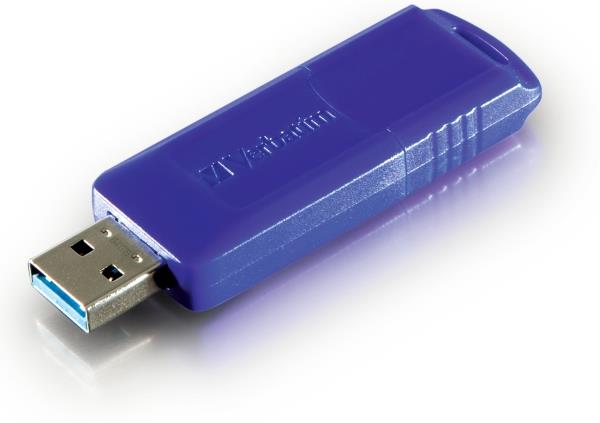
Verbatim Store'n'Go Classic 64GB.
I was thinking about a 32GB stick, but this one was too cheap(60€), so I got it.

Its the first time I own a usb stick, so I have some questions.

- Is it a good idea to download torrents in the stick? (the other option is in ssd)
- Is it a good idea to watch HD movies via stick?
- Often save/delete could reduce the performance of the stick?
- The wireless access/speed of a usb stick is same as with hard disk?
- Is there any password protection software?
 
- Is it a good idea to download torrents in the stick? (the other option is in ssd)
Legal ones, it will not matter where you put them. If you want to move them regularly, then stick 'em on there. If not, then SSD is just fine.
- Is it a good idea to watch HD movies via stick?
It's not a bad idea if that is what you are asking. Unlike USB2, 3 does not generally have issues with bandwidth, so you should be good to go.
- Often save/delete could reduce the performance of the stick?
Theoretically it could, but you are talking fractions of a megabyte over a years use. Don't worry about it. These are meant to have many saves and writes and deletes on them.
- The wireless access/speed of a usb stick is same as with hard disk?
Assuming you are talking about access rates, then no. SATA HDDs will have greater reads, writes, and random rates. You could theoretically for a short period of time match rates with a USB Hard drive though.
- Is there any password protection software?
Encrypt it. Or make the whole drive a .rar password protected file. It is much easier to download truecrypt and encrypt it though.
 
Legal ones, it will not matter where you put them. If you want to move them regularly, then stick 'em on there. If not, then SSD is just fine.

Αs you know, the torrents downloading wears the ssd disk.
Is it possible to download any torrent and all of its files in the stick, without any ssd participation?

It's not a bad idea if that is what you are asking. Unlike USB2, 3 does not generally have issues with bandwidth, so you should be good to go.

So I can watch any 1920x1080 movie from the stick without problems.

I d like to do all the job in the stick instead of ssd--> Download a movie/watch it/delete it.
When u delete a file in the stick, it goes to internal disk?

Theoretically it could, but you are talking fractions of a megabyte over a years use. Don't worry about it. These are meant to have many saves and writes and deletes on them.

Many saves and writes may reduce the life of the device OR may reduce its performance?

Assuming you are talking about access rates, then no. SATA HDDs will have greater reads, writes, and random rates. You could theoretically for a short period of time match rates with a USB Hard drive though.

-I m talking about watch a (HD)movie in the stick but via wireless connection(through shared file).
Could this have any issues?

- The transfer wireless speed from stick to hard disk, is the same as the transfer wireless speed from hard disk to hard disk?

Encrypt it. Or make the whole drive a .rar password protected file. It is much easier to download truecrypt and encrypt it though.

Making rar file is not good idea.
I d like a program which, any time u insert the device in its port, it will ask for a password.
Verbatim has a trial password protection software in its site(havent checked it yet).
 
Last edited:
Be aware, USB3 gear has a problem with RF leakage that can cause problems with routers, wireless gear like keyboards etc...
 
Αs you know, the torrents downloading wears the ssd disk.
Is it possible to download any torrent and all of its files in the stick, without any ssd participation?
Negative on both points. They do not wear down the SSD any worse than any other data being downloaded. It will wear the same no matter if it is DOD classified video, or a MP3 from itunes. Data is Data.
Also, nope. Whenever you download anything, it saves it to a temporary file on your IS drive during the download. When finished, it moves the completed file to the target destination (where ever you told it to save to).

So I can watch any 1920x1080 movie from the stick without problems.

I d like to do all the job in the stick instead of ssd--> Download a movie/watch it/delete it.
When u delete a file in the stick, it goes to internal disk?
You should be able to watch the movie, assuming the stick has high enough read rates.

Many saves and writes may reduce the life of the device OR may reduce its performance?
It will reduce performance and life at the same time. But it is such a small amount that you are worrying about nothing. To do any major damage that is recognizable, you would have to write and delete something on the order of 4,398,046,500,000,000,000,000 single letter files to it per day.

-I m talking about watch a (HD)movie in the stick but via wireless connection(through shared file).
Could this have any issues?
So you are asking if you can share the file wireless to the PC the USB stick is in, and use the USB stick as the random access space for the file being watched? If so, you would have to have the program downloading said file also on the stick. But you are going through a lot of trouble for nothing.

- The transfer wireless speed from stick to hard disk, is the same as the transfer wireless speed from hard disk to hard disk?
Transfer speed over wireless is determined by your wireless network, and the write rates of the drives involved. If you have a SATA II SSD writing to a PCIe x4 SSD, you will never get above 250Mb/s writes. If you have a HDD transferring to SSD, you will never have a rate greater than the HDDs read rate.
Basically, no. As long as you have the same disk transferring to the 1st disk and the flashkey, the rates will be the same, maybe a tad faster on the key due to faster writes.

Making rar file is not good idea.
I d like a program which, any time u insert the device in its port, it will ask for a password.
Verbatim has a trial password protection software in its site(havent checked it yet).
It is going to be difficult to find an automated program like that. Though let us know when you do find one. Personally, I would just encrypt it and be done with it.

 
Be aware, USB3 gear has a problem with RF leakage that can cause problems with routers, wireless gear like keyboards etc...

Translate that, plz? :)

Negative on both points. They do not wear down the SSD any worse than any other data being downloaded. It will wear the same no matter if it is DOD classified video, or a MP3 from itunes. Data is Data.
Also, nope. Whenever you download anything, it saves it to a temporary file on your IS drive during the download. When finished, it moves the completed file to the target destination (where ever you told it to save to).

Well... When u download a torrent there are many-many small files. The wear of an hdd and of an ssd, even if its same, in ssd is more important because ssd is much more expensive.
Can I set the torrent client to save temporary files in the usb stick?

You should be able to watch the movie, assuming the stick has high enough read rates.

So, it depends on the read speed?
The read speed of this device is 120MB/sec, according specs. Is it a good speed?

It will reduce performance and life at the same time. But it is such a small amount that you are worrying about nothing. To do any major damage that is recognizable, you would have to write and delete something on the order of 4,398,046,500,000,000,000,000 single letter files to it per day.

About life, the warranty is 2 years.
About performance, what exactly this means? That, for examble, the read speed will drop to 100MB/s?

So you are asking if you can share the file wireless to the PC the USB stick is in.........

The situation is this,
I have my main pc(pcA) and another pc/htpc(pcB) in which I connect the usb stick.
From pcA I open a shared file of pcB, which is the stick and whatever exists inside, for examble a HD movie. Shall I be able to watch that movie without issues, like it was in the internal disk?

Transfer speed over wireless is determined by your wireless network, and the write rates of the drives involved. If you have a SATA II SSD writing to a PCIe x4 SSD, you will never get above 250Mb/s writes. If you have a HDD transferring to SSD, you will never have a rate greater than the HDDs read rate.
Basically, no. As long as you have the same disk transferring to the 1st disk and the flashkey, the rates will be the same, maybe a tad faster on the key due to faster writes.

We r talking about wireless transports between ssd disks(sata2 and sata3) and the stick, via a 54mbps router.
The writing speed of ssd sata2 is 100MB/s, the writing speed of ssd sata3 is 450MB/s, the writing speed of flashkey is just 70MB/s. So how it could be a tad faster on the key?

Personally, I would just encrypt it and be done with it.
I ll learn more about encryption and report later:)
 
Last edited:
Translate that, plz? :)
Some flashkeys (not only USB3, my USB2 DT100 16GB had issues with it too) create radio interference when in use. It is not a real issue unless you are using wireless internet, or wireless keyboard/mouse with it. you can use a USB3 extension cable to move the flashkey away from the computer a bit and solve the issue.

Well... When u download a torrent there are many-many small files. The wear of an hdd and of an ssd, even if its same, in ssd is more important because ssd is much more expensive.
Can I set the torrent client to save temporary files in the usb stick?
I know how torrents work, but you don't see to understand how SSDs work. You are worrying about loss of performance, but you are not writting enough to the drive for it to be a problem. You have to write on the order of TBs a day to the drive for it to be a real issue. That is assuming a 5 year drive life. Shorten it and you can write more, lengthen it and you can write less.
So, it depends on the read speed?
The read speed of this device is 120MB/sec, according specs. Is it a good speed?
That is plenty fast enough.
About life, the warranty is 2 years.
About performance, what exactly this means? That, for examble, the read speed will drop to 100MB/s?
You will loose about 10MB/s a year more or less, depending on how much data you write to it.

The situation is this,
I have my main pc(pcA) and another pc/htpc(pcB) in which I connect the usb stick.
From pcA I open a shared file of pcB, which is the stick and whatever exists inside, for examble a HD movie. Shall I be able to watch that movie without issues, like it was in the internal disk?
Assuming both are on a windows network, then you will have to mount the flashkey, save the file to teh flashkey, and then set permissions to public for the key. But yes, it should be able to work.
We r talking about wireless transports between ssd disks(sata2 and sata3) and the stick, via a 54mbps router.
The writing speed of ssd sata2 is 100MB/s, the writing speed of ssd sata3 is 450MB/s, the writing speed of flashkey is just 70MB/s. So how it could be a tad faster on the key?
You could have gotten a boost from the key if you were running a 300mb/s router and a HDD instead of SSD. In your current setup, it will not make a bit of difference, as you are limited by yuor network speed of 54mb/s
I ll learn more about encryption and report later:)
It is not automatic, but is about as close as you are going to get. It will password the drive, and when looking at it without the password, all you will see is scrambled nonsense. Enter the password and decrypt and you will see the original datas.
 
Some flashkeys (not only USB3, my USB2 DT100 16GB had issues with it too) create radio interference when in use. It is not a real issue unless you are using wireless internet, or wireless keyboard/mouse with it. you can use a USB3 extension cable to move the flashkey away from the computer a bit and solve the issue.

I use a wirelles internet and wireless mouse in my htpc.
What exactly could cause these radio interferences?

you don't see to understand how SSDs work. You are worrying about loss of performance, but you are not writting enough to the drive for it to be a problem. You have to write on the order of TBs a day to the drive for it to be a real issue. That is assuming a 5 year drive life.

If you write torrents 24 hours per day isnt this an issue?
My ssd(Intel X-25M sata2 MLC 160GB) is already 3,5 years old.

You will loose about 10MB/s a year more or less, depending on how much data you write to it.

I m a little confused, what is the usual read/write speed of a mechanical hard disk sata2(4500-7200rpm) ?

Assuming both are on a windows network, then you will have to mount the flashkey, save the file to teh flashkey, and then set permissions to public for the key. But yes, it should be able to work.

That is already done, the question was "Shall I be able to watch that movie without issues, like it was in the internal disk"? If the answer is "yes", dont mention it in your next post.

You could have gotten a boost from the key if you were running a 300mb/s router and a HDD instead of SSD. In your current setup, it will not make a bit of difference, as you are limited by yuor network speed of 54mb/s

The network speed is 54mbps and wont be changed.
Boost if I had HDD instead of SSD :confused:

I transfered a 21GB folder(thousands of music files inside) from an extrernal sata2 hdd to the stick and took 27 minutes, the transfer speed was 15-12,5MB/sec. Is this speed good?
When we transfer a file, the speed depends on the device the folder goes?
 
If you write torrents 24 hours per day isnt this an issue?
My ssd(Intel X-25M sata2 MLC 160GB) is already 3,5 years old.
No. It is not a problem. It is technically impossible over a 24 hour period to write enough data to a SSD to have an issue. Even a 3 year old one. You are talking about TBs per day. That is writing over 2000GBs per day to a 120GB drive. The larger the drive the more you can write to it before it degrades.

I m a little confused, what is the usual read/write speed of a mechanical hard disk sata2(4500-7200rpm) ?
About 50MB/s write and 70MB/s read on a 7200RPM drive. Amount gets smaller as the RPM drops.

The network speed is 54mbps and wont be changed.
Boost if I had HDD instead of SSD :confused:
You are not going to get a boost at all. You are limited by your network speed. If you had a 150Mb/s network, then you still would not get that much of a boost, as it would max out at 18.75MB/s (8 bits to a byte). At 300mb/s, you could get a theoretical 37.5MB/s.

You will max out the network with a HDD. You get no increase. But that said, if you went to something way out there, like http://www.newegg.com/Product/Product.aspx?Item=33-127-432&IsVirtualParent=1 and http://www.newegg.com/Product/Product.aspx?Item=N82E16833320136 with a SSD, you could theoretically (as it depends on RFI in your area) max out at 218.75MB/s on that network.


I transfered a 21GB folder(thousands of music files inside) from an extrernal sata2 hdd to the stick and took 27 minutes, the transfer speed was 15-12,5MB/sec. Is this speed good?
When we transfer a file, the speed depends on the device the folder goes?
That speed is decent, assuming you used the network or USB2 to mount the HDD.

As for file transfer, you can be limited by several things. It can be the method of transfer (network speed, USB speed, SATA speed), the drive performance (you will never get any faster than 12.5MB/s if you are transferring to a ATA100 HDD, no matter what you are transferring from. Works the other way too. you can be transferring from ATA100 to a 840pro, and you will still only get 12.5MB/s MAX transfer).
 
USB 3 has a nasty habit of interferring with 2.4GHz stuff.

http://www.usb.org/developers/whitepapers/327216.pdf

I gave a brief sight to that link, but can u tell me in one line what is the problem when usb3 stick is near wireless devices?

No. It is not a problem. It is technically impossible over a 24 hour period to write enough data to a SSD to have an issue. Even a 3 year old one. You are talking about TBs per day. That is writing over 2000GBs per day to a 120GB drive. The larger the drive the more you can write to it before it degrades.
Ok, so it is safe to work torrents on an ssd, thats what u r telling us.
Sounds weird, because I ve heard the opposite:)

Deleting files all the time, is it safe too?

About 50MB/s write and 70MB/s read on a 7200RPM drive. Amount gets smaller as the RPM drops.
So a mechanical hard disk has read/write speed 70/50. Looks like the usb stick with 120/70 is much faster…
And what is the read/write speed of a dvd disk?
You are not going to get a boost at all. You are limited by your network speed. If you had a 150Mb/s network, then you still would not get that much of a boost, as it would max out at 18.75MB/s (8 bits to a byte). At 300mb/s, you could get a theoretical 37.5MB/s.

You will max out the network with a HDD. You get no increase. But that said, if you went to something way out there, like http://www.newegg.com/Product/Product.aspx?Item=33-127-432&IsVirtualParent=1 and http://www.newegg.com/Product/Product.aspx?Item=N82E16833320136 with a SSD, you could theoretically (as it depends on RFI in your area) max out at 218.75MB/s on that network.

The network speed is 54mbps so lets focus in that only.
You r telling me that the wireless transfer speed will be the same in any case(from/to - hdd/ssd/flashkey - sata2/sata3), right?

you will never get any faster than 12.5MB/s if you are transferring to a ATA100 HDD, no matter what you are transferring from. Works the other way too

So the answer to "When we transfer a file, the speed depends on the device the folder goes to?" is "No. Depends on the sender device, also. Always the weaker device prevails".

Now some more questions
-When we delete a file in the flashkey, where this goes? To the flashkey itself or to the internal disk?
-If we press Shift when delete, file goes… where?
-Is the transfer speed different if the file is one/seamless or in many pieces?
-Can a pc system work with just a usb stick, I mean no hard disks at all?
 
I gave a brief sight to that link, but can u tell me in one line what is the problem when usb3 stick is near wireless devices?
In 1 line: Radio Frequency Interference.
Basically, it interferes with the frequency (2.4GHz) that some wireless devices (and phones) use.

Ok, so it is safe to work torrents on an ssd, thats what u r telling us.
Sounds weird, because I ve heard the opposite:)

Deleting files all the time, is it safe too?
Do you research. Those telling yuo different don't know their arse from a hole in the ground about SSDs. Just like those on here than make them sound like some kind of magic potion to speed up the PC. They don't do that past boot up.

As long as you are not exceeding 2TB per day on reads/writes then you will be fine.

So a mechanical hard disk has read/write speed 70/50. Looks like the usb stick with 120/70 is much faster…
And what is the read/write speed of a dvd disk?
couple of things you are forgetting here. You will not get a constant 70MB/s read or write there. Same with the 120/70. That is a max rate. about 20% less is the sequential rate in normal large transfers.

The network speed is 54mbps so lets focus in that only.
You r telling me that the wireless transfer speed will be the same in any case(from/to - hdd/ssd/flashkey - sata2/sata3), right?
Yes. Your wireless rate is 54 MegaBits per second. That is 6.75 MegaBytes per second. You will max that out even on ATA100.
To take full advantage of your USB3/SSDs/SATA speeds, you need a faster network speed.

So the answer to "When we transfer a file, the speed depends on the device the folder goes to?" is "No. Depends on the sender device, also. Always the weaker device prevails".
Yes. The slowest device always prevails. You can have a 1TB file transferring from a server to your computer with a 1TB PCIe x4 SSD, and you will never get above 6.75MB/s transfer because of your network (the slowest component).

Now some more questions
-When we delete a file in the flashkey, where this goes? To the flashkey itself or to the internal disk?
In windows, it goes to your trashcan/recycle bin, which is on the C:/ drive. Linux handles it a little differently, but short to say, it stays on the key. If the file is too big to fit in the recycle bin, then it can be permanently deleted, but the data will still be there, just invisible.
-If we press Shift when delete, file goes… where?
http://support.microsoft.com/kb/239754. sends it to the recycle bin. So in simple words, nothing changes.
-Is the transfer speed different if the file is one/seamless or in many pieces?
I am not exactly sure, but I think it does not matter. Even a single large file is nothing more than an integration of several smaller files.
-Can a pc system work with just a usb stick, I mean no hard disks at all?
This is possible as long as you put the OS on the flashkey also. Same idea as liveboot.
 
In 1 line: Radio Frequency Interference.
Basically, it interferes with the frequency (2.4GHz) that some wireless devices (and phones) use.

Interefes in what way? I dont have mobile phone.
Which devices use the 2.4Ghz frequency?

As long as you are not exceeding 2TB per day on reads/writes then you will be fine.

Deletes incuding?

If u press Shift when u delete a file, files doesnt go to recycle.bin
Does this delete way makes any difference?

couple of things you are forgetting here. You will not get a constant 70MB/s read or write there. Same with the 120/70. That is a max rate. about 20% less is the sequential rate in normal large transfers.

So the 120/70 in the usb3 stick is the max, while the 70/50 in the mechanical hdd is the minimum/average?

The speed of a dvd disk is much lower, right?

To take full advantage of your USB3/SSDs/SATA speeds, you need a faster network speed.

You mean get a router>54mbps. Well that seems not necessary since I can use the stick for transfers.
U know, the one of my two pc's is sata2/usb2. So I wont take full advantage anyway.

In windows, it goes to your trashcan/recycle bin, which is on the C:/ drive.......

The question was not about where the deleted files go in general, it was notably about deleted in usb stick. Windows(7) only.
So, when we delete a file in the stick, that goes to C too?

If we set the deleted files NOT to go to recycle.bin, do we earn something?
I mean, is it deletion once instead of twice?

This is possible as long as you put the OS on the flashkey also.

So it is possible for a pc to work without hard disk, just with a flashkey.
Thats very interesting, I ll keep it in mind.
 
Interefes in what way? I dont have mobile phone.
Which devices use the 2.4Ghz frequency?
Think of RFI (Radio Frequency Interference) like this. Assume you are speaking to someone you care about, and it is just you and them. This is similar to an interference free zone.
Okay, now someone turns on the stereo at full volume. This simulates interference in the bandwidth you are using (audio). This will make it difficult, if not impossible to understand the person you were talking to (interference). Turn the radio down will help (reduce interference).

The 2.4GHz band is used by several things, but the only ones that i remember right now are cordless house phones, WiFi devices, and some bluetooth devices. USB3 creates interference (turns up the volume so to speak) in this band (2.4GHz)

Deletes incuding?

If u press Shift when u delete a file, files doesnt go to recycle.bin
Does this delete way makes any difference?
I am not really sure. I have always seen it written writes/deletes, so I assume it means both together, but it may mean each separate. Do a tad more research to be sure which it is.

as for shift, you're going to have to wait for someone that knows more about that. I have never used that method, and know nothing about it. I assume that if it does not go to recycle bin, then it is "permanent deleted".
So the 120/70 in the usb3 stick is the max, while the 70/50 in the mechanical hdd is the minimum/average?
yes. That is about, more or less, average. You will see 105-110 max reads and 85-90 max writes.
The speed of a dvd disk is much lower, right?
I assume so, but I have never seen a bench on read/writes from DVD drives.

The question was not about where the deleted files go in general, it was notably about deleted in usb stick. Windows(7) only.
So, when we delete a file in the stick, that goes to C too?
It should still go to recycle bin.

If we set the deleted files NOT to go to recycle.bin, do we earn something?
I mean, is it deletion once instead of twice?
you will not gain anything, but you will loose the easiest way to retrieve the data again should you need it.

So it is possible for a pc to work without hard disk, just with a flashkey.
Thats very interesting, I ll keep it in mind.
For the most part it is possible. But it depends on how your BIOS is programmed. I know on the Z77 Extreme 4, it requires a HDD be installed to POST, but after that, it can be removed. My Asus, and all my laptops will live boot off a USB without HDD installed just fine.
 
as for shift, you're going to have to wait for someone that knows more about that. I have never used that method, and know nothing about it. I assume that if it does not go to recycle bin, then it is "permanent deleted".

Ok tell me something that u may know, when I delete a file in a shared folder, from a wireless access from a pc A (file belongs to pc B), will the deleted file go to pcA or pcB? It does not goes to any recycle folder, just disapear.

I assume so, but I have never seen a bench on read/writes from DVD drives.

When u play a movie from a dvd disk, and at the same time u trasfer a file from dvd disk to hard disk, movie lugs... In the flashkey there is no such problem. So I guess the speed of dvd is much lower.


It should still go to recycle bin.

Hmm I need a certain answer, no any other friend in this forum to answer that? And what happens when press <shift> at the same time.

For the most part it is possible. But it depends on how your BIOS is programmed. I know on the Z77 Extreme 4, it requires a HDD be installed to POST, but after that, it can be removed. My Asus, and all my laptops will live boot off a USB without HDD installed just fine.

I m talking for Win 7, not linux. Can I install Win in a flashkey and work properly a system just with it?
If I transfer that flashkey to another pc, will it be functional?
 
Ok tell me something that u may know, when I delete a file in a shared folder, from a wireless access from a pc A (file belongs to pc B), will the deleted file go to pcA or pcB? It does not goes to any recycle folder, just disapear.
there are 2 p's in disappear, just to let you know.
As for your question, I do believe that It will either go to PC-A's recycle bin, or will just be permanent deleted.

When u play a movie from a dvd disk, and at the same time u trasfer a file from dvd disk to hard disk, movie lugs... In the flashkey there is no such problem. So I guess the speed of dvd is much lower.
Well, with optical media, you are working with more than just transfer rates. You also have to take into account that you only have one read head (laser) and it can only read one location at a time. So you will get lag from it If it is trying to read from both ends f the disk at the same time.
I assume the read/writes are lower also.
I m talking for Win 7, not linux. Can I install Win in a flashkey and work properly a system just with it?
It does not matter what OS, what matters is that it is ran from flashkey. In that regard to the BIOS, windows, Linux, BSD, Unix, or OSx does not matter. They will all be seen as "sandisk glide 32GB" or the like, depending on what flashkey you use (that is the one I use for my live systems and installers).

As for Windows 7, it will work as long as you have BIOS support for USB boot and are not limited by BIOS to need a SATA device (which for most you can get around that with a DVD drive).

No. You can not install Windows to a flashkey (Legally speaking) and use it properly on another system. Your key will be tied to the motherboard that you install to, and will have to reactivate at a minimum when you move it to a different system (this does not matter OEM or Retail technically).
Weather or not it will ACTUALLY work (not worrying about activation) depends more on the hardware of both systems, and the version of windows.
If I transfer that flashkey to another pc, will it be functional?[/QUOTE]
 
I do believe that It will either go to PC-A's recycle bin, or will just be permanent deleted.

In another forum many people told be it will go to pc B for sure. In the default drive.

No. You can not install Windows to a flashkey (Legally speaking) and use it properly on another system. Your key will be tied to the motherboard that you install to, and will have to reactivate at a minimum when you move it to a different system (this does not matter OEM or Retail technically).
Weather or not it will ACTUALLY work (not worrying about activation) depends more on the hardware of both systems, and the version of windows.

And what if the Win have no key, and the hardware of both systems is similar?
Of course I could try myself, but is there any chance to make damage(to the pc I m gonna connect flashkey)?
 
I don't know where it will go for sure. As I have probably said, I have never needed to delete from a networked computer before.
What you are doing here is making a very simple process extremely complicated for no good reason.


If you install with no key, technically your windows is illegal. You will need to activate it before we could help you with it. But that aside, it is not just that the software is similar. You have to have the same Chipset for the most part to maintain activation. Other than that, if you stay with close hardware, but not exact, most times with vista onwards it will boot and work assuming you install drivers for it at boot.

The only possibly damage could be messing up your boot order in BIOS, and possible DATA loss on the computer you plug it to (if you go messing around with system drives while it is booted). Other than that, not a chance.
 
What you are doing here is making a very simple process extremely complicated for no good reason.

But this is what I use to do every day. I access my htpc via shared folders in a wireless home network. Its not something strange or compliacated, I m sure a lot of people do that too.

If you install with no key, technically your windows is illegal.

But, you know, there are many illegal windows with a key.

You will need to activate it before we could help you with it.

What do u mean "we"? Exept you, no one else replies in this topic :D

But that aside, it is not just that the software is similar. You have to have the same Chipset for the most part to maintain activation.

Thats like if we have a hard disk with OS inside, and we transfer it to another pc. Then in some cases windows will work, in some other cases will not, right?

Other than that, if you stay with close hardware, but not exact, most times with vista onwards it will boot and work assuming you install drivers for it at boot.

I m talking for Win7 to Win XP. If I plug the flashkey with win7 inside and close the Updates, then no any harmful driver will come, right?

If in the flashkey there is a win7 setup, will I be able to instal win7 in a pc which I m not admin? (planning to keep the default OS and create a second one, working the pc with dual booting)
 
Last edited:
Back
Top